Welcome to ROSMASTER X3 Plus repository
12.Mediapipe arm attitude control robotic arm
12. Mediapipe arm attitude control robotic arm
12. Mediapipe arm attitude control robotic arm12.1. Using12.2. Principle of realization12.3.Core code analysis PoseArm.py
12.1. Using
After the program starts, the camera captures the image, and the right arm is raised. After the buzzer is not heard, the robotic arm will synchronously imitate the movement of the arm (straighten, bend the palm to close).
Note: [R2] of the remote controller has the function of [pause/on] for this gameplay.
Feature package path:~/yahboomcar_ws/src/arm_mediapipe/
Robot side
x#You need to enter docker first, perform this step more#If running the script to enter docker fails, please refer to 07.Docker-orin/05, Enter the robot's docker container~/run_docker.shroslaunch arm_mediapipe mediaArm.launch # RobotsVirtual machine side (recommended)
xxxxxxxxxxrosrun arm_mediapipe PoseArm.py
After the program starts, press the R2 key on the handle to turn on this function, stand in front of the camera, and make the entire arm appear on the screen. At this time, the buzzer will sound.This is written in the program to prevent the robotic arm from moving after the arm is put down, causing confusion in the program. We raised our elbows and waited for the buzzer to go off, and the robotic arm would simulate the movement of the arm. You can straighten, bend the elbow, wrist, shoulder, open/close the palm to control the robotic arm.
12.2. Principle of realization
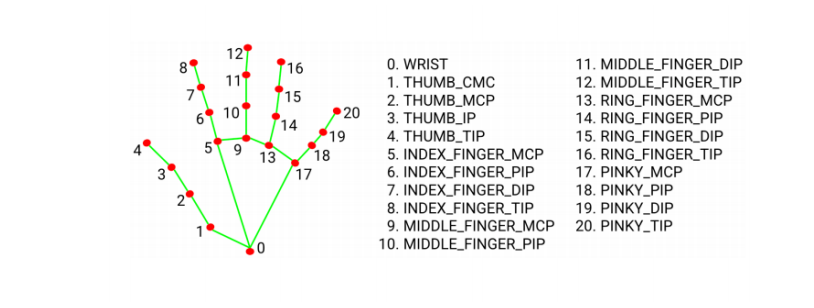
MediaPipe Hands infers 3D coordinates of 21 hand-valued joints from one frame
The landmark model in MediaPipe Pose predicts the location of 33 pose coordinates (see figure below).
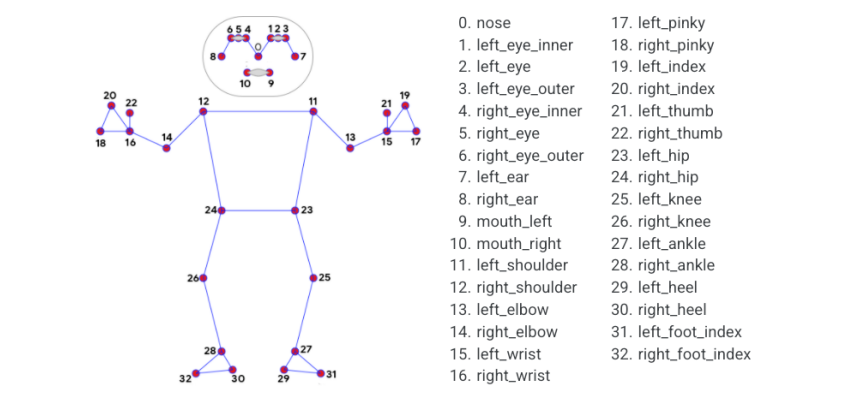
In this program, all we need is the coordinates of the part of the right arm. By calculating the angle formed by these coordinates, we can calculate how much angle each steering gear of the robotic arm needs to turn.
12.3.Core code analysis PoseArm.py
Code reference path:~/yahboomcar_ws/src/arm_mediapipe/scripts
Import critical libraries
xxxxxxxxxxfrom media_library import *Get the information of each joint of the right arm
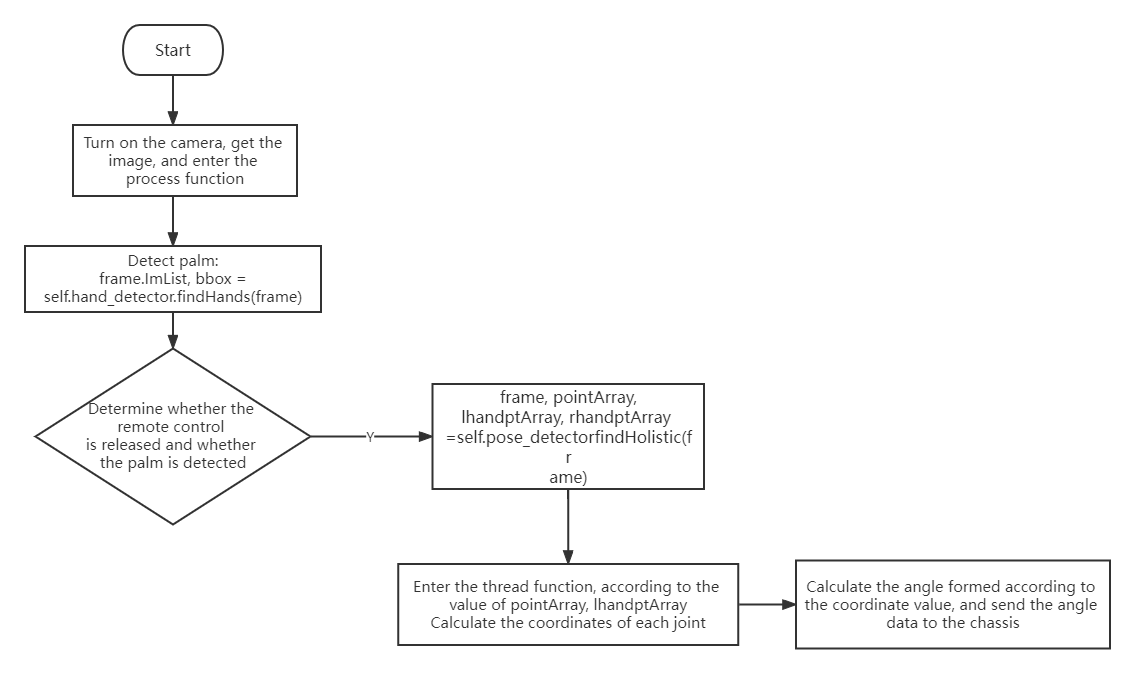
xxxxxxxxxxframe, pointArray, lhandptArray, rhandptArray = self.pose_detector.findHolistic(frame)#This pose_detector.findHolistic function prototype is in media_library.pyHere is an explanation of how the angles formed by the lower shoulder joint, elbow joint, wrist joint, palm opening and closing are calculated:
1)、 As can be seen from the above figure, the three points 12-11-13 form the shoulder, so the angle of the shoulder joint can be calculated by obtaining the coordinate values of these three points;
2)、As can be seen from the above figure, the three points 11-13-15 form the elbow, therefore, the angle of the elbow joint can be calculated by obtaining the coordinate values of these three points;
3)、As can be seen from the above figure, the three points 13-0 (palm wrist joint)-8 (top of index finger) form the wrist joint. Therefore, the coordinate values of these three points can be obtained to calculate the angle of the wrist joint;
4)、As can be seen from the above figure, the three points of 4 (the top of the thumb)-0 (the palm wrist joint)-8 (the top of the index finger) form the angle of the gripper. Therefore, the coordinate values of these three points can be obtained to calculate the gripper angle at which the claw needs to be clamped;
The above-mentioned 4 key joint codes are specifically realized,you can look at the program source code.
12.4. Program flow chart