Welcome to Jetson Orin NX Developer Kit repository
当製品の日本語版マニュアル資料は、こちらからご取得ください。
02.Jetson device skills
Jetson device skills tutorial
1. Description of the function
jetson-device-skills is the collection of the Jetson device side Agent Skills provided by NVIDIA. It makes OpenClaw carry out the device diagnostics, the memory audits, the inference service configuration, the video capability checks and the performance tests by following the Jetson specific flows.
This article takes the ordinary OpenClaw Gateway as an example; it does not install NemoClaw and it does not use the NemoClaw sandbox.
Official repository:
https://github.com/NVIDIA-AI-IOT/jetson-device-skills2. Get the repository
It is already installed on the factory system, so you can skip this step.
Run the following in the Jetson terminal:
xxxxxxxxxxcdgit clone https://github.com/NVIDIA-AI-IOT/jetson-device-skills.gitcd ~/jetson-device-skills3. Description of the skills and of the official installation script
The skills that are included:
jetson-diagnosticcaptures a read only snapshot of the health of the device, including the Jetson identity, the memory, the GPU, the temperature, the power consumption, the storage, the services and the top processes.jetson-memory-auditmeasures the DRAM/NvMap usage and uses the real time audit data to verify the situation before and after the memory is reclaimed.jetson-headless-modehelps to turn the Jetson into a headless edge node by disabling the desktop and the secure background services.jetson-inference-mem-tunerecommends the runtime and the memory flags for vLLM, SGLang, llama.cpp and TensorRT Edge-LLM.jetson-llm-serveprovides the serving recipes for vLLM and SGLang that are suitable for the Jetson.jetson-llm-benchmarkoutputs the structured benchmark metrics for vLLM, llama.cpp and theOllamapath.jetson-packageguides the choice of the packages, the wheels and the containers that are specific to the Jetson.jetson-speculative-decodingadds the Jetson specific EAGLE-3 or the draft model speculative decoding guidance for vLLM.jetson-video-setupinstalls and independently verifies the native NVIDIA video codec SDK and the PyNvVideoCodec interface.jetson-video-capabilityreconciles the real time NVENC/NVDEC queries and operations with the documented supported products.jetson-video-recipeturns the codec use cases into the verified, media free native and PyNvVideoCodec configuration plans.jetson-video-benchmarkmeasures the encoding and the decoding performance of the official samples on the target device.jetson-video-pipelineperforms and verifies the operations of the codec stages of the official samples and the passing of their artefacts.
Install the skills in the agent skills directory on the Jetson:
xxxxxxxxxx./install.sh
By default, install.sh links the skills into the user level skill roots of Claude Code, Codex and Cursor.
~/.claude/skills~/.codex/skills~/.agents/skills~/.cursor/skillsYou can select specific targets, or copy the files instead of creating the symlinks:
xxxxxxxxxx./install.sh --targets claude,cursor./install.sh --targets cursor-project --project /path/to/project./install.sh --copy./install.sh --force
For the NemoClaw/OpenClaw sandbox:
xxxxxxxxxx./install.sh --targets nemoclaw --nemoclaw-sandbox jetson-skills
Restart the agent session after the installation so that the new skill entries are loaded. If your agent expects a different skills directory, copy or sync the skills/ directory to that location. Keep each skill as a complete directory that contains its SKILL.md, scripts/ and references/ content.
4. Connecting it to the ordinary OpenClaw
The Skills directory of the current OpenClaw workspace:
xxxxxxxxxx/home/jetson/.openclaw/workspace/skillsThis system only sets up the openclaw environment and does not set up the Nemoclaw sandbox; the commands that create the symlinks one by one are as follows:
xcd ~/jetson-device-skills
for s in ~/jetson-device-skills/skills/jetson-*; do n="${s##*/}"; t="$HOME/.openclaw/workspace/skills/$n"; [ -e "$t" ] || [ -L "$t" ] || { ln -s "$s" "$t"; echo "Linked: $n"; }; done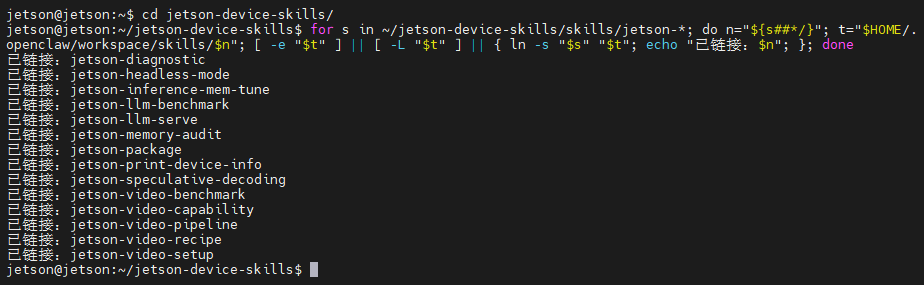
An example of the link relation:
xxxxxxxxxx~/.openclaw/workspace/skills/jetson-diagnostic -> ~/jetson-device-skills/skills/jetson-diagnosticThis does not copy the files and it does not create a subdirectory named jetson-device-skills. The source directory has to be kept.
5. Verifying the integration
Look at the symlinks:
xxxxxxxxxxls -l ~/.openclaw/workspace/skills/jetson-*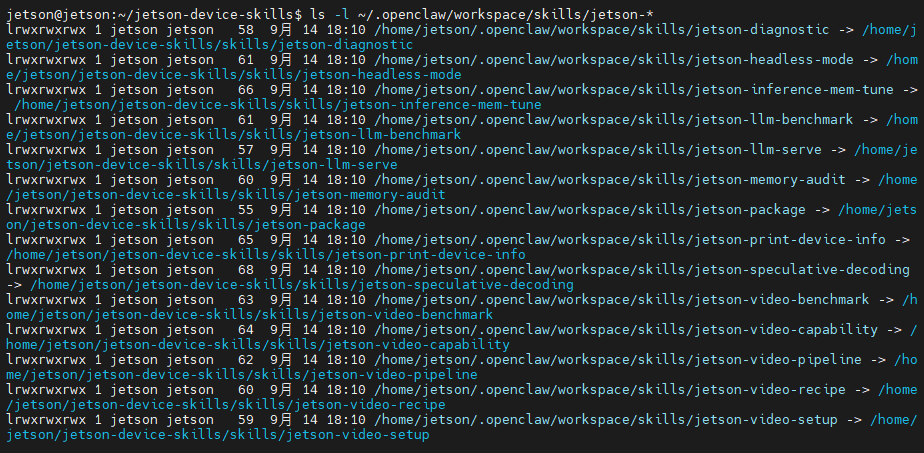
Look at the SKILL.md inside the links:
xxxxxxxxxxfind -L ~/.openclaw/workspace/skills -maxdepth 2 -name SKILL.md | grep '/jetson-'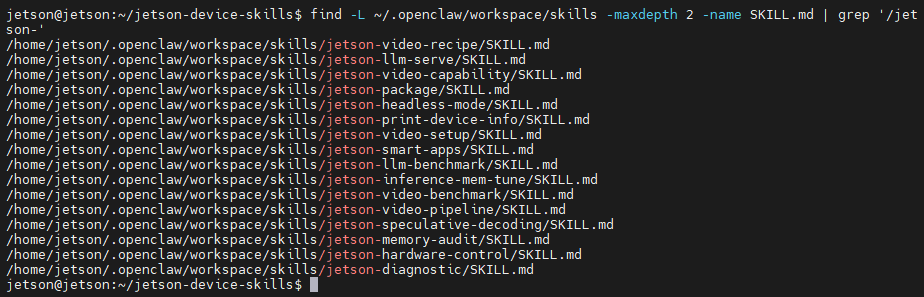
The -L is required, because the ordinary find does not enter the symlinked directories by default.
Restart the Gateway and start a new session:
xxxxxxxxxxopenclaw gateway restartopenclaw tui6. Testing some of the skills
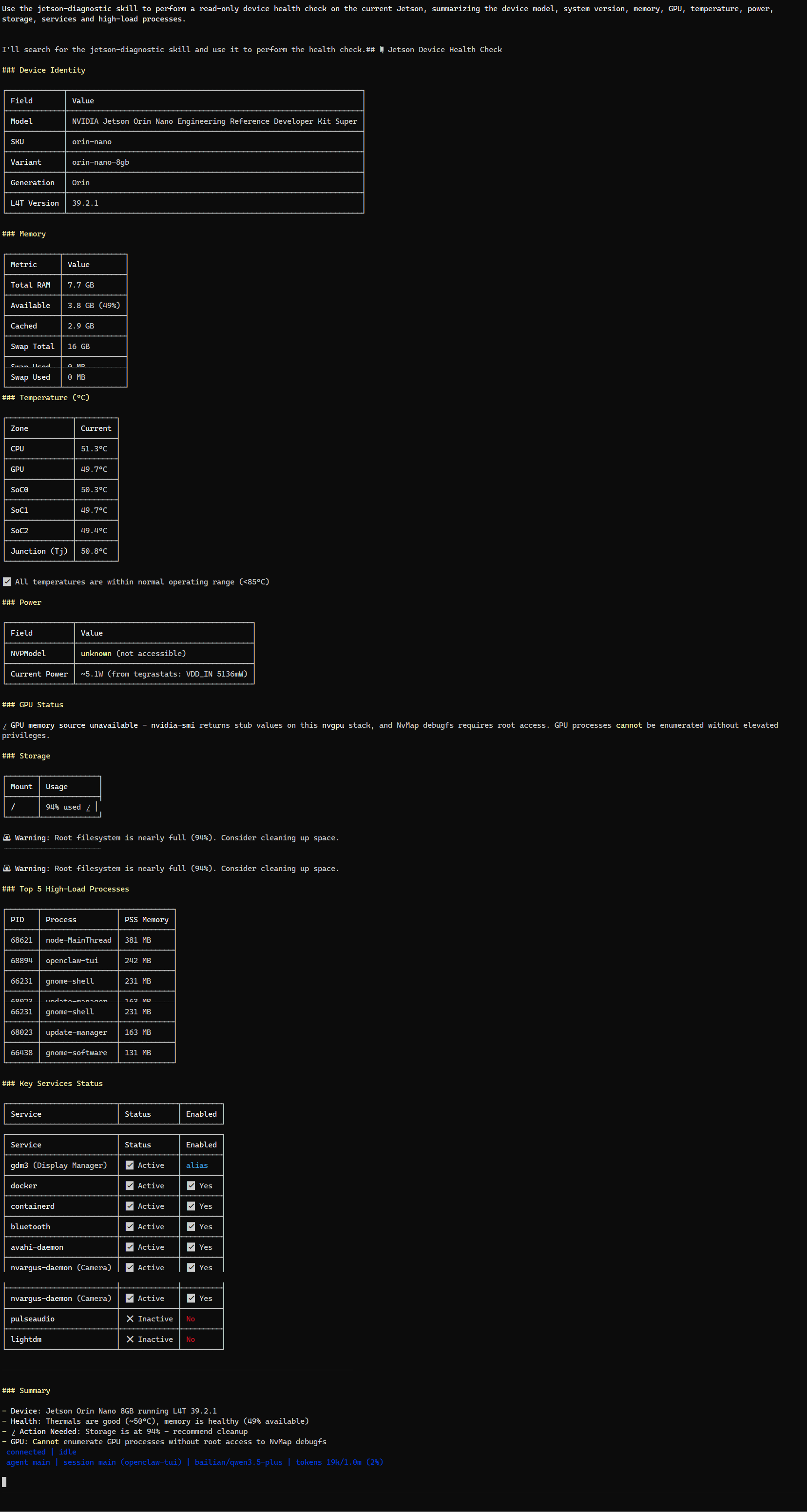
Use the jetson-diagnostic skill to run a read only health check of the current Jetson and to summarise the device model, the system version, the memory, the GPU, the temperature, the power supply, the storage, the services and the high usage processes.
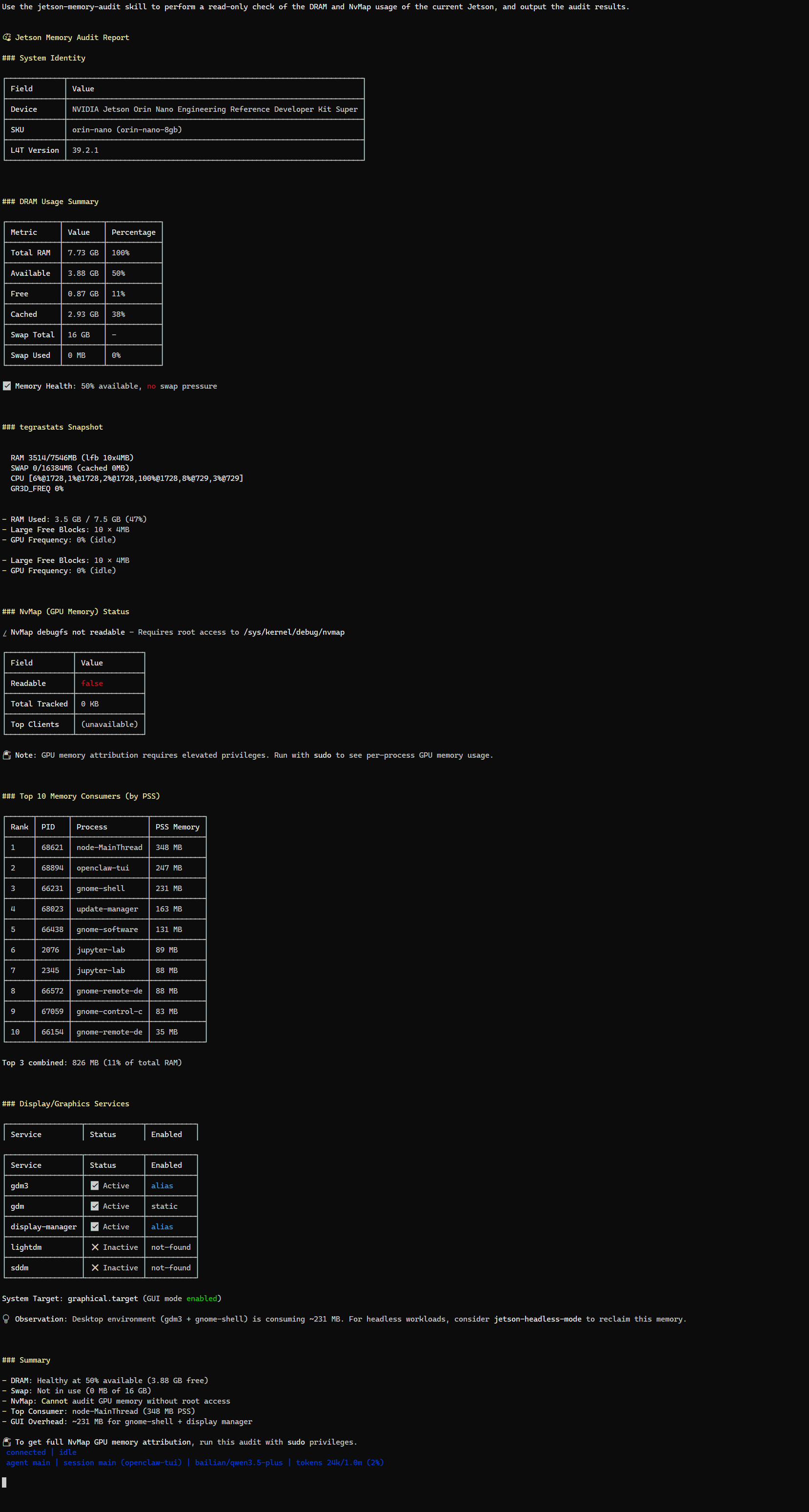
Use the jetson-memory-audit skill to perform a read-only check of the DRAM and NvMap usage of the current Jetson, and output the audit results.
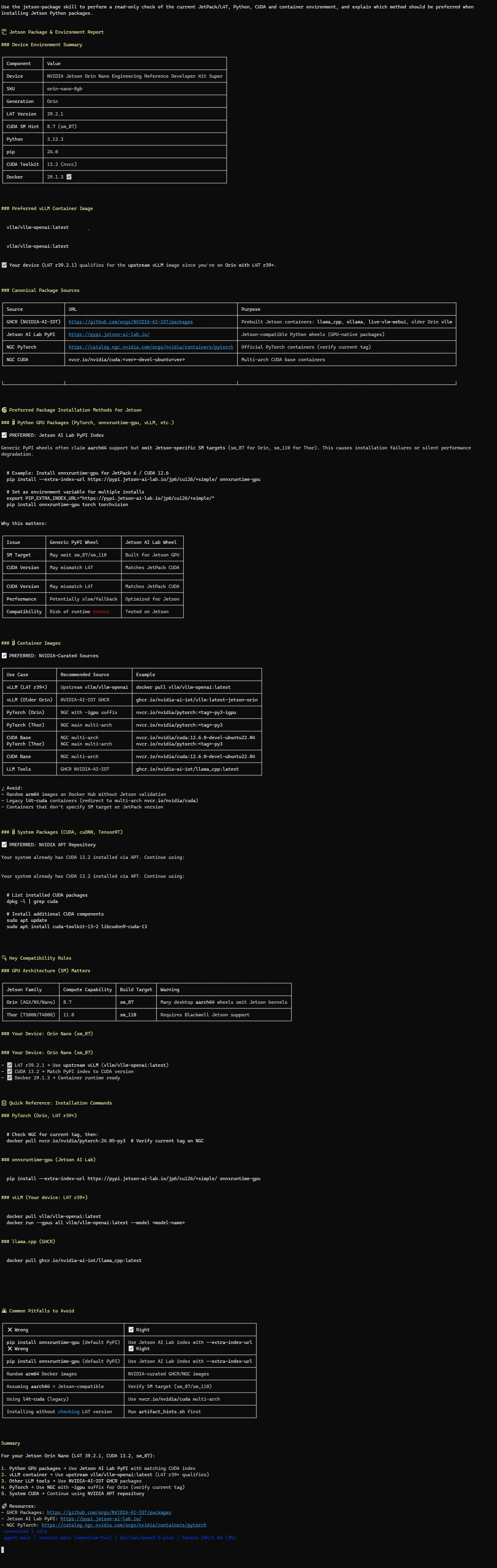
Use the jetson-package skill to perform a read-only check of the current JetPack/L4T, Python, CUDA and container environment, and explain which method should be preferred when installing Jetson Python packages.
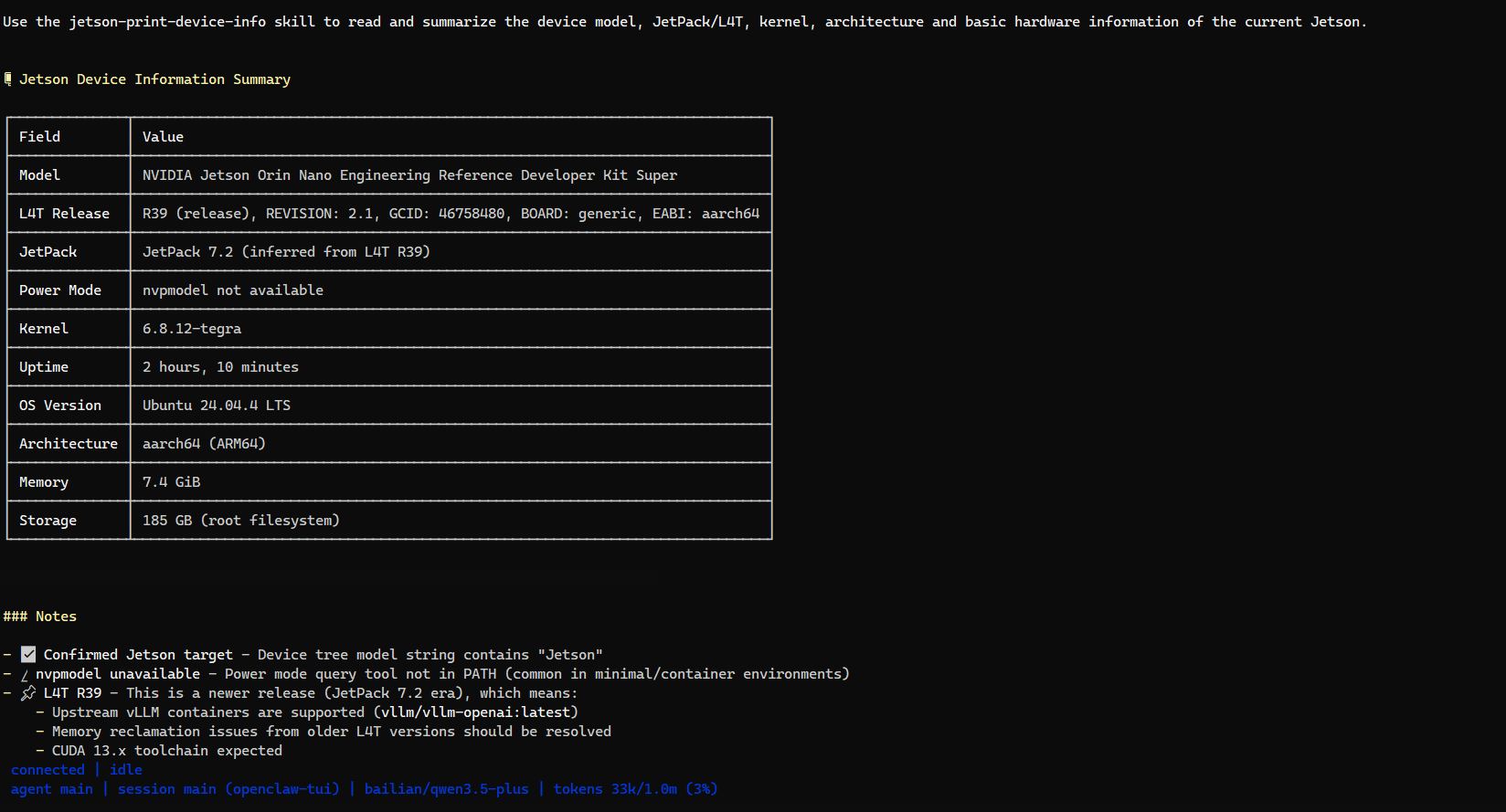
Use the jetson-print-device-info skill to read and summarize the device model, JetPack/L4T, kernel, architecture and basic hardware information of the current Jetson.
7. Rolling back the symlinks
Only delete the symlinks that point to the NVIDIA repository:
xxxxxxxxxxd="$HOME/.openclaw/workspace/skills"; for l in "$d"/jetson-*; do [ -L "$l" ] || continue; t="$(readlink "$l")"; case "$t" in "$HOME/jetson-device-skills/skills/"*) rm "$l"; echo "Removed: ${l##*/}";; esac; doneThis command does not delete the source directory, and it does not delete the existing real directories jetson-smart-apps and jetson-hardware-control.
8. Points to note
The current system does not have nemoclaw installed; only the device-skills are symlinked into the skills of openclaw.
Do not treat
--targets codexas an OpenClaw installation parameter.The source directory
jetson-device-skillshas to be kept, otherwise the symlinks stop working.jetson-headless-modemay change the state of the desktop and of the services, so you have to confirm the impact before you use it.The LLM and the video benchmarks may consume a lot of memory, GPU and disk space.
The final execution rules of each Skill are the ones in its
SKILL.mdin the directory.