Welcome to Jetson Orin NX Developer Kit repository
当製品の日本語版マニュアル資料は、こちらからご取得ください。
13.LiDAR 3D point cloud detection
TAO PointPillarNet LiDAR 3D point cloud detection
TAO PointPillarNet LiDAR 3D point cloud detection1. Case objective and processing flow2. Checks before running3. Starting the point cloud detection4. Replacing the point cloud data5. Common issues6. References
Applicable environment: Jetson Orin NX, JetPack 7.2.1, DeepStream 9.1, CUDA 13.2, TensorRT 10.16.2.10 (internal to the DS). This case uses the LiDAR point cloud and the Triton gRPC; it is not a video detection.
1. Case objective and processing flow
PointPillarNet detects 3D objects from the point cloud data. The input is a .bin point cloud together with the number of points/the calibration information required by the configuration; ordinary RGB pictures and MP4 are not accepted.
LiDAR point cloud → preprocessing → Triton gRPC → PointPillarNet → 3D detection result
2. Checks before running
bash
xcd /opt/nvidia/deepstream/deepstream-9.1/sources/apps/sample_apps/deepstream-lidar-inference-app/# Confirm the app binaryls -la deepstream-lidar-inference-app# Confirm the Triton backendls -la /opt/tritonserver/bin/tritonserverfind /opt/tritonserver /opt/nvidia/deepstream -name libtriton_tensorrt.so -print 2>/dev/nullls -la /opt/nvidia/deepstream/deepstream-9.1/lib/libtritonserver.so# Confirm the model and the enginels -la tritonserver/models/pointpillars/1/ls -la tritonserver/models/pointpillars/config.pbtxt# Confirm the KITTI offline datals -la configs/
The configuration directory of the ordinary video mode does not apply to this case.
3. Starting the point cloud detection
The unified entry point checks Triton and the TensorRT backend; if there is no service on port 8001, it starts Triton automatically and waits for the gRPC to become ready:
xxxxxxxxxxcd ~/deepstream_tao_demoexport DISPLAY=:0./run_lidar.sh render
If Triton has already been started manually, the script reuses the existing service. For the offline inference only:
xxxxxxxxxx./run_lidar.sh dump
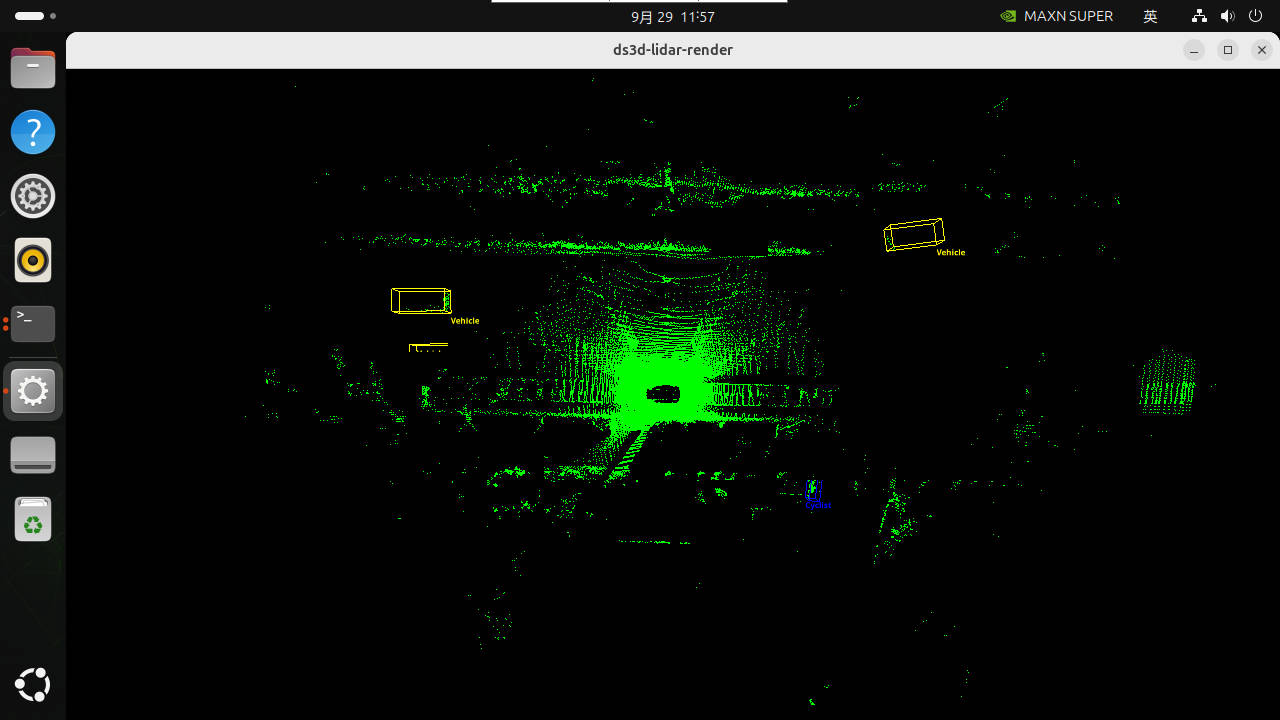
Expected: the VNC popup shows the green point cloud + the yellow 3D boxes + the labels such as Vehicle.
When /opt/tritonserver/bin/tritonserver or /opt/tritonserver/backends/triton_tensorrt/libtriton_tensorrt.so is missing, the script exits immediately and prints the missing path; it does not go on to start an application that is bound to fail.
4. Replacing the point cloud data
Prepare a .bin point cloud that agrees with the input convention of the model, together with its accompanying labels/calibration information, and put it under the data/ of the current directory. Before replacing it, check the path that is actually read in configs/config_lidar_*.yaml, the layout of the point fields, the coordinate units and the preprocessing parameters; keep the original sample as it is at first. Do not disguise an MP4 as a point cloud by changing its file extension.
5. Common issues
| Symptom | Check and handling |
|---|---|
| The gRPC connection fails | Confirm that the Triton of the first terminal is still running; check --grpc-port 8001 and the model repository path. |
| The model repository fails to load | Check that tritonserver/models/pointpillars/1/model.plan exists; in config.pbtxt there has to be default_model_filename: "model.plan" and backend: "tensorrt". |
| The input cannot be opened | Check the .bin path, the permissions and the point cloud format; an MP4 cannot be used as the input. |
| No 3D boxes | Check the coordinate system, the units, the field layout, the calibration and the preprocessing configuration. |
libdcgm.so.4 cannot be found | sudo apt-get install -y datacenter-gpu-manager-4-core && sudo ldconfig. |
The engine plan file across different models of devices warning | It is ignored and it does not affect the inference. |
| The Triton port is occupied | Use another port, or change the grpc port in config.pbtxt and synchronize the url in config_lidar_*.yaml. |
6. References
NVIDIA DeepStream TAO application examples: https://github.com/NVIDIA/DeepStream/tree/main/src/apps/tao_apps
DeepStream TAO integration documentation: https://docs.nvidia.com/metropolis/deepstream/dev-guide/text/DS_TAO_integration.html
The PointPillarNet model:
/opt/nvidia/deepstream/deepstream-9.1/samples/models/tao_pretrained/pointpillarnet_vdeployable_v1.1/