Welcome to Jetson Orin NX Developer Kit repository
当製品の日本語版マニュアル資料は、こちらからご取得ください。
07.Single-view 3D tracking
DeepStream single-view 3D multi-object tracking (SV3DT)
DeepStream single-view 3D multi-object tracking (SV3DT)1. Case goal2. Monocular geometry and calibration requirements3. Environment and assets4. Direct run5. Output and acceptance6. Common problems
Applicable environment: JetPack 7.2.1, Ubuntu 24.04, DeepStream 9.1, CUDA 13.2, TensorRT 10.16, Jetson Orin NX.
This course has completed the offline inference acceptance on the official Retail video. Run it directly on the host, no Docker is required; this case only handles offline video.
1. Case goal
SV3DT (Single-View 3D Tracking) detects and tracks the people in a video from a single fixed viewpoint, and estimates the 3D position and the size of the targets relative to the camera by combining the camera calibration with the human body size priors. It is not multi-camera fusion, and it does not recover the exact real size of an arbitrary object from monocular video alone.
Typical processing chain:
Video → PeopleNet person detection → ReIdentificationNet appearance feature→ BodyPose3DNet pose/human body geometry → NvMultiObjectTracker 3D tracking→ 2D/3D OSD, MP4, trajectory text and per-frame results
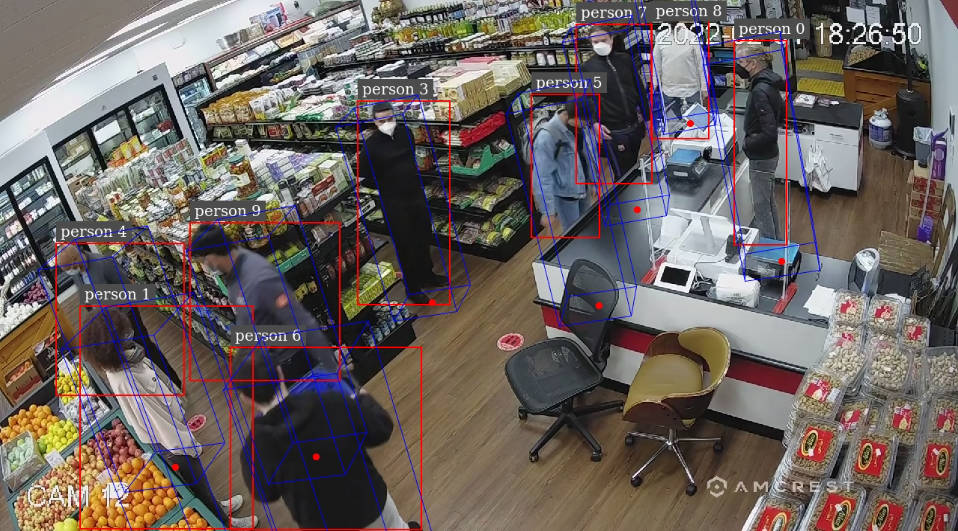
The person N in the frame is the tracking ID inside the current video; the configuration explicitly sets display-tracking-id=1. The red box indicates the extent of the target in the image plane, and the blue cuboid indicates the estimated 3D human body box. The estimation is affected by the camera parameters, the ground plane assumption, the occlusion, the detection boxes and the human body size priors, and it should not be treated as a measurement-grade 3D scan.
2. Monocular geometry and calibration requirements
Monocular images lack direct depth. SV3DT estimates the depth by using constraints such as the camera projection model, the detected foot points/human body shape and the preset human body sizes. Therefore:
When you use the official sample video, use the matching configuration and the
camInfo.ymlthat are provided together with that video.Your own video or camera must provide a
projectionMatrix_3x4that matches the resolution, the crop, the rotation and the mounting pose.After the camera is moved, zoomed, rotated, or its resolution or crop is changed, the original calibration usually no longer applies and you have to calibrate again.
The units of the human body height and radius in the calibration YAML must be consistent with the projection/world coordinate conventions.
3. Environment and assets
Official reference application: https://github.com/NVIDIA/DeepStream/tree/main/src/apps/reference_apps/deepstream-tracker-3d
The local workspace (it runs directly on the host, without Docker):
xxxxxxxxxx~/deepstream_reference_apps/deepstream-tracker-3d/
Use the PeopleNet, ReIdentificationNet and BodyPose3DNet that have already been prepared, together with the corresponding TensorRT engines (all of them are under /opt/nvidia/deepstream/deepstream-9.1/samples/models/tao_pretrained/ and they are accessed through symlinks). The course device is already prepared; do not download the models/the engines again and do not delete them.
4. Direct run
Run the following in a terminal on the Jetson itself or in a terminal of a graphical desktop that is already logged in:
xcd ~/deepstream_reference_apps/deepstream-tracker-3d/configsexport DISPLAY=:0# Make sure that the output directory existsmkdir -p track_results# Run the pipelinedeepstream-app -c deepstream_app_source1_3d_tracking.txt
The launcher uses the official Retail sample video and the corresponding camera configuration (camInfo.yml), and it runs DeepStream directly on the host (not in a container). A pure SSH session without a valid X11/VNC display environment cannot show the real-time preview.
5. Output and acceptance
The main outputs of the official sample are located at:
xxxxxxxxxx~/deepstream_reference_apps/deepstream-tracker-3d/configs/track_results/00_000_NNNNNN.txt~/deepstream_reference_apps/deepstream-tracker-3d/track_dump_0.txt~/deepstream_reference_apps/deepstream-tracker-3d/configs/out.mp4
track_results/ holds the tracking data in the KITTI format for every frame (about 603 frames of a 20 second video); track_dump_0.txt holds the complete tracking data in the MOT format, with the 34 key points of each target and their (x, y, z, confidence) quadruples; out.mp4 is located in configs/, not in the root of the repository.
When it finishes normally, the log should contain Received EOS and App run successful. When you accept the result, check the following at the same time:
There are the person detection boxes and the 3D boxes in the video window.
track_dump_0.txtis not empty and every line contains the 3D position and the key points.track_results/has 600+ non empty files.
To stop the program, press Ctrl+C once in the original terminal and wait for the pipeline to exit; do not kill -9. The MP4 needs the EOS to finish in order for the container index to be written.
6. Common problems
| Symptom | The cause or the handling |
|---|---|
| The depth of the 3D box is not reasonable | Check whether the camInfo.yml corresponds to the current video, the resolution and the viewpoint, and check the units of the body priors. |
| There is a position offset after the camera is replaced/moved | The old projection matrix no longer matches and you have to calibrate again. |
| There are only the output files and no window | Start it from the Jetson desktop or from a VNC graphical session and confirm the DISPLAY permission. |
| The MP4 cannot be played after it was stopped | Wait for the EOS to finish normally; do not force kill the process. |
| The engine takes a long time to build on the first start | Check the memory of the device and the build log; do not run another heavy inference task in parallel. |
It reports that libnvds_infercustomparser.so cannot be found | Confirm that the custom-lib-path points to /opt/nvidia/deepstream/deepstream-9.1/lib/libnvds_infercustomparser.so. |
The Tracker reports the user meta buffer warning | It is a known warning of this case and it does not block anything; do not increase the user-meta-pool-size. |