Welcome to Jetson Orin NX Developer Kit repository
当製品の日本語版マニュアル資料は、こちらからご取得ください。
01.AI large model environment deployment
Ollama
Ollama1. Large language models (LLM)2. Offline models and 4GB compatibility3. Installing OllamaScript installation4. Using Ollama5. Uninstalling OllamaReferences
Demo Environment
Development board: Jetson Orin series mainboard
Ollama is an open source tool that aims to simplify the deployment and running of large language models, so that users can use high quality language models in a local environment.
1. Large language models (LLM)
Large language models (Large Language Models, referred to as LLM) are a class of advanced text generation systems based on artificial intelligence technology. Their main characteristic is that they can learn and understand human language from large-scale training data, and generate natural and fluent text.
2. Offline models and 4GB compatibility
Before downloading a model, choose the version according to the memory of the development board. The table below summarises the models listed in the offline model tutorials of this chapter, and adds the Qwen3-VL used by the visual understanding cases of chapter 11. The compatibility status applies to the Jetson Orin Nano 4GB and the configuration of this course; it is not a general conclusion for all the quantisations, context lengths and ways of running that model.
The table below marks "Supported" or "Not supported" according to the compatibility conclusion of this course; even a supported model still needs memory to be reserved for the system and the other running components. The download size of a model is not the same as the memory it needs at runtime; inference also needs the context cache, the vision components and the system memory.
| Model family and tutorial | Model version | Main use | Orin Nano 4GB |
|---|---|---|---|
| Llama 3.2 | llama3.2:1b | Text conversation | Supported |
| Llama 3.2 | llama3.2:3b | Text conversation | Supported |
| Qwen3 | qwen3:0.6b | Text conversation | Supported |
| Qwen3 | qwen3:1.7b | Text conversation | Supported |
| Qwen3 | qwen3:4b | Text conversation | Supported |
| Qwen3 | qwen3:8b | Text conversation | Not supported |
| Phi-4-mini | phi4-mini:3.8b | Text conversation, reasoning | Not supported |
| DeepSeek-R1 | deepseek-r1:1.5b | Text conversation, reasoning | Supported |
| DeepSeek-R1 | deepseek-r1:7b | Text conversation, reasoning | Not supported |
| DeepSeek-R1 | deepseek-r1:8b | Text conversation, reasoning | Not supported |
| Qwen2.5-VL | qwen2.5vl:3b | Image understanding, text conversation | Not supported |
| Qwen2.5-VL | qwen2.5vl:7b | Image understanding, text conversation | Not supported |
| Qwen3-VL | qwen3-vl:2b | Image understanding, text conversation | Not supported (multimodal cases of this course) |
| Gemma 3 | gemma3:1b | Text conversation | Supported |
| Gemma 3 | gemma3:4b | Image understanding, text conversation | Not supported |
| LLaVA | llava:7b | Image understanding, text conversation | Not supported |
| MiniCPM-V | minicpm-v:8b | Image understanding, text conversation | Not supported |
| LocateAnything | LocateAnything-3B Q4_K_M + BF16 mmproj | Image object grounding | Not supported |
Limitation of the course: the range of the small text models in the table above does not mean that the complete multimodal applications can run. The six cases of chapter 11 "Multimodal large model application (online/offline large model + text/voice interaction)" do not support the 4GB configuration, so use a Jetson Orin Nano 8GB. The fact that a model itself can run does not mean that it supports the image input or the tool calling that the cases require.
3. Installing Ollama
The tutorial demonstrates installing Ollama with a script on the Jetson Orin series mainboard. It is already installed on the factory system, so you can skip this section.
Note: a failure to pull with ollama is normal; you can try several times, or pull it through a proxy. You have to look up the proxy method yourself online
Script installation
sudo apt install curl -ysudo curl -fsSL https://ollama.com/install.sh | sh
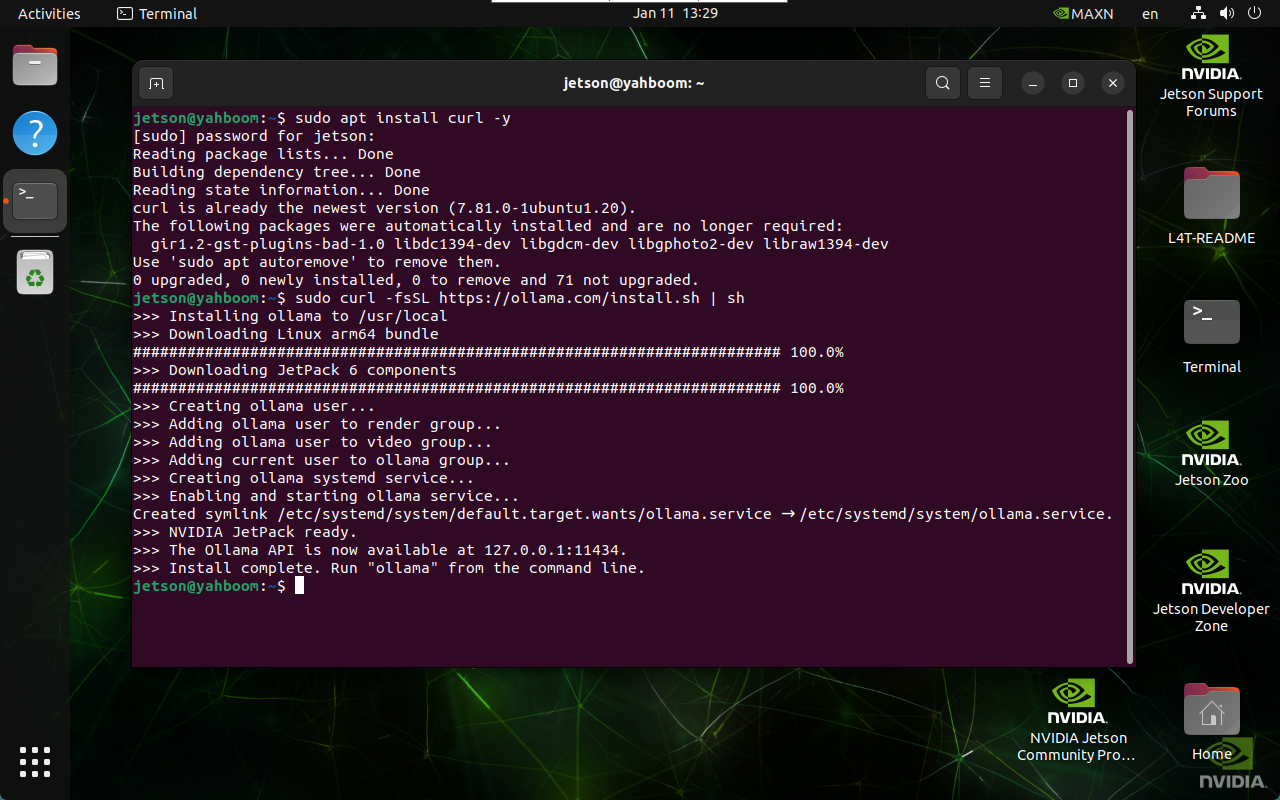
The whole installation takes a fairly long time, so be patient!
4. Using Ollama
Entering ollama in the terminal shows the following help:
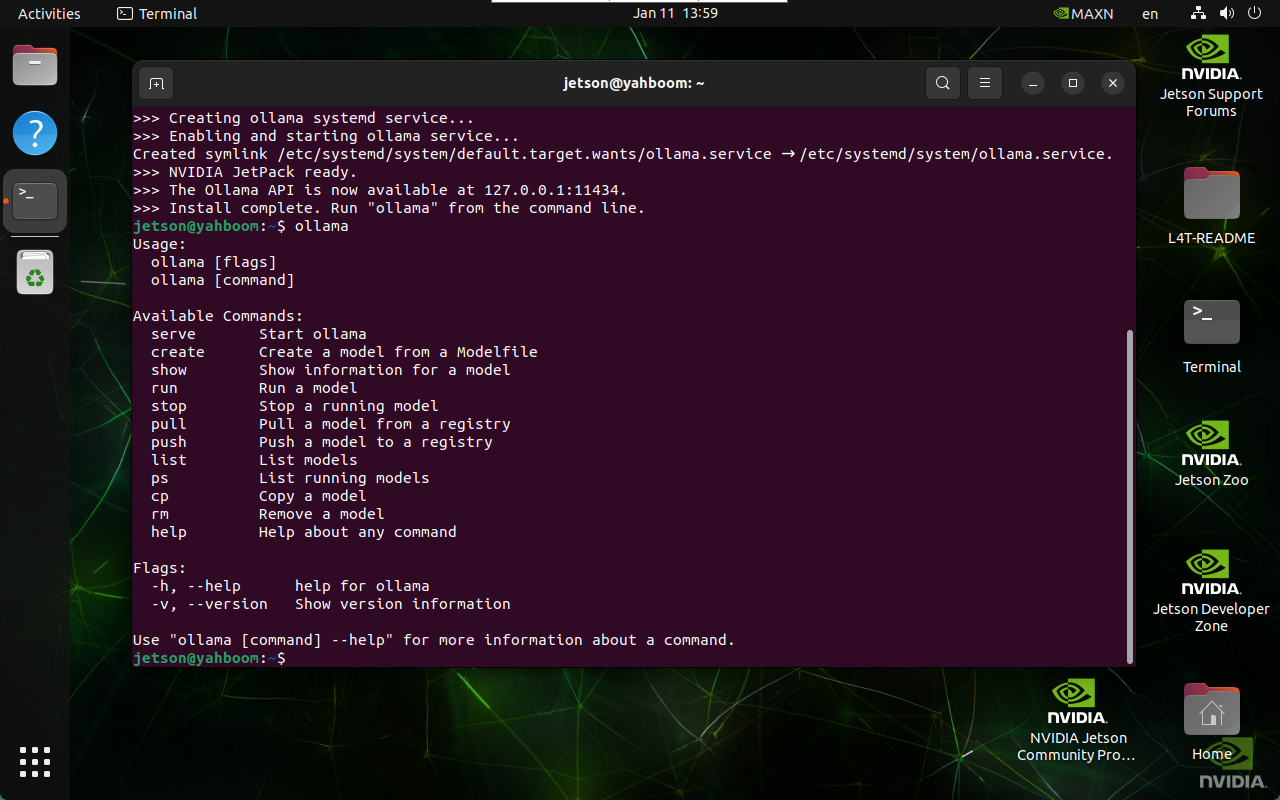
| Command | Description |
|---|---|
| ollama serve | Start ollama |
| ollama create | Create a model from a model file |
| ollama show | Show the information of a model |
| ollama run | Run a model |
| ollama pull | Pull a model from the registry |
| ollama push | Push a model to the registry |
| ollama list | List the models |
| ollama ps | List the running models |
| ollama cp | Copy a model |
| ollama rm | Remove a model |
| ollama help | Get the help information of any command |
5. Uninstalling Ollama
Remove the service
xxxxxxxxxxsudo systemctl stop ollamasudo systemctl disable ollamasudo rm /etc/systemd/system/ollama.service
Remove the files
xxxxxxxxxxsudo rm $(which ollama)
Remove the models, the service user and the group
xxxxxxxxxxsudo rm -r /usr/share/ollamasudo userdel ollamasudo groupdel ollama
References
Ollama
Official website: https://ollama.com/
GitHub: https://github.com/ollama/ollama