Welcome to Jetson Orin NX Developer Kit repository
当製品の日本語版マニュアル資料は、こちらからご取得ください。
08.Multi-view 3D tracking
DeepStream multi-view 3D tracking (MV3DT)
DeepStream multi-view 3D tracking (MV3DT)1. Case goal and processing chain2. Input data and calibration3. Dependencies and preparation of the resources4. Running the official 4-channel sample5. Checking the tracking and the Kafka metadata5.1 Output artifacts5.2 Reading the cross-camera messages6. The resource limits of the 12 channels7. Common problems
Applicable environment: JetPack 7.2.1, Ubuntu 24.04, DeepStream 9.1, CUDA 13.2, TensorRT 10.16, Jetson Orin NX.
The official 4-channel offline sample has been accepted on the course device; the 12-channel sample can build the engine, but it also fails on the Orin NX 16GB because of the insufficient GPU/video buffer memory, so it is not used as a working configuration. The real USB/CSI multi-camera is not connected at the moment.
1. Case goal and processing chain
MV3DT (Multi-View 3D Tracking) associates the observations of multiple calibrated cameras into a shared world coordinate, keeps a global target ID across the different viewpoints, and publishes the structured 3D tracking metadata through Kafka.
4 synchronized videos → person detection/pose estimation per channel → camera coordinate projection→ cross-camera target association and global 3D tracking→ Kafka mv3dt topic → BEV visualization
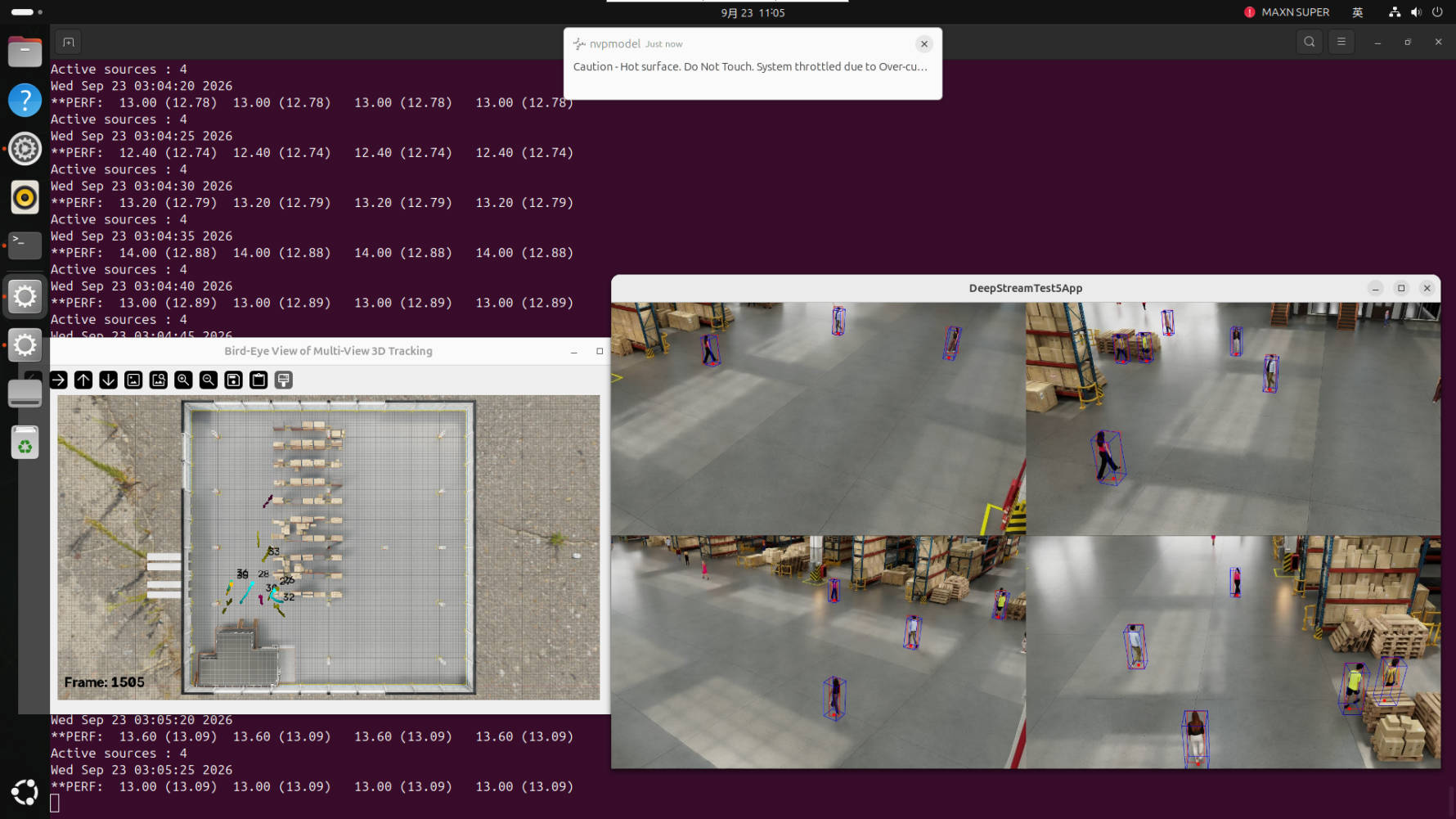
The DeepStreamTest5App on the right shows the images of the four cameras; the Bird-Eye View on the left projects the cross-camera tracks onto the floor map. The performance information is also displayed on the desktop. The overheat/current limit notification in the screenshot is not the output of the algorithm; during the run you must use a sufficient power supply and keep the cooling.
2. Input data and calibration
The official 4-channel data is located at:
xxxxxxxxxx~/deepstream_reference_apps/deepstream-tracker-3d-multi-view/datasets/mtmc_4cam/├── camInfo/│ ├── Warehouse_Synthetic_Cam001.yml│ ├── Warehouse_Synthetic_Cam002.yml│ ├── Warehouse_Synthetic_Cam003.yml│ └── Warehouse_Synthetic_Cam004.yml└── videos/├── Warehouse_Synthetic_Cam001.mp4├── Warehouse_Synthetic_Cam002.mp4├── Warehouse_Synthetic_Cam003.mp4└── Warehouse_Synthetic_Cam004.mp4
The YAML of each camera contains a 3×4 projection matrix (12 values) and the body model parameters (the height and the radius). The custom data has to satisfy:
The videos of all the cameras are synchronized in time and the frame rate/the timestamps can be aligned.
The resolutions are consistent and they correspond to the calibration parameters.
Every camera needs its own
projectionMatrix_3x4_w2p; the matrix of another camera must not be reused.The field of view of the cameras needs enough overlap or an associable area; the floor map and the coordinate transformation have to cover the actual area.
MV3DT still needs the calibration. It does not automatically know the spatial relation between the cameras just because it uses several of them.
3. Dependencies and preparation of the resources
Official reference application: https://github.com/NVIDIA/DeepStream/tree/main/src/apps/reference_apps/deepstream-tracker-3d-multi-view
The local workspace (it runs containerized, so Docker is required):
xxxxxxxxxx~/deepstream_reference_apps/deepstream-tracker-3d-multi-view/
The dependency components:
| Component | Location | Description |
|---|---|---|
| The DS 9.1 image | nvcr.io/nvidia/deepstream:9.1-triton-multiarch | It is pulled through the DaoCloud/1ms relay |
| The Kafka container | mv3dt-kafka (apache/kafka:4.2.0) | It starts itself with --restart unless-stopped |
| Mosquitto | The systemd service of the host | It listens on 127.0.0.1:1883 |
| The detection model | models/PeopleNetTransformer/peoplenet_transformer_model_op17.onnx | The official default detector, not PeopleNet2.6.3 |
| The pose model | models/BodyPose3DNet/bodypose3dnet_accuracy.onnx | |
| The engines | models/PeopleNetTransformer/*_b4_gpu0_fp16.engine + models/BodyPose3DNet/*_b1_gpu0_fp16.engine | They are compiled automatically on the first start |
| The Python venv | mv3dt_venv/ | Inside the project directory, not ~/DeepStream/mv3dt-runtime/ |
Key: the models are a physical copy (and not a symlink). A symlink breaks inside the container because the root path of the DS is different.
4. Running the official 4-channel sample
Run it from a terminal of the graphical desktop of the Jetson or of a VNC session, with the unified entry:
xxxxxxxxxx~/mv3dt start
The ~/mv3dt script automatically completes:
It checks and starts the Kafka container (
mv3dt-kafka)It checks the Mosquitto service of the host
It sets the X11 permission (
xhost +local:root)It makes sure that the OSD sink (sink1) is enabled
It starts the Docker pipeline (
nvcr.io/nvidia/deepstream:9.1-triton-multiarch)
The first run compiles 2 engines (PeopleNetTransformer batch=4 + BodyPose3DNet batch=1), which takes about 15 minutes.
Other commands:
| Command | Effect |
|---|---|
~/mv3dt start | Start the pipeline (the VNC popup) |
~/mv3dt stop | Stop the pipeline (the Kafka/Mosquitto remain) |
~/mv3dt status | Look at the Kafka/Mosquitto/engine/disk/MP4 |
~/mv3dt log | Watch the log in real time |
~/mv3dt clean | Clean up the dump and the MP4 (the engines remain) |
~/mv3dt help | Show the help |
5. Checking the tracking and the Kafka metadata
The four OSD windows are expected to appear on the desktop, the FPS is stable at about 5.6, and the terminal ends with App run successful. The operations of the VNC window:
| Operation | Effect |
|---|---|
| The left click on a tile | Zoom in on that channel |
| The right click inside the window | Go back to the 4 tiles |
q (in the terminal) | Quit |
5.1 Output artifacts
| Path | Content |
|---|---|
experiments/deepstream/4cam/outVideos/tiled_display_raw.mp4 | The 4-tile OSD video (about 30 MB) |
experiments/deepstream/4cam/infer-kitti-dump/ | The 2D detection of each frame (the KITTI format) |
experiments/deepstream/4cam/tracker-kitti-dump/ | The 3D tracking of each frame (with the global ID) |
The format of tracker-kitti-dump/*.txt is the KITTI one:
xxxxxxxxxxtype trunc occl alpha bbox(4) dim(3) loc(3) ry score ID
The last column = the global 3D ID (consistent across the cameras).
5.2 Reading the cross-camera messages
Open another terminal:
xxxxxxxxxxcd ~/deepstream_reference_apps/deepstream-tracker-3d-multi-viewsource mv3dt_venv/bin/activatepython utils/kafka_client.py --broker localhost:9092 --topic mv3dt
The message has to contain the camera identification, the target ID, footLocation3D, bbox3d and the other fields. The association of the IDs in the consecutive frames/the different cameras is used to judge whether the global tracking works; the fact that Kafka has a topic does not mean that the inference succeeded, and you still have to confirm that new messages are received.
6. The resource limits of the 12 channels
Although the batch-12 engine of PeopleNetTransformer can be built successfully, the actual run of 12 channels shows a GPU out of memory, an unusable video output buffer and the failures of the tracker submissions:
xxxxxxxxxx# Modify test_12cam_ds.sh or change DETECTOR_MODEL manually, then run it# It is not recommended on this machine, the resource limits have been verified
7. Common problems
| Symptom | Handling |
|---|---|
| The BEV window or the 4 tiles do not appear | Start it from the graphical desktop/VNC of the Jetson and check the DISPLAY, the X11 permission and /tmp/mv3dt_osd.log. |
| There are no Kafka messages | Check whether mv3dt-kafka is Up in docker ps and whether the mv3dt topic exists: docker exec mv3dt-kafka /opt/kafka/bin/kafka-topics.sh --bootstrap-server localhost:9092 --list |
| The IDs do not match between the cameras | Check the time synchronization, the projectionMatrix_3x4_w2p of each channel, the coordinate system and the overlap of the fields of view. |
The container reports ONNX file does not exist | Confirm that the ONNX under models/ is a physical copy and not a symlink (a symlink breaks inside the container). |
--runtime=nvidia reports unknown runtime | Install the nvidia-container-toolkit and run nvidia-ctk runtime configure --runtime=docker. |
| The DS image cannot be pulled | Use the DaoCloud relay: docker pull nvcr.1ms.run/nvidia/deepstream:9.1-triton-multiarch and then docker tag it as nvcr.io/.... |
| The Mosquitto container conflicts with the host | Delete the container and use the mosquitto of the host directly (systemctl is-active mosquitto). |
The container remains after Ctrl+C | ~/mv3dt stop kills the pipeline container and pkills the remaining windows. |
| The OOM of 12 channels | It is a known limit of the current hardware; go back to 4 channels, reduce the number of channels or use a platform with more memory. |