Welcome to Jetson Orin NX Developer Kit repository
当製品の日本語版マニュアル資料は、こちらからご取得ください。
03.Vehicle brand classification
TAO VehicleMakeNet vehicle brand classification
TAO VehicleMakeNet vehicle brand classification1. Case goal and processing flow2. The checks before running it3. Start the detection4. The real-time detection with a USB camera5. The real-time detection with a CSI camera6. Frequently asked questions7. References
Applicable environment: Jetson Orin NX 16GB, JetPack 7.2.1, DeepStream 9.1.
1. Case goal and processing flow
VehicleMakeNet is a second-level classifier; it is not responsible for locating the vehicles in the whole frame. TrafficCamNet detects the vehicles first, DeepStream crops the region of the vehicle, and then VehicleMakeNet predicts the brand category.
Video/USB/CSI → TrafficCamNet vehicle detection → crop/resize→ VehicleMakeNet brand classification → the preview/the video output
Without the vehicle box of the previous stage there is no brand result; the coverage of the categories is also limited by the training set.
2. The checks before running it
xcd ~/deepstream_tao_apps/deepstream_app_tao_configs# Confirm the configuration and the input sourcegrep -E "uri=|config-file=" run_vehiclemake.txt# Confirm that all the config-file paths are valid (the path trap was hit before)for f in run_vehiclemake.txt run_vehiclemake_usb.txt run_vehiclemake_csi.txt; doecho "--- $f ---"grep "config-file=" "$f" | while read line; dopath=$(echo "$line" | cut -d= -f2)[ -f "$path" ] && echo "OK $path" || echo "MISS $path"donedone
Confirm that the material and the output directory are available. The USB/CSI real-time mode has to run in a graphical session of the Jetson, and the camera has to be connected in advance.
3. Start the detection
To run only the brand classification (the video version):
xxxxxxxxxxexport DISPLAY=:0 && ~/deepstream_tao_demo/run_case.sh vehiclemake video
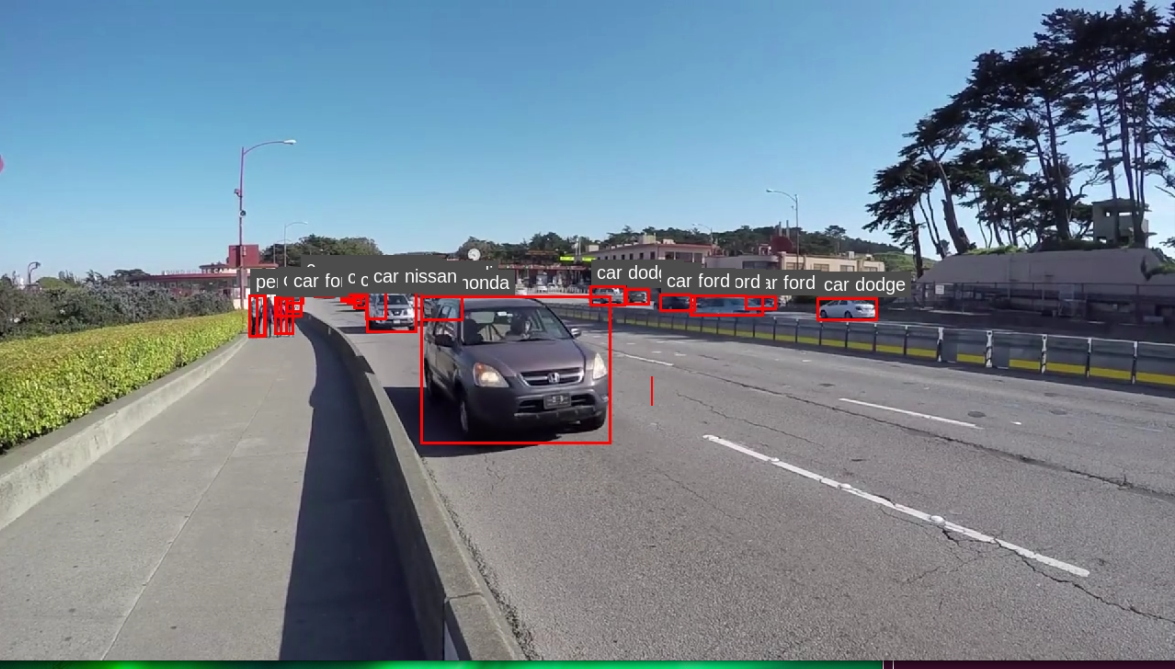
The input is the sample_720p.h264 that comes with DeepStream. The default cascade combination run_vehicles.txt runs the brand and the model classification at the same time.
When you replace the test video, modify the uri=file:// of the [source0] section in run_vehiclemake.txt to the absolute path of the MP4/H.264 file on the Jetson. Use gst-discoverer-1.0 to confirm that the new video can be decoded.
4. The real-time detection with a USB camera
The USB entry supports the Vehicle brand classification. After checking the device, start it in a graphical session:
xxxxxxxxxxls -l /dev/video*v4l2-ctl -d /dev/video0 --list-formats-extexport DISPLAY=:0 && ~/deepstream_tao_demo/run_case.sh vehiclemake usb
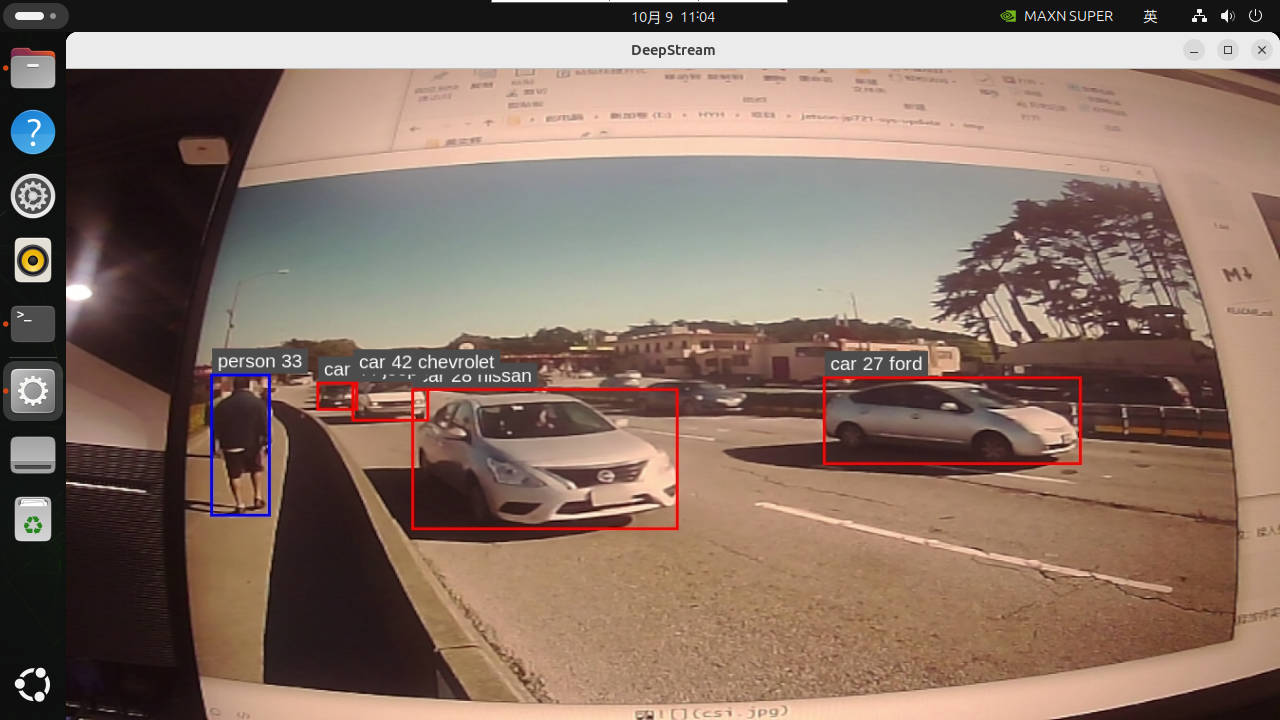
The script detects the USB camera node automatically through ~/deepstream_tao_demo/find_usb_cam.sh.
In the real-time image the vehicle boxes come from TrafficCamNet, the number is the Tracker ID and the brand label comes from the second-level classification. The USB mode is used for the preview and it does not produce an offline MP4.
Press Ctrl+C once and wait for App run successful; confirm that the camera has been released.
5. The real-time detection with a CSI camera
The CSI entry of the course supports the real-time preview. After connecting a compatible camera and confirming that the driver and the Argus service work normally, run the corresponding command in a graphical terminal of the Jetson desktop/VNC:
Start:
xxxxxxxxxxexport DISPLAY=:0 && ~/deepstream_tao_demo/run_case.sh vehiclemake csi
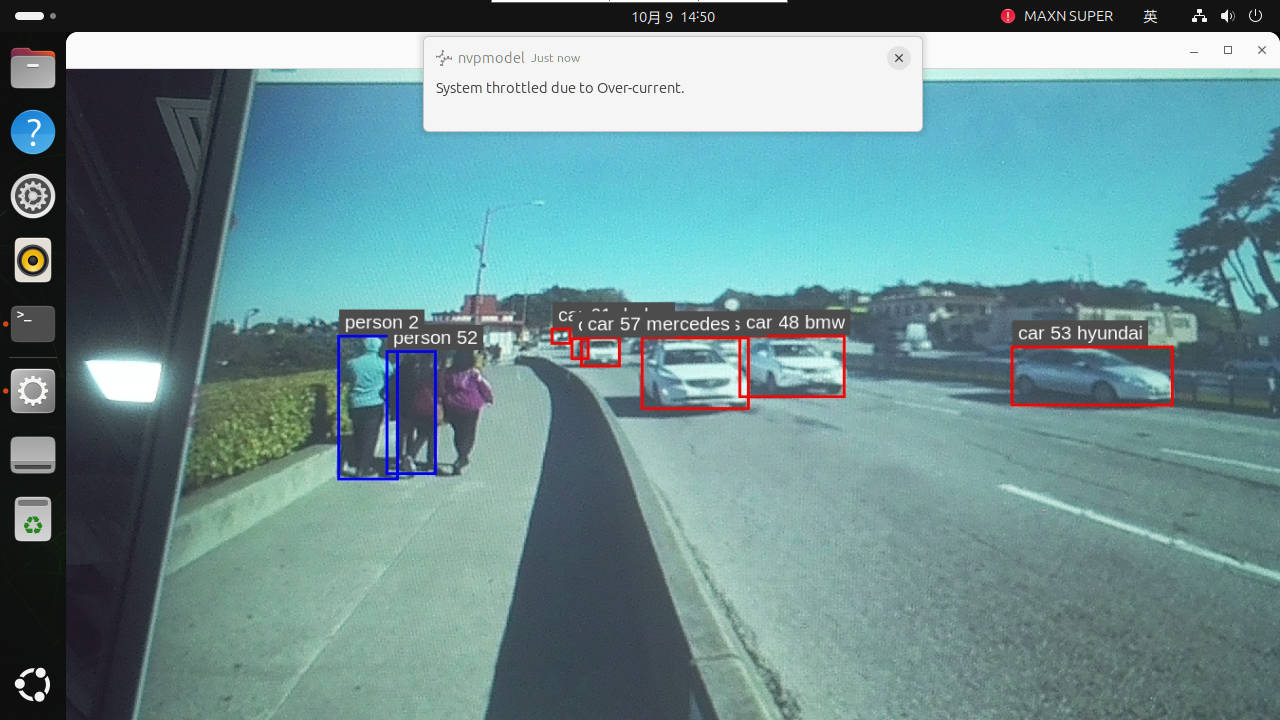
The CSI mode supports the real-time preview and it does not produce an offline video output. To stop it, press Ctrl+C once and wait for the program to release the camera.
6. Frequently asked questions
| Symptom | The check and the handling |
|---|---|
| There are vehicle boxes but no brand | First look at whether TrafficCamNet hits a vehicle, and then check the VehicleMakeNet configuration, the engine and the labels. |
Failed to load config file | Start it with run_case.sh; all three entries have been unified to the config-file= path of TrafficCamNet + Tracker + VehicleMakeNet. |
| The brand category is not accurate | The set of the categories is limited; evaluate it with the data of the target region, the model and the shooting angle, and do not judge it from a single frame. |
| There is no image with USB | Check the node, the format, the permissions and whether the device is in use; the resolution has to match the camera-width/camera-height/camera-fps in the script. |
| The CSI cannot start | Check the connection of the compatible module, the sensor driver, the Argus service and whether the camera is in use; this entry directly uses the Argus type=5. |
| The MP4 cannot be found | The camera mode only previews; in the video mode confirm the EOS of the pipeline and the output path. |
nvv4l2h264enc has no property named 'gpu-id' | It is a known non-blocking warning of DS 9.1 and it does not affect the inference or the display. |
7. References
The NVIDIA DeepStream TAO application examples: https://github.com/NVIDIA/DeepStream/tree/main/src/apps/tao_apps
The DeepStream TAO integration documentation: https://docs.nvidia.com/metropolis/deepstream/dev-guide/text/DS_TAO_integration.html