Welcome to Jetson Orin NX Developer Kit repository
当製品の日本語版マニュアル資料は、こちらからご取得ください。
03.Object detection
Object detection
Object detection1. Enable the maximum performance of the mainboard1.1. Enable the MAX power mode1.2. Enable the Jetson clocks2. Object prediction: imageEffect preview3. Object prediction: videoEffect preview4. Object prediction: real-time detection4.1. USB cameraEffect previewReferences
Use Python to demonstrate Ultralytics: the effect of Object Detection on images, videos, and real-time detection.
1. Enable the maximum performance of the mainboard
1.1. Enable the MAX power mode
Enabling MAX Power Mode (maximum power mode) on Jetson ensures that all CPU and GPU cores are turned on:
sudo nvpmodel -m 0
1.2. Enable the Jetson clocks
Enabling Jetson Clocks ensures that all CPU and GPU cores run at the maximum frequency:
xxxxxxxxxxsudo jetson_clocks
2. Object prediction: image
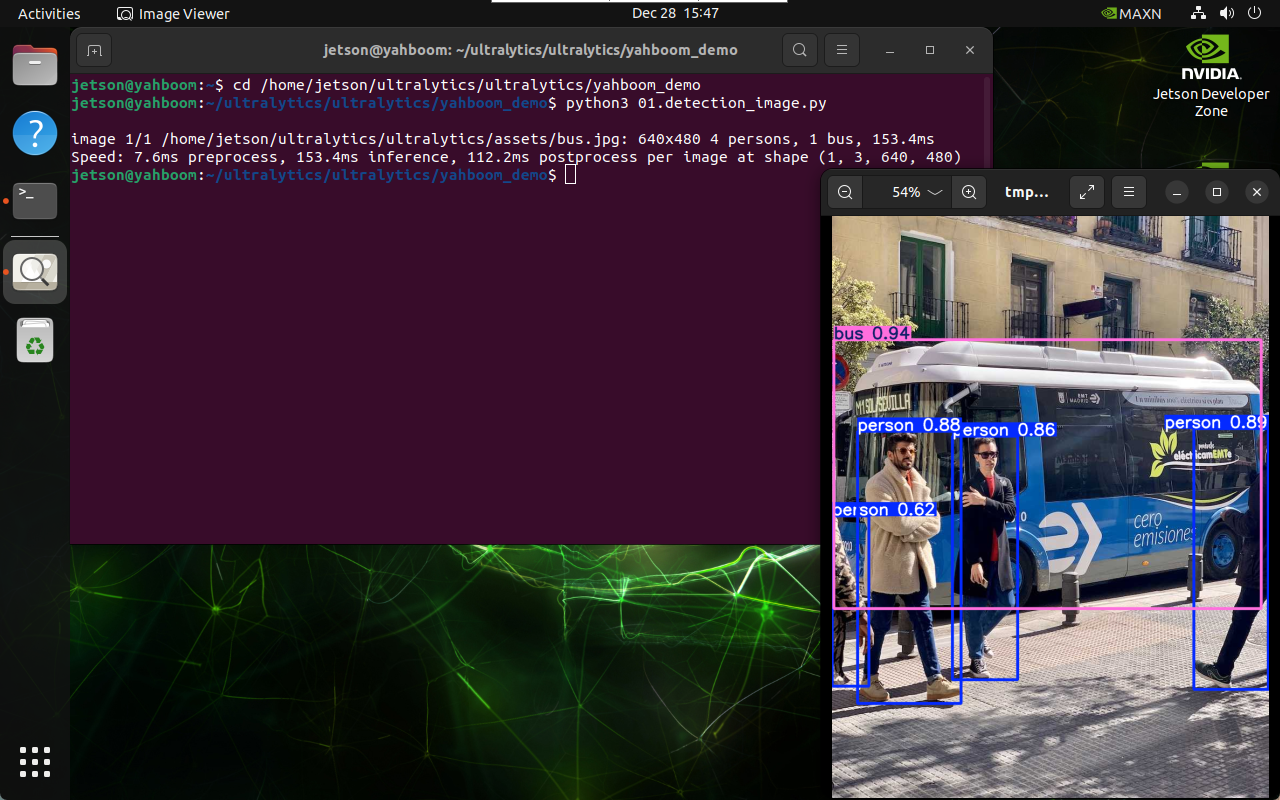
Use yolo11n.pt to predict the images bundled with the ultralytics project.
Enter the code folder:
xxxxxxxxxxcd /home/jetson/ultralytics/ultralytics/yahboom_demo
Run the code:
xxxxxxxxxxpython3 01.detection_image.py
Effect preview
Location of the image output by yolo: /home/jetson/ultralytics/ultralytics/output/
Example code:
xfrom ultralytics import YOLO
# Load a modelmodel = YOLO("/home/jetson/ultralytics/ultralytics/yolo11n.pt")
# Run batched inference on a list of imagesresults = model("/home/jetson/ultralytics/ultralytics/assets/bus.jpg") # return a list of Results objects
# Process results listfor result in results: boxes = result.boxes # Boxes object for bounding box outputs # masks = result.masks # Masks object for segmentation masks outputs # keypoints = result.keypoints # Keypoints object for pose outputs # probs = result.probs # Probs object for classification outputs # obb = result.obb # Oriented boxes object for OBB outputs result.show() # display to screen result.save(filename="/home/jetson/ultralytics/ultralytics/output/bus_output.jpg") # save to disk3. Object prediction: video
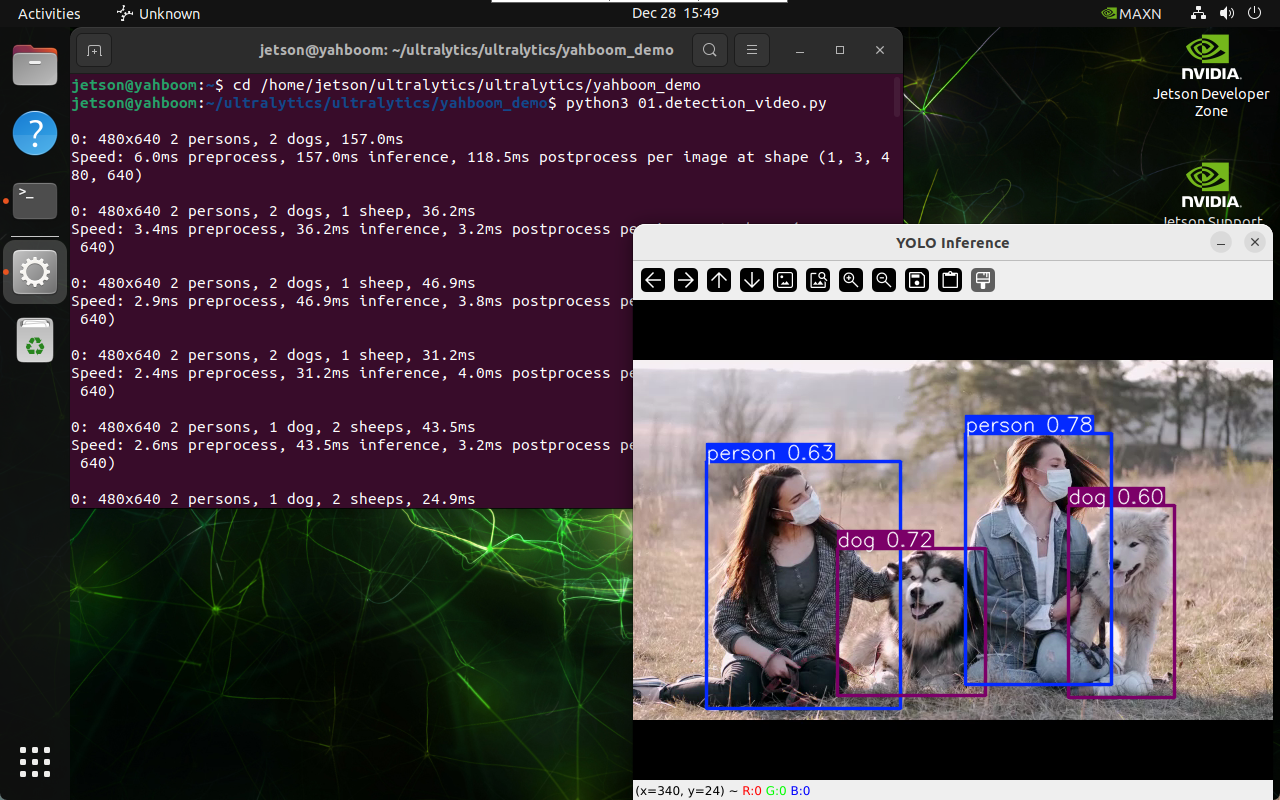
Use yolo11n.pt to predict the videos under the ultralytics project (not the videos bundled with ultralytics).
Enter the code folder:
xxxxxxxxxxcd /home/jetson/ultralytics/ultralytics/yahboom_demo
Run the code:
xxxxxxxxxxpython3 01.detection_video.py
Effect preview
Location of the video output by yolo: /home/jetson/ultralytics/ultralytics/output/
Example code:
xxxxxxxxxximport cv2from ultralytics import YOLO
# Load the YOLO modelmodel = YOLO("/home/jetson/ultralytics/ultralytics/yolo11n.pt")
# Open the video filevideo_path = "/home/jetson/ultralytics/ultralytics/videos/people_animals.mp4"cap = cv2.VideoCapture(video_path)
# Get the video frame size and frame rateframe_width = int(cap.get(cv2.CAP_PROP_FRAME_WIDTH))frame_height = int(cap.get(cv2.CAP_PROP_FRAME_HEIGHT))fps = int(cap.get(cv2.CAP_PROP_FPS))
# Define the codec and create a VideoWriter object to output the processed videooutput_path = "/home/jetson/ultralytics/ultralytics/output/01.people_animals_output.mp4"fourcc = cv2.VideoWriter_fourcc(*'mp4v')  # You can use 'XVID' or 'mp4v' depending on your platformout = cv2.VideoWriter(output_path, fourcc, fps, (frame_width, frame_height))
# Loop through the video frameswhile cap.isOpened():    # Read a frame from the video    success, frame = cap.read()
    if success:        # Run YOLO inference on the frame        results = model(frame)
        # Visualize the results on the frame        annotated_frame = results[0].plot()
        # Write the annotated frame to the output video file        out.write(annotated_frame)
        # Display the annotated frame        cv2.imshow("YOLO Inference", annotated_frame)
        # Break the loop if 'q' is pressed        if cv2.waitKey(1) & 0xFF == ord("q"):            break    else:        # Break the loop if the end of the video is reached        break# Release the video capture and writer objects, and close the display windowcap.release()out.release()cv2.destroyAllWindows()
4. Object prediction: real-time detection
4.1. USB camera
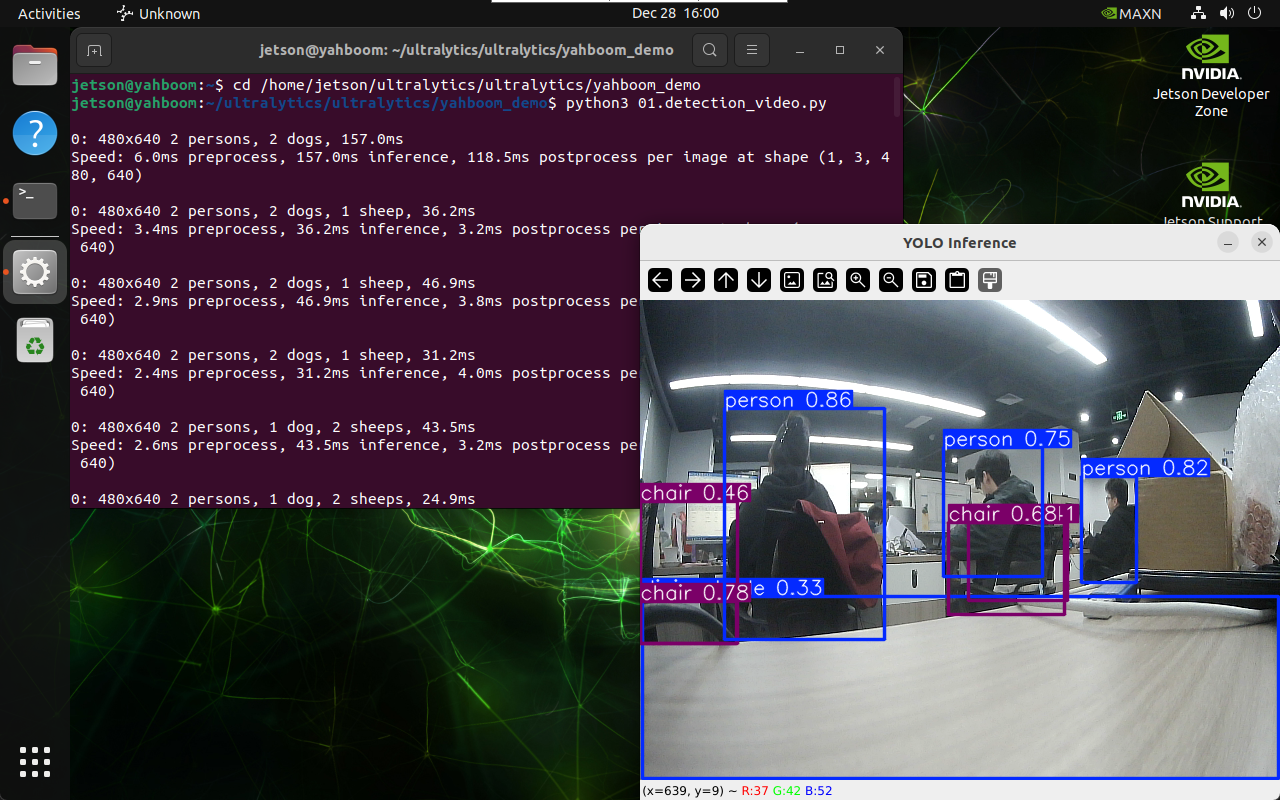
Use yolo11n.pt to predict the image of the USB camera.
Enter the code folder:
xxxxxxxxxxcd /home/jetson/ultralytics/ultralytics/yahboom_demo
Run the code: click on the preview window and press the q key to terminate the program!
xxxxxxxxxxpython3 01.detection_camera_usb.py
Effect preview
Location of the video output by yolo: /home/jetson/ultralytics/ultralytics/output/
Example code:
xxxxxxxxxximport cv2from ultralytics import YOLO
# Load the YOLO modelmodel = YOLO("/home/jetson/ultralytics/ultralytics/yolo11n.pt")
# Open the cammeracap = cv2.VideoCapture(0)
# Get the video frame size and frame rateframe_width = int(cap.get(cv2.CAP_PROP_FRAME_WIDTH))frame_height = int(cap.get(cv2.CAP_PROP_FRAME_HEIGHT))fps = int(cap.get(cv2.CAP_PROP_FPS))
# Define the codec and create a VideoWriter object to output the processed videooutput_path = "/home/jetson/ultralytics/ultralytics/output/01.detection_camera_usb.mp4"fourcc = cv2.VideoWriter_fourcc(*'mp4v')  # You can use 'XVID' or 'mp4v' depending on your platformout = cv2.VideoWriter(output_path, fourcc, fps, (frame_width, frame_height))
# Loop through the video frameswhile cap.isOpened():    # Read a frame from the video    success, frame = cap.read()
    if success:        # Run YOLO inference on the frame        results = model(frame)
        # Visualize the results on the frame        annotated_frame = results[0].plot()
        # Write the annotated frame to the output video file        out.write(annotated_frame)
        # Display the annotated frame        cv2.imshow("YOLO Inference", annotated_frame)
        # Break the loop if 'q' is pressed        if cv2.waitKey(1) & 0xFF == ord("q"):            break    else:        # Break the loop if the end of the video is reached        break# Release the video capture and writer objects, and close the display windowcap.release()out.release()cv2.destroyAllWindows()