yahboom
HomeTutorialsProduct
Solution
Blog
Online Store
About Us
EN/中文
Store
K230 Vision Module📖
1. Quick Start
  • 0.Get start
  • 1. K230 firmware download and burning
  • 2. Install the programming environment
  • 3. Debug and run routines
  • 4. Offline running routine
  • 5. Micropython Quick Start
  • 6. GUI Program Instructions
  • 7.K230 module bracket installation tutorial
  • 8.K230 module 2DOF PTZ installation tutorial
2. Basic Courses
  • 1.FPIOA pin assignment
  • 2.RGB lights
  • 3.Buzzer
  • 4.Buttons
  • 5.Serial communication
  • 6.I2C communication
  • 7.PWM
  • 8.WDT watchdog
  • 9.Timer
  • 10.Fourier Transform
  • 11.SHA256 encryption
  • 12.AES encryption
  • 13.Multithreading
  • 14.File reading and writing
  • 15.Image Display
  • 16.Touch Display
  • 17.Camera display
  • 18.Image Flip
  • 19.Camera
3. Draw the image
  • 1. Draw the lines
  • 2. Draw the circle
  • 3. Draw the rectangle
  • 4. Draw the ellipse
  • 5. Draw the arrow
  • 6. Draw the crosshairs
  • 7. Draw text
  • 8. Draw key points
4. Graphics detection
  • 1. Line segment detection
  • 2. Rectangle Detection
  • 3. Circle detection
  • 4. Object edge detection
  • 5. Line inspection basics:fast linear regression
5. Color recognition
  • 1. Color recognition
  • 2. Object Counting
  • 3. Multi-color recognition
  • 4. K230 Color Line Patrol
6.1 CV_lite Image Processing Special Topic
  • 1.Introduction to cv_litenew
  • 2.cv_lite API Reference Manualnew
  • 3.Color Block Recognition - Grayscale Imagenew
  • 4.Color Block Recognition - Color Imagenew
  • 5.Circle Recognition - Grayscale Imagenew
  • 6.Circle Recognition - Color Imagenew
  • 7.Corner Recognition - Grayscale Imagenew
  • 8.Corner Recognition - Color Imagenew
  • 9.Edge Recognition - Grayscale Imagenew
  • 10. Edge Recognition - Color Imagenew
  • 11. Rectangle Recognition - Grayscale Imagenew
  • 12.Rectangle Recognition - Color Imagenew
  • 13.Rectangle recognition combined with corner recognition - grayscale imagenew
  • 14.Rectangle recognition combined with corner recognition - color imagenew
  • 15.Image Binarization - Grayscalenew
  • 16.Image Binarization - Color Imagenew
  • 17.Exposure Adjustmentnew
  • 18.Image Black Hat Operationsnew
  • 19.Image Color Histogramnew
  • 20.Image Closingnew
  • 21.Image Expansionnew
  • 22.Image Corrosionnew
  • 23.Gaussian Blurnew
  • 24.Gradient Transformationnew
  • 25.Mean Fuzzynew
  • 26.Image Openingnew
  • 27.Image Top Hat Operationnew
  • 28.PnP rangingnew
  • 29.Find rectangles and measure distancesnew
  • 30.Image grayscale world white balancenew
6.2 OpenCV Image Processing Special Topicnew
  • 1. OpenCV Introduction
  • 2. OpenCV API Reference
  • 3. Image Basic Transforms
  • 4. Morphological Operations
  • 5. Color Segmentation and Shape Classification
  • 6. Corner and Centroid Detection
  • 7. Hough Circle Detection
  • 8. Hough Line Detection
  • 9. Contour Analysis
  • 10. Drawing Functions
  • 11. Template Matching
  • 12. Image Blur Filtering
  • 13. Edge Detection
  • 14. Thresholding
  • 15. Color Segmentation
  • 16. Histogram and Pixel Transformation
  • 17. Arithmetic and Bitwise Operations
  • 18. Channel Operation and Statistics
  • 19. Image File Read and Write
  • 20. Pixel Level Transformation
7. Code type recognition
  • 1.Barcode recognition
  • 2.QR code recognition
  • 3.AprilTag tag recognition
  • 4.DM code recognition
8. Face Recognition
  • 1.[Must-read] General code structure and prerequisite knowledge of AI vision routines
  • 2.Face Detection
  • 3.Facial key point recognition
  • 4.Face orientation detection
  • 5.Face 3D Network
  • 6.Gaze direction detection
  • 7.Register for face recognition
9. Human body characteristics
  • 1. Human body detection
  • 2. Human key point detection
  • 3. Human posture recognition
  • 4. Fall detection
  • 5. Palm detection
  • 6. Palm key point detection
  • 7. Palm key point classification
  • 8. Gesture Recognition
  • 9. Dynamic gesture recognition
  • 10. Rock, Paper, Scissors
10. Scenario Application
  • 1.OCR character detection
  • 2.OCR character recognition
  • 3.yolov8n target detection
  • 4.yolov8n segmentation
  • 5. Self-learning object recognition
  • 6. License plate detection
  • 7. License Plate Recognition
  • 8. Target Tracking
  • 9. Fruit classification
  • 10. Garbage classification
  • 11. Road sign recognition
11. Audio and video processing
  • 1. Audio Recording
  • 2. Play Audio
  • 3. Video Recording
  • 4. Play Video
  • 5. Keyword wake-up
12. Network Basics
  • 1. Wireless network connection
  • 2. AP hotspot mode
  • 3. TCP-Server Example
  • 4. TCP-Client Example
  • 5. UDP-Server Example
  • 6. UDP-Client Example
  • 7. HTTP-Server Example
  • 8. HTTP-Client Example
  • 9. MQTT Quick Start
  • 10. MQTT-Publisher
  • 11. MQTT-Subscriber
  • 12. RTSP real-time image transmission
  • 13. RTSP real-time image transmission combined with AIDemo
  • 14. Call OpenRouter large model aggregation service
  • 15. Open the Resource Monitoring Panel
13. LVGL Graphical Interface
  • 1. Introduction to LVGL
  • 2. Create a button
  • 3. Create a slider
  • 4. Create an Image
  • 5. Create a text box and keyboard
14. GUI Code Tutorial & Secondary Development
  • 01.GUI System Architecture
  • 02.Core Engine Initialization
  • 03.Application Discovery Mechanism in GUI
  • 04.Desktop Layout Algorithm
  • 05.Advanced UI Styling
  • 06.BaseApp Base Class Analysis
  • 07.Hello_World Practical
  • 08.GUI Application Lifecycle and Resource Management
15. Train your own model
  • 1. Local deployment of yolo training environment
  • 2. Use online platforms for training
16.Touch Course
  • 1.Touch point detectionnew
  • 2.Touch Paintingnew
  • 3.Touch to take a photonew
17. Multi-master communication (purchased separately)
Arduino-K230
  • 1.arduino_k230 color recognition
  • 2.arduino_k230 barcode recognition
  • 3.arduino_k230 QR code recognition
  • 4.arduino_k230 Apriltag code recognition
  • 5.arduino_k230 DM code recognition
  • 6.arduino_k230 face detection
  • 7.arduino_k230 looking direction
  • 8.arduino_k230 face recognition
  • 9.arduino_k230 human body detection
  • 10.arduino_k230 fall detection
  • 11.arduino_k230 palm detection
  • 12.arduino_k230 gesture recognition
  • 13.arduino_k230 OCR character recognition
  • 14.arduino_k230 object detection
  • 15.arduino_k230 target tracking
  • 16.arduino_k230 self-learning object recognition
  • 17.arduino_k230 license plate recognition
ESP32-K230
  • 1.k230 color recognition
  • 2.k230 barcode recognition
  • 3.k230 QR code recognition
  • 4.k230Apriltag code recognition
  • 5.k230DM code recognition
  • 6.k230 face detection
  • 7.k230 gaze direction
  • 8.k230 face recognition
  • 9.k230 human body detection
  • 10.k230 fall detection
  • 11.k230 palm detection
  • 12.k230 gesture recognition
  • 13.k230OCR character recognition
  • 14.k230 object detection
  • 15.k230 target tracking
  • 16.k230 self-learning object recognition
  • 17.k230 license plate recognition
Jetson-K230
  • 1.k230 color recognition
  • 2.k230 barcode recognition
  • 3.k230 QR code recognition
  • 4.k230Apriltag code recognition
  • 5.k230DM code recognition
  • 6.k230 face detection
  • 7.k230 gaze direction
  • 8.k230 face recognition
  • 9.k230 human body detection
  • 10.k230 fall detection
  • 11.k230 palm detection
  • 12.k230 gesture recognition
  • 13.k230OCR character recognition
  • 14.k230 object detection
  • 15.k230 target tracking
  • 16.k230 self-learning object recognition
  • 17.k230 license plate recognition
Microbit-K230
  • 1.microbit_k230 color recognition
  • 2.microbit_k230 barcode recognition
  • 3.microbit_k230 QR code recognition
  • 4.microbit_k230 Apriltag code recognition
  • 5.microbit_k230 DM code recognition
  • 6.microbit_k230 face detection
  • 7.microbit_k230 looking direction
  • 8.microbit_k230 face recognition
  • 9.microbit_k230 human body detection
  • 10.microbit_k230 fall detection
  • 11.microbit_k230 palm detection
  • 12.microbit_k230 gesture recognition
  • 13.microbit_k230 OCR character recognition
  • 14.microbit_k230 object detection
  • 15.microbit_k230 target tracking
  • 16.microbit_k230 self-learning object recognition
  • 17.microbit_k230 license plate recognition
MSPM0G3507-K230
  • 1.k230 color recognition
  • 2.k230 barcode recognition
  • 3.k230 QR code recognition
  • 4.k230Apriltag code recognition
  • 5.k230DM code recognition
  • 6.k230 face detection
  • 7.k230 gaze direction
  • 8.k230 face recognition
  • 9.k230 human body detection
  • 10.k230 fall detection
  • 11.k230 palm detection
  • 12.k230 gesture recognition
  • 13.k230OCR character recognition
  • 14.k230 object detection
  • 15.k230 target tracking
  • 16.k230 self-learning object recognition
  • 17.k230 license plate recognition
MSPM0G3519-K230
  • 1. K230 Color Recognitionnew
  • 2. K230 Barcode Recognitionnew
  • 3. K230 QR Code Recognitionnew
  • 4. K230 Apriltag Code Recognitionnew
  • 5. K230 DM Code Recognitionnew
  • 6. K230 Face Detectionnew
  • 7. K230 Gaze Directionnew
  • 8. K230 Face Recognitionnew
  • 9. K230 Human Body Detectionnew
  • 10. K230 Fall Detectionnew
  • 11. K230 Palm Detectionnew
  • 12. K230 Gesture Recognitionnew
  • 13. K230 OCR Character Recognitionnew
  • 14. K230 Object Detectionnew
  • 15. K230 Target Trackingnew
  • 16. K230 Self-learning Object Recognitionnew
  • 17. K230 License Plate Recognitionnew
Pico-K230
  • 1.k230 color recognition
  • 2.k230 barcode recognition
  • 3.k230 QR code recognition
  • 4.k230Apriltag code recognition
  • 5.k230DM code recognition
  • 6.k230 face detection
  • 7.k230 gaze direction
  • 8.k230 face recognition
  • 9.k230 human body detection
  • 10.k230 fall detection
  • 11.k230 palm detection
  • 12.k230 gesture recognition
  • 13.k230OCR character recognition
  • 14.k230 object detection
  • 15.k230 target tracking
  • 16.k230 self-learning object recognition
  • 17.k230 license plate recognition
raspberrypi-K230
  • 1.k230 color recognition
  • 2.k230 barcode recognition
  • 3.k230 QR code recognition
  • 4.k230Apriltag code recognition
  • 5.k230DM code recognition
  • 6.k230 face detection
  • 7.k230 gaze direction
  • 8.k230 face recognition
  • 9.k230 human body detection
  • 10.k230 fall detection
  • 11.k230 palm detection
  • 12.k230 gesture recognition
  • 13.k230OCR character recognition
  • 14.k230 object detection
  • 15.k230 target tracking
  • 16.k230 self-learning object recognition
  • 17.k230 license plate recognition
RDK-K230
  • 1.k230 color recognition
  • 2.k230 barcode recognition
  • 3.k230 QR code recognition
  • 4.k230Apriltag code recognition
  • 5.k230DM code recognition
  • 6.k230 face detection
  • 7.k230 gaze direction
  • 8.k230 face recognition
  • 9.k230 human body detection
  • 10.k230 fall detection
  • 11.k230 palm detection
  • 12.k230 gesture recognition
  • 13.k230OCR character recognition
  • 14.k230 object detection
  • 15.k230 target tracking
  • 16.k230 self-learning object recognition
  • 17.k230 license plate recognition
STM32-K230
  • 1. stm32_k230 color recognition
  • 2. stm32_k230 barcode recognition
  • 3. stm32_k230 QR code recognition
  • 4. stm32_k230Apriltag code recognition
  • 5. stm32_k230DM code recognition
  • 6. stm32_k230 face detection
  • 7.stm32_k230 looking direction
  • 8. stm32_k230 face recognition
  • 9. stm32_k230 human body detection
  • 10. stm32_k230 fall detection
  • 11. stm32_k230 palm detection
  • 12. stm32_k230 gesture recognition
  • 13. stm32_k230OCR character recognition
  • 14. stm32_k230 object detection
  • 15. stm32_k230 target tracking
  • 16. stm32_k230 self-learning object recognition
  • 17.stm32_k230 license plate recognition
18.Extension case (purchase separately)
For 2DOF Electric Platform
  • 1.Moving target control and automatic tracking system
  • 2.Human body recognition alarm
  • 3.Gesture Recognition
  • 4.Rock Paper Scissors
  • 5.Fruit sorting
  • 6.Color Tracking
  • 7.Face Tracking
MSPM0G3507 wheeled chassis V1/V2 combined with K230 application case
  • 1.Visual tracking
  • 2.Color tracking
  • 3.Color response
  • 4.Road sign recognition
  • 5.Machine code tracking
  • 6.QR code recognition action
  • 7.Autonomous avoid
  • 8.License plate tracking
  • 9.Face tracking
  • 10.Gaze direction tracking
  • 11.Palm tracking
  • 12.Target tracking
  • 13.Human body tracking
  • 14.OCR character recognition action
MSPM0G3519 wheeled chassis V1/V2 combined with K230 application case
  • 1.Visual trackingnew
  • 2.Color trackingnew
  • 3.Color responsenew
  • 4.Road sign recognitionnew
  • 5.Machine code trackingnew
  • 6.QR code recognition actionnew
  • 7.Autonomous avoidnew
  • 8.License plate trackingnew
  • 9.Face trackingnew
  • 10.Gaze direction trackingnew
  • 11.Palm trackingnew
  • 12.Target trackingnew
  • 13.Human body trackingnew
  • 14.OCR character recognition actionnew
STM32 wheeled chassis V1/V2 combined with K230 application case
  • 1.Visual tracking
  • 2.Color tracking
  • 3.Color response
  • 4.Road sign recognition
  • 5.Machine code tracking
  • 6.QR code recognition action
  • 7.Autonomous avoid
  • 8.License plate tracking
  • 9.Face tracking
  • 10.Gaze direction tracking
  • 11.Palm tracking
  • 12.Target tracking
  • 13.Human body tracking
  • 14.OCR character recognition action
19. Expansion case(purchase separately)new
  • 1.Motion target control and Auto track system
  • 2.Vehicle-mounted balance ball motion control system
Download
  • Manual
  • CanMV IDE
  • Software Tools
  • Firmware
  • Source Code
  • Appendix
Download ZIP

Welcome to K230 Vision Module repository

6. GUI Program Instructions

GUI Program Instructions

GUI Program InstructionsIntroductionVersion NotesBasic useFirst power onset upWireless networksoundMy DevicesshowlanguageAI ApplicationscameraGalleryGraphics DetectionHardware interface testAdvanced UseModify the lock screen imageLLM Large Language ModelCustomize APP name/icon/functionFAQ


Introduction

To help you quickly experience the functions of YAHBOOM K230, the screen version of the image has a built-in GUI program that starts automatically when the computer is turned on. The GUI program has some commonly used routines built in, so you can easily select AI functions to experience. Due to the limitations of K230's graphics rendering capabilities and the complexity of the GUI program, please read this document carefully to better understand and use the GUI program.

Version Notes

The GUI program version corresponding to the current document is 【YAHBOOM K230 GUI 1.0】

You can find the system version corresponding to the current image in 【Settings/My Device/OS Version】 of the GUI program

Basic use

First power on

After getting our K230, we can directly power it through the type-c interface.

If the other end is to be connected to the computer USB port, please use the USB3.0 port (usually the inside of the interface is blue), otherwise the power supply may not reach the 5V required by K230

It takes about [5~10 seconds] for K230 to initialize for the first time , which is normal

After the initialization is successful, the RGB light on the top of K230 will turn blue and the screen will display the loading information.

The first time you use it, you need to configure the language information. After configuration, it will automatically restart. Just wait.
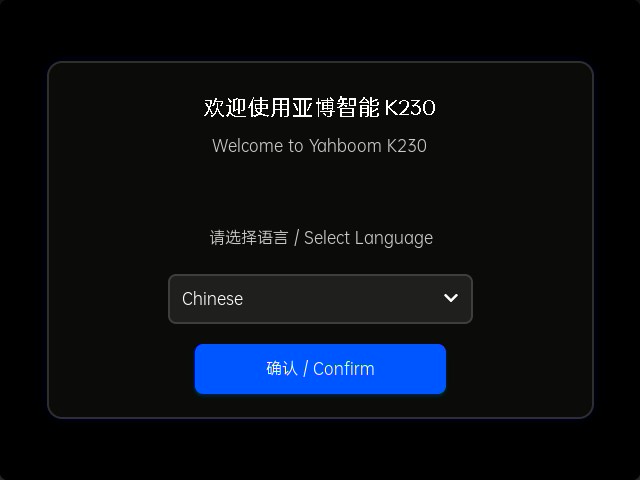
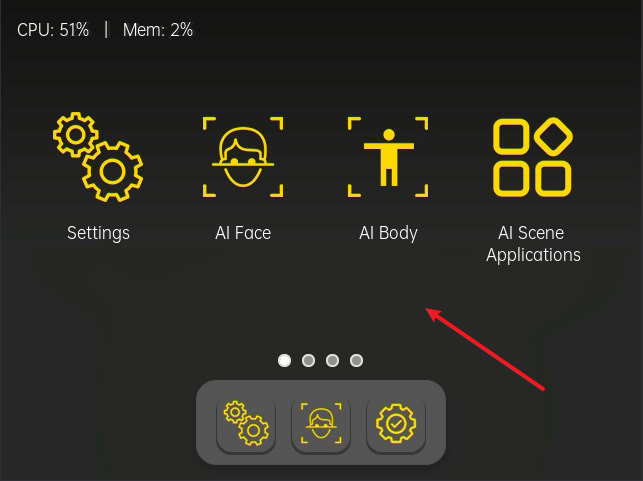
image-20250425142147344

image-20250425142347611

Swipe left or right in the blank area (the area pointed by the arrow in the picture) to turn the page.

Click the corresponding icon to enter the corresponding program function.

set up

Version 1.0 provides five categories: [Wireless Network], [Sound], [My Device], [Display] and [Language & Language]. We will explain them one by one.

Wireless network

If you are not using a large model, it is recommended not to turn on the WIFI network.
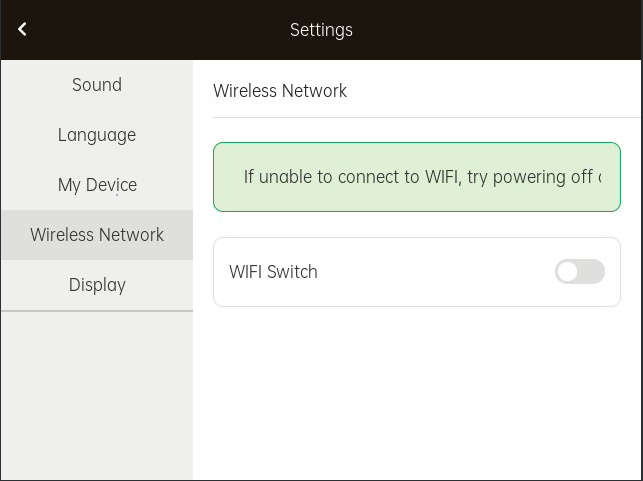
image-20250425142654372

In this interface, we can choose to turn on/off the WIFI network
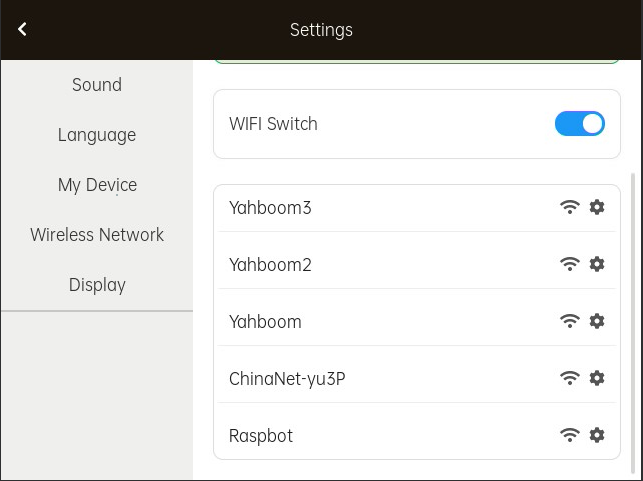
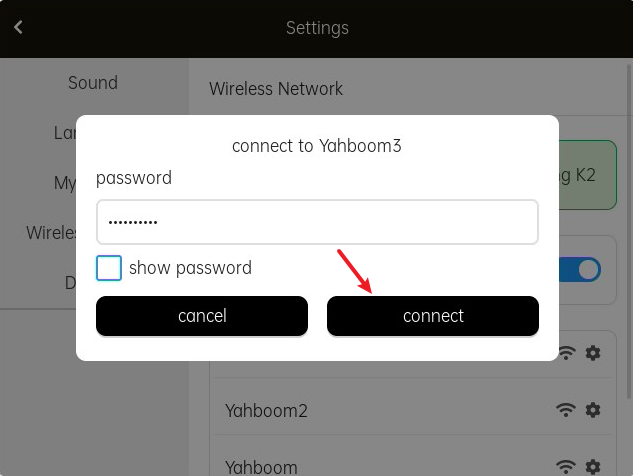
image-20250425142850360

image-20250425143048407

FAQ Description:

If you cannot connect to WIFI & the system freezes, please check:

  1. Is the WIFI password entered correctly?
  2. Is the WIFI 2.4Ghz?
  3. The WIFI chip may occasionally experience connection anomalies. Please try to power off the K230 and wait for 15 seconds before trying to connect again.

sound

Drag the volume adjustment progress bar to change the system volume
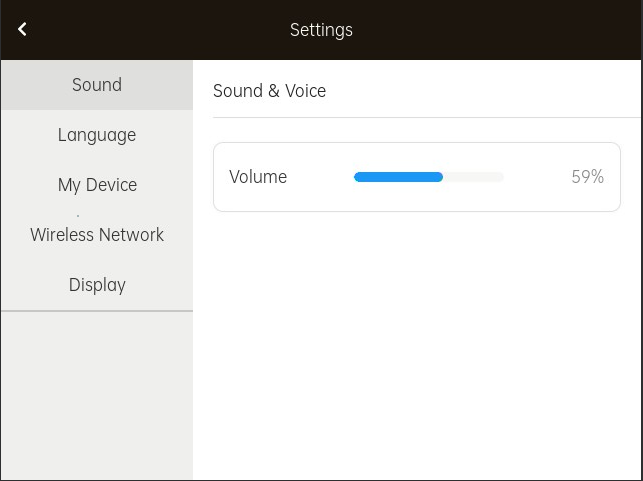
image-20250425145438628

Note 1: The current version of the GUI program does not have any part that needs to play sound.

Note 2: In the current version, the slider has a high probability of automatically jumping to 0 when dragging. You can "click" the position of the progress bar instead of "dragging", which will reduce the possibility of automatically jumping to 0.

My Devices

In this interface, you can see some basic information of the current K230, which will not be described in detail here.
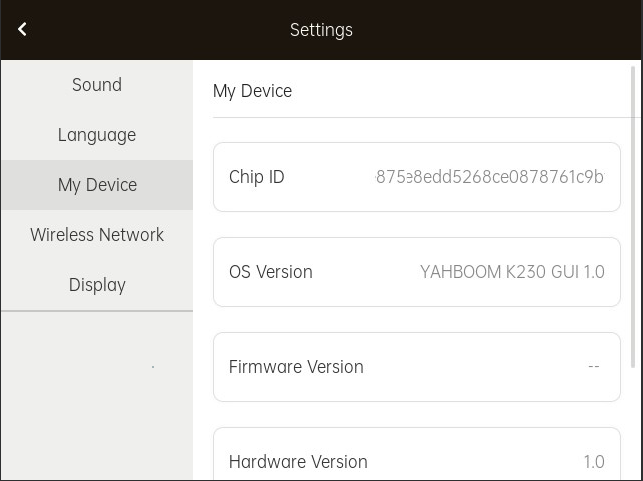
image-20250425145755271

show

Adjust brightness [not supported in current version] and resolution

Note: The resolution here refers to the capture resolution of camera channel 3, which generally does not need to be modified.
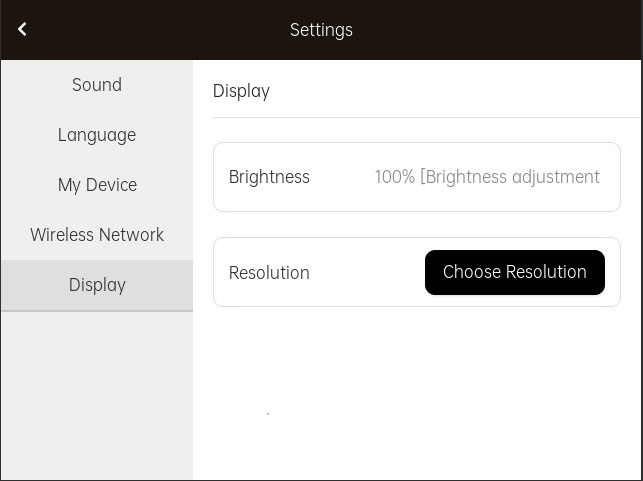
image-20250425145923370

language

The current version supports two options: Chinese (Chinese) and English (English).

The language switching function will take effect after restarting
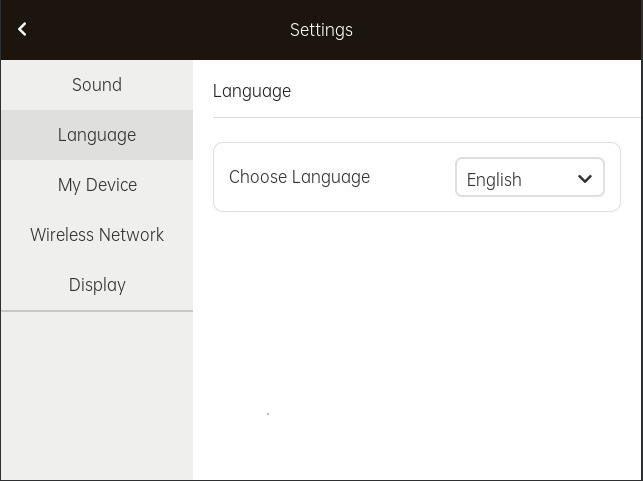
image-20250425150115219

AI Applications

The usage methods of AI applications are very similar. Here we take AI face recognition application as an example
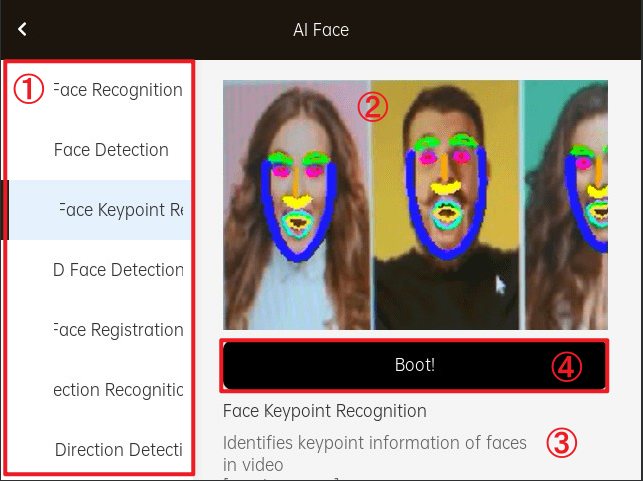
image-20250425150409566

① is the list on the left, which lists all the sub-functions included in the AI Face App

② is a rough effect diagram

③ is example program introduction text

④ is the case [Boot! ] button. Click this button to enter the corresponding function

camera

Camera applications are often used to take photos as data for model training

The location where the photos are saved will be displayed on the start screen

For example, in the case shown in the figure, after entering the photo taking process, the picture will be saved in the directory [/data/photo/8509972215/]
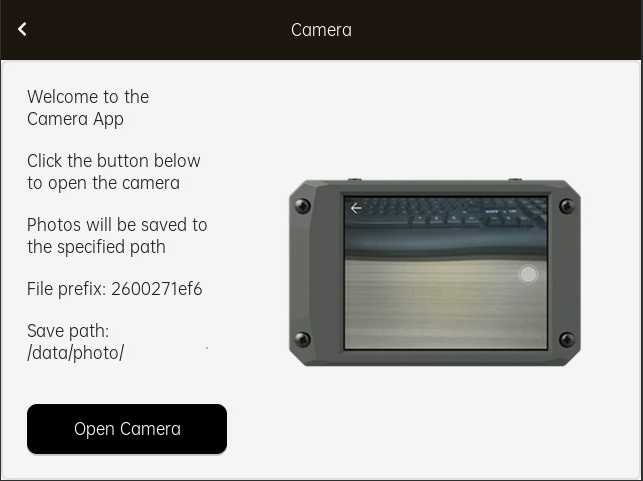
image-20250425160702981

Gallery

The photo album app will display all images with a resolution of 640*480 and a suffix of [png] in the [data] partition.

Pictures that do not meet the above description will not be displayed in the album application

Graphics Detection

Contains two functions: [Rectangle Detection] and [Line Segment Detection]

It should be noted that running graphics detection requires changing the camera resolution, which is a more troublesome step.

Therefore, it is recommended that you use the separate routines in the tutorial to experiment with graphics detection related functions.
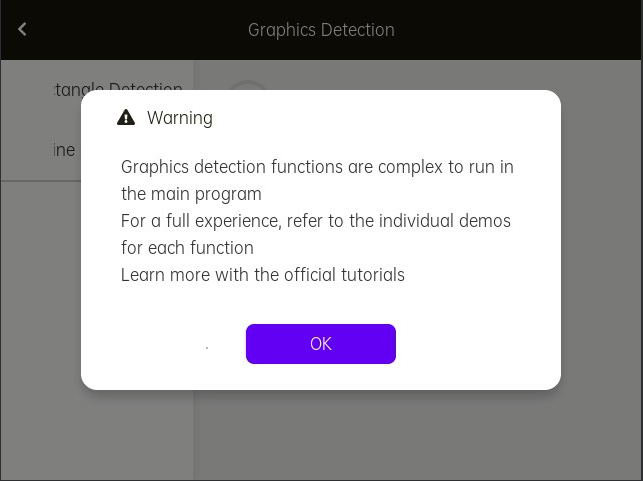
image-20250425160933271

Hardware interface test

Mainly includes [Buzzer Test], [PWM Test] and [RGB Tight Test]
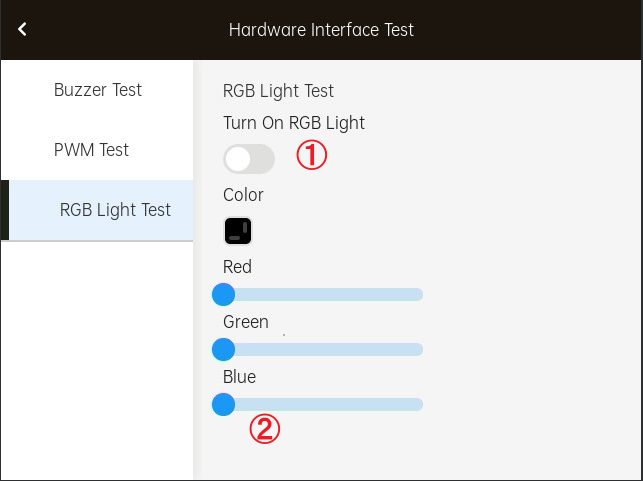
image-20250425161147160

Note 1: If the RGB light does not change after dragging the slider bar, please try to turn off and then turn on the RGB light option again (① in the picture)

Note 2: The blue slider bar at ② is not sensitive to touch, which is a common bug and will be gradually resolved in subsequent versions.

Advanced Use

The use of advanced parts requires a certain foundation. If some configurations are modified and cause abnormalities, please re-burn the factory image

Modify the lock screen image

Modify the /sdcard/resources/wallpaper.png file
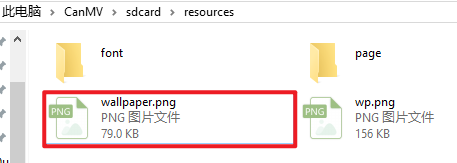
image-20250425161749014

Note: Only 640x480 png images are supported and cannot have a transparent background

Note 2: You can also modify the /sdcard/configs/sys_config.json configuration file

LLM Large Language Model

We provide a large language model interface that supports API calls from iFlytek Spark and the aggregation platform OpenRouter

Before this, you need to manually apply for and configure the API Key for the large model.

Please refer to these two tutorials for the specific methods of applying for API Key and using the LLM interface.

iFlytek Spark:

Note: iFlytek Spark is only available to users in China

OpenRouter: [11. Network Basics / 14. Calling OpenRouter Large Model Aggregation Service]

The process of calling a large model is relatively complicated. Please make sure to study these two lessons first before making further attempts.

If you want to experience the functions of the large model, it is recommended to read the above two courses directly and use the corresponding example source code to experience

It is difficult to call large model operations in GUI programs

We assume that we have applied for the API Key of iFlytek Spark: "key-123465789"

We found the configuration file /sdcard/configs/sys_config.json

Then copy it to a directory on your computer.

The files in the k230 cannot be opened and modified directly, so you must first copy a copy to the local computer, and then modify it and put it back to the corresponding path of the SD card to overwrite the original file.

The default content is as follows:
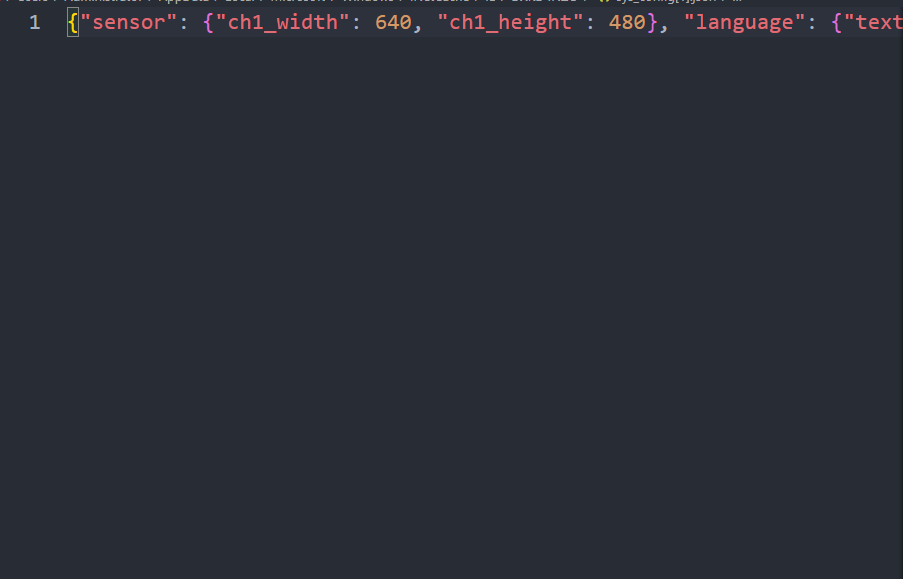
image-20250425163259986

Format the file

If you are using the VSCode editor, you can use the Alt+Shift+F shortcut to format

You can also search for [JSON file online formatting tool] on the Internet.

No further description is given here

Then find AI --> LLM
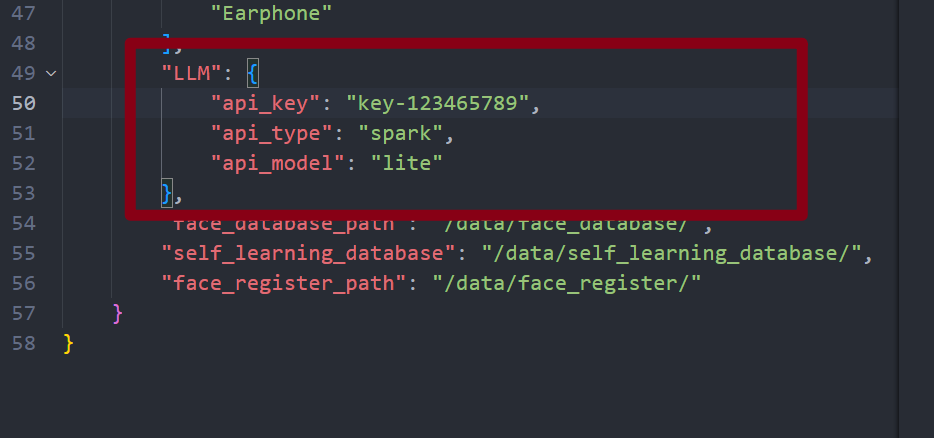
image-20250425163753457

Change the value of api_key to the "key-123465789" you just obtained.

Change the value of api_type to "spark"

If you want to use openrouter, just change api_type to "openrouter"

Change the value of api_model to the model you want to use. Here I take the free model lite of iFlytek Spark as an example.

After modifying, let’s save it.

Then overwrite the modified sys_config.json file with the /sdcard/resources/sys_config.json file

Then we restart K230, enter the GUI program, connect to WIFI, and start communicating with the large model.

Please note that the API_KEY in the example cannot be used directly. Please apply for a correct API_KEY yourself.
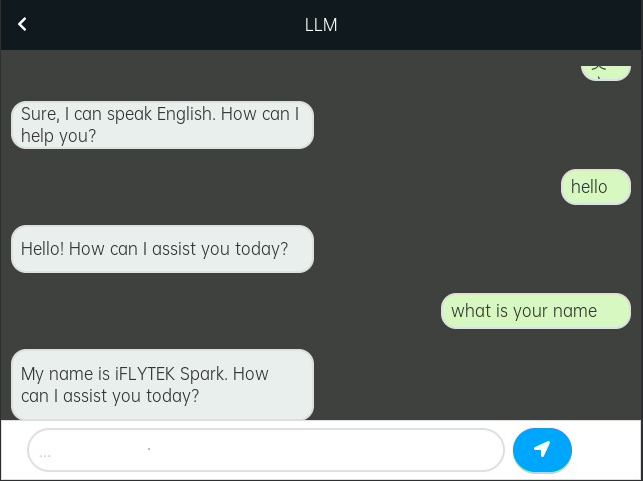
image-20250425165040360

Customize APP name/icon/function

All apps in the GUI program are open source, and the code is located in the /sdcard/apps/ directory

The code is developed based on LVGL 8.3

If you have a certain coding foundation, you can try to deeply customize or optimize these apps.

This part of the custom content has too many functions, and we are temporarily unable to provide in-depth and detailed technical support services
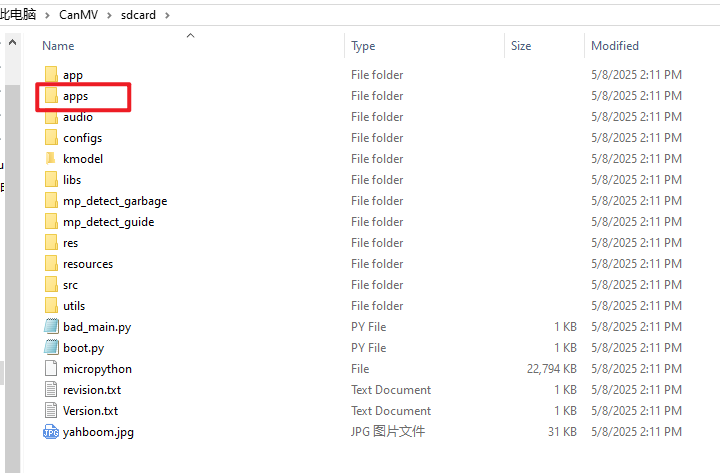
image-20250425170549243

FAQ

  1. System stuck

    A: Please try restarting. If the freezing problem is easy to reproduce, please report the situation to the technical support group. We will release an update patch in the subsequent version after statistics.

  2. K230 does not respond after power on, but can connect to CanMV IDE normally

    A: Please connect K230 to the computer, open the /sdcard/ directory, and check if there is a file named bad_main.py. If there is, please rename it to main.py, then disconnect. Reconnect after five seconds.

  3. How to turn off the automatic startup of GUI programs?

    1. Temporary shutdown: Keep pressing the Key key before powering on until successfully connected to the CanMV IDE
    2. Permanently shut down: delete the main.py file in the /sdcard/ directory
  4. How to restore the original state?

    A: You can re-burn the image file (firmware)

Micropython Quick Start
K230 module bracket installation tutorial

COMPANY

  • About us
  • Team Style
  • Blog

LEARNING & EXPLORATION

  • Tutorials
  • Edge AI hardware
  • Educational robots
  • Embedded intelligent hardware

WHERE TO BUY

  • Yahboom Online Store
  • Amazon
  • Alibaba
  • AliExpress
  • Mercado

TECHNOLOGY SUPPORT

  • Email: support@yahboom.com

BE A DISTRIBUTOR

  • Email: sales@yahboom.com
QR Code

Copyright © 2017-2026 Yahboom. All Rights Reserved.

EN/中文