yahboom
HomeLearn
Solution
Blog
Online Store
About Us
EN/中文
K230 Vision Module📖
1. Quick Start
  • 0.Get start
  • 1. K230 firmware download and burning
  • 2. Install the programming environment
  • 3. Debug and run routines
  • 4. Offline running routine
  • 5. Micropython Quick Start
  • 6. GUI Program Instructions
  • 7.K230 module bracket installation tutorial
  • 8.K230 module 2DOF PTZ installation tutorial
2. Basic Courses
  • 1.FPIOA pin assignment
  • 2.RGB lights
  • 3.Buzzer
  • 4.Buttons
  • 5.Serial communication
  • 6.I2C communication
  • 7.PWM
  • 8.WDT watchdog
  • 9.Timer
  • 10.Fourier Transform
  • 11.SHA256 encryption
  • 12.AES encryption
  • 13.Multithreading
  • 14.File reading and writing
  • 15.Image Display
  • 16.Touch Display
  • 17.Camera display
  • 18.Image Flip
  • 19.Camera
3. Draw the image
  • 1. Draw the lines
  • 2. Draw the circle
  • 3. Draw the rectangle
  • 4. Draw the ellipse
  • 5. Draw the arrow
  • 6. Draw the crosshairs
  • 7. Draw text
  • 8. Draw key points
4. Graphics detection
  • 1. Line segment detection
  • 2. Rectangle Detection
  • 3. Circle detection
  • 4. Object edge detection
  • 5. Line inspection basics:fast linear regression
5. Color recognition
  • 1. Color recognition
  • 2. Object Counting
  • 3. Multi-color recognition
  • 4. K230 Color Line Patrol
6.1 CV_lite Image Processing Special Topic
  • 1.Introduction to cv_litenew
  • 2.cv_lite API Reference Manualnew
  • 3.Color Block Recognition - Grayscale Imagenew
  • 4.Color Block Recognition - Color Imagenew
  • 5.Circle Recognition - Grayscale Imagenew
  • 6.Circle Recognition - Color Imagenew
  • 7.Corner Recognition - Grayscale Imagenew
  • 8.Corner Recognition - Color Imagenew
  • 9.Edge Recognition - Grayscale Imagenew
  • 10. Edge Recognition - Color Imagenew
  • 11. Rectangle Recognition - Grayscale Imagenew
  • 12.Rectangle Recognition - Color Imagenew
  • 13.Rectangle recognition combined with corner recognition - grayscale imagenew
  • 14.Rectangle recognition combined with corner recognition - color imagenew
  • 15.Image Binarization - Grayscalenew
  • 16.Image Binarization - Color Imagenew
  • 17.Exposure Adjustmentnew
  • 18.Image Black Hat Operationsnew
  • 19.Image Color Histogramnew
  • 20.Image Closingnew
  • 21.Image Expansionnew
  • 22.Image Corrosionnew
  • 23.Gaussian Blurnew
  • 24.Gradient Transformationnew
  • 25.Mean Fuzzynew
  • 26.Image Openingnew
  • 27.Image Top Hat Operationnew
  • 28.PnP rangingnew
  • 29.Find rectangles and measure distancesnew
  • 30.Image grayscale world white balancenew
6.2 OpenCV Image Processing Special Topicnew
  • 1. OpenCV Introduction
  • 2. OpenCV API Reference
  • 3. Image Basic Transforms
  • 4. Morphological Operations
  • 5. Color Segmentation and Shape Classification
  • 6. Corner and Centroid Detection
  • 7. Hough Circle Detection
  • 8. Hough Line Detection
  • 9. Contour Analysis
  • 10. Drawing Functions
  • 11. Template Matching
  • 12. Image Blur Filtering
  • 13. Edge Detection
  • 14. Thresholding
  • 15. Color Segmentation
  • 16. Histogram and Pixel Transformation
  • 17. Arithmetic and Bitwise Operations
  • 18. Channel Operation and Statistics
  • 19. Image File Read and Write
  • 20. Pixel Level Transformation
7. Code type recognition
  • 1.Barcode recognition
  • 2.QR code recognition
  • 3.AprilTag tag recognition
  • 4.DM code recognition
8. Face Recognition
  • 1.[Must-read] General code structure and prerequisite knowledge of AI vision routines
  • 2.Face Detection
  • 3.Facial key point recognition
  • 4.Face orientation detection
  • 5.Face 3D Network
  • 6.Gaze direction detection
  • 7.Register for face recognition
9. Human body characteristics
  • 1. Human body detection
  • 2. Human key point detection
  • 3. Human posture recognition
  • 4. Fall detection
  • 5. Palm detection
  • 6. Palm key point detection
  • 7. Palm key point classification
  • 8. Gesture Recognition
  • 9. Dynamic gesture recognition
  • 10. Rock, Paper, Scissors
10. Scenario Application
  • 1.OCR character detection
  • 2.OCR character recognition
  • 3.yolov8n target detection
  • 4.yolov8n segmentation
  • 5. Self-learning object recognition
  • 6. License plate detection
  • 7. License Plate Recognition
  • 8. Target Tracking
  • 9. Fruit classification
  • 10. Garbage classification
  • 11. Road sign recognition
11. Audio and video processing
  • 1. Audio Recording
  • 2. Play Audio
  • 3. Video Recording
  • 4. Play Video
  • 5. Keyword wake-up
12. Network Basics
  • 1. Wireless network connection
  • 2. AP hotspot mode
  • 3. TCP-Server Example
  • 4. TCP-Client Example
  • 5. UDP-Server Example
  • 6. UDP-Client Example
  • 7. HTTP-Server Example
  • 8. HTTP-Client Example
  • 9. MQTT Quick Start
  • 10. MQTT-Publisher
  • 11. MQTT-Subscriber
  • 12. RTSP real-time image transmission
  • 13. RTSP real-time image transmission combined with AIDemo
  • 14. Call OpenRouter large model aggregation service
  • 15. Open the Resource Monitoring Panel
13. LVGL Graphical Interface
  • 1. Introduction to LVGL
  • 2. Create a button
  • 3. Create a slider
  • 4. Create an Image
  • 5. Create a text box and keyboard
14. GUI Code Tutorial & Secondary Development
  • 01.GUI System Architecture
  • 02.Core Engine Initialization
  • 03.Application Discovery Mechanism in GUI
  • 04.Desktop Layout Algorithm
  • 05.Advanced UI Styling
  • 06.BaseApp Base Class Analysis
  • 07.Hello_World Practical
  • 08.GUI Application Lifecycle and Resource Management
15. Train your own model
  • 1. Local deployment of yolo training environment
  • 2. Use online platforms for training
16.Touch Course
  • 1.Touch point detectionnew
  • 2.Touch Paintingnew
  • 3.Touch to take a photonew
17. Multi-master communication (purchased separately)
ESP32-K230
  • 1.k230 color recognition
  • 2.k230 barcode recognition
  • 3.k230 QR code recognition
  • 4.k230Apriltag code recognition
  • 5.k230DM code recognition
  • 6.k230 face detection
  • 7.k230 gaze direction
  • 8.k230 face recognition
  • 9.k230 human body detection
  • 10.k230 fall detection
  • 11.k230 palm detection
  • 12.k230 gesture recognition
  • 13.k230OCR character recognition
  • 14.k230 object detection
  • 15.k230 target tracking
  • 16.k230 self-learning object recognition
  • 17.k230 license plate recognition
Jetson-K230
  • 1.k230 color recognition
  • 2.k230 barcode recognition
  • 3.k230 QR code recognition
  • 4.k230Apriltag code recognition
  • 5.k230DM code recognition
  • 6.k230 face detection
  • 7.k230 gaze direction
  • 8.k230 face recognition
  • 9.k230 human body detection
  • 10.k230 fall detection
  • 11.k230 palm detection
  • 12.k230 gesture recognition
  • 13.k230OCR character recognition
  • 14.k230 object detection
  • 15.k230 target tracking
  • 16.k230 self-learning object recognition
  • 17.k230 license plate recognition
MSPM0G3507-K230
  • 1.k230 color recognition
  • 2.k230 barcode recognition
  • 3.k230 QR code recognition
  • 4.k230Apriltag code recognition
  • 5.k230DM code recognition
  • 6.k230 face detection
  • 7.k230 gaze direction
  • 8.k230 face recognition
  • 9.k230 human body detection
  • 10.k230 fall detection
  • 11.k230 palm detection
  • 12.k230 gesture recognition
  • 13.k230OCR character recognition
  • 14.k230 object detection
  • 15.k230 target tracking
  • 16.k230 self-learning object recognition
  • 17.k230 license plate recognition
Pico-K230
  • 1.k230 color recognition
  • 2.k230 barcode recognition
  • 3.k230 QR code recognition
  • 4.k230Apriltag code recognition
  • 5.k230DM code recognition
  • 6.k230 face detection
  • 7.k230 gaze direction
  • 8.k230 face recognition
  • 9.k230 human body detection
  • 10.k230 fall detection
  • 11.k230 palm detection
  • 12.k230 gesture recognition
  • 13.k230OCR character recognition
  • 14.k230 object detection
  • 15.k230 target tracking
  • 16.k230 self-learning object recognition
  • 17.k230 license plate recognition
raspberrypi-K230
  • 1.k230 color recognition
  • 2.k230 barcode recognition
  • 3.k230 QR code recognition
  • 4.k230Apriltag code recognition
  • 5.k230DM code recognition
  • 6.k230 face detection
  • 7.k230 gaze direction
  • 8.k230 face recognition
  • 9.k230 human body detection
  • 10.k230 fall detection
  • 11.k230 palm detection
  • 12.k230 gesture recognition
  • 13.k230OCR character recognition
  • 14.k230 object detection
  • 15.k230 target tracking
  • 16.k230 self-learning object recognition
  • 17.k230 license plate recognition
RDK-K230
  • 1.k230 color recognition
  • 2.k230 barcode recognition
  • 3.k230 QR code recognition
  • 4.k230Apriltag code recognition
  • 5.k230DM code recognition
  • 6.k230 face detection
  • 7.k230 gaze direction
  • 8.k230 face recognition
  • 9.k230 human body detection
  • 10.k230 fall detection
  • 11.k230 palm detection
  • 12.k230 gesture recognition
  • 13.k230OCR character recognition
  • 14.k230 object detection
  • 15.k230 target tracking
  • 16.k230 self-learning object recognition
  • 17.k230 license plate recognition
STM32-K230
  • 1. stm32_k230 color recognition
  • 2. stm32_k230 barcode recognition
  • 3. stm32_k230 QR code recognition
  • 4. stm32_k230Apriltag code recognition
  • 5. stm32_k230DM code recognition
  • 6. stm32_k230 face detection
  • 7.stm32_k230 looking direction
  • 8. stm32_k230 face recognition
  • 9. stm32_k230 human body detection
  • 10. stm32_k230 fall detection
  • 11. stm32_k230 palm detection
  • 12. stm32_k230 gesture recognition
  • 13. stm32_k230OCR character recognition
  • 14. stm32_k230 object detection
  • 15. stm32_k230 target tracking
  • 16. stm32_k230 self-learning object recognition
  • 17.stm32_k230 license plate recognition
Arduino-K230
  • 1.arduino_k230 color recognition
  • 2.arduino_k230 barcode recognition
  • 3.arduino_k230 QR code recognition
  • 4.arduino_k230 Apriltag code recognition
  • 5.arduino_k230 DM code recognition
  • 6.arduino_k230 face detection
  • 7.arduino_k230 looking direction
  • 8.arduino_k230 face recognition
  • 9.arduino_k230 human body detection
  • 10.arduino_k230 fall detection
  • 11.arduino_k230 palm detection
  • 12.arduino_k230 gesture recognition
  • 13.arduino_k230 OCR character recognition
  • 14.arduino_k230 object detection
  • 15.arduino_k230 target tracking
  • 16.arduino_k230 self-learning object recognition
  • 17.arduino_k230 license plate recognition
Microbit-K230
  • 1.microbit_k230 color recognition
  • 2.microbit_k230 barcode recognition
  • 3.microbit_k230 QR code recognition
  • 4.microbit_k230 Apriltag code recognition
  • 5.microbit_k230 DM code recognition
  • 6.microbit_k230 face detection
  • 7.microbit_k230 looking direction
  • 8.microbit_k230 face recognition
  • 9.microbit_k230 human body detection
  • 10.microbit_k230 fall detection
  • 11.microbit_k230 palm detection
  • 12.microbit_k230 gesture recognition
  • 13.microbit_k230 OCR character recognition
  • 14.microbit_k230 object detection
  • 15.microbit_k230 target tracking
  • 16.microbit_k230 self-learning object recognition
  • 17.microbit_k230 license plate recognition
MSPM0G3519-K230
  • 1. K230 Color Recognitionnew
  • 2. K230 Barcode Recognitionnew
  • 3. K230 QR Code Recognitionnew
  • 4. K230 Apriltag Code Recognitionnew
  • 5. K230 DM Code Recognitionnew
  • 6. K230 Face Detectionnew
  • 7. K230 Gaze Directionnew
  • 8. K230 Face Recognitionnew
  • 9. K230 Human Body Detectionnew
  • 10. K230 Fall Detectionnew
  • 11. K230 Palm Detectionnew
  • 12. K230 Gesture Recognitionnew
  • 13. K230 OCR Character Recognitionnew
  • 14. K230 Object Detectionnew
  • 15. K230 Target Trackingnew
  • 16. K230 Self-learning Object Recognitionnew
  • 17. K230 License Plate Recognitionnew
18.Extension case (purchase separately)
For 2DOF Electric Platform
  • 1.Moving target control and automatic tracking system
  • 2.Human body recognition alarm
  • 3.Gesture Recognition
  • 4.Rock Paper Scissors
  • 5.Fruit sorting
  • 6.Color Tracking
  • 7.Face Tracking
MSPM0G3507 wheeled chassis V1/V2 combined with K230 application case
  • 1.Visual tracking
  • 2.Color tracking
  • 3.Color response
  • 4.Road sign recognition
  • 5.Machine code tracking
  • 6.QR code recognition action
  • 7.Autonomous avoid
  • 8.License plate tracking
  • 9.Face tracking
  • 10.Gaze direction tracking
  • 11.Palm tracking
  • 12.Target tracking
  • 13.Human body tracking
  • 14.OCR character recognition action
STM32 wheeled chassis V1/V2 combined with K230 application case
  • 1.Visual tracking
  • 2.Color tracking
  • 3.Color response
  • 4.Road sign recognition
  • 5.Machine code tracking
  • 6.QR code recognition action
  • 7.Autonomous avoid
  • 8.License plate tracking
  • 9.Face tracking
  • 10.Gaze direction tracking
  • 11.Palm tracking
  • 12.Target tracking
  • 13.Human body tracking
  • 14.OCR character recognition action
MSPM0G3519 wheeled chassis V1/V2 combined with K230 application case
  • 1.Visual trackingnew
  • 2.Color trackingnew
  • 3.Color responsenew
  • 4.Road sign recognitionnew
  • 5.Machine code trackingnew
  • 6.QR code recognition actionnew
  • 7.Autonomous avoidnew
  • 8.License plate trackingnew
  • 9.Face trackingnew
  • 10.Gaze direction trackingnew
  • 11.Palm trackingnew
  • 12.Target trackingnew
  • 13.Human body trackingnew
  • 14.OCR character recognition actionnew
19. Expansion case(purchase separately)new
  • 1.Motion target control and Auto track system
  • 2.Vehicle-mounted balance ball motion control system
Download
  • Manual
  • CanMV IDE
  • Software Tools
  • Firmware
  • Source Code
  • Appendix
Download ZIP

Welcome to K230 Vision Module repository

1. Introduction to LVGL

LVGL Development Preparation

LVGL Development PreparationIntroduction to LVGLLVGL's core advantageslv_binding_micropythonCore FeaturesApplicable scenariosLimitation of UseAdvantagesHow to learn lvgl on K230Quick Start

This tutorial is the necessary foundation for subsequent LVGL development

Although you can learn how to write lvgl without the optional screen, many touch-related functions cannot be used, and the learning experience will be poor

Introduction to LVGL

LVGL (Light and Versatile Graphics Library) is a free, open source graphics library designed specifically for embedded systems.

If you want to draw simple lines and graphics on K230, you can use the draw_xxxx series of graphics processing methods. For details, please refer to the previous tutorial. If you want to display some more complex graphics on K230 that can interact with the user (such as text boxes, buttons, progress bars, etc.)

Then we usually choose a GUI (Graphical User Interface) library to implement it. LVGL is a very useful GUI library.

LVGL's core advantages

Low resource usage

  • Minimum memory requirement is only 64KB ROM and 16KB RAM
  • Suitable for resource-constrained MCU platforms
  • Components can be introduced on demand to optimize resource usage

Cross-platform compatibility

  • Supports almost all mainstream MCU platforms
  • Strong portability and well-designed hardware abstraction layer
  • Support multiple operating systems: FreeRTOS, RT-Thread, etc.

Development efficiency

  • Developed in C language, with a gentle learning curve (it also supports other languages, such as Micropython, which we will mention later)
  • API design is simple and intuitive
  • Rich sample code and documentation support

lv_binding_micropython

Github link lvgl/lv_binding_micropython: LVGL binding for MicroPython

Note: Github is often inaccessible, which is normal. Not reading the content of this link will not affect the subsequent learning.

In the previous article, we talked about LVGL. The original LVGL is actually a C language project and cannot be programmed using Micropython. As more and more embedded scenarios are programmed using Micropython, the lv_binding_micropython project was born.

lv_binding_micropython is an open source project that binds LVGL to MicroPython, allowing developers to develop LVGL graphical interfaces using the Python language. The following are the main features:

Core Features

  1. Ease of use
  • Developing LVGL using Python syntax
  • Lowers the threshold for using LVGL
  • Support rapid prototyping
  1. Fully functional
xxxxxxxxxx
# Example code
# Note that this is pseudo code and cannot be run directly on K230
# 示例代码
# 注意,这个是伪代码,不能直接在K230上运行
import lvgl as lv
scr = lv.obj()  # 创建屏幕对象  Create a screen object
btn = lv.btn(scr)  # 创建按钮 Create a button
btn.center()  # 居中按钮  Center button
label = lv.label(btn)  # 创建标签  Create a label
label.set_text("Button")  # 设置文本  Set the text

Applicable scenarios

  • Rapid prototyping
  • Education and Teaching
  • Simple graphical interface development
  • Non-performance critical applications

Limitation of Use

  1. Performance overhead
  • There is a certain performance loss compared to the C language version
  • Relatively larger memory usage
  1. Hardware requirements
  • Requires more Flash and RAM
  • It is recommended to use an MCU with a main frequency exceeding 100MHz

Advantages

  • High development efficiency
  • Easy debugging
  • Reduced code size
  • Suitable for quick verification

How to learn lvgl on K230

LVGL is a relatively complex component library. Our tutorial is difficult to cover all the content, so it is necessary to read the official documentation.

The lvgl library in the K230 firmware uses version v8.3

The official documentation link is as follows: Welcome to the documentation of LVGL! — LVGL documentation

If the link is invalid, you can find LVGL.pdf in our development board documentation, which is an offline version of the document backup

The official tutorial is mainly written in C language. Although there are parts written in Micropython, there are inconsistencies between the writing in the document and the actual call , such as differences in function names and calling methods. To solve this problem, I printed out the real constant writing and function names of LVGL in the K230 firmware and put them in the development board data. You need to combine the official document and the actual supported calling writing (0. Development board data/ Other third-party documents/ lvgl_.txt) to develop and learn.

Quick Start

Complete code file [Source code summary / 12.Lvgl / 01.start.py]

The following is an example of the basic structure of a lvgl code

xxxxxxxxxx
import lvgl as lv
from media.display import *
import time  # 显式导入time模块 / Explicitly import time module
​
# 显示屏分辨率配置 / Display resolution configuration
DISPLAY_WIDTH = 640   # 显示屏宽度 / Display width
DISPLAY_HEIGHT = 480  # 显示屏高度 / Display height
​
def disp_drv_flush_cb(disp_drv, area, color):
    """
    显示驱动刷新回调函数
    Display driver flush callback function
    
    Args:
        disp_drv: 显示驱动对象 / Display driver object
        area: 刷新区域 / Refresh area
        color: 颜色数据 / Color data
    """
    global disp_img1
    Display.show_image(disp_img1)  # 显示图像缓冲区 / Show image buffer
    time.sleep(0.01)  # 适当延时确保显示稳定 / Small delay to ensure stable display
    disp_drv.flush_ready()  # 通知LVGL刷新完成 / Notify LVGL that flush is complete
​
def display_init():
    """
    显示设备初始化函数
    Display device initialization function
    """
    # 初始化ST7701显示屏 / Initialize ST7701 display
    Display.init(
        Display.ST7701,
        width=DISPLAY_WIDTH, 
        height=DISPLAY_HEIGHT,
        to_ide=True  # 启用IDE显示功能 / Enable IDE display function
    )
    
    # 初始化媒体管理器 / Initialize media manager
    MediaManager.init()
​
def lvgl_init():
    """
    LVGL初始化函数
    LVGL initialization function
    """
    global disp_img1
    
    # 初始化LVGL库 / Initialize LVGL library
    lv.init()
    
    # 创建显示缓冲区 / Create display buffer
    disp_img1 = image.Image(
        DISPLAY_WIDTH,
        DISPLAY_HEIGHT,
        image.BGRA8888  # 使用BGRA8888颜色格式 / Use BGRA8888 color format
    )
    
    # 创建显示驱动 / Create display driver
    disp_drv = lv.disp_create(DISPLAY_WIDTH, DISPLAY_HEIGHT)
    
    # 设置显示缓冲区 / Set display buffers
    disp_drv.set_draw_buffers(
        disp_img1.bytearray(),
        None,  # 单缓冲模式 / Single buffer mode
        disp_img1.size(),
        lv.DISP_RENDER_MODE.DIRECT  # 直接渲染模式 / Direct rendering mode
    )
    
    # 设置刷新回调函数 / Set flush callback
    disp_drv.set_flush_cb(disp_drv_flush_cb)
    
def display_deinit():
    os.exitpoint(os.EXITPOINT_ENABLE_SLEEP)
    time.sleep_ms(50)
    # deinit display
    Display.deinit()
    # release media buffer
    MediaManager.deinit()
    
def lvgl_deinit():
    global disp_img1
    lv.deinit()
    del disp_img1
    
def main():
    """
    主函数
    Main function
    """
    try:
        # 初始化显示设备和LVGL / Initialize display device and LVGL
        display_init()
        lvgl_init()
        print("LVGL initialization completed")
        
        # LVGL主循环 / LVGL main loop
        while True:
            # 运行LVGL定时器处理程序 / Run LVGL timer handler
            period = lv.timer_handler_run_in_period(1)
            time.sleep_ms(period)
            
    except Exception as e:
        display_deinit()
        lvgl_deinit()
        print(f"Error occurred: {e}")
​
if __name__ == "__main__":
    main()

The basic structure includes the following main parts:

Display device initialization:

  • Initialize the ST7701 display
  • Set the display resolution
  • Initialize the Media Manager

LVGL initialization:

  • Initialize the LVGL library
  • Creating and configuring a display buffer
  • Set up display driver and callback function

Main loop:

  • Run the LVGL timer handler
  • Error checking and handling

Display refresh callback:

  • Displaying images
  • Wait for the display to stabilize
  • Notification refresh completed

Cleaning process:

  • Display device cleanup
  • Media Manager Cleanup
  • LVGL Cleanup
  • Buffer deletion

These steps are essential for using lvgl on K230. Although the code looks a lot, basically no modification is required. Just copy it every time you write a new LVGL program.
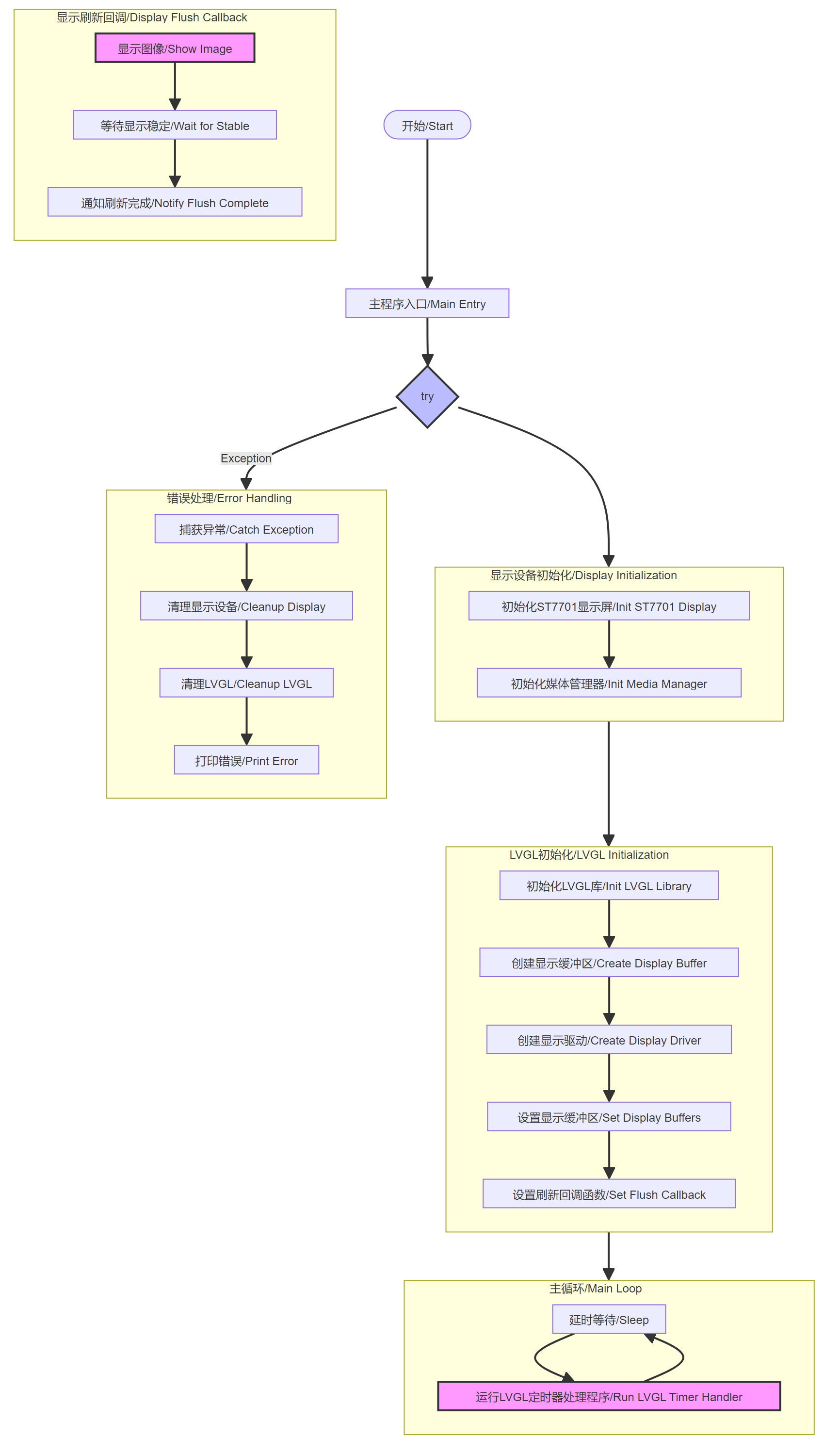
image-20250224142841072

When we run this code example, we can see that a white background appears on the K230 screen and no error message appears, which means that lvgl initialization is successful.

In the following chapters, we will introduce several commonly used components of LVGL.

Open the Resource Monitoring Panel
Create a button

COMPANY

  • About us
  • Team Style
  • Blog

LEARNING & EXPLORATION

  • Tutorials
  • Edge AI hardware
  • Educational robots
  • Embedded intelligent hardware

WHERE TO BUY

  • Yahboom Online Store
  • Amazon
  • Alibaba
  • AliExpress
  • Mercado

TECHNOLOGY SUPPORT

  • Email: support@yahboom.com

BE A DISTRIBUTOR

  • Email: sales@yahboom.com
QR Code

Copyright © 2017-2026 Yahboom. All Rights Reserved.

EN/中文