Welcome to K230 Vision Module repository
2.k230 barcode recognition
k230 barcode recognition
k230 barcode recognitionk230 and ESP32S3 communication1. Experimental Prerequisites2. Experimental wiring3. Main code explanation4. Experimental Phenomenon
k230 and ESP32S3 communication
1. Experimental Prerequisites
This tutorial uses the ESP32S3 development board, and the corresponding routine path is [14.export\ESP32-K230\02_k230_barcode].
K230 needs to run the [14.export\CanmvIDE-K230\02.find_barcodes.py] program to start the experiment. It is recommended to download it as an offline program.
Things you need:
Windows computer, ESP32S3 development board, K230 visual module (including TF card with burned image), two type-C data cables,Connection cable
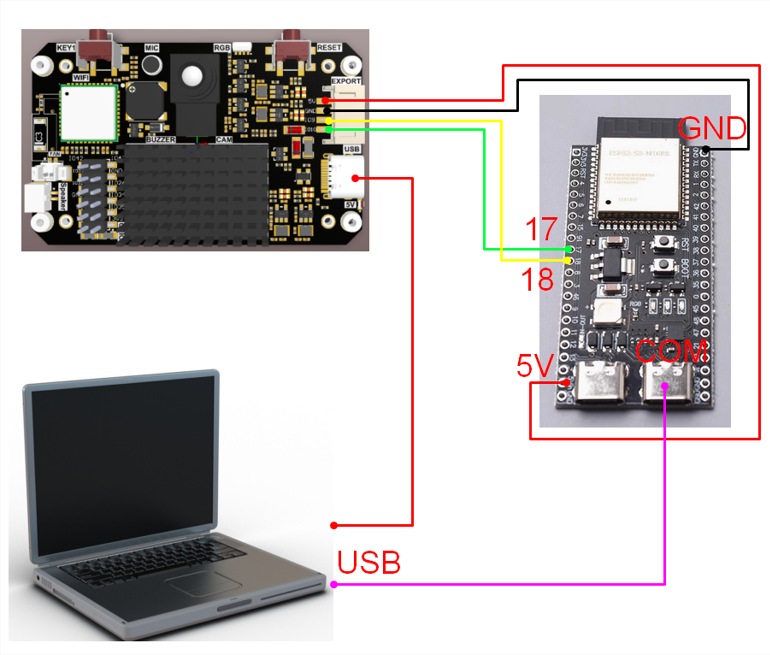
2. Experimental wiring
| k230 vision module | ESP32S3 Development Board |
|---|---|
| 5V | 5V |
| GND | GND |
| TXD(IO9) | 18 |
| RXD(IO10) | 17 |
3. Main code explanation
void Pto_Data_Parse(uint8_t *data_buf, uint8_t num){ uint8_t pto_head = data_buf[0]; uint8_t pto_tail = data_buf[num-1]; if (!(pto_head == PTO_HEAD && pto_tail == PTO_TAIL)) { printf("pto error:pto_head=0x%02x , pto_tail=0x%02x\n", pto_head, pto_tail); return; } uint8_t data_index = 1; uint8_t field_index[PTO_BUF_LEN_MAX] = {0}; int i = 0; int values[PTO_BUF_LEN_MAX] = {0}; char msg[PTO_BUF_LEN_MAX] = {0}; for (i = 1; i < num-1; i++) { if (data_buf[i] == ',') { data_buf[i] = 0; field_index[data_index] = i; data_index++; } } for (i = 0; i < data_index; i++) { if (i == 6) { memcpy(msg, (char*)data_buf+field_index[i]+1, values[0]-field_index[i]-2); } else { values[i] = Pto_Char_To_Int((char*)data_buf+field_index[i]+1); } } uint8_t pto_len = values[0]; if (pto_len != num) { printf("pto_len error:%d , data_len:%d\n", pto_len, num); return; } uint8_t pto_id = values[1]; if (pto_id != PTO_FUNC_ID) { printf("pto_id error:%d, func_id:%d\n", pto_id, PTO_FUNC_ID); return; } int x = values[2]; int y = values[3]; int w = values[4]; int h = values[5]; printf("barcode:x:%d, y:%d, w:%d, h:%d, msg:'%s'\n", x, y, w, h, msg);}The above functions are for parsing K230 data. Only when they meet specific protocols can the corresponding data be parsed.
in
- x: is the horizontal coordinate of the upper left corner of the recognized box
- y: is the vertical coordinate of the upper left corner of the recognized box
- w: is the width of the recognized frame
- h: is the length of the recognized frame
- msg: is the content of the barcode
4. Experimental Phenomenon
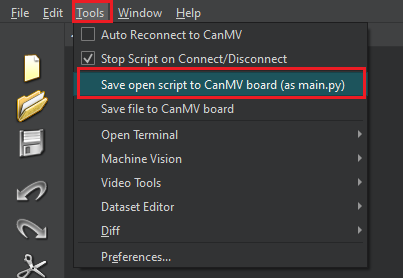
- After connecting the cables, the k230 visual module runs offline. After K230 is connected to Canmv IDE, open the corresponding program, click [Save open script to CanMV board (as main.py)] on the toolbar, and then restart K230.
- The bin file generated by the ESP32S3 burning routine. Open the ESP32S3 burning tool, configure it according to the figure below, click the [START] button, and download the bin file to the ESP32S3 development board.
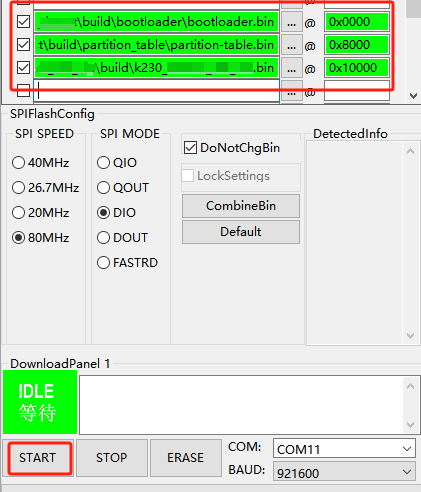
Set the serial port assistant to the interface shown in the figure and open the serial port of ESP32S3.
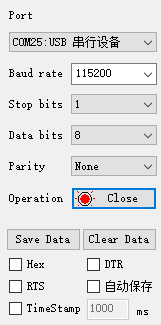
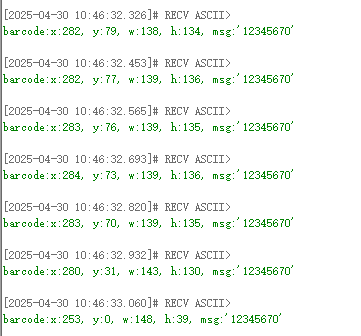
When the K230 camera recognizes the barcode, the serial port assistant will print out the information transmitted from K230 to ESP32S3.
in
x: is the horizontal coordinate of the upper left corner of the recognized box
y: is the vertical coordinate of the upper left corner of the recognized box
w: is the width of the recognized frame
h: is the length of the recognized frame
msg: is the content of the barcode
As shown in the figure below