yahboom
HomeLearn
Solution
Blog
Online Store
About Us
EN/中文
K230 Vision Module📖
1. Quick Start
  • 0.Get start
  • 1. K230 firmware download and burning
  • 2. Install the programming environment
  • 3. Debug and run routines
  • 4. Offline running routine
  • 5. Micropython Quick Start
  • 6. GUI Program Instructions
  • 7.K230 module bracket installation tutorial
  • 8.K230 module 2DOF PTZ installation tutorial
2. Basic Courses
  • 1.FPIOA pin assignment
  • 2.RGB lights
  • 3.Buzzer
  • 4.Buttons
  • 5.Serial communication
  • 6.I2C communication
  • 7.PWM
  • 8.WDT watchdog
  • 9.Timer
  • 10.Fourier Transform
  • 11.SHA256 encryption
  • 12.AES encryption
  • 13.Multithreading
  • 14.File reading and writing
  • 15.Image Display
  • 16.Touch Display
  • 17.Camera display
  • 18.Image Flip
  • 19.Camera
3. Draw the image
  • 1. Draw the lines
  • 2. Draw the circle
  • 3. Draw the rectangle
  • 4. Draw the ellipse
  • 5. Draw the arrow
  • 6. Draw the crosshairs
  • 7. Draw text
  • 8. Draw key points
4. Graphics detection
  • 1. Line segment detection
  • 2. Rectangle Detection
  • 3. Circle detection
  • 4. Object edge detection
  • 5. Line inspection basics:fast linear regression
5. Color recognition
  • 1. Color recognition
  • 2. Object Counting
  • 3. Multi-color recognition
  • 4. K230 Color Line Patrol
6.1 CV_lite Image Processing Special Topic
  • 1.Introduction to cv_litenew
  • 2.cv_lite API Reference Manualnew
  • 3.Color Block Recognition - Grayscale Imagenew
  • 4.Color Block Recognition - Color Imagenew
  • 5.Circle Recognition - Grayscale Imagenew
  • 6.Circle Recognition - Color Imagenew
  • 7.Corner Recognition - Grayscale Imagenew
  • 8.Corner Recognition - Color Imagenew
  • 9.Edge Recognition - Grayscale Imagenew
  • 10. Edge Recognition - Color Imagenew
  • 11. Rectangle Recognition - Grayscale Imagenew
  • 12.Rectangle Recognition - Color Imagenew
  • 13.Rectangle recognition combined with corner recognition - grayscale imagenew
  • 14.Rectangle recognition combined with corner recognition - color imagenew
  • 15.Image Binarization - Grayscalenew
  • 16.Image Binarization - Color Imagenew
  • 17.Exposure Adjustmentnew
  • 18.Image Black Hat Operationsnew
  • 19.Image Color Histogramnew
  • 20.Image Closingnew
  • 21.Image Expansionnew
  • 22.Image Corrosionnew
  • 23.Gaussian Blurnew
  • 24.Gradient Transformationnew
  • 25.Mean Fuzzynew
  • 26.Image Openingnew
  • 27.Image Top Hat Operationnew
  • 28.PnP rangingnew
  • 29.Find rectangles and measure distancesnew
  • 30.Image grayscale world white balancenew
6.2 OpenCV Image Processing Special Topicnew
  • 1. OpenCV Introduction
  • 2. OpenCV API Reference
  • 3. Image Basic Transforms
  • 4. Morphological Operations
  • 5. Color Segmentation and Shape Classification
  • 6. Corner and Centroid Detection
  • 7. Hough Circle Detection
  • 8. Hough Line Detection
  • 9. Contour Analysis
  • 10. Drawing Functions
  • 11. Template Matching
  • 12. Image Blur Filtering
  • 13. Edge Detection
  • 14. Thresholding
  • 15. Color Segmentation
  • 16. Histogram and Pixel Transformation
  • 17. Arithmetic and Bitwise Operations
  • 18. Channel Operation and Statistics
  • 19. Image File Read and Write
  • 20. Pixel Level Transformation
7. Code type recognition
  • 1.Barcode recognition
  • 2.QR code recognition
  • 3.AprilTag tag recognition
  • 4.DM code recognition
8. Face Recognition
  • 1.[Must-read] General code structure and prerequisite knowledge of AI vision routines
  • 2.Face Detection
  • 3.Facial key point recognition
  • 4.Face orientation detection
  • 5.Face 3D Network
  • 6.Gaze direction detection
  • 7.Register for face recognition
9. Human body characteristics
  • 1. Human body detection
  • 2. Human key point detection
  • 3. Human posture recognition
  • 4. Fall detection
  • 5. Palm detection
  • 6. Palm key point detection
  • 7. Palm key point classification
  • 8. Gesture Recognition
  • 9. Dynamic gesture recognition
  • 10. Rock, Paper, Scissors
10. Scenario Application
  • 1.OCR character detection
  • 2.OCR character recognition
  • 3.yolov8n target detection
  • 4.yolov8n segmentation
  • 5. Self-learning object recognition
  • 6. License plate detection
  • 7. License Plate Recognition
  • 8. Target Tracking
  • 9. Fruit classification
  • 10. Garbage classification
  • 11. Road sign recognition
11. Audio and video processing
  • 1. Audio Recording
  • 2. Play Audio
  • 3. Video Recording
  • 4. Play Video
  • 5. Keyword wake-up
12. Network Basics
  • 1. Wireless network connection
  • 2. AP hotspot mode
  • 3. TCP-Server Example
  • 4. TCP-Client Example
  • 5. UDP-Server Example
  • 6. UDP-Client Example
  • 7. HTTP-Server Example
  • 8. HTTP-Client Example
  • 9. MQTT Quick Start
  • 10. MQTT-Publisher
  • 11. MQTT-Subscriber
  • 12. RTSP real-time image transmission
  • 13. RTSP real-time image transmission combined with AIDemo
  • 14. Call OpenRouter large model aggregation service
  • 15. Open the Resource Monitoring Panel
13. LVGL Graphical Interface
  • 1. Introduction to LVGL
  • 2. Create a button
  • 3. Create a slider
  • 4. Create an Image
  • 5. Create a text box and keyboard
14. GUI Code Tutorial & Secondary Development
  • 01.GUI System Architecture
  • 02.Core Engine Initialization
  • 03.Application Discovery Mechanism in GUI
  • 04.Desktop Layout Algorithm
  • 05.Advanced UI Styling
  • 06.BaseApp Base Class Analysis
  • 07.Hello_World Practical
  • 08.GUI Application Lifecycle and Resource Management
15. Train your own model
  • 1. Local deployment of yolo training environment
  • 2. Use online platforms for training
16.Touch Course
  • 1.Touch point detectionnew
  • 2.Touch Paintingnew
  • 3.Touch to take a photonew
17. Multi-master communication (purchased separately)
ESP32-K230
  • 1.k230 color recognition
  • 2.k230 barcode recognition
  • 3.k230 QR code recognition
  • 4.k230Apriltag code recognition
  • 5.k230DM code recognition
  • 6.k230 face detection
  • 7.k230 gaze direction
  • 8.k230 face recognition
  • 9.k230 human body detection
  • 10.k230 fall detection
  • 11.k230 palm detection
  • 12.k230 gesture recognition
  • 13.k230OCR character recognition
  • 14.k230 object detection
  • 15.k230 target tracking
  • 16.k230 self-learning object recognition
  • 17.k230 license plate recognition
Jetson-K230
  • 1.k230 color recognition
  • 2.k230 barcode recognition
  • 3.k230 QR code recognition
  • 4.k230Apriltag code recognition
  • 5.k230DM code recognition
  • 6.k230 face detection
  • 7.k230 gaze direction
  • 8.k230 face recognition
  • 9.k230 human body detection
  • 10.k230 fall detection
  • 11.k230 palm detection
  • 12.k230 gesture recognition
  • 13.k230OCR character recognition
  • 14.k230 object detection
  • 15.k230 target tracking
  • 16.k230 self-learning object recognition
  • 17.k230 license plate recognition
MSPM0G3507-K230
  • 1.k230 color recognition
  • 2.k230 barcode recognition
  • 3.k230 QR code recognition
  • 4.k230Apriltag code recognition
  • 5.k230DM code recognition
  • 6.k230 face detection
  • 7.k230 gaze direction
  • 8.k230 face recognition
  • 9.k230 human body detection
  • 10.k230 fall detection
  • 11.k230 palm detection
  • 12.k230 gesture recognition
  • 13.k230OCR character recognition
  • 14.k230 object detection
  • 15.k230 target tracking
  • 16.k230 self-learning object recognition
  • 17.k230 license plate recognition
Pico-K230
  • 1.k230 color recognition
  • 2.k230 barcode recognition
  • 3.k230 QR code recognition
  • 4.k230Apriltag code recognition
  • 5.k230DM code recognition
  • 6.k230 face detection
  • 7.k230 gaze direction
  • 8.k230 face recognition
  • 9.k230 human body detection
  • 10.k230 fall detection
  • 11.k230 palm detection
  • 12.k230 gesture recognition
  • 13.k230OCR character recognition
  • 14.k230 object detection
  • 15.k230 target tracking
  • 16.k230 self-learning object recognition
  • 17.k230 license plate recognition
raspberrypi-K230
  • 1.k230 color recognition
  • 2.k230 barcode recognition
  • 3.k230 QR code recognition
  • 4.k230Apriltag code recognition
  • 5.k230DM code recognition
  • 6.k230 face detection
  • 7.k230 gaze direction
  • 8.k230 face recognition
  • 9.k230 human body detection
  • 10.k230 fall detection
  • 11.k230 palm detection
  • 12.k230 gesture recognition
  • 13.k230OCR character recognition
  • 14.k230 object detection
  • 15.k230 target tracking
  • 16.k230 self-learning object recognition
  • 17.k230 license plate recognition
RDK-K230
  • 1.k230 color recognition
  • 2.k230 barcode recognition
  • 3.k230 QR code recognition
  • 4.k230Apriltag code recognition
  • 5.k230DM code recognition
  • 6.k230 face detection
  • 7.k230 gaze direction
  • 8.k230 face recognition
  • 9.k230 human body detection
  • 10.k230 fall detection
  • 11.k230 palm detection
  • 12.k230 gesture recognition
  • 13.k230OCR character recognition
  • 14.k230 object detection
  • 15.k230 target tracking
  • 16.k230 self-learning object recognition
  • 17.k230 license plate recognition
STM32-K230
  • 1. stm32_k230 color recognition
  • 2. stm32_k230 barcode recognition
  • 3. stm32_k230 QR code recognition
  • 4. stm32_k230Apriltag code recognition
  • 5. stm32_k230DM code recognition
  • 6. stm32_k230 face detection
  • 7.stm32_k230 looking direction
  • 8. stm32_k230 face recognition
  • 9. stm32_k230 human body detection
  • 10. stm32_k230 fall detection
  • 11. stm32_k230 palm detection
  • 12. stm32_k230 gesture recognition
  • 13. stm32_k230OCR character recognition
  • 14. stm32_k230 object detection
  • 15. stm32_k230 target tracking
  • 16. stm32_k230 self-learning object recognition
  • 17.stm32_k230 license plate recognition
Arduino-K230
  • 1.arduino_k230 color recognition
  • 2.arduino_k230 barcode recognition
  • 3.arduino_k230 QR code recognition
  • 4.arduino_k230 Apriltag code recognition
  • 5.arduino_k230 DM code recognition
  • 6.arduino_k230 face detection
  • 7.arduino_k230 looking direction
  • 8.arduino_k230 face recognition
  • 9.arduino_k230 human body detection
  • 10.arduino_k230 fall detection
  • 11.arduino_k230 palm detection
  • 12.arduino_k230 gesture recognition
  • 13.arduino_k230 OCR character recognition
  • 14.arduino_k230 object detection
  • 15.arduino_k230 target tracking
  • 16.arduino_k230 self-learning object recognition
  • 17.arduino_k230 license plate recognition
Microbit-K230
  • 1.microbit_k230 color recognition
  • 2.microbit_k230 barcode recognition
  • 3.microbit_k230 QR code recognition
  • 4.microbit_k230 Apriltag code recognition
  • 5.microbit_k230 DM code recognition
  • 6.microbit_k230 face detection
  • 7.microbit_k230 looking direction
  • 8.microbit_k230 face recognition
  • 9.microbit_k230 human body detection
  • 10.microbit_k230 fall detection
  • 11.microbit_k230 palm detection
  • 12.microbit_k230 gesture recognition
  • 13.microbit_k230 OCR character recognition
  • 14.microbit_k230 object detection
  • 15.microbit_k230 target tracking
  • 16.microbit_k230 self-learning object recognition
  • 17.microbit_k230 license plate recognition
MSPM0G3519-K230
  • 1. K230 Color Recognitionnew
  • 2. K230 Barcode Recognitionnew
  • 3. K230 QR Code Recognitionnew
  • 4. K230 Apriltag Code Recognitionnew
  • 5. K230 DM Code Recognitionnew
  • 6. K230 Face Detectionnew
  • 7. K230 Gaze Directionnew
  • 8. K230 Face Recognitionnew
  • 9. K230 Human Body Detectionnew
  • 10. K230 Fall Detectionnew
  • 11. K230 Palm Detectionnew
  • 12. K230 Gesture Recognitionnew
  • 13. K230 OCR Character Recognitionnew
  • 14. K230 Object Detectionnew
  • 15. K230 Target Trackingnew
  • 16. K230 Self-learning Object Recognitionnew
  • 17. K230 License Plate Recognitionnew
18.Extension case (purchase separately)
For 2DOF Electric Platform
  • 1.Moving target control and automatic tracking system
  • 2.Human body recognition alarm
  • 3.Gesture Recognition
  • 4.Rock Paper Scissors
  • 5.Fruit sorting
  • 6.Color Tracking
  • 7.Face Tracking
MSPM0G3507 wheeled chassis V1/V2 combined with K230 application case
  • 1.Visual tracking
  • 2.Color tracking
  • 3.Color response
  • 4.Road sign recognition
  • 5.Machine code tracking
  • 6.QR code recognition action
  • 7.Autonomous avoid
  • 8.License plate tracking
  • 9.Face tracking
  • 10.Gaze direction tracking
  • 11.Palm tracking
  • 12.Target tracking
  • 13.Human body tracking
  • 14.OCR character recognition action
STM32 wheeled chassis V1/V2 combined with K230 application case
  • 1.Visual tracking
  • 2.Color tracking
  • 3.Color response
  • 4.Road sign recognition
  • 5.Machine code tracking
  • 6.QR code recognition action
  • 7.Autonomous avoid
  • 8.License plate tracking
  • 9.Face tracking
  • 10.Gaze direction tracking
  • 11.Palm tracking
  • 12.Target tracking
  • 13.Human body tracking
  • 14.OCR character recognition action
MSPM0G3519 wheeled chassis V1/V2 combined with K230 application case
  • 1.Visual trackingnew
  • 2.Color trackingnew
  • 3.Color responsenew
  • 4.Road sign recognitionnew
  • 5.Machine code trackingnew
  • 6.QR code recognition actionnew
  • 7.Autonomous avoidnew
  • 8.License plate trackingnew
  • 9.Face trackingnew
  • 10.Gaze direction trackingnew
  • 11.Palm trackingnew
  • 12.Target trackingnew
  • 13.Human body trackingnew
  • 14.OCR character recognition actionnew
19. Expansion case(purchase separately)new
  • 1.Motion target control and Auto track system
  • 2.Vehicle-mounted balance ball motion control system
Download
  • Manual
  • CanMV IDE
  • Software Tools
  • Firmware
  • Source Code
  • Appendix
Download ZIP

Welcome to K230 Vision Module repository

6. UDP-Client Example

UDP-Client Example

UDP-Client ExampleRoutine IntroductionCode Analysisfunctionconnect_wififunctionstart_udp_clientSend a test messageClosing a SocketMain program entryUDP protocol1. Basic knowledge of UDP1.1 What is UDP?1.2 UDP vs TCP Core Differences2. UDP protocol structure (diagram)2.1 Datagram Format2.2 Header Structure3. UDP key working mechanism3.1 Connectionless Communication3.2 Checksum calculation4. UDP Advanced Features4.1 Multiplexing and Demultiplexing4.2 Application layer reliability implementation5. Typical UDP application scenarios5.1 Real-time audio and video transmission5.2 Game Communication5.3 Network Service Discovery5.4 IoT Communications


Routine Introduction

In this section, we will introduce how to use K230 as a UDP server

We open the example code in this section and modify the WIFI connection information part in the code to your home WIFI or mobile hotspot

sta.connect("WIFI SSID", "WIFI PASSWORD")  # 连接到指定WiFi / Connect to specified WiFi

Then we open the network debugging assistant and enter the IP address of the machine (check with ipconfig)
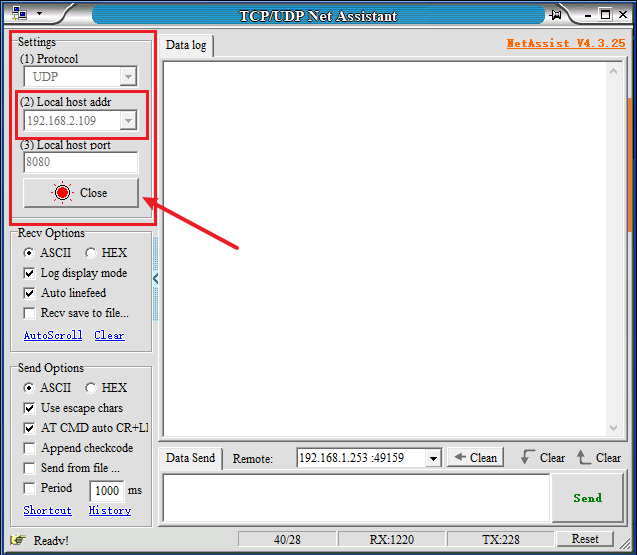
image-20250221103458817

Then we go back to the code and modify this part of the code (modify it to the IP address and port number filled in above)

x
# 设置服务器参数 / Set server parameters
server_ip = '192.168.2.109'
server_port = 8080

Click the run button in the lower left corner, and the console will output the information sent to the server.

​x
发送字节数 / Bytes sent: 29
发送消息 / Sending: K230 UDP client send test 1
​
发送字节数 / Bytes sent: 29
发送消息 / Sending: K230 UDP client send test 2
​
发送字节数 / Bytes sent: 29
发送消息 / Sending: K230 UDP client send test 3
​
发送字节数 / Bytes sent: 29
发送消息 / Sending: K230 UDP client send test 4
​
发送字节数 / Bytes sent: 29
发送消息 / Sending: K230 UDP client send test 5
​
发送字节数 / Bytes sent: 29
发送消息 / Sending: K230 UDP client send test 6
​
发送字节数 / Bytes sent: 29
发送消息 / Sending: K230 UDP client send test 7
​
发送字节数 / Bytes sent: 29
发送消息 / Sending: K230 UDP client send test 8
​
发送字节数 / Bytes sent: 29
发送消息 / Sending: K230 UDP client send test 9
​
发送字节数 / Bytes sent: 29
客户端已结束 / Client ended.

At the same time, we will go to the network debugging assistant and find that the information sent by K230 has also been received here

xxxxxxxxxx
[2025-02-21 10:37:01.615]# RECV ASCII/30 from 192.168.1.253 :49153 <<<
K230 UDP client send test 0 
​
​
[2025-02-21 10:37:01.679]# RECV ASCII/30 from 192.168.1.253 :49153 <<<
K230 UDP client send test 1 
​
​
[2025-02-21 10:37:01.862]# RECV ASCII/30 from 192.168.1.253 :49153 <<<
K230 UDP client send test 2 
​
​
[2025-02-21 10:37:02.188]# RECV ASCII/30 from 192.168.1.253 :49153 <<<
K230 UDP client send test 3 
​
​
[2025-02-21 10:37:02.378]# RECV ASCII/30 from 192.168.1.253 :49153 <<<
K230 UDP client send test 4 
​
​
[2025-02-21 10:37:02.466]# RECV ASCII/30 from 192.168.1.253 :49153 <<<
K230 UDP client send test 5 
​
​
[2025-02-21 10:37:02.779]# RECV ASCII/30 from 192.168.1.253 :49153 <<<
K230 UDP client send test 6 
​
​
[2025-02-21 10:37:02.869]# RECV ASCII/30 from 192.168.1.253 :49153 <<<
K230 UDP client send test 7 
​
​
[2025-02-21 10:37:03.096]# RECV ASCII/30 from 192.168.1.253 :49153 <<<
K230 UDP client send test 8 
​
                                                                          
[2025-02-21 10:37:03.272]# RECV ASCII/30 from 192.168.1.253 :49153 <<<
K230 UDP client send test 9 

Code Analysis

For complete comments and code, please refer to the file [Source Code/11.Network/04.udp/udp_client.py]

xxxxxxxxxx
import socket
import os
import time
import network

At the beginning of the code, the necessary modules are imported:

  • socket: Provides network communication functions and supports TCP and UDP protocols.
  • os: Provides functionality for interacting with the operating system, such as exiting a program.
  • time: Provides time-related functions, such as delay.
  • network: Provides network related functions, here for WiFi connection.

functionconnect_wifi

xxxxxxxxxx
def connect_wifi(ssid="[WIFI SSID]", password="[WIFI PASSWORD]"):
    """
    连接WiFi并返回IP地址
    Connect to WiFi and return IP address
    
    参数 / Parameters:
    ssid: WiFi名称 / WiFi name
    password: WiFi密码 / WiFi password
    
    返回 / Returns:
    str: IP地址 / IP address
    """

This function is used to connect to the specified WiFi network and return the IP address after successful connection. Its parameters include the WiFi name (SSID) and password.

xxxxxxxxxx
    wifi_station = network.WLAN(0)  # 创建WiFi站点对象 / Create WiFi station object
    wifi_station.connect(ssid, password)  # 连接到指定WiFi / Connect to specified WiFi

Here a WiFi site object is created and a connection is made to the WiFi network using the provided SSID and password.

xxxxxxxxxx
    # 等待直到获取到IP地址 / Wait until IP address is obtained
    while wifi_station.ifconfig()[0] == '0.0.0.0':
        os.exitpoint()

Check if the IP address has been obtained by ifconfig()the method. If not (that is, the IP address is 0.0.0.0), enter the loop and keep checking until a valid IP address is obtained. The here os.exitpoint()may be an error, usually it should be os._exit(1)or raise SystemExit.

xxxxxxxxxx
    return wifi_station.ifconfig()[0]  # 返回IP地址 / Return IP address

Once a valid IP address is obtained, it is returned.

functionstart_udp_client

xxxxxxxxxx
def start_udp_client():
    """
    启动UDP客户端,发送测试消息
    Start UDP client and send test messages
    """

This function is responsible for starting the UDP client and sending a test message.

xxxxxxxxxx
    # 连接WiFi网络 / Connect to WiFi network
    connect_wifi()

Call connect_wififunction to connect to WiFi.

xxxxxxxxxx
    # 设置服务器参数 / Set server parameters
    server_ip = '192.168.2.89'
    server_port = 8080

Defines the IP address and port of the UDP server to connect to.

xxxxxxxxxx
    # 获取服务器地址信息 / Get server address information
    address_info = socket.getaddrinfo(server_ip, server_port)
    print("地址信息 / Address info:", address_info)
    
    server_address = address_info[0][-1]
    print("连接地址 / Connect address:", server_address)

Use socket.getaddrinfo()to obtain the server's address information and extract the actual connection address (the last element of the tuple).

xxxxxxxxxx
    # 创建UDP套接字 / Create UDP socket
    udp_socket = socket.socket(socket.AF_INET, socket.SOCK_DGRAM)

Create a UDP socket.

Send a test message

xxxxxxxxxx
    # 发送测试消息 / Send test messages
    try:
        for msg_count in range(10):
            # 构建消息 / Build message
            message = f"K230 UDP client send test {msg_count}\r\n"
            print("发送消息 / Sending:", message)
            
            # 发送消息并获取发送字节数 / Send message and get bytes sent
            bytes_sent = udp_socket.sendto(message.encode(), server_address)
            print("发送字节数 / Bytes sent:", bytes_sent)
            
            # 等待200ms / Wait 200ms
            time.sleep(0.2)

In trythe block, a loop sends 10 test messages:

  • The message content is a formatted string, including the message number.
  • Use sendtothe method to send a message and print the number of bytes sent.
  • After each message is sent, the program will wait 200 milliseconds.

Closing a Socket

xxxxxxxxxx
    finally:
        # 关闭套接字 / Close socket
        udp_socket.close()
        print("客户端已结束 / Client ended.")

Regardless of whether the message sending process is successful or not, finallythe UDP socket will be closed in the block and the end information will be printed.

Main program entry

xxxxxxxxxx
# 启动客户端 / Start client
if __name__ == '__main__':
    start_udp_client()

If this script is the main program running, the function is called start_udp_client()to start the UDP client.

UDP protocol

1. Basic knowledge of UDP

1.1 What is UDP?

  • Positioning : Transport layer protocol (OSI layer 4)
  • Features : connectionless, best effort delivery, lightweight header, low latency
  • Analogy : Like the post office's "normal postcard service" (no guarantee of delivery, but fast delivery)

1.2 UDP vs TCP Core Differences

characteristicUDPTCP
Connection EstablishmentNo handshakeThree-way handshake
Data transmission guaranteeOrder and arrival are not guaranteedCompletely reliable (logically reliable only from this layer)
Header overhead8 bytes20-60 bytes
Transport ControlNo flow control/congestion controlFine-grained control
Applicable scenariosReal-time communicationReliable transmission

2. UDP protocol structure (diagram)

2.1 Datagram Format
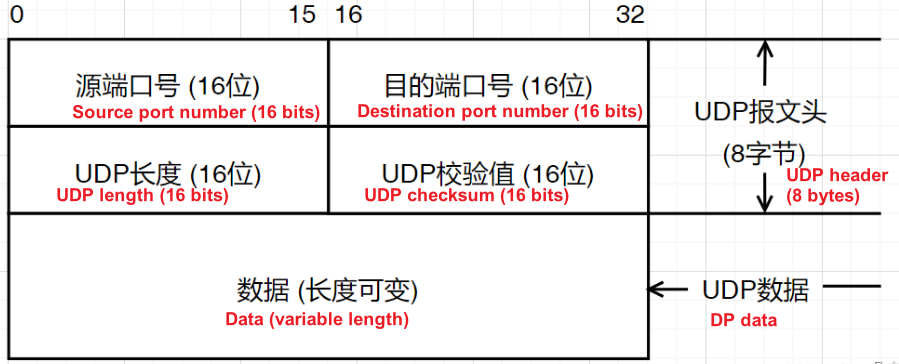
image-20250221104459436

2.2 Header Structure

xxxxxxxxxx
 0                   1                   2                   3   
 0 1 2 3 4 5 6 7 8 9 0 1 2 3 4 5 6 7 8 9 0 1 2 3 4 5 6 7 8 9 0 1 
+-+-+-+-+-+-+-+-+-+-+-+-+-+-+-+-+-+-+-+-+-+-+-+-+-+-+-+-+-+-+-+-+
|          Source Port          |       Destination Port        |
+-+-+-+-+-+-+-+-+-+-+-+-+-+-+-+-+-+-+-+-+-+-+-+-+-+-+-+-+-+-+-+-+
|            Length             |           Checksum            |
+-+-+-+-+-+-+-+-+-+-+-+-+-+-+-+-+-+-+-+-+-+-+-+-+-+-+-+-+-+-+-+-+
|                             Data                              |
+-+-+-+-+-+-+-+-+-+-+-+-+-+-+-+-+-+-+-+-+-+-+-+-+-+-+-+-+-+-+-+-+
  • Source Port (16 bits): Optional field, 0 indicates a passive port
  • Destination Port (16 bits): Required destination port
  • Length (16 bits): Total number of bytes of header + data (minimum 8 bytes)
  • Checksum (16 bits): Checksum (optional for IPv4, mandatory for IPv6)

3. UDP key working mechanism

3.1 Connectionless Communication

  • Unicast : one-to-one transmission
  • Multicast : one-to-many transmission (IP multicast address range: 224.0.0.0~239.255.255.255)
  • Broadcast : One-to-all transmission (limited broadcast address 255.255.255.255)

3.2 Checksum calculation

  • Coverage : pseudo header + UDP header + data
  • Pseudo header structure :
xxxxxxxxxx
| Source IP address (32 bits) | Destination IP address (32 bits) | Protocol (8 bits) | UDP length (16 bits) |

4. UDP Advanced Features

4.1 Multiplexing and Demultiplexing

  • Port number : Different applications are distinguished by port number (0~65535)

4.2 Application layer reliability implementation

  • Custom retransmission : such as packet loss detection in the QUIC protocol
  • Forward Error Correction : Adding Redundant Data to Deal with Packet Loss
  • Sequence number mechanism : add custom sequence numbers in data payload

5. Typical UDP application scenarios

5.1 Real-time audio and video transmission

  • Zoom/Teams : Allowing a small amount of packet loss in exchange for low latency
  • Streaming protocol : RTP over UDP

5.2 Game Communication

  • MOBA games : high-frequency position updates (20-30 times per second)
  • FPS shooting game : quickly transmit operation instructions

5.3 Network Service Discovery

  • DHCP : Dynamically obtain an IP address
  • mDNS : LAN device discovery (such as printers)

5.4 IoT Communications

  • CoAP : A lightweight protocol for constrained devices
  • MQTT-SN : Sensor Network Protocol
UDP-Server Example
HTTP-Server Example

COMPANY

  • About us
  • Team Style
  • Blog

LEARNING & EXPLORATION

  • Tutorials
  • Edge AI hardware
  • Educational robots
  • Embedded intelligent hardware

WHERE TO BUY

  • Yahboom Online Store
  • Amazon
  • Alibaba
  • AliExpress
  • Mercado

TECHNOLOGY SUPPORT

  • Email: support@yahboom.com

BE A DISTRIBUTOR

  • Email: sales@yahboom.com
QR Code

Copyright © 2017-2026 Yahboom. All Rights Reserved.

EN/中文