Welcome to K230 Vision Module repository
2. Human key point detection
Human key point detection
Human key point detectionRoutine Experiment EffectCode ExplanationCode structureCode Analysisflow chartBrief description of human key point detection algorithmCommon application scenariosAlgorithm OverviewNetwork structure
Routine Experiment Effect
In this section, we will learn how to use K230 to realize the function of human key point detection.
The example code is in [Source code/08.Body/02.person_keypoint_detect.py]
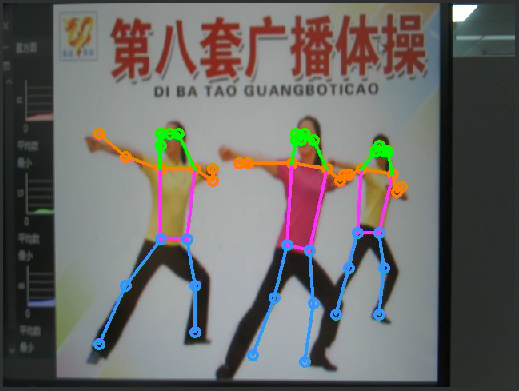
After connecting to the IDE, run the sample code in this section, and use K230 to aim at a picture with multiple human bodies. You can see the positions of the key points of the human bodies marked on the screen. For scenes with multiple human bodies, they can also be identified more accurately.
Code Explanation
Code structure
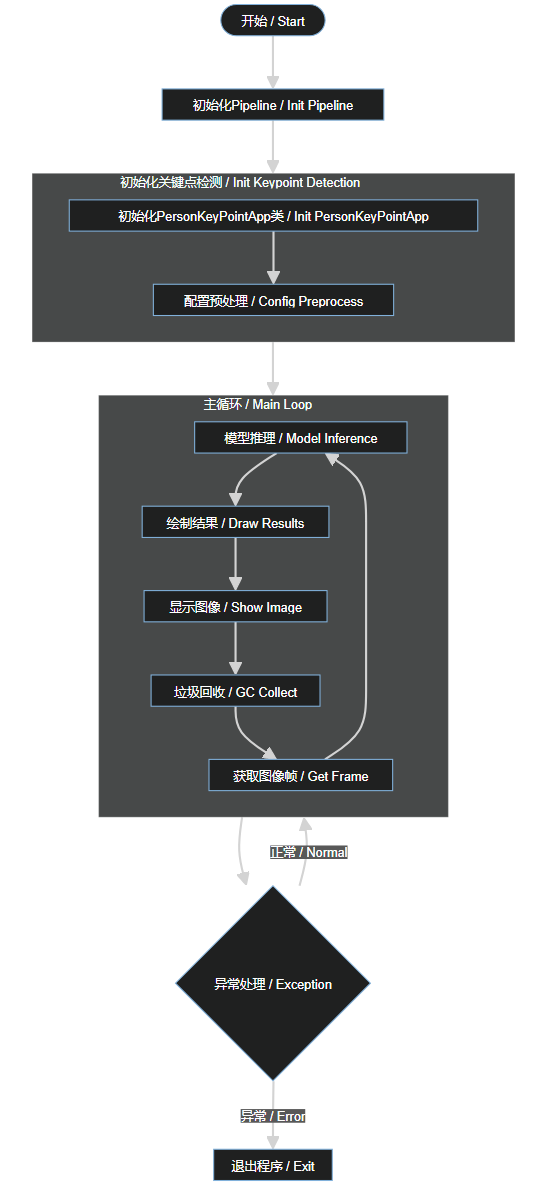
Main program flow:
Initialization phase:
- Initializing Pipeline
- Initialize the PersonKeyPointApp class
- Configuring preprocessing parameters
Main loop:
- Get image frame
- Perform model inference
- Plotting the detection results
- Displaying images
- Performing garbage collection
Exception handling:
- Detecting anomalies
- If normal, continue the cycle
- Exit the program if abnormal
Code Analysis
For the complete code, please refer to the file [Source Code/08.Body/02.person_keypoint_detect.py]
xxxxxxxxxxif __name__ == "__main__": # 显示模式,默认"hdmi",可以选择"hdmi"和"lcd" # Display mode, default "hdmi", can choose "hdmi" or "lcd" display_mode = "lcd" rgb888p_size = [640, 360] # RGB图像尺寸 (RGB image size) if display_mode == "hdmi": display_size = [640, 360] # HDMI显示尺寸 (HDMI display size) else: display_size = [640, 480] # LCD显示尺寸 (LCD display size) # 模型路径 (Model path) kmodel_path = "/sdcard/kmodel/yolov8n-pose.kmodel" # 其它参数设置 (Other parameter settings) confidence_threshold = 0.2 # 置信度阈值 (Confidence threshold) nms_threshold = 0.5 # 非极大值抑制阈值 (NMS threshold) # 初始化PipeLine (Initialize PipeLine) pl = PipeLine(rgb888p_size=rgb888p_size, display_size=display_size, display_mode=display_mode) pl.create() # 初始化自定义人体关键点检测实例 (Initialize custom person keypoint detection instance) person_kp = PersonKeyPointApp( kmodel_path, model_input_size=[320, 320], confidence_threshold=confidence_threshold, nms_threshold=nms_threshold, rgb888p_size=rgb888p_size, display_size=display_size, debug_mode=0 ) person_kp.config_preprocess() # 配置预处理 (Configure preprocessing) while True: with ScopedTiming("total", 1): # 获取当前帧数据 (Get current frame data) img = pl.get_frame() # 推理当前帧 (Infer current frame) res = person_kp.run(img) # 绘制结果到PipeLine的osd图像 (Draw results to PipeLine's osd image) person_kp.draw_result(pl, res) # 显示当前的绘制结果 (Show current drawing results) pl.show_image() gc.collect() # 垃圾回收 (Garbage collection) # 释放资源 (Release resources) person_kp.deinit() pl.destroy()
flow chart
Brief description of human key point detection algorithm
Common application scenarios
Smart Fitness and Sports Analysis
- Posture correction and movement guidance
- Sports performance analysis and evaluation
- Remote Fitness Coaching System
Medical rehabilitation
- Patient motor function assessment
- Rehabilitation training progress tracking
- Telemedicine guidance
Security monitoring
- Abnormal behavior identification
- Fall detection and warning
- Crowd density and flow analysis
Human-computer interaction
- Gesture recognition control
- Virtual reality/augmented reality interaction
- Motion capture and 3D modeling
Sports
- Athlete technical movement analysis
- Game tactics research
- Training assistance system
Industrial production
- Work environment safety monitoring
- Workers’ operational compliance inspection
- Human-machine collaborative control
Algorithm Overview
Network structure
Human key point detection usually adopts the following network architecture:
Backbone
- Use deep convolutional neural networks (such as ResNet, HRNet, etc.) to extract image features
- Capture human feature information at different scales through multi-scale feature extraction
Neck
- Feature pyramid structure (FPN) integrates features at different levels
- Combining upsampling and downsampling to enhance feature expression capabilities
Prediction Head
- Generate a heatmap to predict the location probability of each key point
- The number of output channels is equal to the number of key points (such as 17 key points in the COCO dataset)