Welcome to K230 Vision Module repository
10. Edge Recognition - Color Image
Edge Recognition - Color Image
Edge Recognition - Color ImageExample ResultsCode OverviewImporting ModulesSetting the Image SizeInitialize the camera (RGB888 format)Initialize the display moduleInitialize the media manager and start the cameraSet edge detection parametersImage processing and edge detectionResource releaseParameter adjustment instructions
Example Results
Run the example code in this section [Source Code/06.cv_lite/8.rgb888_find_edges.py]
In this section, we will use the cv_lite extension module to implement edge detection (Canny algorithm) in the RGB888 format on an embedded device.
Note: The implementation results in this section are the same as in the previous section, but the edge detection API used is different. The algorithm used in this section supports color images in RGB888 format.
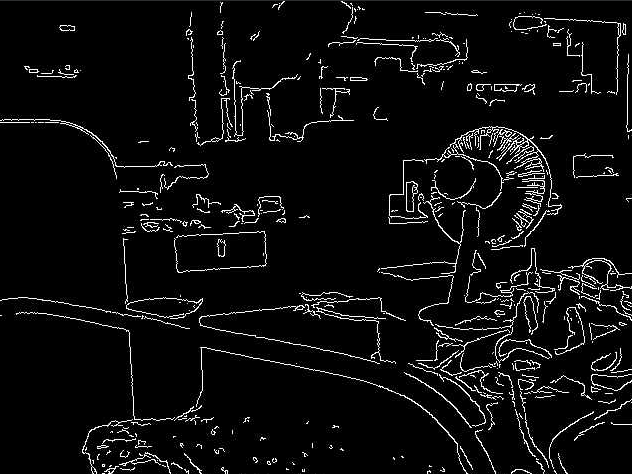
Code Overview
Importing Modules
import time, os, sys, gcfrom machine import Pinfrom media.sensor import * # Import the camera interfacefrom media.display import * # Import the display interfacefrom media.media import * # Import the media managerimport _threadimport cv_lite # Import the cv_lite extensionimport ulab.numpy as np # MicroPython NumPy librarySetting the Image Size
xxxxxxxxxximage_shape = [480, 640] # Height x WidthDefine the image resolution as 480x640 (height x width). The camera and display module will be initialized based on this size later.
Initialize the camera (RGB888 format)
xxxxxxxxxxsensor = Sensor(id=2, width=1280, height=960, fps=90)sensor.reset()sensor.set_framesize(width=image_shape[1], height=image_shape[0])sensor.set_pixformat(Sensor.RGB888) # Set RGB888 pixel format- Initialize the camera, set the resolution to 1280x960 and the frame rate to 90 FPS.
- Resize the output frame to 640x480 and set it to RGB888 format (three-channel color image, suitable for edge detection in color images).
Initialize the display module
xxxxxxxxxxDisplay.init(Display.ST7701, width=image_shape[1], height=image_shape[0], to_ide=True, quality=50)Initialize the display module, using the ST7701 driver chip, with a resolution consistent with the image size. to_ide=True indicates that the image will be simultaneously transmitted to the IDE for virtual display, and quality=50 sets the image transmission quality.
Initialize the media manager and start the camera
xxxxxxxxxxMediaManager.init()sensor.run()Initialize the media resource manager and start the camera to capture the image stream.
Set edge detection parameters
xxxxxxxxxxthreshold1 = 50 # Lower threshold for Canny edge detectionthreshold2 = 80 # Higher threshold for Canny edge detectionclock = time.clock() # Start FPS timerthreshold1: Canny edge detection lower threshold, used to control the detection of weak edges.threshold2: Canny edge detection upper threshold, used to control the detection of strong edges. A larger value results in fewer edges being detected.clock: Used to calculate the frame rate.
Image processing and edge detection
xwhile True: clock.tick() # Capture a frame img = sensor.snapshot() img_np = img.to_numpy_ref() # Get a reference to the RGB888 ndarray # Call the edge detection function extended by cv_lite and return a grayscale edge map ndarray edge_np = cv_lite.rgb888_find_edges(image_shape, img_np, threshold1, threshold2) # Construct a grayscale image object for display img_out = image.Image(image_shape[1], image_shape[0], image.GRAYSCALE, alloc=image.ALLOC_REF, data=edge_np) # Display edge detection results Display.show_image(img_out) # Garbage collection gc.collect() # Print Current Frame Rate / Print FPS print("edges:", clock.fps())- Image Capture: Capture an image frame using
sensor.snapshot()and convert it to a NumPy array reference usingto_numpy_ref(). - Edge Detection: Call
cv_lite.rgb888_find_edges()to perform Canny edge detection, returning a NumPy array of grayscale edge images. - Image Packaging and Display: Pack the edge detection result into a grayscale image object and display it on the screen or in an IDE virtual window.
- Memory Management and Frame Rate Output: Call
gc.collect()to clear memory and print the current frame rate usingclock.fps().
Resource release
xxxxxxxxxxsensor.stop()Display.deinit()os.exitpoint(os.EXITPOINT_ENABLE_SLEEP)time.sleep_ms(100)MediaManager.deinit()Parameter adjustment instructions
threshold1: Low threshold. A smaller value can detect more weak edges, but may introduce noise. It is recommended to start adjusting from 50.threshold2: High threshold. A larger value can detect fewer strong edges, which is suitable for noisy environments. Increasing this value can reduce false edges.