yahboom
HomeLearn
Solution
Blog
Online Store
About Us
EN/中文
K230 Vision Module📖
1. Quick Start
  • 0.Get start
  • 1. K230 firmware download and burning
  • 2. Install the programming environment
  • 3. Debug and run routines
  • 4. Offline running routine
  • 5. Micropython Quick Start
  • 6. GUI Program Instructions
  • 7.K230 module bracket installation tutorial
  • 8.K230 module 2DOF PTZ installation tutorial
2. Basic Courses
  • 1.FPIOA pin assignment
  • 2.RGB lights
  • 3.Buzzer
  • 4.Buttons
  • 5.Serial communication
  • 6.I2C communication
  • 7.PWM
  • 8.WDT watchdog
  • 9.Timer
  • 10.Fourier Transform
  • 11.SHA256 encryption
  • 12.AES encryption
  • 13.Multithreading
  • 14.File reading and writing
  • 15.Image Display
  • 16.Touch Display
  • 17.Camera display
  • 18.Image Flip
  • 19.Camera
3. Draw the image
  • 1. Draw the lines
  • 2. Draw the circle
  • 3. Draw the rectangle
  • 4. Draw the ellipse
  • 5. Draw the arrow
  • 6. Draw the crosshairs
  • 7. Draw text
  • 8. Draw key points
4. Graphics detection
  • 1. Line segment detection
  • 2. Rectangle Detection
  • 3. Circle detection
  • 4. Object edge detection
  • 5. Line inspection basics:fast linear regression
5. Color recognition
  • 1. Color recognition
  • 2. Object Counting
  • 3. Multi-color recognition
  • 4. K230 Color Line Patrol
6.1 CV_lite Image Processing Special Topic
  • 1.Introduction to cv_litenew
  • 2.cv_lite API Reference Manualnew
  • 3.Color Block Recognition - Grayscale Imagenew
  • 4.Color Block Recognition - Color Imagenew
  • 5.Circle Recognition - Grayscale Imagenew
  • 6.Circle Recognition - Color Imagenew
  • 7.Corner Recognition - Grayscale Imagenew
  • 8.Corner Recognition - Color Imagenew
  • 9.Edge Recognition - Grayscale Imagenew
  • 10. Edge Recognition - Color Imagenew
  • 11. Rectangle Recognition - Grayscale Imagenew
  • 12.Rectangle Recognition - Color Imagenew
  • 13.Rectangle recognition combined with corner recognition - grayscale imagenew
  • 14.Rectangle recognition combined with corner recognition - color imagenew
  • 15.Image Binarization - Grayscalenew
  • 16.Image Binarization - Color Imagenew
  • 17.Exposure Adjustmentnew
  • 18.Image Black Hat Operationsnew
  • 19.Image Color Histogramnew
  • 20.Image Closingnew
  • 21.Image Expansionnew
  • 22.Image Corrosionnew
  • 23.Gaussian Blurnew
  • 24.Gradient Transformationnew
  • 25.Mean Fuzzynew
  • 26.Image Openingnew
  • 27.Image Top Hat Operationnew
  • 28.PnP rangingnew
  • 29.Find rectangles and measure distancesnew
  • 30.Image grayscale world white balancenew
6.2 OpenCV Image Processing Special Topicnew
  • 1. OpenCV Introduction
  • 2. OpenCV API Reference
  • 3. Image Basic Transforms
  • 4. Morphological Operations
  • 5. Color Segmentation and Shape Classification
  • 6. Corner and Centroid Detection
  • 7. Hough Circle Detection
  • 8. Hough Line Detection
  • 9. Contour Analysis
  • 10. Drawing Functions
  • 11. Template Matching
  • 12. Image Blur Filtering
  • 13. Edge Detection
  • 14. Thresholding
  • 15. Color Segmentation
  • 16. Histogram and Pixel Transformation
  • 17. Arithmetic and Bitwise Operations
  • 18. Channel Operation and Statistics
  • 19. Image File Read and Write
  • 20. Pixel Level Transformation
7. Code type recognition
  • 1.Barcode recognition
  • 2.QR code recognition
  • 3.AprilTag tag recognition
  • 4.DM code recognition
8. Face Recognition
  • 1.[Must-read] General code structure and prerequisite knowledge of AI vision routines
  • 2.Face Detection
  • 3.Facial key point recognition
  • 4.Face orientation detection
  • 5.Face 3D Network
  • 6.Gaze direction detection
  • 7.Register for face recognition
9. Human body characteristics
  • 1. Human body detection
  • 2. Human key point detection
  • 3. Human posture recognition
  • 4. Fall detection
  • 5. Palm detection
  • 6. Palm key point detection
  • 7. Palm key point classification
  • 8. Gesture Recognition
  • 9. Dynamic gesture recognition
  • 10. Rock, Paper, Scissors
10. Scenario Application
  • 1.OCR character detection
  • 2.OCR character recognition
  • 3.yolov8n target detection
  • 4.yolov8n segmentation
  • 5. Self-learning object recognition
  • 6. License plate detection
  • 7. License Plate Recognition
  • 8. Target Tracking
  • 9. Fruit classification
  • 10. Garbage classification
  • 11. Road sign recognition
11. Audio and video processing
  • 1. Audio Recording
  • 2. Play Audio
  • 3. Video Recording
  • 4. Play Video
  • 5. Keyword wake-up
12. Network Basics
  • 1. Wireless network connection
  • 2. AP hotspot mode
  • 3. TCP-Server Example
  • 4. TCP-Client Example
  • 5. UDP-Server Example
  • 6. UDP-Client Example
  • 7. HTTP-Server Example
  • 8. HTTP-Client Example
  • 9. MQTT Quick Start
  • 10. MQTT-Publisher
  • 11. MQTT-Subscriber
  • 12. RTSP real-time image transmission
  • 13. RTSP real-time image transmission combined with AIDemo
  • 14. Call OpenRouter large model aggregation service
  • 15. Open the Resource Monitoring Panel
13. LVGL Graphical Interface
  • 1. Introduction to LVGL
  • 2. Create a button
  • 3. Create a slider
  • 4. Create an Image
  • 5. Create a text box and keyboard
14. GUI Code Tutorial & Secondary Development
  • 01.GUI System Architecture
  • 02.Core Engine Initialization
  • 03.Application Discovery Mechanism in GUI
  • 04.Desktop Layout Algorithm
  • 05.Advanced UI Styling
  • 06.BaseApp Base Class Analysis
  • 07.Hello_World Practical
  • 08.GUI Application Lifecycle and Resource Management
15. Train your own model
  • 1. Local deployment of yolo training environment
  • 2. Use online platforms for training
16.Touch Course
  • 1.Touch point detectionnew
  • 2.Touch Paintingnew
  • 3.Touch to take a photonew
17. Multi-master communication (purchased separately)
ESP32-K230
  • 1.k230 color recognition
  • 2.k230 barcode recognition
  • 3.k230 QR code recognition
  • 4.k230Apriltag code recognition
  • 5.k230DM code recognition
  • 6.k230 face detection
  • 7.k230 gaze direction
  • 8.k230 face recognition
  • 9.k230 human body detection
  • 10.k230 fall detection
  • 11.k230 palm detection
  • 12.k230 gesture recognition
  • 13.k230OCR character recognition
  • 14.k230 object detection
  • 15.k230 target tracking
  • 16.k230 self-learning object recognition
  • 17.k230 license plate recognition
Jetson-K230
  • 1.k230 color recognition
  • 2.k230 barcode recognition
  • 3.k230 QR code recognition
  • 4.k230Apriltag code recognition
  • 5.k230DM code recognition
  • 6.k230 face detection
  • 7.k230 gaze direction
  • 8.k230 face recognition
  • 9.k230 human body detection
  • 10.k230 fall detection
  • 11.k230 palm detection
  • 12.k230 gesture recognition
  • 13.k230OCR character recognition
  • 14.k230 object detection
  • 15.k230 target tracking
  • 16.k230 self-learning object recognition
  • 17.k230 license plate recognition
MSPM0G3507-K230
  • 1.k230 color recognition
  • 2.k230 barcode recognition
  • 3.k230 QR code recognition
  • 4.k230Apriltag code recognition
  • 5.k230DM code recognition
  • 6.k230 face detection
  • 7.k230 gaze direction
  • 8.k230 face recognition
  • 9.k230 human body detection
  • 10.k230 fall detection
  • 11.k230 palm detection
  • 12.k230 gesture recognition
  • 13.k230OCR character recognition
  • 14.k230 object detection
  • 15.k230 target tracking
  • 16.k230 self-learning object recognition
  • 17.k230 license plate recognition
Pico-K230
  • 1.k230 color recognition
  • 2.k230 barcode recognition
  • 3.k230 QR code recognition
  • 4.k230Apriltag code recognition
  • 5.k230DM code recognition
  • 6.k230 face detection
  • 7.k230 gaze direction
  • 8.k230 face recognition
  • 9.k230 human body detection
  • 10.k230 fall detection
  • 11.k230 palm detection
  • 12.k230 gesture recognition
  • 13.k230OCR character recognition
  • 14.k230 object detection
  • 15.k230 target tracking
  • 16.k230 self-learning object recognition
  • 17.k230 license plate recognition
raspberrypi-K230
  • 1.k230 color recognition
  • 2.k230 barcode recognition
  • 3.k230 QR code recognition
  • 4.k230Apriltag code recognition
  • 5.k230DM code recognition
  • 6.k230 face detection
  • 7.k230 gaze direction
  • 8.k230 face recognition
  • 9.k230 human body detection
  • 10.k230 fall detection
  • 11.k230 palm detection
  • 12.k230 gesture recognition
  • 13.k230OCR character recognition
  • 14.k230 object detection
  • 15.k230 target tracking
  • 16.k230 self-learning object recognition
  • 17.k230 license plate recognition
RDK-K230
  • 1.k230 color recognition
  • 2.k230 barcode recognition
  • 3.k230 QR code recognition
  • 4.k230Apriltag code recognition
  • 5.k230DM code recognition
  • 6.k230 face detection
  • 7.k230 gaze direction
  • 8.k230 face recognition
  • 9.k230 human body detection
  • 10.k230 fall detection
  • 11.k230 palm detection
  • 12.k230 gesture recognition
  • 13.k230OCR character recognition
  • 14.k230 object detection
  • 15.k230 target tracking
  • 16.k230 self-learning object recognition
  • 17.k230 license plate recognition
STM32-K230
  • 1. stm32_k230 color recognition
  • 2. stm32_k230 barcode recognition
  • 3. stm32_k230 QR code recognition
  • 4. stm32_k230Apriltag code recognition
  • 5. stm32_k230DM code recognition
  • 6. stm32_k230 face detection
  • 7.stm32_k230 looking direction
  • 8. stm32_k230 face recognition
  • 9. stm32_k230 human body detection
  • 10. stm32_k230 fall detection
  • 11. stm32_k230 palm detection
  • 12. stm32_k230 gesture recognition
  • 13. stm32_k230OCR character recognition
  • 14. stm32_k230 object detection
  • 15. stm32_k230 target tracking
  • 16. stm32_k230 self-learning object recognition
  • 17.stm32_k230 license plate recognition
Arduino-K230
  • 1.arduino_k230 color recognition
  • 2.arduino_k230 barcode recognition
  • 3.arduino_k230 QR code recognition
  • 4.arduino_k230 Apriltag code recognition
  • 5.arduino_k230 DM code recognition
  • 6.arduino_k230 face detection
  • 7.arduino_k230 looking direction
  • 8.arduino_k230 face recognition
  • 9.arduino_k230 human body detection
  • 10.arduino_k230 fall detection
  • 11.arduino_k230 palm detection
  • 12.arduino_k230 gesture recognition
  • 13.arduino_k230 OCR character recognition
  • 14.arduino_k230 object detection
  • 15.arduino_k230 target tracking
  • 16.arduino_k230 self-learning object recognition
  • 17.arduino_k230 license plate recognition
Microbit-K230
  • 1.microbit_k230 color recognition
  • 2.microbit_k230 barcode recognition
  • 3.microbit_k230 QR code recognition
  • 4.microbit_k230 Apriltag code recognition
  • 5.microbit_k230 DM code recognition
  • 6.microbit_k230 face detection
  • 7.microbit_k230 looking direction
  • 8.microbit_k230 face recognition
  • 9.microbit_k230 human body detection
  • 10.microbit_k230 fall detection
  • 11.microbit_k230 palm detection
  • 12.microbit_k230 gesture recognition
  • 13.microbit_k230 OCR character recognition
  • 14.microbit_k230 object detection
  • 15.microbit_k230 target tracking
  • 16.microbit_k230 self-learning object recognition
  • 17.microbit_k230 license plate recognition
MSPM0G3519-K230
  • 1. K230 Color Recognitionnew
  • 2. K230 Barcode Recognitionnew
  • 3. K230 QR Code Recognitionnew
  • 4. K230 Apriltag Code Recognitionnew
  • 5. K230 DM Code Recognitionnew
  • 6. K230 Face Detectionnew
  • 7. K230 Gaze Directionnew
  • 8. K230 Face Recognitionnew
  • 9. K230 Human Body Detectionnew
  • 10. K230 Fall Detectionnew
  • 11. K230 Palm Detectionnew
  • 12. K230 Gesture Recognitionnew
  • 13. K230 OCR Character Recognitionnew
  • 14. K230 Object Detectionnew
  • 15. K230 Target Trackingnew
  • 16. K230 Self-learning Object Recognitionnew
  • 17. K230 License Plate Recognitionnew
18.Extension case (purchase separately)
For 2DOF Electric Platform
  • 1.Moving target control and automatic tracking system
  • 2.Human body recognition alarm
  • 3.Gesture Recognition
  • 4.Rock Paper Scissors
  • 5.Fruit sorting
  • 6.Color Tracking
  • 7.Face Tracking
MSPM0G3507 wheeled chassis V1/V2 combined with K230 application case
  • 1.Visual tracking
  • 2.Color tracking
  • 3.Color response
  • 4.Road sign recognition
  • 5.Machine code tracking
  • 6.QR code recognition action
  • 7.Autonomous avoid
  • 8.License plate tracking
  • 9.Face tracking
  • 10.Gaze direction tracking
  • 11.Palm tracking
  • 12.Target tracking
  • 13.Human body tracking
  • 14.OCR character recognition action
STM32 wheeled chassis V1/V2 combined with K230 application case
  • 1.Visual tracking
  • 2.Color tracking
  • 3.Color response
  • 4.Road sign recognition
  • 5.Machine code tracking
  • 6.QR code recognition action
  • 7.Autonomous avoid
  • 8.License plate tracking
  • 9.Face tracking
  • 10.Gaze direction tracking
  • 11.Palm tracking
  • 12.Target tracking
  • 13.Human body tracking
  • 14.OCR character recognition action
MSPM0G3519 wheeled chassis V1/V2 combined with K230 application case
  • 1.Visual trackingnew
  • 2.Color trackingnew
  • 3.Color responsenew
  • 4.Road sign recognitionnew
  • 5.Machine code trackingnew
  • 6.QR code recognition actionnew
  • 7.Autonomous avoidnew
  • 8.License plate trackingnew
  • 9.Face trackingnew
  • 10.Gaze direction trackingnew
  • 11.Palm trackingnew
  • 12.Target trackingnew
  • 13.Human body trackingnew
  • 14.OCR character recognition actionnew
19. Expansion case(purchase separately)new
  • 1.Motion target control and Auto track system
  • 2.Vehicle-mounted balance ball motion control system
Download
  • Manual
  • CanMV IDE
  • Software Tools
  • Firmware
  • Source Code
  • Appendix
Download ZIP

Welcome to K230 Vision Module repository

10.Gaze direction tracking

Gaze direction tracking

1. Opening Statement

The motor driver board used in this case is the four-way motor driver board of Yaboom. If you use this driver board, please read the "Motor Introduction and Usage" in the four-way motor driver board document first to understand the motor parameters, wiring method, and power supply voltage you are currently using. This will avoid burning out the motherboard or motor.

2. Experimental Preparation

Wheeled car chassis, 4*L520 motors, 12V lithium battery, K230 vision module, Yaboom MSPM0G3519 core board.

The relationship between the 4 motor interfaces and the car is as follows:

M1 -> Upper left motor (left front wheel of the car) M3 -> upper right motor (right front wheel of the car)

M2 -> Lower left motor (left rear wheel of the car) M4 -> Lower right motor (right rear wheel of the car)

Hardware Wiring

图层-3 (10)

Wiring Pins

Four-way motor driver boardMSPM0G3519
5V5V
GNDGND
RX2PB6
TX2PB7

The following takes the M1 motor as an example, and other motors are similar:

MotorFour-way motor driver board (Motor)
M2M1-
VCC3V3
AH1A
BH1B
GNDGND
M1M1+
K230MSPM0G3519
5V5V
GNDGND
TXDPA25
RXDPA26

3. Experimental Operation

  1. Follow the hardware wiring instructions in the tutorial to connect.

  2. Open the ProtocolHub project used by MSPM0G3519, first check the beginning of the main.c file, the first thing to do is to change the number of MOTOR_TYPE to the motor you are using, after the modification is correct, compile and burn, and finally reset or power on again.

3.Place Gaze_Following.py in the root directory of K230's sdcard and rename it to main.py, then reset or power on.

If you are not sure how to burn the program into K230, please read the K230 Quick Start tutorial first.

  1. Move the K230 module bracket to a suitable angle and connect the power supply.

  2. After K230 is initialized successfully, it will start to recognize the direction of your gaze. When you look to the right while facing the car, the car will also rotate to your right.

4. Code analysis

  • main.c

​x
#define MOTOR_TYPE 5   //1:520电机 2:310电机 3:测速码盘TT电机 4:TT直流减速电机 5:L型520电机
                       //1:520 motor 2:310 motor 3:speed code disc TT motor 4:TT DC reduction motor 5:L type 520 motor


//修改当前要运行的颜色案例  Modify the color case currently being run
ColorMode color_mode = 1;  //1:巡线、2:跟踪  1: Patrol, 2: Tracking


//选择是否在初始化完成后,小车自主向前走,0为否,1为是(自主避让案例使用)
//Select whether the car moves forward autonomously after initialization is completed, 0 for no, 1 for yes (used in autonomous avoidance cases)
int Car_Auto_Drive = 0;


int main(void)
{       
    USART_Init();


     //使能DMA通道,用于加快与四路电机驱动板串口的通讯  Enable DMA channel to speed up communication with the serial port of the four-way motor driver board
    NVIC_ClearPendingIRQ(UART_1_INST_INT_IRQN);
    DL_DMA_enableChannel(DMA, DMA_CH0_CHAN_ID);
    NVIC_EnableIRQ(UART_1_INST_INT_IRQN);
    
    //开启与K230串口通信的中断    Enable interrupts for communication with the K230 serial port
    NVIC_ClearPendingIRQ(UART_3_INST_INT_IRQN);
    NVIC_EnableIRQ(UART_3_INST_INT_IRQN);
    
    //设置电机类型    Set motor type
    Set_Motor(MOTOR_TYPE);


    if(Car_Auto_Drive)//K230上电初始化需要时间,等待初始化完成之后再开始前进。   It takes time for K230 to power on and initialize. Wait until the initialization is complete before moving forward.
    {
        delay_ms(1000);delay_ms(1000);delay_ms(1000);delay_ms(1000);delay_ms(1000);delay_ms(1000);delay_ms(1000);delay_ms(1000);delay_ms(1000);delay_ms(1000);
    }
    printf("Init Succeed\r\n");
    while(1)
    {
        Pto_Loop();
        delay_ms(10);
    }
}

MOTOR_TYPE: Used to set the motor type to be used. Modify the corresponding number according to the comments based on the motor you are currently using.

color_mode: Use 1 when running the visual line patrol case, and use 2 for the color tracking case

Car_Auto_Drive: Controls the car to move forward automatically after initialization. The default value is 0, which means the car does not move forward automatically. This function only needs to be enabled when using the autonomous avoidance case.

USART_Init: initialization function of system and serial port.

Set_Motor: Communicate with the four-way motor driver board and set motor related parameters

Pto_Loop: Continuously processes the received K230 messages.

  • yb_protocol.c

xxxxxxxxxx
/**
 * @Brief: 数据分析 Data analysis
 * @Note: 
 * @Parm: 传入接受到的一个数据帧和长度    Pass in a received data frame and length
 * @Retval: 
 */
void Pto_Data_Parse(uint8_t *data_buf, uint8_t num)
{
    uint8_t pto_head = data_buf[0];
    uint8_t pto_tail = data_buf[num-1];
    
    //校验头尾  Check head and tail
    if (!(pto_head == PTO_HEAD && pto_tail == PTO_TAIL))
    {
        //DEBUG_PRINT("pto error:pto_head=0x%02x , pto_tail=0x%02x\n", pto_head, pto_tail);
        return;
    }
    
    uint8_t data_index = 1;
    uint8_t field_index[PTO_BUF_LEN_MAX] = {0};
    int i = 0;
    int values[PTO_BUF_LEN_MAX] = {0};
    char msgs[][PTO_BUF_LEN_MAX] = {0};
    
    //分割字段  Split Field
    for (i = 1; i < num-1; i++)
    {
        if (data_buf[i] == ',')
        {
            data_buf[i] = 0;
            field_index[data_index] = i;
            data_index++;
        }
    }
    
    //解析长度与功能ID  Parsing length and function ID
    for (i = 0; i < 2; i++)
    {
        values[i] = Pto_Char_To_Int((char*)data_buf+field_index[i]+1);
    }
    
    uint8_t pto_len = values[0];
    uint8_t pto_id = values[1];
    
    ParseCommonFields(pto_id,data_buf,pto_len,field_index,data_index,values,msgs);
}


//获取数据函数  Get data function
void ParseCommonFields(
    int func_index,       // 功能索引(对应func_table中的位置) Function index (corresponding to the position in func_table)
    uint8_t *data_buf,    // 原始数据缓冲区 Raw data buffer
    uint8_t num,          // 数据总长度(含头尾)   Total length of data (including head and tail)
    uint8_t *field_index, // 字段分隔符位置数组(逗号的位置)   Array of field separator positions (positions of commas)
    uint8_t data_index,   // 总字段数(如数据有6个字段)    Total number of fields (if the data has 6 fields)
    int* values,          // 存储整数字段的数组 Array to store integer fields
    char msgs[][PTO_BUF_LEN_MAX]        // 存储字符串的指针数组 Array of pointers to store strings
){
    const FuncDesc* desc = &func_table[func_index-1];
    
    if(func_index != desc->id)
    {
        DEBUG_PRINT("Unsupported protocol ID: %d, Chosen ID:%d\n", func_index,desc->id);
        return;
    }
    
    for (int i = 0; i < desc->field_count; i++) 
    {
        const FieldMeta* meta = &desc->fields[i];
        uint8_t pos = meta->pos;
        
        if (meta->type == FIELD_STRING) {
            int start = field_index[pos] + 1;
            int end = (pos+1 < data_index) ? field_index[pos+1] : (num-1);
            int len = end - start;
            
            len = (len < PTO_BUF_LEN_MAX-1) ? len : PTO_BUF_LEN_MAX-1;
            memcpy(msgs[i], data_buf+start, len);
            msgs[i][len] = '\0';
        } else {
            values[pos] = Pto_Char_To_Int((char*)data_buf + field_index[pos] +1);
        }
    }
    desc->handler(values, msgs);
}


Parse the received data that conforms to the protocol, obtain the function ID number and the data information carried in the data, and execute the processing function of the corresponding function. This project uses the metadata parsing method. The core idea is to separate the description of the protocol format (field position, type, etc.) from the parsing logic, define the protocol format through data structures (such as structure arrays), and the parsing function automatically processes the data based on these descriptions.

The protocol contains different types of data that can also be parsed. If you want to know the implementation details, you can study it yourself. I won't give too many answers. This function has been adapted to all K230 communication protocols in our store, and you can use it normally without fully understanding it.

  • bsp_motor_iic.c

xxxxxxxxxx
//只能控制带编码器类型的电机 Can only control motors with encoders
//传入参数:4个电机的速度      Input parameters: speed of 4 motors
void control_speed(int16_t m1,int16_t m2 ,int16_t m3,int16_t m4)
{
    static uint8_t speed[8];
    
    speed[0] = (m1>>8)&0xff;
    speed[1] = (m1)&0xff;
    
    speed[2] = (m2>>8)&0xff;
    speed[3] = (m2)&0xff;
    
    speed[4] = (m3>>8)&0xff;
    speed[5] = (m3)&0xff;
    
    speed[6] = (m4>>8)&0xff;
    speed[7] = (m4)&0xff;
    
    i2cWrite(Motor_model_ADDR,SPEED_Control_REG,8,speed);


}


//控制带编码器类型的电机   Control the motor with encoder type
//传入参数:4个电机的pwm PWM of 4 motors
//此函数可以结合实时编码器的数据,来实现control_speed的功能   This function can combine the data of real-time encoder to realize the function of control_speed
void control_pwm(int16_t m1,int16_t m2 ,int16_t m3,int16_t m4)
{
    static uint8_t pwm[8];
    
    pwm[0] = (m1>>8)&0xff;
    pwm[1] = (m1)&0xff;
    
    pwm[2] = (m2>>8)&0xff;
    pwm[3] = (m2)&0xff;
    
    pwm[4] = (m3>>8)&0xff;
    pwm[5] = (m3)&0xff;
    
    pwm[6] = (m4>>8)&0xff;
    pwm[7] = (m4)&0xff;
    
    i2cWrite(Motor_model_ADDR,PWM_Control_REG,8,pwm);


}

control_speed : Controls the speed of the motor. It splits the four motor speed values into high and low bytes, and then sends them to the motor controller via the I2C protocol to set the motor speed.

control_pwm : controls the PWM (pulse width modulation) value of the motor. It splits the incoming PWM values of the four motors into high and low bytes and sends them to the motor controller via the I2C protocol to control the speed and direction of the motor.

  • app_engine.c

xxxxxxxxxx
//控制小车运行,输入的参数分别为x、y、z三个轴上的速度值
//Control the movement of the car. The input parameters are the speed values on the x, y, and z axes.
void Motion_Car_Control(int16_t V_x, int16_t V_y, int16_t V_z)
{
    float robot_APB = Motion_Get_APB();
    speed_lr = 0;
    speed_fb = V_x;
    speed_spin = (V_z / 1000.0f) * robot_APB;
    if (V_x == 0 && V_y == 0 && V_z == 0)
    {
        control_pwm(0,0,0,0);
        return;
    }


    speed_L1_setup = speed_fb - speed_spin;
    speed_L2_setup = speed_fb - speed_spin;
    speed_R1_setup = speed_fb  + speed_spin;
    speed_R2_setup = speed_fb  + speed_spin;
        
    if (speed_L1_setup > 1000) speed_L1_setup = 1000;
    if (speed_L1_setup < -1000) speed_L1_setup = -1000;
    if (speed_L2_setup > 1000) speed_L2_setup = 1000;
    if (speed_L2_setup < -1000) speed_L2_setup = -1000;
    if (speed_R1_setup > 1000) speed_R1_setup = 1000;
    if (speed_R1_setup < -1000) speed_R1_setup = -1000;
    if (speed_R2_setup > 1000) speed_R2_setup = 1000;
    if (speed_R2_setup < -1000) speed_R2_setup = -1000;
    
    //DEBUG_PRINT("L1:%d, L2:%d, L3:%d, L4:%d\r\n",speed_L1_setup,speed_L2_setup,speed_R1_setup,speed_R2_setup);
    //DEBUG_PRINT("\r\n");
    if(PWM_Car_Flag)//如果小车是无编码器类型的,就直接控制pwm,否则控制速度 If the car is encoderless, it controls PWM directly, otherwise it controls the speed
    {
        control_pwm(speed_L1_setup, speed_L2_setup, speed_R1_setup, speed_R2_setup);
    }
    else
    {
        control_speed(speed_L1_setup, speed_L2_setup, speed_R1_setup, speed_R2_setup);
    }
}


void GazeDire_Track(int x_start, int x_end)
{
    int err = x_start - x_end;
    if(err<40 && err>-40)
    {
        err=0;
        Motion_Car_Control(0, 0, 0);
    }
    DEBUG_PRINT("x_start:%d, x_end:%d\r\n", x_start, x_end);
    DEBUG_PRINT("err:%d\r\n", err);


    // 边界检查:禁止任何越界方向的转向 Boundary check: any turn in the out-of-bounds direction is prohibited
    bool allow_motion = true;  // 默认允许运动  Movement is allowed by default


    if (x_start < 270 && err < 0) {
        // 左边界且需要向右转 → 禁止    Left boundary and need to turn right → No
        DEBUG_PRINT("STOP: x_start=%d < 270, err=%d (no right turn)\r\n", x_start, err);
        allow_motion = false;
    } 
    else if (x_start > 400 && err > 0) {
        // 右边界且需要向左转 → 禁止    Right boundary and need to turn left → No
        DEBUG_PRINT("STOP: x_start=%d > 400, err=%d (no left turn)\r\n", x_start, err);
        allow_motion = false;
    }


    // 根据条件执行动作 Perform actions based on conditions
    if (allow_motion && (err > 40 || err < -40)) {
        pid_output = PID_Calc(err);


        // 限制输出范围 Limit output range
        if (pid_output > 250) pid_output = 250;
        if (pid_output < -250) pid_output = -250;


        DEBUG_PRINT("pid_output:%d\r\n", pid_output);
        DEBUG_PRINT("\r\n");
        Motion_Car_Control(0, 0, pid_output);
    } 
    else if (!allow_motion) {
        Motion_Car_Control(0, 0, 0);
    }
}


Motion_Car_Control: A function used to control the car. The input parameter value will be used to control the speed of the motor with encoder, and the motor without encoder will control the pwm value.

GazeDire_Track: Calculates the deviation between the starting and ending positions of the gaze direction to control the car's rotation in situ, and limits the output value of pid and the car's rotation range to prevent the car from being unable to continue to identify the gaze direction due to excessive rotation.

5. Experimental Phenomenon

Turn on the power switch and wait for the system to initialize. The screen will display the camera image and recognize the direction of your gaze. When you face the robot and look to the right, the robot will rotate to your right. When you look to the left, the robot will rotate back to the left. However, the rotation angle will not be very large. This is to facilitate the K230 to recognize when the gaze direction changes and the robot can respond.
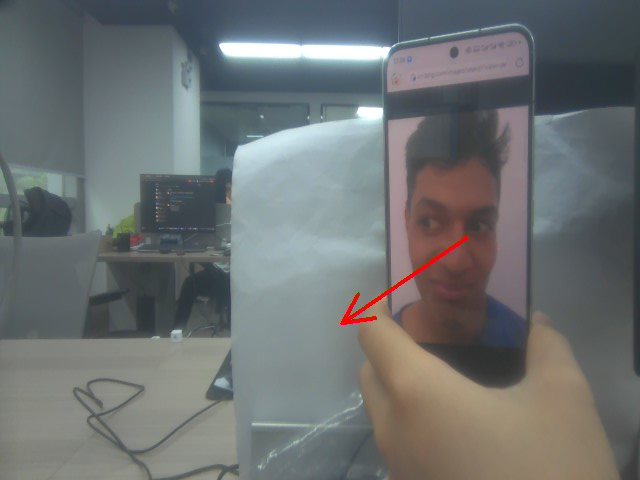
gazefollow

Face tracking
Palm tracking

COMPANY

  • About us
  • Team Style
  • Blog

LEARNING & EXPLORATION

  • Tutorials
  • Edge AI hardware
  • Educational robots
  • Embedded intelligent hardware

WHERE TO BUY

  • Yahboom Online Store
  • Amazon
  • Alibaba
  • AliExpress
  • Mercado

TECHNOLOGY SUPPORT

  • Email: support@yahboom.com

BE A DISTRIBUTOR

  • Email: sales@yahboom.com
QR Code

Copyright © 2017-2026 Yahboom. All Rights Reserved.

EN/中文