yahboom
HomeLearn
Solution
Blog
Online Store
About Us
EN/中文
K230 Vision Module📖
1. Quick Start
  • 0.Get start
  • 1. K230 firmware download and burning
  • 2. Install the programming environment
  • 3. Debug and run routines
  • 4. Offline running routine
  • 5. Micropython Quick Start
  • 6. GUI Program Instructions
  • 7.K230 module bracket installation tutorial
  • 8.K230 module 2DOF PTZ installation tutorial
2. Basic Courses
  • 1.FPIOA pin assignment
  • 2.RGB lights
  • 3.Buzzer
  • 4.Buttons
  • 5.Serial communication
  • 6.I2C communication
  • 7.PWM
  • 8.WDT watchdog
  • 9.Timer
  • 10.Fourier Transform
  • 11.SHA256 encryption
  • 12.AES encryption
  • 13.Multithreading
  • 14.File reading and writing
  • 15.Image Display
  • 16.Touch Display
  • 17.Camera display
  • 18.Image Flip
  • 19.Camera
3. Draw the image
  • 1. Draw the lines
  • 2. Draw the circle
  • 3. Draw the rectangle
  • 4. Draw the ellipse
  • 5. Draw the arrow
  • 6. Draw the crosshairs
  • 7. Draw text
  • 8. Draw key points
4. Graphics detection
  • 1. Line segment detection
  • 2. Rectangle Detection
  • 3. Circle detection
  • 4. Object edge detection
  • 5. Line inspection basics:fast linear regression
5. Color recognition
  • 1. Color recognition
  • 2. Object Counting
  • 3. Multi-color recognition
  • 4. K230 Color Line Patrol
6.1 CV_lite Image Processing Special Topic
  • 1.Introduction to cv_litenew
  • 2.cv_lite API Reference Manualnew
  • 3.Color Block Recognition - Grayscale Imagenew
  • 4.Color Block Recognition - Color Imagenew
  • 5.Circle Recognition - Grayscale Imagenew
  • 6.Circle Recognition - Color Imagenew
  • 7.Corner Recognition - Grayscale Imagenew
  • 8.Corner Recognition - Color Imagenew
  • 9.Edge Recognition - Grayscale Imagenew
  • 10. Edge Recognition - Color Imagenew
  • 11. Rectangle Recognition - Grayscale Imagenew
  • 12.Rectangle Recognition - Color Imagenew
  • 13.Rectangle recognition combined with corner recognition - grayscale imagenew
  • 14.Rectangle recognition combined with corner recognition - color imagenew
  • 15.Image Binarization - Grayscalenew
  • 16.Image Binarization - Color Imagenew
  • 17.Exposure Adjustmentnew
  • 18.Image Black Hat Operationsnew
  • 19.Image Color Histogramnew
  • 20.Image Closingnew
  • 21.Image Expansionnew
  • 22.Image Corrosionnew
  • 23.Gaussian Blurnew
  • 24.Gradient Transformationnew
  • 25.Mean Fuzzynew
  • 26.Image Openingnew
  • 27.Image Top Hat Operationnew
  • 28.PnP rangingnew
  • 29.Find rectangles and measure distancesnew
  • 30.Image grayscale world white balancenew
6.2 OpenCV Image Processing Special Topicnew
  • 1. OpenCV Introduction
  • 2. OpenCV API Reference
  • 3. Image Basic Transforms
  • 4. Morphological Operations
  • 5. Color Segmentation and Shape Classification
  • 6. Corner and Centroid Detection
  • 7. Hough Circle Detection
  • 8. Hough Line Detection
  • 9. Contour Analysis
  • 10. Drawing Functions
  • 11. Template Matching
  • 12. Image Blur Filtering
  • 13. Edge Detection
  • 14. Thresholding
  • 15. Color Segmentation
  • 16. Histogram and Pixel Transformation
  • 17. Arithmetic and Bitwise Operations
  • 18. Channel Operation and Statistics
  • 19. Image File Read and Write
  • 20. Pixel Level Transformation
7. Code type recognition
  • 1.Barcode recognition
  • 2.QR code recognition
  • 3.AprilTag tag recognition
  • 4.DM code recognition
8. Face Recognition
  • 1.[Must-read] General code structure and prerequisite knowledge of AI vision routines
  • 2.Face Detection
  • 3.Facial key point recognition
  • 4.Face orientation detection
  • 5.Face 3D Network
  • 6.Gaze direction detection
  • 7.Register for face recognition
9. Human body characteristics
  • 1. Human body detection
  • 2. Human key point detection
  • 3. Human posture recognition
  • 4. Fall detection
  • 5. Palm detection
  • 6. Palm key point detection
  • 7. Palm key point classification
  • 8. Gesture Recognition
  • 9. Dynamic gesture recognition
  • 10. Rock, Paper, Scissors
10. Scenario Application
  • 1.OCR character detection
  • 2.OCR character recognition
  • 3.yolov8n target detection
  • 4.yolov8n segmentation
  • 5. Self-learning object recognition
  • 6. License plate detection
  • 7. License Plate Recognition
  • 8. Target Tracking
  • 9. Fruit classification
  • 10. Garbage classification
  • 11. Road sign recognition
11. Audio and video processing
  • 1. Audio Recording
  • 2. Play Audio
  • 3. Video Recording
  • 4. Play Video
  • 5. Keyword wake-up
12. Network Basics
  • 1. Wireless network connection
  • 2. AP hotspot mode
  • 3. TCP-Server Example
  • 4. TCP-Client Example
  • 5. UDP-Server Example
  • 6. UDP-Client Example
  • 7. HTTP-Server Example
  • 8. HTTP-Client Example
  • 9. MQTT Quick Start
  • 10. MQTT-Publisher
  • 11. MQTT-Subscriber
  • 12. RTSP real-time image transmission
  • 13. RTSP real-time image transmission combined with AIDemo
  • 14. Call OpenRouter large model aggregation service
  • 15. Open the Resource Monitoring Panel
13. LVGL Graphical Interface
  • 1. Introduction to LVGL
  • 2. Create a button
  • 3. Create a slider
  • 4. Create an Image
  • 5. Create a text box and keyboard
14. GUI Code Tutorial & Secondary Development
  • 01.GUI System Architecture
  • 02.Core Engine Initialization
  • 03.Application Discovery Mechanism in GUI
  • 04.Desktop Layout Algorithm
  • 05.Advanced UI Styling
  • 06.BaseApp Base Class Analysis
  • 07.Hello_World Practical
  • 08.GUI Application Lifecycle and Resource Management
15. Train your own model
  • 1. Local deployment of yolo training environment
  • 2. Use online platforms for training
16.Touch Course
  • 1.Touch point detectionnew
  • 2.Touch Paintingnew
  • 3.Touch to take a photonew
17. Multi-master communication (purchased separately)
ESP32-K230
  • 1.k230 color recognition
  • 2.k230 barcode recognition
  • 3.k230 QR code recognition
  • 4.k230Apriltag code recognition
  • 5.k230DM code recognition
  • 6.k230 face detection
  • 7.k230 gaze direction
  • 8.k230 face recognition
  • 9.k230 human body detection
  • 10.k230 fall detection
  • 11.k230 palm detection
  • 12.k230 gesture recognition
  • 13.k230OCR character recognition
  • 14.k230 object detection
  • 15.k230 target tracking
  • 16.k230 self-learning object recognition
  • 17.k230 license plate recognition
Jetson-K230
  • 1.k230 color recognition
  • 2.k230 barcode recognition
  • 3.k230 QR code recognition
  • 4.k230Apriltag code recognition
  • 5.k230DM code recognition
  • 6.k230 face detection
  • 7.k230 gaze direction
  • 8.k230 face recognition
  • 9.k230 human body detection
  • 10.k230 fall detection
  • 11.k230 palm detection
  • 12.k230 gesture recognition
  • 13.k230OCR character recognition
  • 14.k230 object detection
  • 15.k230 target tracking
  • 16.k230 self-learning object recognition
  • 17.k230 license plate recognition
MSPM0G3507-K230
  • 1.k230 color recognition
  • 2.k230 barcode recognition
  • 3.k230 QR code recognition
  • 4.k230Apriltag code recognition
  • 5.k230DM code recognition
  • 6.k230 face detection
  • 7.k230 gaze direction
  • 8.k230 face recognition
  • 9.k230 human body detection
  • 10.k230 fall detection
  • 11.k230 palm detection
  • 12.k230 gesture recognition
  • 13.k230OCR character recognition
  • 14.k230 object detection
  • 15.k230 target tracking
  • 16.k230 self-learning object recognition
  • 17.k230 license plate recognition
Pico-K230
  • 1.k230 color recognition
  • 2.k230 barcode recognition
  • 3.k230 QR code recognition
  • 4.k230Apriltag code recognition
  • 5.k230DM code recognition
  • 6.k230 face detection
  • 7.k230 gaze direction
  • 8.k230 face recognition
  • 9.k230 human body detection
  • 10.k230 fall detection
  • 11.k230 palm detection
  • 12.k230 gesture recognition
  • 13.k230OCR character recognition
  • 14.k230 object detection
  • 15.k230 target tracking
  • 16.k230 self-learning object recognition
  • 17.k230 license plate recognition
raspberrypi-K230
  • 1.k230 color recognition
  • 2.k230 barcode recognition
  • 3.k230 QR code recognition
  • 4.k230Apriltag code recognition
  • 5.k230DM code recognition
  • 6.k230 face detection
  • 7.k230 gaze direction
  • 8.k230 face recognition
  • 9.k230 human body detection
  • 10.k230 fall detection
  • 11.k230 palm detection
  • 12.k230 gesture recognition
  • 13.k230OCR character recognition
  • 14.k230 object detection
  • 15.k230 target tracking
  • 16.k230 self-learning object recognition
  • 17.k230 license plate recognition
RDK-K230
  • 1.k230 color recognition
  • 2.k230 barcode recognition
  • 3.k230 QR code recognition
  • 4.k230Apriltag code recognition
  • 5.k230DM code recognition
  • 6.k230 face detection
  • 7.k230 gaze direction
  • 8.k230 face recognition
  • 9.k230 human body detection
  • 10.k230 fall detection
  • 11.k230 palm detection
  • 12.k230 gesture recognition
  • 13.k230OCR character recognition
  • 14.k230 object detection
  • 15.k230 target tracking
  • 16.k230 self-learning object recognition
  • 17.k230 license plate recognition
STM32-K230
  • 1. stm32_k230 color recognition
  • 2. stm32_k230 barcode recognition
  • 3. stm32_k230 QR code recognition
  • 4. stm32_k230Apriltag code recognition
  • 5. stm32_k230DM code recognition
  • 6. stm32_k230 face detection
  • 7.stm32_k230 looking direction
  • 8. stm32_k230 face recognition
  • 9. stm32_k230 human body detection
  • 10. stm32_k230 fall detection
  • 11. stm32_k230 palm detection
  • 12. stm32_k230 gesture recognition
  • 13. stm32_k230OCR character recognition
  • 14. stm32_k230 object detection
  • 15. stm32_k230 target tracking
  • 16. stm32_k230 self-learning object recognition
  • 17.stm32_k230 license plate recognition
Arduino-K230
  • 1.arduino_k230 color recognition
  • 2.arduino_k230 barcode recognition
  • 3.arduino_k230 QR code recognition
  • 4.arduino_k230 Apriltag code recognition
  • 5.arduino_k230 DM code recognition
  • 6.arduino_k230 face detection
  • 7.arduino_k230 looking direction
  • 8.arduino_k230 face recognition
  • 9.arduino_k230 human body detection
  • 10.arduino_k230 fall detection
  • 11.arduino_k230 palm detection
  • 12.arduino_k230 gesture recognition
  • 13.arduino_k230 OCR character recognition
  • 14.arduino_k230 object detection
  • 15.arduino_k230 target tracking
  • 16.arduino_k230 self-learning object recognition
  • 17.arduino_k230 license plate recognition
Microbit-K230
  • 1.microbit_k230 color recognition
  • 2.microbit_k230 barcode recognition
  • 3.microbit_k230 QR code recognition
  • 4.microbit_k230 Apriltag code recognition
  • 5.microbit_k230 DM code recognition
  • 6.microbit_k230 face detection
  • 7.microbit_k230 looking direction
  • 8.microbit_k230 face recognition
  • 9.microbit_k230 human body detection
  • 10.microbit_k230 fall detection
  • 11.microbit_k230 palm detection
  • 12.microbit_k230 gesture recognition
  • 13.microbit_k230 OCR character recognition
  • 14.microbit_k230 object detection
  • 15.microbit_k230 target tracking
  • 16.microbit_k230 self-learning object recognition
  • 17.microbit_k230 license plate recognition
MSPM0G3519-K230
  • 1. K230 Color Recognitionnew
  • 2. K230 Barcode Recognitionnew
  • 3. K230 QR Code Recognitionnew
  • 4. K230 Apriltag Code Recognitionnew
  • 5. K230 DM Code Recognitionnew
  • 6. K230 Face Detectionnew
  • 7. K230 Gaze Directionnew
  • 8. K230 Face Recognitionnew
  • 9. K230 Human Body Detectionnew
  • 10. K230 Fall Detectionnew
  • 11. K230 Palm Detectionnew
  • 12. K230 Gesture Recognitionnew
  • 13. K230 OCR Character Recognitionnew
  • 14. K230 Object Detectionnew
  • 15. K230 Target Trackingnew
  • 16. K230 Self-learning Object Recognitionnew
  • 17. K230 License Plate Recognitionnew
18.Extension case (purchase separately)
For 2DOF Electric Platform
  • 1.Moving target control and automatic tracking system
  • 2.Human body recognition alarm
  • 3.Gesture Recognition
  • 4.Rock Paper Scissors
  • 5.Fruit sorting
  • 6.Color Tracking
  • 7.Face Tracking
MSPM0G3507 wheeled chassis V1/V2 combined with K230 application case
  • 1.Visual tracking
  • 2.Color tracking
  • 3.Color response
  • 4.Road sign recognition
  • 5.Machine code tracking
  • 6.QR code recognition action
  • 7.Autonomous avoid
  • 8.License plate tracking
  • 9.Face tracking
  • 10.Gaze direction tracking
  • 11.Palm tracking
  • 12.Target tracking
  • 13.Human body tracking
  • 14.OCR character recognition action
STM32 wheeled chassis V1/V2 combined with K230 application case
  • 1.Visual tracking
  • 2.Color tracking
  • 3.Color response
  • 4.Road sign recognition
  • 5.Machine code tracking
  • 6.QR code recognition action
  • 7.Autonomous avoid
  • 8.License plate tracking
  • 9.Face tracking
  • 10.Gaze direction tracking
  • 11.Palm tracking
  • 12.Target tracking
  • 13.Human body tracking
  • 14.OCR character recognition action
MSPM0G3519 wheeled chassis V1/V2 combined with K230 application case
  • 1.Visual trackingnew
  • 2.Color trackingnew
  • 3.Color responsenew
  • 4.Road sign recognitionnew
  • 5.Machine code trackingnew
  • 6.QR code recognition actionnew
  • 7.Autonomous avoidnew
  • 8.License plate trackingnew
  • 9.Face trackingnew
  • 10.Gaze direction trackingnew
  • 11.Palm trackingnew
  • 12.Target trackingnew
  • 13.Human body trackingnew
  • 14.OCR character recognition actionnew
19. Expansion case(purchase separately)new
  • 1.Motion target control and Auto track system
  • 2.Vehicle-mounted balance ball motion control system
Download
  • Manual
  • CanMV IDE
  • Software Tools
  • Firmware
  • Source Code
  • Appendix
Download ZIP

Welcome to K230 Vision Module repository

28.PnP ranging

PnP ranging

PnP rangingExample ResultsPrinciple ExplanationWhat is Image Color Blob Detection and Distance Estimation?Code OverviewImporting ModulesSetting the Image SizeInitialize the camera (RGB888 format)Initialize the display moduleInitialize the media manager and start the cameraSetting blob detection parametersSet the camera's intrinsic parameters and distortion coefficientsSetting the frame rate timerImage processing, color block detection, and distance estimationResource releaseParameter adjustment instructions

Example Results

Run this section's example code [Source Code/06.cv_lite/23.rgb888_find_blobs_and_distance.py]

In this section, we'll use the cv_lite extension module to implement color blob detection in RGB888 format images on an embedded device and estimate the distance of the detected blob using the PnP algorithm.

The measured distance is 32.5cm. The code performs integer division on the distance. To improve accuracy, consider changing the integer division (//) to decimal division (/).
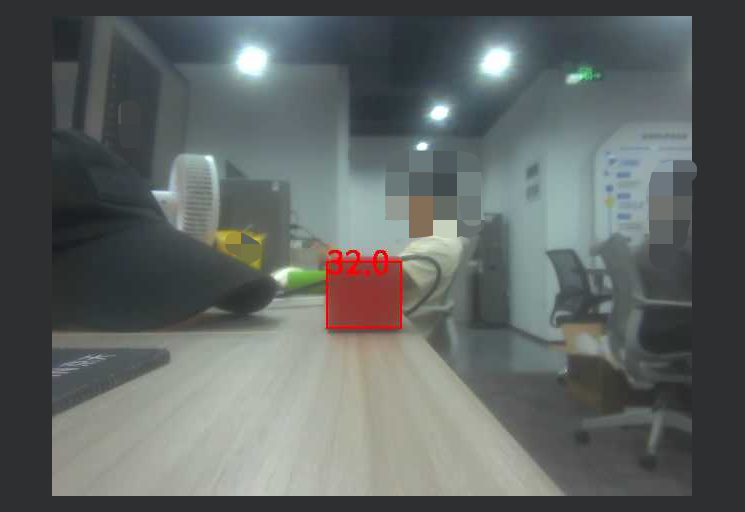
image-20250804210154029

Principle Explanation

What is Image Color Blob Detection and Distance Estimation?

Image color blob detection is a computer vision technique used to identify regions of specific color (called blob) in an image and estimate the distance of these blob in the real world through further calculations. Color block detection segments the image based on color thresholding, while distance estimation uses camera calibration parameters and the object's actual size to calculate depth information.

  • How it works:

    • Color block detection: First, the image is segmented using a predefined color threshold (e.g., RGB range) to extract pixel regions that meet the criteria. Morphological operations (such as erosion and dilation) are then used to refine the detection results, filter noise, and connect adjacent regions. The detection result typically returns the bounding box (x, y, width, height) of the color block.
    • Distance estimation: Based on the PnP (Perspective-n-Point) algorithm, it uses the camera intrinsic parameter matrix (camera_matrix) and distortion coefficients (dist_coeffs) to estimate the object's position in 3D space. Combined with the known actual object dimensions (such as the actual width and height of the color block), the distance is calculated through triangulation. The formula involves projective geometry and inverse perspective transformation.
  • Effect: This operation can detect objects of a specific color in an image in real time, draw a bounding box on the image, and display the estimated distance. It is suitable for scenarios requiring fast localization and measurement. Detection accuracy is affected by color thresholding, image quality, and camera calibration.

  • Application Scenarios: Color block detection and distance estimation are commonly used in robotic vision (e.g., tracking colored signs), augmented reality (AR), industrial automation (e.g., detecting product defects), and drone navigation. On embedded devices, this approach combines simplicity and practicality, making it suitable for resource-constrained environments.

In practical applications, parameter adjustments (e.g., color thresholding and minimum area) can optimize detection accuracy, while camera parameters ensure the reliability of distance estimation.

Code Overview

Importing Modules

import time, os, sys, gc
from machine import Pin
from media.sensor import * # Camera interface
from media.display import * # Display interface
from media.media import * # Media manager
import _thread
import cv_lite # Custom CV extension
import ulab.numpy as np # MicroPython version of NumPy / Lightweight NumPy for uPython

Setting the Image Size

xxxxxxxxxx
image_shape = [480, 640] # Image Height x Width

Define the image resolution to 480x640 (height x width). The camera and display modules will be initialized based on this size.

Initialize the camera (RGB888 format)

xxxxxxxxxx
sensor = Sensor(id=2, width=1280, height=960, fps=90)
sensor.reset()
sensor.set_framesize(width=image_shape[1], height=image_shape[0])
sensor.set_pixformat(Sensor.RGB888) # Set pixel format to RGB888
  • Initialize the camera, set the resolution to 1280x960 and the frame rate to 90 FPS.
  • Resize the output frame to 640x480 and set it to RGB888 format (three-channel color image, suitable for color block detection).

Initialize the display module

xxxxxxxxxx
Display.init(Display.VIRT, width=image_shape[1], height=image_shape[0], to_ide=True, quality=50)

Initialize the display module, using the virtual display driver (Display.VIRT) with a resolution consistent with the image size. to_ide=True indicates that the image will be simultaneously transferred to the IDE for virtual display, and quality=50 sets the image transfer quality.

Initialize the media manager and start the camera

xxxxxxxxxx
MediaManager.init()
sensor.run() # Start capturing

Initialize the media resource manager and start the camera to capture the image stream.

Setting blob detection parameters

xxxxxxxxxx
threshold = [123, 145, 48, 79, 44, 73] # Color thresholds [Rmin, Rmax, Gmin, Gmax, Bmin, Bmax]
min_area = 10 # Minimum valid blob area
kernel_size = 1 # Morphological kernel size
  • threshold: RGB color threshold array, used to define the color range for detection.
  • min_area: Minimum blob area threshold, used to filter out undersized detection areas.
  • kernel_size: Kernel size for morphological operations, used to optimize detection results.

Set the camera's intrinsic parameters and distortion coefficients

The intrinsic parameters and distortion coefficients given here are for the GC2093 camera included with the Yabo Smart K230. Initialize the corresponding parameters at 1280*960.

​x
camera_matrix = [
    1199.1495245491617, 0.0, 670.4213222250077,
    0.0, 1200.6879329729338, 475.11122810359876,
    0.0, 0.0, 1.0
]
dist_coeffs = [-0.0331624688297151, 0.04145795463721313, 0.0016964134879770974, 0.0008834973490863845, -0.05414957483933673]
dist_len = len(dist_coeffs)
​
# Actual ROI size (unit: cm) / Real-world size of detected ROI (cm)
roi_width_real = 3.7 # Example: Blob width 3cm / Real-world Blob width
roi_height_real = 3.7 # Example: Blob height 2.8cm / Real-world Blob height
  • camera_matrix: Camera intrinsic parameter matrix, used for distance estimation.
  • dist_coeffs: Camera distortion coefficients, used to correct for lens distortion.
  • roi_width_real and roi_height_real: detect the actual physical size of the color patch, which is used to calculate the distance.

Setting the frame rate timer

xxxxxxxxxx
clock = time.clock()

Initialize the frame rate timer, which is used to calculate and display the frames per second (FPS).

Image processing, color block detection, and distance estimation

xxxxxxxxxx
while True:
    clock.tick()  # Start FPS timer
​
    img = sensor.snapshot() # Capture one frame
    img_np = img.to_numpy_ref() # Get NumPy reference to RGB data
​
    # Color block detection: Returns multiple color blocks [x, y, w, h, ...] / Detect color blobs
    blobs = cv_lite.rgb888_find_blobs(image_shape, img_np, threshold, min_area, kernel_size)
​
    if len(blobs) > 0:
        # Get first blob's bounding box
        roi = [blobs[0], blobs[1], blobs[2], blobs[3]]
​
        # Estimate distance via PnP
        distance = cv_lite.rgb888_pnp_distance(
            image_shape, img_np, roi,
            camera_matrix, dist_coeffs, dist_len,
            roi_width_real, roi_height_real
        ) // 2
​
        # Draw bounding box and distance text
        img.draw_rectangle(roi[0], roi[1], roi[2], roi[3], color=(255, 0, 0), thickness=2)
        img.draw_string_advanced(roi[0], roi[1] - 20, 32, str(distance), color=(255, 0, 0))
​
    # Display image to IDE
    Display.show_image(img)
​
    # Print current FPS
    print("findblobs:", clock.fps())
​
    # Garbage collection
    gc.collect()
  • Image Capture: Acquire an image frame using sensor.snapshot() and convert it to a NumPy array reference using to_numpy_ref().
  • Block Detection: Call cv_lite.rgb888_find_blobs() to detect blobs and return a list of blobs.
  • Distance Estimation: Calculate the distance of the detected blobs using cv_lite.rgb888_pnp_distance().
  • Drawing and Display: Draw the blob bounding box and distance text on the image and display them on the screen or in an IDE virtual window.
  • Memory management and frame rate output: Call gc.collect() to clean up the memory, and print the current frame rate through clock.fps().

Resource release

xxxxxxxxxx
sensor.stop()
Display.deinit()
os.exitpoint(os.EXITPOINT_ENABLE_SLEEP)
time.sleep_ms(100)
MediaManager.deinit()

Parameter adjustment instructions

  • threshold: RGB color threshold array [Rmin, Rmax, Gmin, Gmax, Bmin, Bmax], used to define the color range for detection. Adjust the value to match the target color (for example, adjust the threshold according to the ambient light). It is recommended to use image analysis tools to test the threshold range.
  • min_area: Minimum color block area. Larger values (such as 10-50) filter more small noise, and smaller values make detection more sensitive. Adjust according to image resolution and target size.
  • kernel_size: Morphological kernel size. Larger values (e.g., 1-5) enhance the morphological operation but may blur the edges of the color patches. It is recommended to start with 1 for testing.
  • roi_width_real and roi_height_real: The actual physical dimensions of the color patches (in centimeters). Adjusted based on real-world object measurements to improve distance estimation accuracy.
  • camera_matrix and dist_coeffs: Camera calibration parameters. Adjust only when the camera changes. Be sure to use the calibration tool to obtain accurate values to avoid distance estimation errors.
Image Top Hat Operation
Find rectangles and measure distances

COMPANY

  • About us
  • Team Style
  • Blog

LEARNING & EXPLORATION

  • Tutorials
  • Edge AI hardware
  • Educational robots
  • Embedded intelligent hardware

WHERE TO BUY

  • Yahboom Online Store
  • Amazon
  • Alibaba
  • AliExpress
  • Mercado

TECHNOLOGY SUPPORT

  • Email: support@yahboom.com

BE A DISTRIBUTOR

  • Email: sales@yahboom.com
QR Code
QR Code

Copyright © 2017-2026 Yahboom. All Rights Reserved.

EN/中文