Welcome to K230 Vision Module repository
9. Contour Analysis
Contour Analysis
Contour AnalysisPrefaceExample ResultsPrinciple ExplanationWhat are ContoursMain Contour PropertiesCode OverviewInitialize Camera and Display ModuleSet Area Threshold and Morphological KernelImage PreprocessingFind and Analyze ContoursMap Coordinates Back and DrawResource ReleaseParameter Adjustment Notes
Preface
This tutorial is applicable to firmware version: CanMV_K230_YAHBOOM_micropython_v1.8-13. Download from Jianan official website https://download.kendryte.com/developer/releases/canmv_k230_micropython/daily_build/
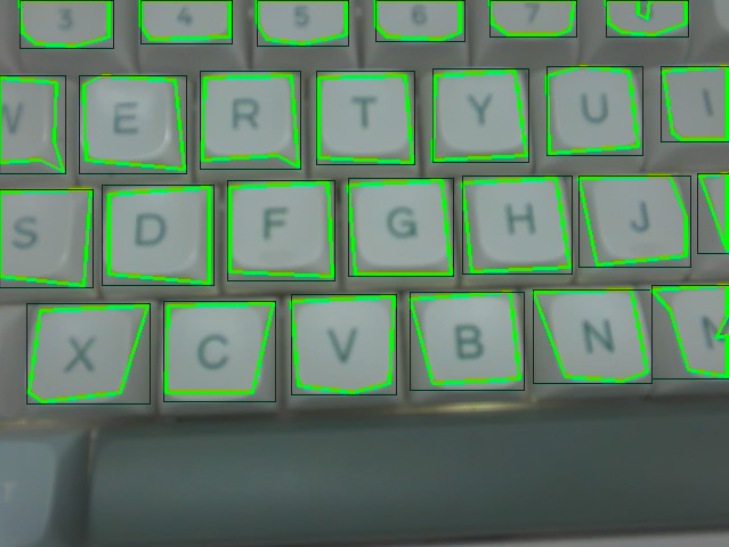
Example Results
Run the example code for this section 07.camera_find_contours.py.
This section performs grayscale conversion, Gaussian denoising, fixed threshold binarization, and closing operation on a 320x240 image, extracts external contours, calculates area, perimeter, polygon approximation and bounding rectangle, then scales the results by 2 and draws them onto the 640x480 original image.
Principle Explanation
What are Contours
Contours are a set of pixel coordinates arranged in boundary order. In binary images, white regions are typically treated as foreground, and findContours() generates contour point sets along the foreground boundary. Contours can further calculate area, perimeter, bounding rectangle, and approximating polygon.
This example's processing flow is as follows:
640x480 BGR image ↓ resize320x240 BGR image ↓ grayscale, Gaussian blur, fixed thresholdBinary image ↓ closing operationForeground with holes filled ↓ findContoursExternal contours ↓ area, perimeter, approximation, bounding rectangle ↓ coordinates multiplied by 2Draw onto original imageMain Contour Properties
contourArea(): Calculates the area enclosed by the contour.
arcLength(): Calculates the contour perimeter, the second parameter indicates whether it is closed.
approxPolyDP(): Simplifies the contour according to the error threshold.
boundingRect(): Returns the axis-aligned bounding rectangle (x, y, w, h).
Code Overview
Initialize Camera and Display Module
xxxxxxxxxxW, H = 640, 480sensor = Sensor(width=1280, height=960, fps=90)sensor.reset()sensor.set_framesize(width=W, height=H)sensor.set_pixformat(Sensor.RGB888)Display.init(Display.ST7701, width=640, height=480, to_ide=True)sensor.run()time.sleep(0.5)Set Area Threshold and Morphological Kernel
xxxxxxxxxxMIN_A = 50k = cv2.getStructuringElement(cv2.MORPH_RECT, (3, 3))MIN_A=50 is the area threshold set for 320x240 processed image. When scaling back to 640x480 full resolution processing, the area scale expands to approximately four times, so this value cannot be used directly.
Image Preprocessing
xxxxxxxxxxsmall = cv2.resize(img_np, (320, 240))gray = cv2.cvtColor(small, cv2.COLOR_BGR2GRAY)blur = cv2.GaussianBlur(gray, (3, 3), 0)ret, binary = cv2.threshold(blur, 127, 255, cv2.THRESH_BINARY)closed = cv2.morphologyEx(binary, cv2.MORPH_CLOSE, k)The source code actually uses fixed threshold 127, not OTSU. Closing operation is used to fill small holes and boundary gaps inside the target.
Find and Analyze Contours
xcontours, _ = cv2.findContours( closed, cv2.RETR_EXTERNAL, cv2.CHAIN_APPROX_SIMPLE)
for contour in contours: area = cv2.contourArea(contour) if area < MIN_A: continue
perimeter = cv2.arcLength(contour, True) approx = cv2.approxPolyDP(contour, 0.02 * perimeter, True) x, y, w, h = cv2.boundingRect(contour)Only external contours are extracted, with a maximum of 50 valid contours processed. Approximation error is 2% of the perimeter.
Map Coordinates Back and Draw
xxxxxxxxxxcv2.drawContours(img_np, [approx * 2], -1, (0, 255, 0), 2)cv2.rectangle( img_np, (x * 2, y * 2), (x * 2 + w * 2, y * 2 + h * 2), (0, 0, 255), 1)Point coordinates, rectangle origin, width and height all need to be multiplied by 2. If only scaling the origin but forgetting to scale the width and height, the drawn rectangle will be noticeably smaller.
Resource Release
xxxxxxxxxxfinally: sensor.stop() Display.deinit() os.exitpoint(os.EXITPOINT_ENABLE_SLEEP) time.sleep_ms(100)Parameter Adjustment Notes
Fixed Threshold 127: Needs to be reset when the target is too dark or lighting varies significantly. Can also switch to OTSU and re-verify.
MIN_A: Currently calculated based on 320x240 area; should be adjusted proportionally by pixel area when processing resolution changes.
Closing Kernel: Can be changed to 5x5 when gaps are large, but larger kernels are more likely to connect adjacent targets.
Approximation Error 0.02: Increasing reduces vertices, decreasing preserves more boundary details.
External Contour Mode: When analyzing holes or nested contours, RETR_EXTERNAL is insufficient. Choose a retrieval mode that supports hierarchy and process hierarchy.
Coordinate Mapping: If subsequent processing size is not fixed at half, calculate scaling ratios separately using W/processed_width and H/processed_height.