Welcome to K230 Vision Module repository
8. Target Tracking
Target Tracking
Routine Experiment Effect
In this section, we will learn how to use K230 to achieve target tracking.
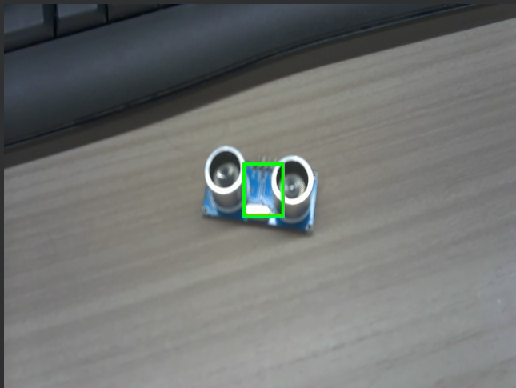
We run the sample program, aim the middle box at the object we want to identify (here we take an ultrasonic module as an example), and wait for about 8 seconds (you can see the output of the serial terminal)
The first 6 to 7 seconds are the learning and waiting process, and the box is green at this time.
During the waiting phase, the serial terminal will output a countdown:
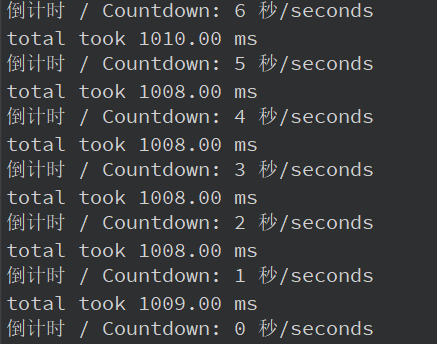
When the countdown ends, the box in the middle of the screen will turn red, indicating that K230 has entered the search and tracking stage.

Note! Please do not move the object to be tracked quickly, otherwise it will not be tracked correctly.
Code Explanation
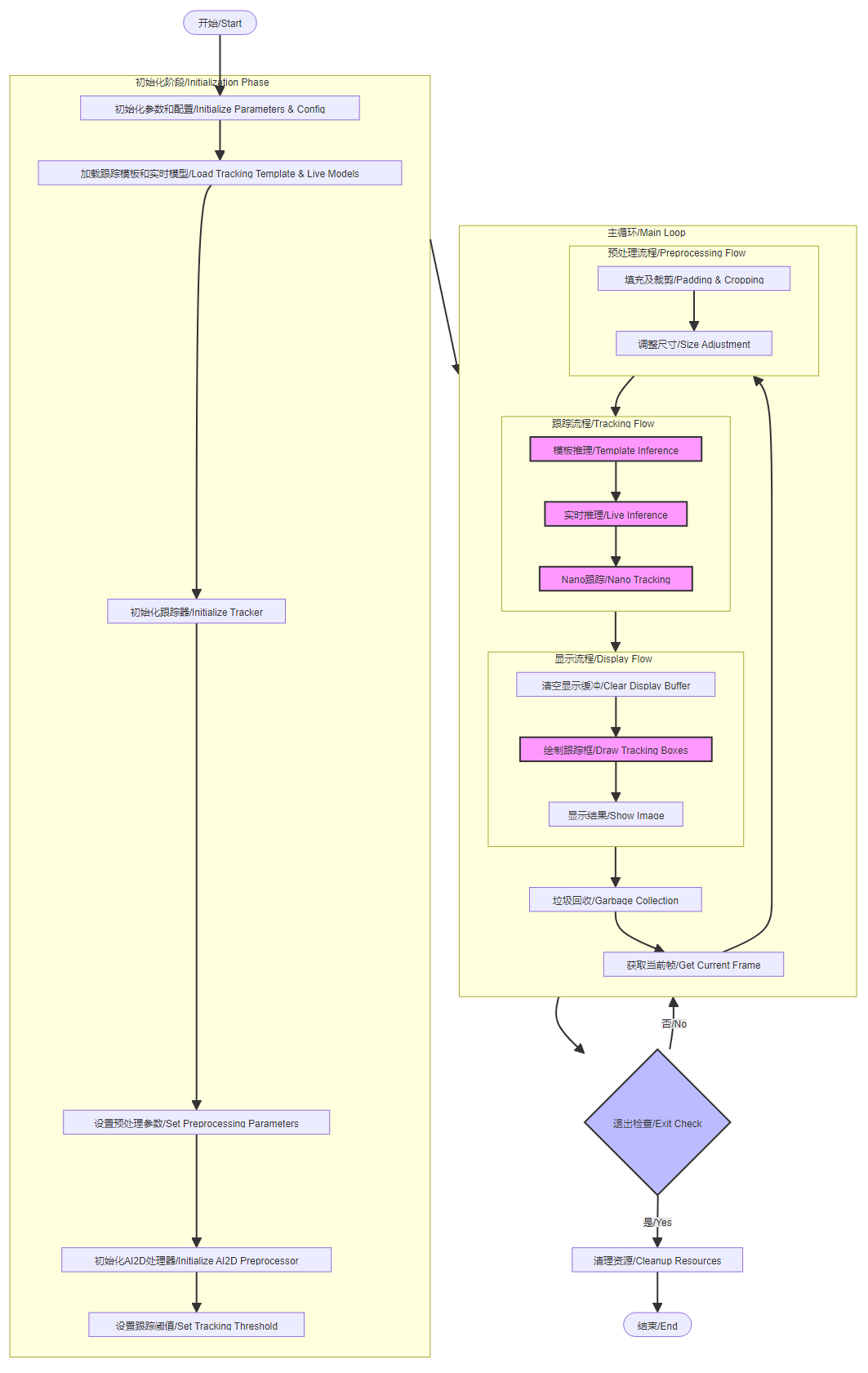
Code structure
Initialization phase:
- Loading tracking templates and live models
- Initialize the tracker
- Set preprocessing parameters
- Initialize the AI2D preprocessor
- Configuring Tracking Thresholds
Main loop phase:
- Image acquisition and preprocessing
- Template reasoning and real-time reasoning
- Tracking algorithm processing
- Results
- Resource Recycling
Exit Processing:
- Abnormality Check
- Resource Cleanup
Code Analysis
For the complete code, please refer to the file [Source Code/09.Scene/06.licence_det.py]
Learning & Tracking Section
xxxxxxxxxx def run(self, input_np): """ 运行追踪算法 / Run tracking algorithm Args: input_np: 输入图像 / Input image Returns: 追踪结果 / Tracking results """ nowtime = time.ticks_ms()//1000 # 初始化阶段:获取模板特征 / Initialization phase: get template features if (self.enter_init and nowtime <= self.endtime): print("倒计时 / Countdown: " + str(self.endtime - nowtime) + " 秒/seconds") self.crop_output = self.track_crop.run(input_np) time.sleep(1) return self.draw_mean # 追踪阶段:对当前帧进行特征提取和追踪 / Tracking phase: feature extraction and tracking for current frame else: self.track_src.config_preprocess(self.center_xy_wh) self.src_output = self.track_src.run(input_np) det = self.tracker.run(self.crop_output, self.src_output, self.center_xy_wh) return det def draw_result(self, pl, box): """ 绘制追踪结果 / Draw tracking results Args: pl: Pipeline对象 / Pipeline object box: 追踪框坐标 / Tracking box coordinates """ pl.osd_img.clear() # 初始化阶段绘制 / Drawing during initialization phase if self.enter_init: pl.osd_img.draw_rectangle(box[0], box[1], box[2], box[3], color=(255, 0, 255, 0), thickness=4) if (time.ticks_ms()//1000 > self.endtime): self.enter_init = False # 追踪阶段绘制 / Drawing during tracking phase else: self.track_boxes = box[0] self.center_xy_wh = box[1] # 检查追踪框是否有效 / Check if tracking box is valid track_bool = True if (len(self.track_boxes) != 0): # 确保追踪框在图像范围内 / Ensure tracking box is within image bounds track_bool = (self.track_boxes[0] > 10 and self.track_boxes[1] > 10 and self.track_boxes[0] + self.track_boxes[2] < self.rgb888p_size[0] - 10 and self.track_boxes[1] + self.track_boxes[3] < self.rgb888p_size[1] - 10) else: track_bool = False # 检查目标大小是否合适 / Check if target size is appropriate if (len(self.center_xy_wh) != 0): track_bool = track_bool and self.center_xy_wh[2] * self.center_xy_wh[3] < 40000 else: track_bool = False if (track_bool): # 更新临时存储并绘制有效的追踪框 / Update temporary storage and draw valid tracking box self.center_xy_wh_tmp = self.center_xy_wh self.track_boxes_tmp = self.track_boxes x1 = int(float(self.track_boxes[0]) * self.display_size[0] / self.rgb888p_size[0]) y1 = int(float(self.track_boxes[1]) * self.display_size[1] / self.rgb888p_size[1]) w = int(float(self.track_boxes[2]) * self.display_size[0] / self.rgb888p_size[0]) h = int(float(self.track_boxes[3]) * self.display_size[1] / self.rgb888p_size[1]) pl.osd_img.draw_rectangle(x1, y1, w, h, color=(255, 255, 0, 0), thickness=4) else: # 使用上一帧的有效追踪框并显示警告 / Use previous valid tracking box and show warnings self.center_xy_wh = self.center_xy_wh_tmp self.track_boxes = self.track_boxes_tmp x1 = int(float(self.track_boxes[0]) * self.display_size[0] / self.rgb888p_size[0]) y1 = int(float(self.track_boxes[1]) * self.display_size[1] / self.rgb888p_size[1]) w = int(float(self.track_boxes[2]) * self.display_size[0] / self.rgb888p_size[0]) h = int(float(self.track_boxes[3]) * self.display_size[1] / self.rgb888p_size[1]) pl.osd_img.draw_rectangle(x1, y1, w, h, color=(255, 255, 0, 0), thickness=4) pl.osd_img.draw_string_advanced(x1, y1-50, 32, "请远离摄像头,保持跟踪物体大小基本一致! / Please move away from camera, keep target size consistent!", color=(255, 255, 0, 0)) pl.osd_img.draw_string_advanced(x1, y1-100, 32, "请靠近中心! / Please move closer to center!", color=(255, 255, 0, 0))
flow chart