Welcome to K230 Vision Module repository
1. Wireless network connection
Wireless network connection
Wireless network connectionRoutine explanationIntroductionComplete codeTroubleshooting common connection failure causes
Routine explanation
Introduction
The Yabo Smart K230 has a built-in WIFI chip. In this section, we will try to connect to a nearby WIFI hotspot.
We change the "[WIFI SSID]" in the sample code to the name of the WIFI nearby (preferably in English), and "[WIFI PASSWORD]" to the password corresponding to the WIFI hotspot. After changing, click the run button in the lower left corner of CanMV IDE. Let's look at the output of the console. If the output is "Connect successfully", it means that WIFI can communicate normally.
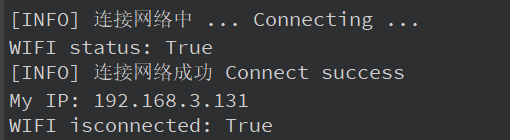
The complete output is as follows
x[INFO] Connecting to the network... Connecting ...WIFI status: True[INFO] Connect to the network successfullyMy IP: 192.168.3.131WIFI isconnected: TrueWIFI status: FalseWIFI isconnected: False
Complete code
The complete code file is in [Source Code Summary/11.Network/01.wifi/connetc_wifi.py]
xxxxxxxxxximport network # 导入网络模块,用于处理WiFi连接 / Import network module for handling WiFi connectionsimport os # 导入操作系统模块,提供系统相关功能 / Import os module for system-related functionsimport time # 导入时间模块,用于延时操作 / Import time module for delay operationsWIFI_SSID = "[WIFI SSID]" # WiFi网络名称(SSID) / WiFi network name (SSID)WIFI_PASSWD = "[WIFI PASSWORD]" # WiFi网络密码 / WiFi network passwordprint("[INFO] 连接网络中 ... Connecting ...") # 打印信息,表示正在连接网络 / Print info indicating network connection in progresswifi = network.WLAN(network.STA_IF) # 创建WLAN对象,设置为STA模式(客户端模式) / Create WLAN object, set to STA mode (client mode)# STA模式连接到指定的WiFi接入点(AP) / Connect to the specified WiFi access point (AP) in STA modewifi.connect(WIFI_SSID, WIFI_PASSWD) # 使用SSID和密码连接WiFi / Connect to WiFi using SSID and password# 查看STA模式的WiFi连接状态 / Check the WiFi connection status in STA modeprint("WIFI status:", wifi.status()) # 打印WiFi状态码 / Print WiFi status codewifi.status() # 获取WiFi状态 / Get WiFi statusif wifi.status(): # 判断WiFi状态是否为非0(通常非0表示连接成功) / Check if WiFi status is non-zero (typically non-zero means connected) print("[INFO] 连接网络成功 Connect success") # 打印成功连接信息 / Print successful connection messageelse: print("[ERROR] 连接网络失败 Connect failed") # 打印连接失败信息 / Print connection failure message# 等待直到获取到有效的IP地址 / Wait until a valid IP address is obtainedwhile wifi.ifconfig()[0] == '0.0.0.0': # 检查IP地址是否为'0.0.0.0'(未分配IP) / Check if IP address is '0.0.0.0' (unassigned IP) os.exitpoint() # 检查是否有退出信号,允许外部中断 / Check for exit signal, allowing external interruption# 查看并打印IP配置信息 / View and print IP configuration informationprint("My IP:", wifi.ifconfig()[0]) # 打印当前设备的IP地址 / Print the current device's IP address# 查看WiFi是否已连接 / Check if WiFi is connectedprint("WIFI isconnected:", wifi.isconnected()) # 打印WiFi连接状态(True表示已连接) / Print WiFi connection status (True means connected)time.sleep(5) # 延时5秒,等待网络稳定或观察状态 / Delay for 5 seconds to stabilize the network or observe status# 断开WiFi连接 / Disconnect from WiFiwifi.disconnect() # 断开当前WiFi连接 / Disconnect the current WiFi connection# 查看断开后的STA状态 / Check STA status after disconnectionprint("WIFI status:", wifi.status()) # 打印断开后的WiFi状态码 / Print WiFi status code after disconnectionprint("WIFI isconnected:", wifi.isconnected()) # 打印断开后的连接状态 / Print connection status after disconnection
Troubleshooting common connection failure causes
- First test whether the WIFI can be connected by a mobile phone or other device to determine whether the router is good or bad.
- Check if the SSID and password are correct.
- According to the official documentation of the chip, it only supports 2.4Ghz WIFI, and does not support WIFI of other frequency bands. (During my test, 5Ghz can be connected with probability, but the compatibility and stability may be poor)
- If the error message: run connect failed appears, and you are sure that the WIFI name (SSID) and password are correct, please try to unplug the USB cable (power off), wait for 5 seconds, then plug in the USB cable and try again, or try to connect to another WIFI.