Welcome to K230 Vision Module repository
1. OpenCV Introduction
K230 OpenCV (cv2) Introduction
This tutorial is based on CanMV_K230_YAHBOOM_micropython_v1.8-13 firmware. OpenCV examples require firmware version micropython_v1.8 or higher.
1. Why Use the OpenCV Library
K230 has two vision processing solutions: cv_lite and cv2 (OpenCV). Here is their relationship and selection logic:
Comparison
| cv_lite | cv2 (OpenCV) | |
|---|---|---|
| Invocation method | Single function completes entire algorithm chain | Multi-step free combination |
| Typical code | cv_lite.rgb888_find_blobs(img, thr, area, ksize) | cvtColor → GaussianBlur → Canny → findContours |
| Flexibility | Low (each function is a black box) | High (each step is controllable and replaceable) |
| Debuggability | Difficult (intermediate results invisible) | Easy (every step can be displayed for inspection) |
| Feature breadth | ~15 atomic operations | 50+ standard OpenCV functions |
| Learning value | Hardware vendor lock-in | Universal skills, consistent with desktop OpenCV |
| Use case | Quick hardware verification, single-task production lines | Algorithm development, learning, prototype validation |
Three Reasons to Choose cv2
1. Standard API, learn once use everywhere
K230's cv2 is a MicroPython port of standard OpenCV - function names, parameters, and constants are consistent with the desktop version. Once you learn cv2.Canny() on K230, you can still write it on PC/Raspberry Pi/Jetson.
2. Free combination, no encapsulation limitations
cv_lite's find_blobs internally does binarization + connected components + area filtering - if a certain step's parameters are not suitable, you cannot replace it or see the intermediate results. cv2 lets you build your own pipeline: change the thresholding method, change the blur type, add morphology, fully customizable.
3. Broad coverage, one library for everything
50+ functions cover color conversion, geometric transformation, thresholding, filtering, edge detection, morphology, contours, Hough detection, template matching, arithmetic operations, channel operations, drawing - basically covering all embedded vision needs.
When to Choose cv_lite
If you only need a fixed task like "find a red color block and calculate distance", cv_lite is faster and more memory-efficient with one line of code. It compiles the entire pipeline into a C extension, avoiding multiple Python layer call overheads.
2. What is K230 OpenCV
OpenCV on K230 is a MicroPython port of standard OpenCV (import cv2), running on CanMV firmware. It provides OpenCV core image processing functions, captures real-time video through the camera (Sensor), and virtually displays in the IDE (Display).
3. Environment Requirements
| Component | Description |
|---|---|
| Hardware | YAHBOOM K230 development board + camera module |
| Firmware | CanMV_K230_YAHBOOM_micropython_v1.8-13 |
| IDE | CanMV IDE or VS Code + CanMV plugin |
| Resolution | Default 640x480 |
Reference: K230 MicroPython Daily Build Download Center
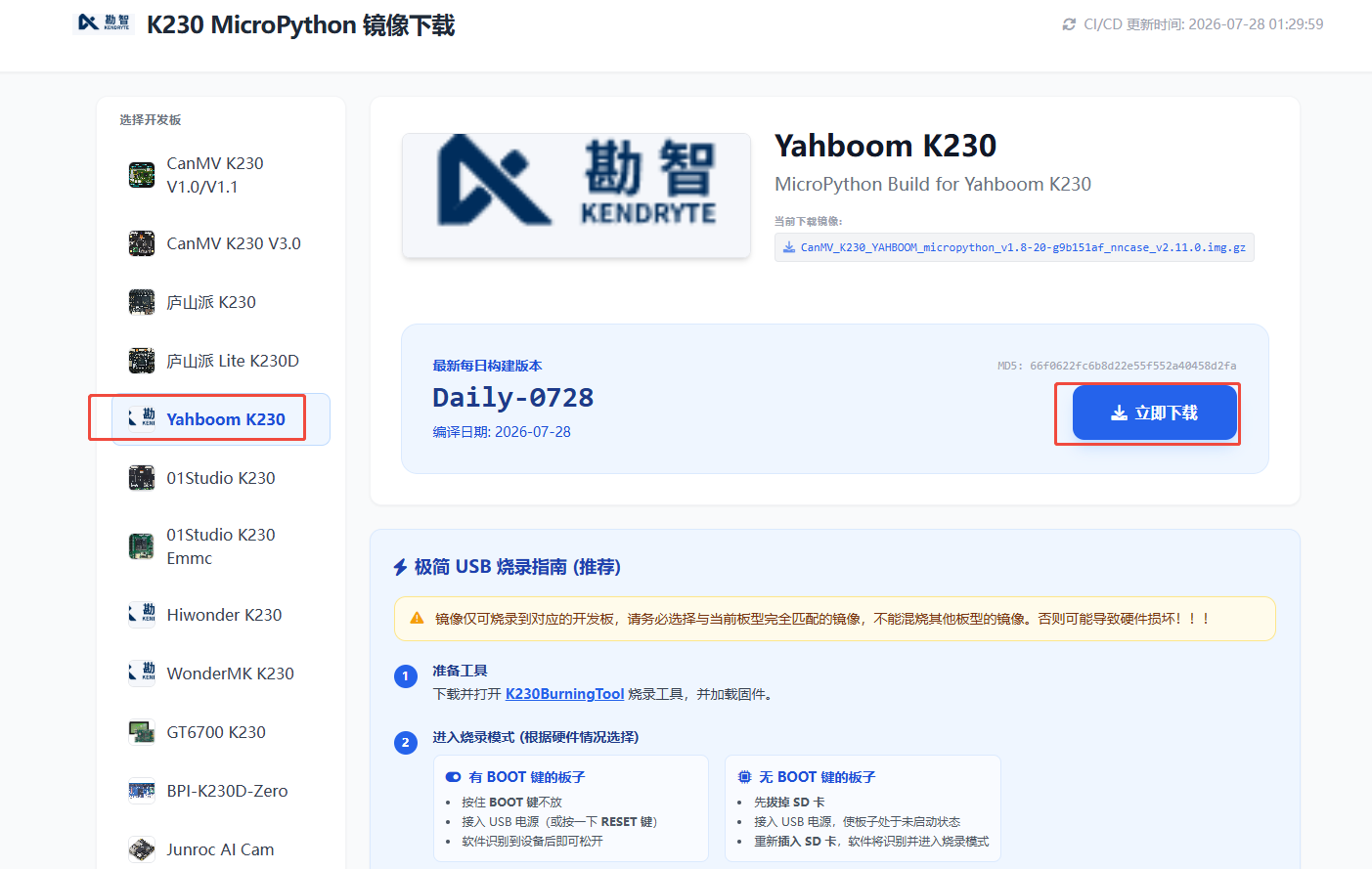
4. Basic Program Structure
ximport time, os, sys, gcfrom media.sensor import * # Camerafrom media.display import * # Displayfrom media.media import * # Media managementimport cv2 # OpenCVimport ulab.numpy as np # Lightweight NumPy
# Initialize camerasensor = Sensor(width=1280, height=960, fps=90)sensor.reset()sensor.set_framesize(width=640, height=480)sensor.set_pixformat(Sensor.RGB888)
# Initialize displayDisplay.init(Display.ST7701, width=640, height=480, to_ide=True)sensor.run()time.sleep(0.5) # Wait for sensor to stabilize
# Main looptry: while True: time.sleep_ms(10) # CPU yield (IDE can stop) img = sensor.snapshot() img_np = img.to_numpy_ref()
# cv2 image processing ... gray = cv2.cvtColor(img_np, cv2.COLOR_BGR2GRAY) edges = cv2.Canny(gray, 80, 200)
# Grayscale display img_out = image.Image(640, 480, image.GRAYSCALE, alloc=image.ALLOC_REF, data=edges) Display.show_image(img_out) gc.collect()finally: sensor.stop() Display.deinit()5. Display Methods
| Output type | Display method |
|---|---|
| Color image | cv2.xxx(img_np, ...) → Display.show_image(img) |
| Grayscale image | image.Image(W,H,image.GRAYSCALE,alloc=image.ALLOC_REF,data=out) → Display.show_image(img_out) |
| ⚠️ Color image + image.Image | K230 does not support image.Image(RGB888, ALLOC_REF, data=cv2_output) |
6. K230 Specific Limitations
| Limitation | Description |
|---|---|
cv2.add does not support scalar broadcasting | Both arrays must have the same size |
cv2.compare requires float64 | Scalars must be floating point |
HoughCircles returns (N,3) | Not standard OpenCV's (N,1,3) |
HoughLines returns (N,2) | Not (N,1,2) |
approxPolyDP returns (N,2) | Not (N,1,2) |
image.Image(RGB888, ALLOC_REF) | Can only use sensor's native img object |
np.float32 does not exist | ulab only supports np.float |
np.array() dtype keyword | May error in loops, recommend omitting |
cv2.putText grayscale scalar color | Use (255,) tuple instead of 255 |
7. Performance Reference
| Operation type | 640x480 frame rate | Optimization methods |
|---|---|---|
| Pixel operations (flip/resize/threshold) | 50-80 fps | — |
| Local convolution (blur/morphology/edge) | 15-30 fps | Reduce kernel size |
| Global search (Hough/matchTemplate) | 3-10 fps | Downsample to 320x240 for processing |
8. opencv_demo Collection
17 independently runnable camera demos, each corresponding to an original OpenCV file, covering 50+ cv2 functions.
Learning Path
01 Basic Transforms ──→ 08 Drawing ──→ 12 Thresholding│├──→ 10 Blur ──→ 11 Edge Detection│├──→ 02 Morphology│├──→ 13 Color Segmentation ──→ 03 Shape Classification ──→ 07 Contour Analysis ──→ 04 Corners│├──→ 05 Hough Circles ──→ 06 Hough Lines ──→ 09 Template Matching│├──→ 14 Pixel Transform├──→ 15 Arithmetic Bitwise Operations└──→ 16 Channel Statistics