Welcome to K230 Vision Module repository
3. Multi-color recognition
Multi-color recognition
Multi-color recognitionIntroduction to the results of routine experimentsCode ExplanationComplete codeCode structure
Introduction to the results of routine experiments
The example code for this section is located in: [Source code/05.Color/03.multi_color_recognition.py]
We use CanMV IDE to open the sample code and connect K230 to the computer via USB.
Open the sample code, find the THRESHOLDS array, and find the index of the color you want to track/identify in the array.
For adding methods, we can see the [Add custom colors] section in the previous section.

Click the Run button in the lower left corner of CanMV IDE.
The K230 screen will simultaneously frame the red, green and blue colors of the image captured by the camera.
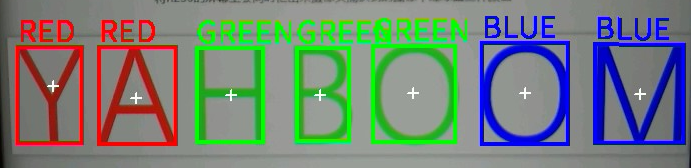
Code Explanation
The peripherals we will use in this section are mainly camera modules
Line segment detection is implemented by the find_blobs() method in K230, which belongs to the image module
Complete code
xxxxxxxxxximport time, os, sysfrom media.sensor import *from media.display import *from media.media import *# 显示参数 / Display parametersDISPLAY_WIDTH = 800 # LCD显示宽度 / LCD display widthDISPLAY_HEIGHT = 480 # LCD显示高度 / LCD display height# 颜色阈值(LAB色彩空间) / Color thresholds (LAB color space)# (L Min, L Max, A Min, A Max, B Min, B Max)COLOR_THRESHOLDS = [ (0, 66, 7, 127, 3, 127), # 红色阈值 / Red threshold (42, 100, -128, -17, 6, 66), # 绿色阈值 / Green threshold (43, 99, -43, -4, -56, -7), # 蓝色阈值 / Blue threshold]# 显示颜色定义 / Display color definitionsDRAW_COLORS = [(255,0,0), (0,255,0), (0,0,255)] # RGB颜色 / RGB colorsCOLOR_LABELS = ['RED', 'GREEN', 'BLUE'] # 颜色标签 / Color labelsdef init_sensor(): """初始化摄像头 / Initialize camera sensor""" sensor = Sensor() sensor.reset() sensor.set_framesize(width=DISPLAY_WIDTH, height=DISPLAY_HEIGHT) sensor.set_pixformat(Sensor.RGB565) return sensor•def init_display(): """初始化显示 / Initialize display""" Display.init(Display.ST7701, to_ide=True) MediaManager.init()•def process_blobs(img, threshold_idx): """处理颜色区块检测 / Process color blob detection""" blobs = img.find_blobs([COLOR_THRESHOLDS[threshold_idx]]) if blobs: for blob in blobs: # 绘制检测框和标记 / Draw detection box and markers img.draw_rectangle(blob[0:4], thickness=4, color=DRAW_COLORS[threshold_idx]) img.draw_cross(blob[5], blob[6], thickness=2) img.draw_string_advanced(blob[0], blob[1]-35, 30, COLOR_LABELS[threshold_idx], color=DRAW_COLORS[threshold_idx])def main(): try: # 初始化设备 / Initialize devices sensor = init_sensor() init_display() sensor.run() clock = time.clock() while True: clock.tick() # 捕获图像 / Capture image img = sensor.snapshot() # 检测三种颜色 / Detect three colors for i in range(3): process_blobs(img, i) # 显示FPS / Display FPS fps_text = f'FPS: {clock.fps():.3f}' img.draw_string_advanced(0, 0, 30, fps_text, color=(255, 255, 255)) # 显示图像并打印FPS / Display image and print FPS Display.show_image(img) print(clock.fps()) except KeyboardInterrupt as e: print("用户中断 / User interrupted: ", e) except Exception as e: print(f"发生错误 / Error occurred: {e}") finally: # 清理资源 / Cleanup resources if 'sensor' in locals() and isinstance(sensor, Sensor): sensor.stop() Display.deinit() MediaManager.deinit()if __name__ == "__main__": main()
Code structure
Basic settings:
- Set the display resolution to 640×480
- The detection thresholds for red, green, and blue are defined using the LAB color space.
- The DRAW_COLORS and COLOR_LABELS arrays are used to draw markers and display color labels
Major improvements:
- Detect three colors simultaneously
- Add color labels and text annotations to detected objects
- Simplified color processing logic
Workflow:
Initialize the camera and display
After entering the main loop:
- Continuous image capture
- Detect three colors in sequence
- Draw rectangles, cross marks, and color labels for each detected object
- Display frame rate information
Exception handling:
- The complete exception handling mechanism is retained
- Ensure that hardware resources are released correctly when the program ends
The detailed flow chart is as follows:

