Welcome to K230 Vision Module repository
12.Rectangle Recognition - Color Image
Rectangle Recognition - Color Image
Rectangle Recognition - Color ImageExample ResultsCode OverviewImporting ModulesSetting the Image SizeInitialize the camera (RGB888 format)Initialize the display moduleInitialize the media manager and start the cameraSet rectangle detection parametersImage Processing and Rectangle DetectionResource releaseParameter adjustment instructions
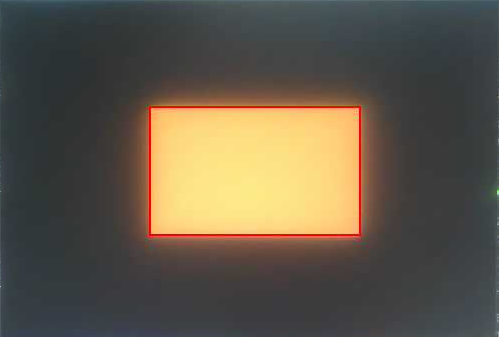
Example Results
Run this section's example code [Source Code /06.cv_lite/8.rgb888_find_rectangles.py]
In this section, we will use the cv_lite extension module to implement rectangle detection in RGB888 format on an embedded device.
Code Overview
Importing Modules
import time, os, sys, gcfrom machine import Pinfrom media.sensor import * # Camera interfacefrom media.display import * # Display interfacefrom media.media import * # Media managerimport _threadimport cv_lite # cv_lite extension moduleimport ulab.numpy as npSetting the Image Size
xxxxxxxxxximage_shape = [480, 640] # Height x WidthDefine the image resolution to 480x640 (height x width). The camera and display modules will be initialized based on this size.
Initialize the camera (RGB888 format)
xxxxxxxxxxsensor = Sensor(id=2, width=1280, height=960, fps=90)sensor.reset()sensor.set_framesize(width=image_shape[1], height=image_shape[0])sensor.set_pixformat(Sensor.RGB888) # Set RGB888 pixel format- Initialize the camera, set the resolution to 1280x960 and the frame rate to 90 FPS.
- Resize the output frame to 640x480 and set it to RGB888 format (three-channel color image, suitable for rectangle detection in color images).
Initialize the display module
xxxxxxxxxxDisplay.init(Display.ST7701, width=image_shape[1], height=image_shape[0], to_ide=True, quality=50)Initialize the display module, using the ST7701 driver chip, with a resolution consistent with the image size. to_ide=True indicates that the image will be simultaneously transmitted to the IDE for virtual display, and quality=50 sets the image transmission quality.
Initialize the media manager and start the camera
xxxxxxxxxxMediaManager.init()sensor.run()Initialize the media resource manager and start the camera to capture the image stream.
Set rectangle detection parameters
xxxxxxxxxxcanny_thresh1 = 50 # Canny edge detection low thresholdcanny_thresh2 = 150 # Canny edge detection high thresholdapprox_epsilon = 0.04 # Polygon approximation precision (ratio)area_min_ratio = 0.001 # Minimum area ratio (0-1)max_angle_cos = 0.5 # Maximum angle cosine (smaller, closer to rectangle)gaussian_blur_size = 5 # Gaussian blur kernel size (odd number)clock = time.clock() # Start FPS timercanny_thresh1: The lower threshold for Canny edge detection, used to control the detection of weak edges.canny_thresh2: The upper threshold for Canny edge detection, used to control the detection of strong edges. A larger value results in fewer edges being detected.approx_epsilon: The polygon fitting accuracy ratio. A smaller value results in more accurate fitting, but increases the computational effort.area_min_ratio: The minimum area ratio relative to the total image area, used to filter out rectangles that are too small.max_angle_cos: The maximum angle cosine. A smaller value results in shapes that are closer to rectangles.gaussian_blur_size: The Gaussian blur kernel size. Used for image preprocessing to reduce noise. Must be an odd number.clock: Used to calculate the frame rate.
Image Processing and Rectangle Detection
xwhile True: clock.tick() # Capture current frame img = sensor.snapshot() img_np = img.to_numpy_ref() # Get RGB888 ndarray reference # Call underlying rectangle detection function, returns list of rectangles [x0, y0, w0, h0, x1, y1, w1, h1, ...] # Call underlying rectangle detection function, returns list of rectangles [x, y, w, h, ...] rects = cv_lite.rgb888_find_rectangles( image_shape, img_np, canny_thresh1, canny_thresh2, approx_epsilon, area_min_ratio, max_angle_cos, gaussian_blur_size ) # Iterate detected rectangles and draw bounding boxes for i in range(0, len(rects), 4): x = rects[i] y = rects[i + 1] w = rects[i + 2] h = rects[i + 3] img.draw_rectangle(x, y, w, h, color=(255, 0, 0), thickness=2) # Display image with drawn rectangles Display.show_image(img) # Free temporary variables memory del img_np del img # Perform garbage collection gc.collect() # Print current FPS and number of detected rectangles print("fps:", clock.fps())- Image Capture: Acquire an image frame using
sensor.snapshot()and convert it to a NumPy array reference usingto_numpy_ref(). - Rectangle Detection: Call
cv_lite.rgb888_find_rectangles()to detect rectangles and return a list of detected rectangle information (each rectangle occupies 4 elements:[x, y, w, h], i.e., the coordinates of the upper-left corner, width, and height). - Rectangle Drawing: Iterate over each detected rectangle and draw a red rectangular outline (
color=(255, 0, 0)) on the image to mark the target area. - Image Display: Display the processed image to the screen or IDE virtual window.
- Memory Management and Frame Rate Output: Release temporary variables, call
gc.collect()to clean up memory, and print the current frame rate usingclock.fps().
Resource release
xxxxxxxxxxsensor.stop()Display.deinit()os.exitpoint(os.EXITPOINT_ENABLE_SLEEP)time.sleep_ms(100)MediaManager.deinit()Parameter adjustment instructions
canny_thresh1: Low threshold. The smaller the value, the more weak edges can be detected, but it may introduce noise. It is recommended to start adjusting from 50.canny_thresh2: High threshold. The larger the value, the fewer strong edges are detected. It is suitable for noisy environments. Increasing this value can reduce false edges.approx_epsilon: Polygon fitting accuracy ratio. The smaller the value, the more accurate the fitting, but the calculation amount increases. It is recommended to adjust it according to the complexity of the image.area_min_ratio: Minimum area ratio. The larger the value, the more rectangles are filtered out. It is suitable for ignoring small targets. Adjust it according to the target size.max_angle_cos: Maximum angle cosine. Smaller values result in detected shapes that are closer to rectangles, making it suitable for strictly filtering for rectangles. A starting value of 0.5 is recommended.gaussian_blur_size: Gaussian blur kernel size. Larger values produce greater image smoothing, but may result in loss of detail. This must be an odd number; 3 or 5 is recommended as a starting point for testing.