Welcome to K230 Vision Module repository
11. Road sign recognition
Road sign recognition
Road sign recognitionEffect IntroductionRoutine source codeCode flowCode structure1. Import dependencies2. Configuration initialization3. Read json parameters4. Main functionRoad sign pictures
Effect Introduction
In this section, we will use the road sign recognition model to recognize road sign images.
Note: Since the road sign images given during model training are fixed and the amount of data is limited, only the road signs in the routine's own images can be recognized, and real road signs may not be recognized.
Use CanMV IDE K230 to run the example source code, and you can see the camera image. When the camera is facing the road sign image, you can see the road sign framed and the road sign name displayed above the frame.
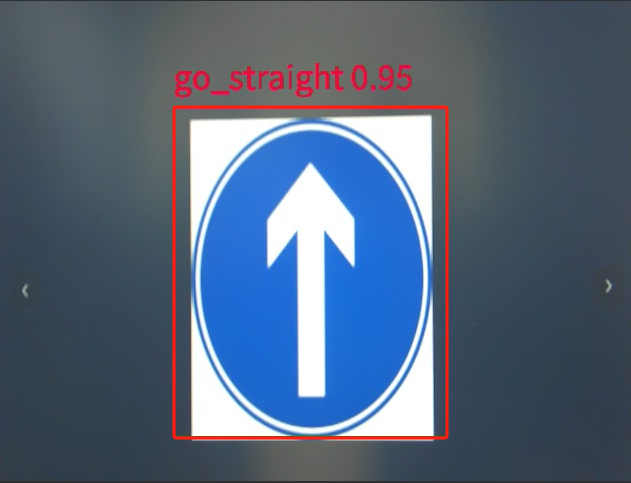
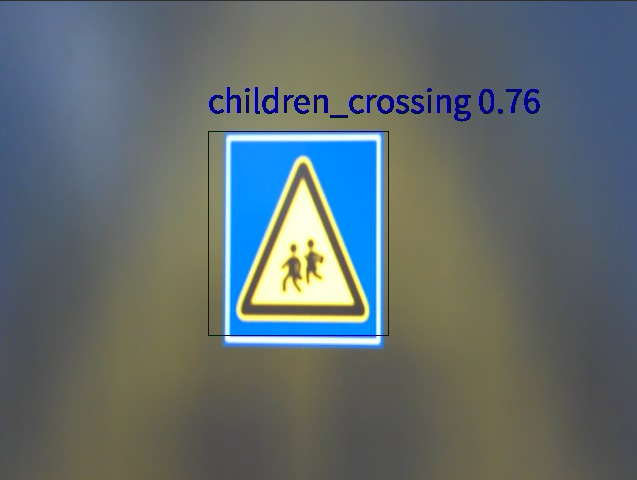
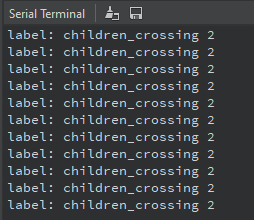
At the same time, the canmv IDE terminal will also print the corresponding name.
Routine source code
Copy the following source code to CanMV IDE K230 and run it.
xxxxxxxxxximport osimport ujsonimport aicubefrom media.sensor import *from media.display import *from media.media import *from time import *import nncase_runtime as nnimport ulab.numpy as npimport timeimport imageimport gcdisplay_mode="lcd"DISPLAY_WIDTH = ALIGN_UP(640, 16)DISPLAY_HEIGHT = 480OUT_RGB888P_WIDTH = ALIGN_UP(1080, 16)OUT_RGB888P_HEIGH = 720# 颜色盘 Color wheelcolor_four = [(255, 220, 20, 60), (255, 119, 11, 32), (255, 0, 0, 142), (255, 0, 0, 230), (255, 106, 0, 228), (255, 0, 60, 100), (255, 0, 80, 100), (255, 0, 0, 70), (255, 0, 0, 192), (255, 250, 170, 30), (255, 100, 170, 30), (255, 220, 220, 0), (255, 175, 116, 175), (255, 250, 0, 30), (255, 165, 42, 42), (255, 255, 77, 255), (255, 0, 226, 252), (255, 182, 182, 255), (255, 0, 82, 0), (255, 120, 166, 157), (255, 110, 76, 0), (255, 174, 57, 255), (255, 199, 100, 0), (255, 72, 0, 118), (255, 255, 179, 240), (255, 0, 125, 92), (255, 209, 0, 151), (255, 188, 208, 182), (255, 0, 220, 176), (255, 255, 99, 164), (255, 92, 0, 73), (255, 133, 129, 255), (255, 78, 180, 255), (255, 0, 228, 0), (255, 174, 255, 243), (255, 45, 89, 255), (255, 134, 134, 103), (255, 145, 148, 174), (255, 255, 208, 186), (255, 197, 226, 255), (255, 171, 134, 1), (255, 109, 63, 54), (255, 207, 138, 255), (255, 151, 0, 95), (255, 9, 80, 61), (255, 84, 105, 51), (255, 74, 65, 105), (255, 166, 196, 102), (255, 208, 195, 210), (255, 255, 109, 65), (255, 0, 143, 149), (255, 179, 0, 194), (255, 209, 99, 106), (255, 5, 121, 0), (255, 227, 255, 205), (255, 147, 186, 208), (255, 153, 69, 1), (255, 3, 95, 161), (255, 163, 255, 0), (255, 119, 0, 170), (255, 0, 182, 199), (255, 0, 165, 120), (255, 183, 130, 88), (255, 95, 32, 0), (255, 130, 114, 135), (255, 110, 129, 133), (255, 166, 74, 118), (255, 219, 142, 185), (255, 79, 210, 114), (255, 178, 90, 62), (255, 65, 70, 15), (255, 127, 167, 115), (255, 59, 105, 106), (255, 142, 108, 45), (255, 196, 172, 0), (255, 95, 54, 80), (255, 128, 76, 255), (255, 201, 57, 1), (255, 246, 0, 122), (255, 191, 162, 208)]root_path="/sdcard/mp_detect_guide/"config_path=root_path+"deploy_config.json"deploy_conf={}debug_mode=0class ScopedTiming: def __init__(self, info="", enable_profile=True): self.info = info self.enable_profile = enable_profile def __enter__(self): if self.enable_profile: self.start_time = time.time_ns() return self def __exit__(self, exc_type, exc_value, traceback): if self.enable_profile: elapsed_time = time.time_ns() - self.start_time print(f"{self.info} took {elapsed_time / 1000000:.2f} ms")def read_deploy_config(config_path): # Open the JSON file to read deploy_config # 打开JSON文件以进行读取deploy_config with open(config_path, 'r') as json_file: try: # Load JSON data from a file # 从文件中加载JSON数据 config = ujson.load(json_file) # Print data (other operations can be performed as needed) # 打印数据(可根据需要执行其他操作) #print(config) except ValueError as e: print("JSON 解析错误:", e) return configdef detection(): print("det_infer start") # Use json to read content and initialize deployment variables # 使用json读取内容初始化部署变量 deploy_conf=read_deploy_config(config_path) kmodel_name=deploy_conf["kmodel_path"] labels=deploy_conf["categories"] confidence_threshold= deploy_conf["confidence_threshold"] nms_threshold = deploy_conf["nms_threshold"] img_size=deploy_conf["img_size"] num_classes=deploy_conf["num_classes"] nms_option = deploy_conf["nms_option"] model_type = deploy_conf["model_type"] if model_type == "AnchorBaseDet": anchors = deploy_conf["anchors"][0] + deploy_conf["anchors"][1] + deploy_conf["anchors"][2] kmodel_frame_size = img_size frame_size = [OUT_RGB888P_WIDTH,OUT_RGB888P_HEIGH] strides = [8,16,32] # Calculate padding value # 计算padding值 ori_w = OUT_RGB888P_WIDTH ori_h = OUT_RGB888P_HEIGH width = kmodel_frame_size[0] height = kmodel_frame_size[1] ratiow = float(width) / ori_w ratioh = float(height) / ori_h if ratiow < ratioh: ratio = ratiow else: ratio = ratioh new_w = int(ratio * ori_w) new_h = int(ratio * ori_h) dw = float(width - new_w) / 2 dh = float(height - new_h) / 2 top = int(round(dh - 0.1)) bottom = int(round(dh + 0.1)) left = int(round(dw - 0.1)) right = int(round(dw - 0.1)) # init kpu and load kmodel kpu = nn.kpu() ai2d = nn.ai2d() kpu.load_kmodel(root_path+kmodel_name) ai2d.set_dtype(nn.ai2d_format.NCHW_FMT, nn.ai2d_format.NCHW_FMT, np.uint8, np.uint8) ai2d.set_pad_param(True, [0,0,0,0,top,bottom,left,right], 0, [114,114,114]) ai2d.set_resize_param(True, nn.interp_method.tf_bilinear, nn.interp_mode.half_pixel ) ai2d_builder = ai2d.build([1,3,OUT_RGB888P_HEIGH,OUT_RGB888P_WIDTH], [1,3,height,width]) # Initialize and configure the sensor # 初始化并配置sensor # sensor = Sensor(width=1280, height=960) sensor = Sensor() sensor.reset() # Set up mirroring # 设置镜像 sensor.set_hmirror(False) # Set flip # 设置翻转 sensor.set_vflip(False) # Channel 0 is directly given to the display VO, the format is YUV420 # 通道0直接给到显示VO,格式为YUV420 sensor.set_framesize(width = DISPLAY_WIDTH, height = DISPLAY_HEIGHT) sensor.set_pixformat(PIXEL_FORMAT_YUV_SEMIPLANAR_420) # Channel 2 is given to AI for algorithm processing, the format is RGB888 # 通道2给到AI做算法处理,格式为RGB888 sensor.set_framesize(width = OUT_RGB888P_WIDTH , height = OUT_RGB888P_HEIGH, chn=CAM_CHN_ID_2) sensor.set_pixformat(PIXEL_FORMAT_RGB_888_PLANAR, chn=CAM_CHN_ID_2) # Bind the output of channel 0 to vo # 绑定通道0的输出到vo sensor_bind_info = sensor.bind_info(x = 0, y = 0, chn = CAM_CHN_ID_0) Display.bind_layer(**sensor_bind_info, layer = Display.LAYER_VIDEO1) # Set to ST7701 display, default 640x480 # 设置为ST7701显示,默认640x480 Display.init(Display.ST7701, to_ide = True) #Create OSD image #创建OSD图像 osd_img = image.Image(DISPLAY_WIDTH, DISPLAY_HEIGHT, image.ARGB8888) try: # media initialization # media初始化 MediaManager.init() # Start the sensor # 启动sensor sensor.run() rgb888p_img = None ai2d_input_tensor = None data = np.ones((1,3,width,height),dtype=np.uint8) ai2d_output_tensor = nn.from_numpy(data) while True: with ScopedTiming("total",debug_mode > 0): rgb888p_img = sensor.snapshot(chn=CAM_CHN_ID_2) # for rgb888planar if rgb888p_img.format() == image.RGBP888: ai2d_input = rgb888p_img.to_numpy_ref() ai2d_input_tensor = nn.from_numpy(ai2d_input) ai2d_builder.run(ai2d_input_tensor, ai2d_output_tensor) # set input kpu.set_input_tensor(0, ai2d_output_tensor) # run kmodel kpu.run() # get output results = [] for i in range(kpu.outputs_size()): out_data = kpu.get_output_tensor(i) result = out_data.to_numpy() result = result.reshape((result.shape[0]*result.shape[1]*result.shape[2]*result.shape[3])) del out_data results.append(result) gc.collect() # postprocess if model_type == "AnchorBaseDet": det_boxes = aicube.anchorbasedet_post_process( results[0], results[1], results[2], kmodel_frame_size, frame_size, strides, num_classes, confidence_threshold, nms_threshold, anchors, nms_option) elif model_type == "GFLDet": det_boxes = aicube.gfldet_post_process( results[0], results[1], results[2], kmodel_frame_size, frame_size, strides, num_classes, confidence_threshold, nms_threshold, nms_option) else: det_boxes = aicube.anchorfreedet_post_process( results[0], results[1], results[2], kmodel_frame_size, frame_size, strides, num_classes, confidence_threshold, nms_threshold, nms_option) osd_img.clear() if det_boxes: for det_boxe in det_boxes: x1, y1, x2, y2 = det_boxe[2],det_boxe[3],det_boxe[4],det_boxe[5] w = float(x2 - x1) * DISPLAY_WIDTH // OUT_RGB888P_WIDTH h = float(y2 - y1) * DISPLAY_HEIGHT // OUT_RGB888P_HEIGH osd_img.draw_rectangle(int(x1 * DISPLAY_WIDTH // OUT_RGB888P_WIDTH) , int(y1 * DISPLAY_HEIGHT // OUT_RGB888P_HEIGH) , int(w) , int(h) , color=color_four[det_boxe[0]][1:]) label = labels[det_boxe[0]] print("label:", label, det_boxe[0]) score = str(round(det_boxe[1],2)) osd_img.draw_string_advanced( int(x1 * DISPLAY_WIDTH // OUT_RGB888P_WIDTH) , int(y1 * DISPLAY_HEIGHT // OUT_RGB888P_HEIGH)-50,32, label + " " + score , color=color_four[det_boxe[0]][1:]) Display.show_image(osd_img, 0, 0, Display.LAYER_OSD3) gc.collect() rgb888p_img = None except Exception as e: print(f"An error occurred during buffer used: {e}") finally: os.exitpoint(os.EXITPOINT_ENABLE_SLEEP) del ai2d_input_tensor del ai2d_output_tensor #Stop camera output #停止摄像头输出 sensor.stop() # Initialize the display device #去初始化显示设备 Display.deinit() #Release the media buffer #释放媒体缓冲区 MediaManager.deinit() gc.collect() time.sleep(1) nn.shrink_memory_pool() print("det_infer end") return 0if __name__=="__main__": detection()
Code flow
Main working principle:
- Get live video stream from camera
- Preprocess each frame and resize it to fit the model input requirements
- Feed the processed image into the neural network for inference
- Filter classification results based on confidence threshold
- Draw the recognition results on the display interface
- Loop to process the next frame
Code structure
1. Import dependencies
xxxxxxxxxximport osimport ujsonimport aicubefrom media.sensor import *from media.display import *from media.media import *from time import *import nncase_runtime as nnimport ulab.numpy as npimport timeimport imageimport gc2. Configuration initialization
xxxxxxxxxxroot_path="/sdcard/mp_detect_guide/"config_path=root_path+"deploy_config.json"deploy_conf={}debug_mode=0Among them, root_path specifies the path of the json parameter and model file.
3. Read json parameters
xxxxxxxxxxdef read_deploy_config(config_path): # Open the JSON file to read deploy_config # 打开JSON文件以进行读取deploy_config with open(config_path, 'r') as json_file: try: # Load JSON data from a file # 从文件中加载JSON数据 config = ujson.load(json_file) # Print data (other operations can be performed as needed) # 打印数据(可根据需要执行其他操作) #print(config) except ValueError as e: print("JSON 解析错误:", e) return config4. Main function
Initialize peripherals such as the camera and display, then read the camera image, pass it to the KPU for calculation, match it with the model file, output the recognition result, and then draw the recognition result on the display.
xxxxxxxxxxdef detection(): print("det_infer start") # Use json to read content and initialize deployment variables # 使用json读取内容初始化部署变量 deploy_conf=read_deploy_config(config_path) kmodel_name=deploy_conf["kmodel_path"] labels=deploy_conf["categories"] confidence_threshold= deploy_conf["confidence_threshold"] nms_threshold = deploy_conf["nms_threshold"] img_size=deploy_conf["img_size"] num_classes=deploy_conf["num_classes"] nms_option = deploy_conf["nms_option"] model_type = deploy_conf["model_type"] if model_type == "AnchorBaseDet": anchors = deploy_conf["anchors"][0] + deploy_conf["anchors"][1] + deploy_conf["anchors"][2] kmodel_frame_size = img_size frame_size = [OUT_RGB888P_WIDTH,OUT_RGB888P_HEIGH] strides = [8,16,32] # Calculate padding value # 计算padding值 ori_w = OUT_RGB888P_WIDTH ori_h = OUT_RGB888P_HEIGH width = kmodel_frame_size[0] height = kmodel_frame_size[1] ratiow = float(width) / ori_w ratioh = float(height) / ori_h if ratiow < ratioh: ratio = ratiow else: ratio = ratioh new_w = int(ratio * ori_w) new_h = int(ratio * ori_h) dw = float(width - new_w) / 2 dh = float(height - new_h) / 2 top = int(round(dh - 0.1)) bottom = int(round(dh + 0.1)) left = int(round(dw - 0.1)) right = int(round(dw - 0.1)) # init kpu and load kmodel kpu = nn.kpu() ai2d = nn.ai2d() kpu.load_kmodel(root_path+kmodel_name) ai2d.set_dtype(nn.ai2d_format.NCHW_FMT, nn.ai2d_format.NCHW_FMT, np.uint8, np.uint8) ai2d.set_pad_param(True, [0,0,0,0,top,bottom,left,right], 0, [114,114,114]) ai2d.set_resize_param(True, nn.interp_method.tf_bilinear, nn.interp_mode.half_pixel ) ai2d_builder = ai2d.build([1,3,OUT_RGB888P_HEIGH,OUT_RGB888P_WIDTH], [1,3,height,width]) # Initialize and configure the sensor # 初始化并配置sensor # sensor = Sensor(width=1280, height=960) sensor = Sensor() sensor.reset() # Set up mirroring # 设置镜像 sensor.set_hmirror(False) # Set flip # 设置翻转 sensor.set_vflip(False) # Channel 0 is directly given to the display VO, the format is YUV420 # 通道0直接给到显示VO,格式为YUV420 sensor.set_framesize(width = DISPLAY_WIDTH, height = DISPLAY_HEIGHT) sensor.set_pixformat(PIXEL_FORMAT_YUV_SEMIPLANAR_420) # Channel 2 is given to AI for algorithm processing, the format is RGB888 # 通道2给到AI做算法处理,格式为RGB888 sensor.set_framesize(width = OUT_RGB888P_WIDTH , height = OUT_RGB888P_HEIGH, chn=CAM_CHN_ID_2) sensor.set_pixformat(PIXEL_FORMAT_RGB_888_PLANAR, chn=CAM_CHN_ID_2) # Bind the output of channel 0 to vo # 绑定通道0的输出到vo sensor_bind_info = sensor.bind_info(x = 0, y = 0, chn = CAM_CHN_ID_0) Display.bind_layer(**sensor_bind_info, layer = Display.LAYER_VIDEO1) # Set to ST7701 display, default 640x480 # 设置为ST7701显示,默认640x480 Display.init(Display.ST7701, to_ide = True) #Create OSD image #创建OSD图像 osd_img = image.Image(DISPLAY_WIDTH, DISPLAY_HEIGHT, image.ARGB8888) try: # media initialization # media初始化 MediaManager.init() # Start the sensor # 启动sensor sensor.run() rgb888p_img = None ai2d_input_tensor = None data = np.ones((1,3,width,height),dtype=np.uint8) ai2d_output_tensor = nn.from_numpy(data) while True: with ScopedTiming("total",debug_mode > 0): rgb888p_img = sensor.snapshot(chn=CAM_CHN_ID_2) # for rgb888planar if rgb888p_img.format() == image.RGBP888: ai2d_input = rgb888p_img.to_numpy_ref() ai2d_input_tensor = nn.from_numpy(ai2d_input) ai2d_builder.run(ai2d_input_tensor, ai2d_output_tensor) # set input kpu.set_input_tensor(0, ai2d_output_tensor) # run kmodel kpu.run() # get output results = [] for i in range(kpu.outputs_size()): out_data = kpu.get_output_tensor(i) result = out_data.to_numpy() result = result.reshape((result.shape[0]*result.shape[1]*result.shape[2]*result.shape[3])) del out_data results.append(result) gc.collect() # postprocess if model_type == "AnchorBaseDet": det_boxes = aicube.anchorbasedet_post_process( results[0], results[1], results[2], kmodel_frame_size, frame_size, strides, num_classes, confidence_threshold, nms_threshold, anchors, nms_option) elif model_type == "GFLDet": det_boxes = aicube.gfldet_post_process( results[0], results[1], results[2], kmodel_frame_size, frame_size, strides, num_classes, confidence_threshold, nms_threshold, nms_option) else: det_boxes = aicube.anchorfreedet_post_process( results[0], results[1], results[2], kmodel_frame_size, frame_size, strides, num_classes, confidence_threshold, nms_threshold, nms_option) osd_img.clear() if det_boxes: for det_boxe in det_boxes: x1, y1, x2, y2 = det_boxe[2],det_boxe[3],det_boxe[4],det_boxe[5] w = float(x2 - x1) * DISPLAY_WIDTH // OUT_RGB888P_WIDTH h = float(y2 - y1) * DISPLAY_HEIGHT // OUT_RGB888P_HEIGH osd_img.draw_rectangle(int(x1 * DISPLAY_WIDTH // OUT_RGB888P_WIDTH) , int(y1 * DISPLAY_HEIGHT // OUT_RGB888P_HEIGH) , int(w) , int(h) , color=color_four[det_boxe[0]][1:]) label = labels[det_boxe[0]] print("label:", label, det_boxe[0]) score = str(round(det_boxe[1],2)) osd_img.draw_string_advanced( int(x1 * DISPLAY_WIDTH // OUT_RGB888P_WIDTH) , int(y1 * DISPLAY_HEIGHT // OUT_RGB888P_HEIGH)-50,32, label + " " + score , color=color_four[det_boxe[0]][1:]) Display.show_image(osd_img, 0, 0, Display.LAYER_OSD3) gc.collect() rgb888p_img = None except Exception as e: print(f"An error occurred during buffer used: {e}") finally: os.exitpoint(os.EXITPOINT_ENABLE_SLEEP) del ai2d_input_tensor del ai2d_output_tensor #Stop camera output #停止摄像头输出 sensor.stop() # Initialize the display device #去初始化显示设备 Display.deinit() #Release the media buffer #释放媒体缓冲区 MediaManager.deinit() gc.collect() time.sleep(1) nn.shrink_memory_pool() print("det_infer end") return 0
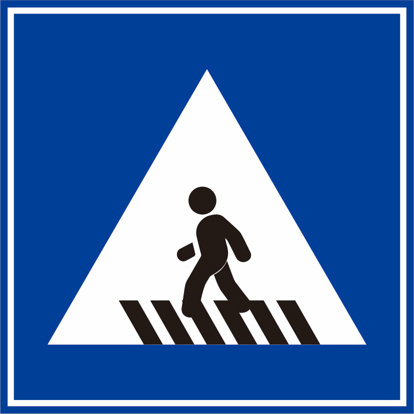
Road sign pictures
go_straight:

turn_right:

Honking:

pedestrian_crossing:
speed_limit:

stop:

children_crossing:

Parking-A:

parking-B: