Welcome to K230 Vision Module repository
17. Arithmetic and Bitwise Operations
Arithmetic and Bitwise Operations
Arithmetic and Bitwise OperationsPrefaceExample ResultsTheoryImage ArithmeticBitwise OperationsCode OverviewCreate Auxiliary ArraysSet Operation ModeArithmetic and Bitwise OperationsThreshold Region HighlightingWrite Back, Save Historical Reference and DisplayResource ReleaseParameter Adjustment Notes
Preface
This tutorial applies to firmware version: CanMV_K230_YAHBOOM_micropython_v1.8-13. You can download it from the Kendryte official website at https://download.kendryte.com/developer/releases/canmv_k230_micropython/daily_build/

Example Results
Run the example code for this section: 15.camera_arithmetic.py.
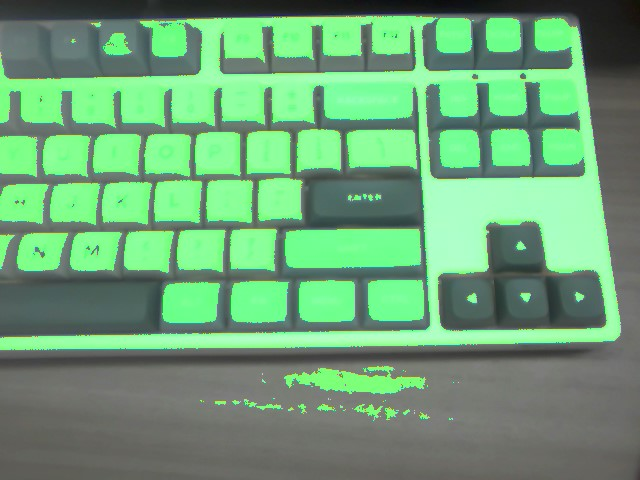
This section demonstrates frame difference, weighted blending, bitwise NOT, AND, OR, XOR, saturated addition, and threshold region highlighting. The example also shows K230 cv2's limitations with scalar broadcasting and how to work around them with same-size arrays.


Theory
Image Arithmetic
- absdiff(): Computes per-pixel absolute difference, commonly used for inter-frame motion detection.
- addWeighted(): Blends two images according to weights.
- add(): Saturation addition; when exceeding 255, it stays at 255.
Bitwise Operations
Bitwise operations directly manipulate the binary bits of each pixel:
- bitwise_not(): Inverts all bits, creating a negative effect.
- bitwise_and(): Only retains when both corresponding bits are 1 on both sides.
- bitwise_or(): Retains if either corresponding bit is 1.
- bitwise_xor(): Returns 1 when corresponding bits differ.
This example creates a horizontal grayscale gradient and merges it into a three-channel image to visually observe bitwise operation results.
Code Overview
Create Auxiliary Arrays
xgrad = np.zeros((H, W), dtype=np.uint8)for column in range(W): grad[:, column] = int(column * 255 / W)grad3 = cv2.merge([grad, grad, grad])add50 = np.zeros((H, W), dtype=np.uint8)for column in range(W): add50[:, column] = 50add50_3ch = cv2.merge([add50, add50, add50])These arrays are created only once at startup. add50_3ch matches the camera frame size and channel count, used to bypass the current K230 cv2.add() limitation that does not support scalar broadcasting.
Set Operation Mode
xxxxxxxxxxmode = 6prev_np = None| mode | Operation | Description |
|---|---|---|
| 0 | absdiff | Absolute difference between current frame and historical reference |
| 1 | addWeighted | Current frame 0.6, historical reference 0.4 |
| 2 | bitwise_not | Negative |
| 3 | bitwise_and | AND with horizontal gradient |
| 4 | bitwise_or | OR with horizontal gradient |
| 5 | bitwise_xor | XOR with horizontal gradient |
| 6 | add | Add 50 to each channel, source default |
| 7 | Threshold highlighting | Mask overlay on green channel |
The "default inversion" mentioned in source comments is inconsistent with actual mode=6; the actual default effect is brightness increase.
Arithmetic and Bitwise Operations
xxxxxxxxxxif mode == 0: out = cv2.absdiff(img_np, prev_np) if prev_np is not None else img_npelif mode == 1: out = cv2.addWeighted(img_np, 0.6, prev_np, 0.4, 0) if prev_np is not None else img_npelif mode == 2: out = cv2.bitwise_not(img_np)elif mode == 3: out = cv2.bitwise_and(img_np, grad3)elif mode == 4: out = cv2.bitwise_or(img_np, grad3)elif mode == 5: out = cv2.bitwise_xor(img_np, grad3)elif mode == 6: out = cv2.add(img_np, add50_3ch)All binary operations have two arrays with the same size and channel count.
Threshold Region Highlighting
xxxxxxxxxxgray = cv2.cvtColor(img_np, cv2.COLOR_BGR2GRAY)ret, binary = cv2.threshold(gray, 127, 255, cv2.THRESH_BINARY)img_np[:, :, 1] = cv2.add(img_np[:, :, 1], binary)out = img_npRegions with grayscale values above 127 have 255 added to the green channel, forming saturated green highlighting.
Write Back, Save Historical Reference and Display
xxxxxxxxxxprev_np = img_npif out is not img_np: img_np[:, :, :] = outDisplay.show_image(img)Here, prev_np = img_np only saves an array reference without copying a frame. If the camera reuses the same buffer on the next frame capture, prev_np may point to the same memory as the new frame, resulting in near-zero frame difference or unstable blending behavior. For reliable historical frames, use firmware-supported copy methods to create independent buffers and evaluate the approximately 900KB memory overhead for 640x480x3.
Resource Release
xxxxxxxxxxfinally: sensor.stop() Display.deinit() os.exitpoint(os.EXITPOINT_ENABLE_SLEEP) time.sleep_ms(100)Parameter Adjustment Notes
- Scalar broadcasting limitation: In the current binding, cv2.add(img, 50) may report type2 == CV_64F. Use an array with the same size and type as the input.
- Blending weights: Usually make the sum of both weights close to 1 to avoid significant overall brightness changes.
- Historical frames: Do not treat shared frame references as stable snapshots. Verify independent copy methods and remaining memory before doing motion detection.
- Gradient mask: grad3 can be replaced with a binary ROI mask to test bitwise operations' effects on specified regions.
- add() vs ordinary addition: cv2.add() saturates to 255, while ordinary array addition may cause 8-bit wraparound with different results.
- Performance: Modes 0 and 1 will increase memory bandwidth and garbage collection pressure if independent historical frame copying is added.