Welcome to K230 Vision Module repository
13.k230OCR character recognition
k230OCR character recognition
k230OCR character recognitionK230 and Raspberry Pi communication1. Experimental Prerequisites2. Experimental wiring3. Main code explanation4. Experimental Phenomenon
K230 and Raspberry Pi communication
1. Experimental Prerequisites
This tutorial uses the Raspberry Pi 5 development board, and the corresponding routine path is [14.export\Raspberrypi-K230\13_k230_ocr_rec.py].
K230 needs to run the [14.export\CanmvIDE-K230\13.ocr_rec.py] program to start the experiment. It is recommended to download it as an offline program.
Things you need:
Windows computer Raspberry Pi 5 development board microUSB cable K230 visual module (including TF card with image burned in) type-C cable connection cable
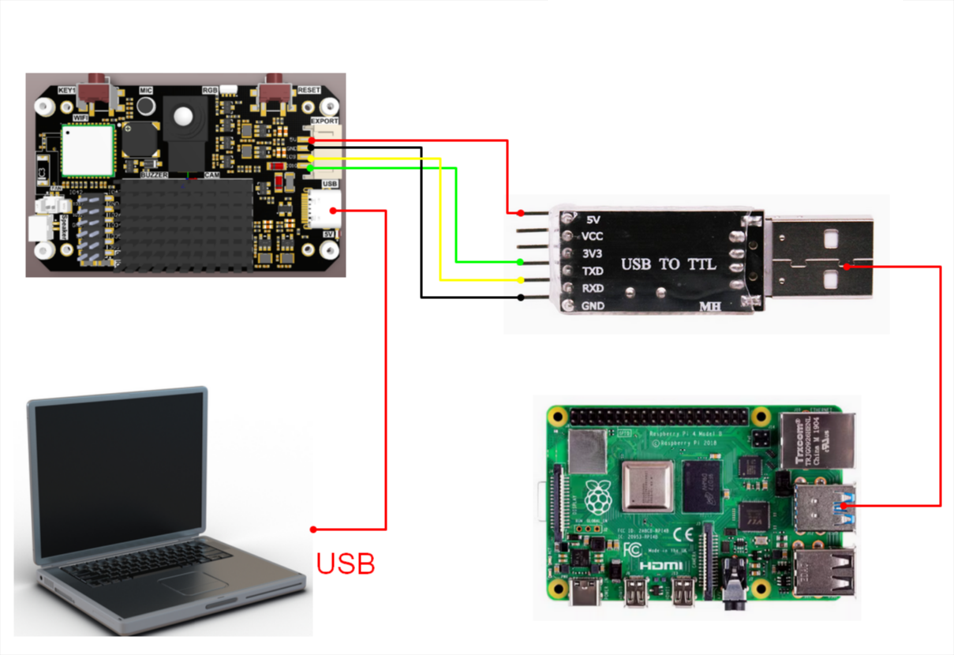
2. Experimental wiring
| k230 vision module | USB to TTL module |
|---|---|
| 5V | VCC |
| GND | GND |
| TXD(IO9) | RxD |
| RXD(IO10) | TXD |
3. Main code explanation
ximport serialcom="/dev/ttyUSB0"ser = serial.Serial(com, 115200)FUNC_ID = 13def parse_data(data): if data[0] == ord('$') and data[len(data)-1] == ord('#'): data_list = data[1:len(data)-1].decode('utf-8').split(',') data_len = int(data_list[0]) data_id = int(data_list[1]) if data_len == len(data) and data_id == FUNC_ID: # print(data_list) result = data_list[2] return result elif (data_len != len(data)): print("data len error:", data_len, len(data)) elif(data_id != FUNC_ID): print("func id error:", data_id, FUNC_ID) else: print("pto error", data) return ""while True: if ser.in_waiting: data = ser.readline() # print("rx:", data) result = parse_data(data.rstrip(b'\n')) print("ocr_rec:", result)The above program is for parsing K230 data. Only when it complies with specific protocols can the corresponding data be parsed.
in
msg: is the OCR character information.
4. Experimental Phenomenon
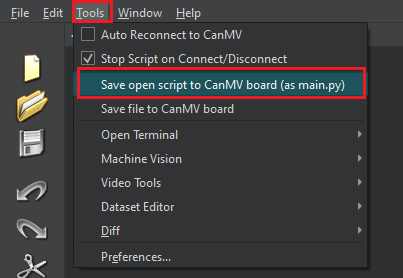
- After connecting the cables, the k230 visual module runs offline. After K230 is connected to Canmv IDE, open the corresponding program, click [Save open script to CanMV board (as main.py)] on the toolbar, and then restart K230.
- Transfer the program file to the system, open the terminal and enter the corresponding directory, then run the following command to start the program.
xxxxxxxxxxpython3 13_k230_ocr_rec.py
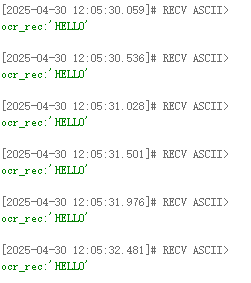
When the K230 camera image recognizes characters, the terminal will parse and print out the information transmitted by the K230.
in
msg: is the OCR character information.
As shown in the figure below