Welcome to K230 Vision Module repository
3.Color response
Color reaction
1. Opening Statement
This case uses the YABOOM 14-bead RGB light strip module, but does not use a motor. The RGB light strip is not included in the package and needs to be purchased separately.
2. Experimental Preparation
K230 vision module, Yaboom MSPM0G3507 core board, 14-bead RGB light strip.
Hardware Wiring
.png)
Wiring Pins
| 14 LED RGB light strip | MSPM0G3507 |
|---|---|
| 5V | 5V |
| GND | GND |
| LED | PA18 |
| K230 | MSPM0G3507 |
|---|---|
| 5V | 5V |
| GND | GND |
| TXD | PA25 |
| RXD | PA26 |
3. Experimental Operation
Follow the hardware wiring instructions in the tutorial to connect.
Burn the ProtocolHub project to MSPM0G3507
Place Color_Reaction.py in the root directory of K230's sdcard and rename it to main.py, then reset or power on again.
If you are not sure how to burn the program into K230, please read the K230 Quick Start tutorial first.
Move the K230 module bracket to a suitable angle, connect the power supply, and place a brightly colored object in front of the K230 camera.
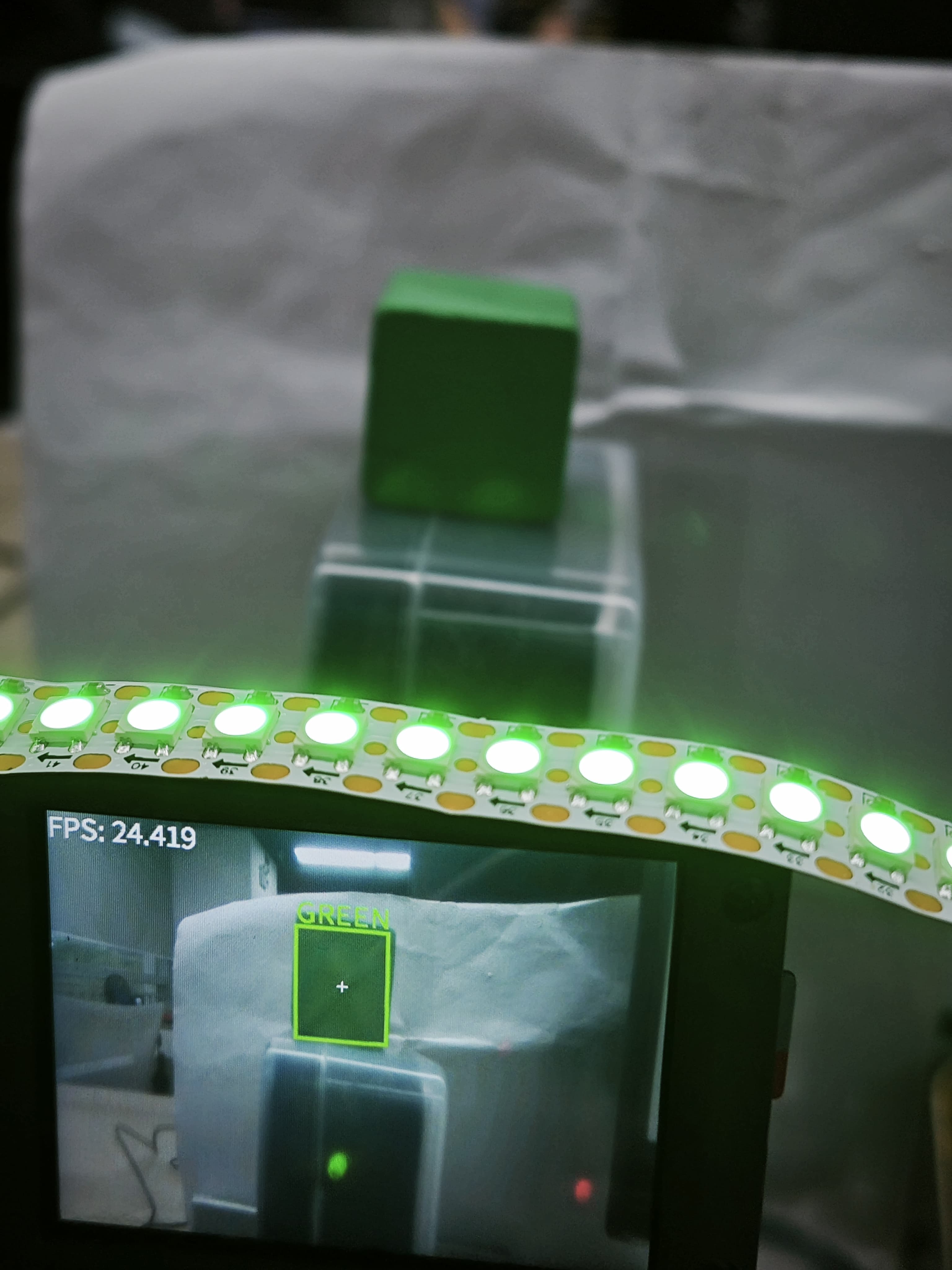
When K230 is initialized successfully, it will start to recognize the set color, and the RGB light bar will also change to the corresponding color.
Notice:
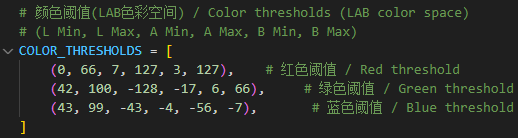
Color_Reaction.py provides recognition of three preset colors: red, green, and blue. If the recognition effect is not good, you can watch the K230 color recognition tutorial to learn how to change the LAB threshold to a threshold that suits your environment.
4. Code analysis
main.c
//1:520电机 2:310电机 3:测速码盘TT电机 4:TT直流减速电机 5:L型520电机 //1:520 motor 2:310 motor 3:speed code disc TT motor 4:TT DC reduction motor 5:L type 520 motor
//修改当前要运行的颜色案例 Modify the color case currently being runColorMode color_mode = 1; //1:巡线、2:跟踪 1: Patrol, 2: Tracking
//选择是否在初始化完成后,小车自主向前走,0为否,1为是(自主避让案例使用)//Select whether the car moves forward autonomously after initialization is completed, 0 for no, 1 for yes (used in autonomous avoidance cases)int Car_Auto_Drive = 0;
int main(void){ USART_Init();
//使能DMA通道,用于加快与四路电机驱动板串口的通讯 Enable DMA channel to speed up communication with the serial port of the four-way motor driver board NVIC_ClearPendingIRQ(UART_1_INST_INT_IRQN); DL_DMA_enableChannel(DMA, DMA_CH0_CHAN_ID); NVIC_EnableIRQ(UART_1_INST_INT_IRQN); //开启与K230串口通信的中断 Enable interrupts for communication with the K230 serial port NVIC_ClearPendingIRQ(UART_3_INST_INT_IRQN); NVIC_EnableIRQ(UART_3_INST_INT_IRQN); //设置电机类型 Set motor type Set_Motor(MOTOR_TYPE);
if(Car_Auto_Drive)//K230上电初始化需要时间,等待初始化完成之后再开始前进。 It takes time for K230 to power on and initialize. Wait until the initialization is complete before moving forward. { delay_ms(1000);delay_ms(1000);delay_ms(1000);delay_ms(1000);delay_ms(1000);delay_ms(1000);delay_ms(1000);delay_ms(1000);delay_ms(1000);delay_ms(1000); } printf("Init Succeed\r\n"); while(1) { Pto_Loop(); delay_ms(10); }}MOTOR_TYPE: Used to set the motor type to be used. Modify the corresponding number according to the comments based on the motor you are currently using.
color_mode: Use 1 when running the visual line patrol case, and use 2 for the color tracking case
Car_Auto_Drive: Controls the car to move forward automatically after initialization. The default value is 0, which means the car does not move forward automatically. This function only needs to be enabled when using the autonomous avoidance case.
USART_Init: initialization function of system and serial port.
Set_Motor: Communicate with the four-way motor driver board and set motor related parameters
Pto_Loop: Continuously processes the received K230 messages.
yb_protocol.c
/** * @Brief: 数据分析 Data analysis * @Note:  * @Parm: 传入接受到的一个数据帧和长度    Pass in a received data frame and length * @Retval:  */void Pto_Data_Parse(uint8_t *data_buf, uint8_t num){    uint8_t pto_head = data_buf[0];    uint8_t pto_tail = data_buf[num-1];        //校验头尾  Check head and tail    if (!(pto_head == PTO_HEAD && pto_tail == PTO_TAIL))    {        //DEBUG_PRINT("pto error:pto_head=0x%02x , pto_tail=0x%02x\n", pto_head, pto_tail);        return;    }        uint8_t data_index = 1;    uint8_t field_index[PTO_BUF_LEN_MAX] = {0};    int i = 0;    int values[PTO_BUF_LEN_MAX] = {0};    char msgs[][PTO_BUF_LEN_MAX] = {0};        //分割字段  Split Field    for (i = 1; i < num-1; i++)    {        if (data_buf[i] == ',')        {            data_buf[i] = 0;            field_index[data_index] = i;            data_index++;        }    }        //解析长度与功能ID  Parsing length and function ID    for (i = 0; i < 2; i++)    {        values[i] = Pto_Char_To_Int((char*)data_buf+field_index[i]+1);    }        uint8_t pto_len = values[0];    uint8_t pto_id = values[1];        ParseCommonFields(pto_id,data_buf,pto_len,field_index,data_index,values,msgs);}

//获取数据函数  Get data functionvoid ParseCommonFields(    int func_index,       // 功能索引(对应func_table中的位置) Function index (corresponding to the position in func_table)    uint8_t *data_buf,    // 原始数据缓冲区 Raw data buffer    uint8_t num,          // 数据总长度(含头尾)   Total length of data (including head and tail)    uint8_t *field_index, // 字段分隔符位置数组(逗号的位置)   Array of field separator positions (positions of commas)    uint8_t data_index,   // 总字段数(如数据有6个字段)    Total number of fields (if the data has 6 fields)    int* values,          // 存储整数字段的数组 Array to store integer fields    char msgs[][PTO_BUF_LEN_MAX]        // 存储字符串的指针数组 Array of pointers to store strings){    const FuncDesc* desc = &func_table[func_index-1];        if(func_index != desc->id)    {        DEBUG_PRINT("Unsupported protocol ID: %d, Chosen ID:%d\n", func_index,desc->id);        return;    }        for (int i = 0; i < desc->field_count; i++)     {        const FieldMeta* meta = &desc->fields[i];        uint8_t pos = meta->pos;                if (meta->type == FIELD_STRING) {            int start = field_index[pos] + 1;            int end = (pos+1 < data_index) ? field_index[pos+1] : (num-1);            int len = end - start;                        len = (len < PTO_BUF_LEN_MAX-1) ? len : PTO_BUF_LEN_MAX-1;            memcpy(msgs[i], data_buf+start, len);            msgs[i][len] = '\0';        } else {            values[pos] = Pto_Char_To_Int((char*)data_buf + field_index[pos] +1);        }    }    desc->handler(values, msgs);}
Parse the received data that conforms to the protocol, obtain the function ID number and the data information carried in the data, and execute the processing function of the corresponding function. This project uses the metadata parsing method. The core idea is to separate the description of the protocol format (field position, type, etc.) from the parsing logic, define the protocol format through data structures (such as structure arrays), and the parsing function automatically processes the data based on these descriptions.
The protocol contains different types of data that can also be parsed. If you want to know the implementation details, you can study it yourself. I won't give too many answers. This function has been adapted to all K230 communication protocols in our store, and you can use it normally without fully understanding it.
app_engine.c
void Color_Rec(const char* msg){ if(strcmp(msg,"RED")==0) { DEBUG_PRINT("RED!\r\n"); RGB_Set_Color(255,255,0,0); RGB_Update(); delay_ms(1000); } else if(strcmp(msg,"GREEN")==0) { DEBUG_PRINT("GREEN!\r\n"); RGB_Set_Color(255,0,255,0); RGB_Update(); delay_ms(1000); } else if (strcmp(msg, "BLUE")==0) { DEBUG_PRINT("BLUE!\r\n"); RGB_Set_Color(255,0,0,255); RGB_Update(); delay_ms(1000); } else { DEBUG_PRINT("Unknown Color: %s\n", msg); }}Color_Rec: After receiving data from K230, check if the string content is red, green or blue, and if so, set the color of the RGB light bar.
5. Experimental Phenomenon
Turn on the power switch and wait for the system to initialize. The screen will display the camera image and frame the recognized color. If it is one of the three colors: red, green, and blue, the RGB light bar will light up the corresponding color.