yahboom
HomeLearn
Solution
Blog
Online Store
About Us
EN/中文
K230 Vision Module📖
1. Quick Start
  • 0.Get start
  • 1. K230 firmware download and burning
  • 2. Install the programming environment
  • 3. Debug and run routines
  • 4. Offline running routine
  • 5. Micropython Quick Start
  • 6. GUI Program Instructions
  • 7.K230 module bracket installation tutorial
  • 8.K230 module 2DOF PTZ installation tutorial
2. Basic Courses
  • 1.FPIOA pin assignment
  • 2.RGB lights
  • 3.Buzzer
  • 4.Buttons
  • 5.Serial communication
  • 6.I2C communication
  • 7.PWM
  • 8.WDT watchdog
  • 9.Timer
  • 10.Fourier Transform
  • 11.SHA256 encryption
  • 12.AES encryption
  • 13.Multithreading
  • 14.File reading and writing
  • 15.Image Display
  • 16.Touch Display
  • 17.Camera display
  • 18.Image Flip
  • 19.Camera
3. Draw the image
  • 1. Draw the lines
  • 2. Draw the circle
  • 3. Draw the rectangle
  • 4. Draw the ellipse
  • 5. Draw the arrow
  • 6. Draw the crosshairs
  • 7. Draw text
  • 8. Draw key points
4. Graphics detection
  • 1. Line segment detection
  • 2. Rectangle Detection
  • 3. Circle detection
  • 4. Object edge detection
  • 5. Line inspection basics:fast linear regression
5. Color recognition
  • 1. Color recognition
  • 2. Object Counting
  • 3. Multi-color recognition
  • 4. K230 Color Line Patrol
6.1 CV_lite Image Processing Special Topic
  • 1.Introduction to cv_litenew
  • 2.cv_lite API Reference Manualnew
  • 3.Color Block Recognition - Grayscale Imagenew
  • 4.Color Block Recognition - Color Imagenew
  • 5.Circle Recognition - Grayscale Imagenew
  • 6.Circle Recognition - Color Imagenew
  • 7.Corner Recognition - Grayscale Imagenew
  • 8.Corner Recognition - Color Imagenew
  • 9.Edge Recognition - Grayscale Imagenew
  • 10. Edge Recognition - Color Imagenew
  • 11. Rectangle Recognition - Grayscale Imagenew
  • 12.Rectangle Recognition - Color Imagenew
  • 13.Rectangle recognition combined with corner recognition - grayscale imagenew
  • 14.Rectangle recognition combined with corner recognition - color imagenew
  • 15.Image Binarization - Grayscalenew
  • 16.Image Binarization - Color Imagenew
  • 17.Exposure Adjustmentnew
  • 18.Image Black Hat Operationsnew
  • 19.Image Color Histogramnew
  • 20.Image Closingnew
  • 21.Image Expansionnew
  • 22.Image Corrosionnew
  • 23.Gaussian Blurnew
  • 24.Gradient Transformationnew
  • 25.Mean Fuzzynew
  • 26.Image Openingnew
  • 27.Image Top Hat Operationnew
  • 28.PnP rangingnew
  • 29.Find rectangles and measure distancesnew
  • 30.Image grayscale world white balancenew
6.2 OpenCV Image Processing Special Topicnew
  • 1. OpenCV Introduction
  • 2. OpenCV API Reference
  • 3. Image Basic Transforms
  • 4. Morphological Operations
  • 5. Color Segmentation and Shape Classification
  • 6. Corner and Centroid Detection
  • 7. Hough Circle Detection
  • 8. Hough Line Detection
  • 9. Contour Analysis
  • 10. Drawing Functions
  • 11. Template Matching
  • 12. Image Blur Filtering
  • 13. Edge Detection
  • 14. Thresholding
  • 15. Color Segmentation
  • 16. Histogram and Pixel Transformation
  • 17. Arithmetic and Bitwise Operations
  • 18. Channel Operation and Statistics
  • 19. Image File Read and Write
  • 20. Pixel Level Transformation
7. Code type recognition
  • 1.Barcode recognition
  • 2.QR code recognition
  • 3.AprilTag tag recognition
  • 4.DM code recognition
8. Face Recognition
  • 1.[Must-read] General code structure and prerequisite knowledge of AI vision routines
  • 2.Face Detection
  • 3.Facial key point recognition
  • 4.Face orientation detection
  • 5.Face 3D Network
  • 6.Gaze direction detection
  • 7.Register for face recognition
9. Human body characteristics
  • 1. Human body detection
  • 2. Human key point detection
  • 3. Human posture recognition
  • 4. Fall detection
  • 5. Palm detection
  • 6. Palm key point detection
  • 7. Palm key point classification
  • 8. Gesture Recognition
  • 9. Dynamic gesture recognition
  • 10. Rock, Paper, Scissors
10. Scenario Application
  • 1.OCR character detection
  • 2.OCR character recognition
  • 3.yolov8n target detection
  • 4.yolov8n segmentation
  • 5. Self-learning object recognition
  • 6. License plate detection
  • 7. License Plate Recognition
  • 8. Target Tracking
  • 9. Fruit classification
  • 10. Garbage classification
  • 11. Road sign recognition
11. Audio and video processing
  • 1. Audio Recording
  • 2. Play Audio
  • 3. Video Recording
  • 4. Play Video
  • 5. Keyword wake-up
12. Network Basics
  • 1. Wireless network connection
  • 2. AP hotspot mode
  • 3. TCP-Server Example
  • 4. TCP-Client Example
  • 5. UDP-Server Example
  • 6. UDP-Client Example
  • 7. HTTP-Server Example
  • 8. HTTP-Client Example
  • 9. MQTT Quick Start
  • 10. MQTT-Publisher
  • 11. MQTT-Subscriber
  • 12. RTSP real-time image transmission
  • 13. RTSP real-time image transmission combined with AIDemo
  • 14. Call OpenRouter large model aggregation service
  • 15. Open the Resource Monitoring Panel
13. LVGL Graphical Interface
  • 1. Introduction to LVGL
  • 2. Create a button
  • 3. Create a slider
  • 4. Create an Image
  • 5. Create a text box and keyboard
14. GUI Code Tutorial & Secondary Development
  • 01.GUI System Architecture
  • 02.Core Engine Initialization
  • 03.Application Discovery Mechanism in GUI
  • 04.Desktop Layout Algorithm
  • 05.Advanced UI Styling
  • 06.BaseApp Base Class Analysis
  • 07.Hello_World Practical
  • 08.GUI Application Lifecycle and Resource Management
15. Train your own model
  • 1. Local deployment of yolo training environment
  • 2. Use online platforms for training
16.Touch Course
  • 1.Touch point detectionnew
  • 2.Touch Paintingnew
  • 3.Touch to take a photonew
17. Multi-master communication (purchased separately)
ESP32-K230
  • 1.k230 color recognition
  • 2.k230 barcode recognition
  • 3.k230 QR code recognition
  • 4.k230Apriltag code recognition
  • 5.k230DM code recognition
  • 6.k230 face detection
  • 7.k230 gaze direction
  • 8.k230 face recognition
  • 9.k230 human body detection
  • 10.k230 fall detection
  • 11.k230 palm detection
  • 12.k230 gesture recognition
  • 13.k230OCR character recognition
  • 14.k230 object detection
  • 15.k230 target tracking
  • 16.k230 self-learning object recognition
  • 17.k230 license plate recognition
Jetson-K230
  • 1.k230 color recognition
  • 2.k230 barcode recognition
  • 3.k230 QR code recognition
  • 4.k230Apriltag code recognition
  • 5.k230DM code recognition
  • 6.k230 face detection
  • 7.k230 gaze direction
  • 8.k230 face recognition
  • 9.k230 human body detection
  • 10.k230 fall detection
  • 11.k230 palm detection
  • 12.k230 gesture recognition
  • 13.k230OCR character recognition
  • 14.k230 object detection
  • 15.k230 target tracking
  • 16.k230 self-learning object recognition
  • 17.k230 license plate recognition
MSPM0G3507-K230
  • 1.k230 color recognition
  • 2.k230 barcode recognition
  • 3.k230 QR code recognition
  • 4.k230Apriltag code recognition
  • 5.k230DM code recognition
  • 6.k230 face detection
  • 7.k230 gaze direction
  • 8.k230 face recognition
  • 9.k230 human body detection
  • 10.k230 fall detection
  • 11.k230 palm detection
  • 12.k230 gesture recognition
  • 13.k230OCR character recognition
  • 14.k230 object detection
  • 15.k230 target tracking
  • 16.k230 self-learning object recognition
  • 17.k230 license plate recognition
Pico-K230
  • 1.k230 color recognition
  • 2.k230 barcode recognition
  • 3.k230 QR code recognition
  • 4.k230Apriltag code recognition
  • 5.k230DM code recognition
  • 6.k230 face detection
  • 7.k230 gaze direction
  • 8.k230 face recognition
  • 9.k230 human body detection
  • 10.k230 fall detection
  • 11.k230 palm detection
  • 12.k230 gesture recognition
  • 13.k230OCR character recognition
  • 14.k230 object detection
  • 15.k230 target tracking
  • 16.k230 self-learning object recognition
  • 17.k230 license plate recognition
raspberrypi-K230
  • 1.k230 color recognition
  • 2.k230 barcode recognition
  • 3.k230 QR code recognition
  • 4.k230Apriltag code recognition
  • 5.k230DM code recognition
  • 6.k230 face detection
  • 7.k230 gaze direction
  • 8.k230 face recognition
  • 9.k230 human body detection
  • 10.k230 fall detection
  • 11.k230 palm detection
  • 12.k230 gesture recognition
  • 13.k230OCR character recognition
  • 14.k230 object detection
  • 15.k230 target tracking
  • 16.k230 self-learning object recognition
  • 17.k230 license plate recognition
RDK-K230
  • 1.k230 color recognition
  • 2.k230 barcode recognition
  • 3.k230 QR code recognition
  • 4.k230Apriltag code recognition
  • 5.k230DM code recognition
  • 6.k230 face detection
  • 7.k230 gaze direction
  • 8.k230 face recognition
  • 9.k230 human body detection
  • 10.k230 fall detection
  • 11.k230 palm detection
  • 12.k230 gesture recognition
  • 13.k230OCR character recognition
  • 14.k230 object detection
  • 15.k230 target tracking
  • 16.k230 self-learning object recognition
  • 17.k230 license plate recognition
STM32-K230
  • 1. stm32_k230 color recognition
  • 2. stm32_k230 barcode recognition
  • 3. stm32_k230 QR code recognition
  • 4. stm32_k230Apriltag code recognition
  • 5. stm32_k230DM code recognition
  • 6. stm32_k230 face detection
  • 7.stm32_k230 looking direction
  • 8. stm32_k230 face recognition
  • 9. stm32_k230 human body detection
  • 10. stm32_k230 fall detection
  • 11. stm32_k230 palm detection
  • 12. stm32_k230 gesture recognition
  • 13. stm32_k230OCR character recognition
  • 14. stm32_k230 object detection
  • 15. stm32_k230 target tracking
  • 16. stm32_k230 self-learning object recognition
  • 17.stm32_k230 license plate recognition
Arduino-K230
  • 1.arduino_k230 color recognition
  • 2.arduino_k230 barcode recognition
  • 3.arduino_k230 QR code recognition
  • 4.arduino_k230 Apriltag code recognition
  • 5.arduino_k230 DM code recognition
  • 6.arduino_k230 face detection
  • 7.arduino_k230 looking direction
  • 8.arduino_k230 face recognition
  • 9.arduino_k230 human body detection
  • 10.arduino_k230 fall detection
  • 11.arduino_k230 palm detection
  • 12.arduino_k230 gesture recognition
  • 13.arduino_k230 OCR character recognition
  • 14.arduino_k230 object detection
  • 15.arduino_k230 target tracking
  • 16.arduino_k230 self-learning object recognition
  • 17.arduino_k230 license plate recognition
Microbit-K230
  • 1.microbit_k230 color recognition
  • 2.microbit_k230 barcode recognition
  • 3.microbit_k230 QR code recognition
  • 4.microbit_k230 Apriltag code recognition
  • 5.microbit_k230 DM code recognition
  • 6.microbit_k230 face detection
  • 7.microbit_k230 looking direction
  • 8.microbit_k230 face recognition
  • 9.microbit_k230 human body detection
  • 10.microbit_k230 fall detection
  • 11.microbit_k230 palm detection
  • 12.microbit_k230 gesture recognition
  • 13.microbit_k230 OCR character recognition
  • 14.microbit_k230 object detection
  • 15.microbit_k230 target tracking
  • 16.microbit_k230 self-learning object recognition
  • 17.microbit_k230 license plate recognition
MSPM0G3519-K230
  • 1. K230 Color Recognitionnew
  • 2. K230 Barcode Recognitionnew
  • 3. K230 QR Code Recognitionnew
  • 4. K230 Apriltag Code Recognitionnew
  • 5. K230 DM Code Recognitionnew
  • 6. K230 Face Detectionnew
  • 7. K230 Gaze Directionnew
  • 8. K230 Face Recognitionnew
  • 9. K230 Human Body Detectionnew
  • 10. K230 Fall Detectionnew
  • 11. K230 Palm Detectionnew
  • 12. K230 Gesture Recognitionnew
  • 13. K230 OCR Character Recognitionnew
  • 14. K230 Object Detectionnew
  • 15. K230 Target Trackingnew
  • 16. K230 Self-learning Object Recognitionnew
  • 17. K230 License Plate Recognitionnew
18.Extension case (purchase separately)
For 2DOF Electric Platform
  • 1.Moving target control and automatic tracking system
  • 2.Human body recognition alarm
  • 3.Gesture Recognition
  • 4.Rock Paper Scissors
  • 5.Fruit sorting
  • 6.Color Tracking
  • 7.Face Tracking
MSPM0G3507 wheeled chassis V1/V2 combined with K230 application case
  • 1.Visual tracking
  • 2.Color tracking
  • 3.Color response
  • 4.Road sign recognition
  • 5.Machine code tracking
  • 6.QR code recognition action
  • 7.Autonomous avoid
  • 8.License plate tracking
  • 9.Face tracking
  • 10.Gaze direction tracking
  • 11.Palm tracking
  • 12.Target tracking
  • 13.Human body tracking
  • 14.OCR character recognition action
STM32 wheeled chassis V1/V2 combined with K230 application case
  • 1.Visual tracking
  • 2.Color tracking
  • 3.Color response
  • 4.Road sign recognition
  • 5.Machine code tracking
  • 6.QR code recognition action
  • 7.Autonomous avoid
  • 8.License plate tracking
  • 9.Face tracking
  • 10.Gaze direction tracking
  • 11.Palm tracking
  • 12.Target tracking
  • 13.Human body tracking
  • 14.OCR character recognition action
MSPM0G3519 wheeled chassis V1/V2 combined with K230 application case
  • 1.Visual trackingnew
  • 2.Color trackingnew
  • 3.Color responsenew
  • 4.Road sign recognitionnew
  • 5.Machine code trackingnew
  • 6.QR code recognition actionnew
  • 7.Autonomous avoidnew
  • 8.License plate trackingnew
  • 9.Face trackingnew
  • 10.Gaze direction trackingnew
  • 11.Palm trackingnew
  • 12.Target trackingnew
  • 13.Human body trackingnew
  • 14.OCR character recognition actionnew
19. Expansion case(purchase separately)new
  • 1.Motion target control and Auto track system
  • 2.Vehicle-mounted balance ball motion control system
Download
  • Manual
  • CanMV IDE
  • Software Tools
  • Firmware
  • Source Code
  • Appendix
Download ZIP

Welcome to K230 Vision Module repository

10. Rock, Paper, Scissors

Rock Paper Scissors

Rock Paper ScissorsRoutine Experiment EffectCode ExplanationCode detailed structureKey Code


Routine Experiment Effect

In this section, we will learn about gesture recognition based on K230 and make a game of rock-paper-scissors.

The game execution process is as follows:

  1. Copy the sample code into CanMV IDE and click the Run button in the lower left corner. Please make sure that there is no "hand" in the camera at this time.
  2. Wait for "Total took xxxxx" to appear in the lower left corner to indicate the game has started.
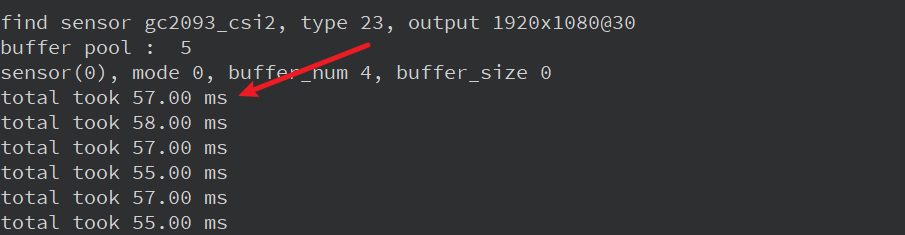
image-20250217194623030

  1. After the game starts, we make the shape of "rock", "scissors" or "paper" with our hands, and it will appear in the camera. At this time, the screen will show the punches of the program and the result of winning or losing. After getting the result, it means that this round is over, please remove your hands from the camera range.
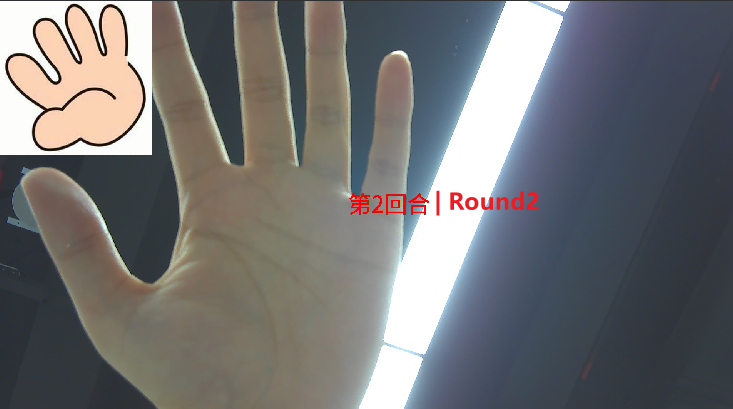
image-20250217194928267

  1. The game lasts for three rounds in total. After three rounds, the program will give the final result according to the best-of-three rule. [There is a small bug here. If the program does not give the final result immediately after the third round, you can let your hand enter the camera again and the program will give the final result.]
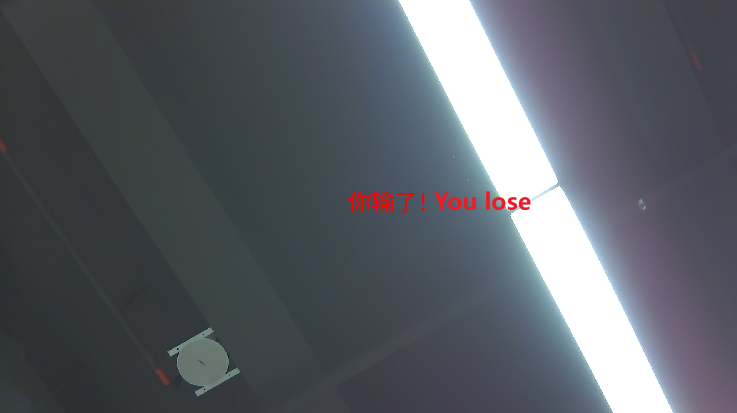
image-20250217195122700

Code Explanation

This is a rock-paper-scissors game program based on gesture recognition. It mainly includes the following parts:

  1. Hand detection class (HandDetApp) and gesture key point classification class (HandKPClassApp)

    • These two classes implement the functions of palm detection and gesture key point recognition respectively, providing underlying support for the rock-paper-scissors game.
    • They encapsulate operations such as image preprocessing, model inference, and post-processing, providing a unified interface for upper-level logic.
  2. FingerGuess

    • This class is responsible for the execution logic of the entire rock-paper-scissors game.
    • It will first call the palm detection and key point classification model to obtain the user's current gesture.
    • Then, according to different game modes (must win, must lose, multiple rounds), the corresponding computer punches are generated and the winner is determined.
    • Finally, the game process and results are drawn to the screen for display.
  3. Game execution function (exce_demo)

    • This function is responsible for initializing the game-related environment and resources and entering the main loop of the game.
    • In the main loop, it continuously obtains the current frame image, calls the run method of the FingerGuess class to process the image, and finally displays the game screen.

The execution flow of the entire game is:

  1. Initialize the game environment and resources

  2. Enter the main game loop

  3. In each frame:

    • Get the current image
    • Detect palms and recognize gestures
    • Generate computer punches based on game logic to determine the winner
    • Draw the game screen and display it

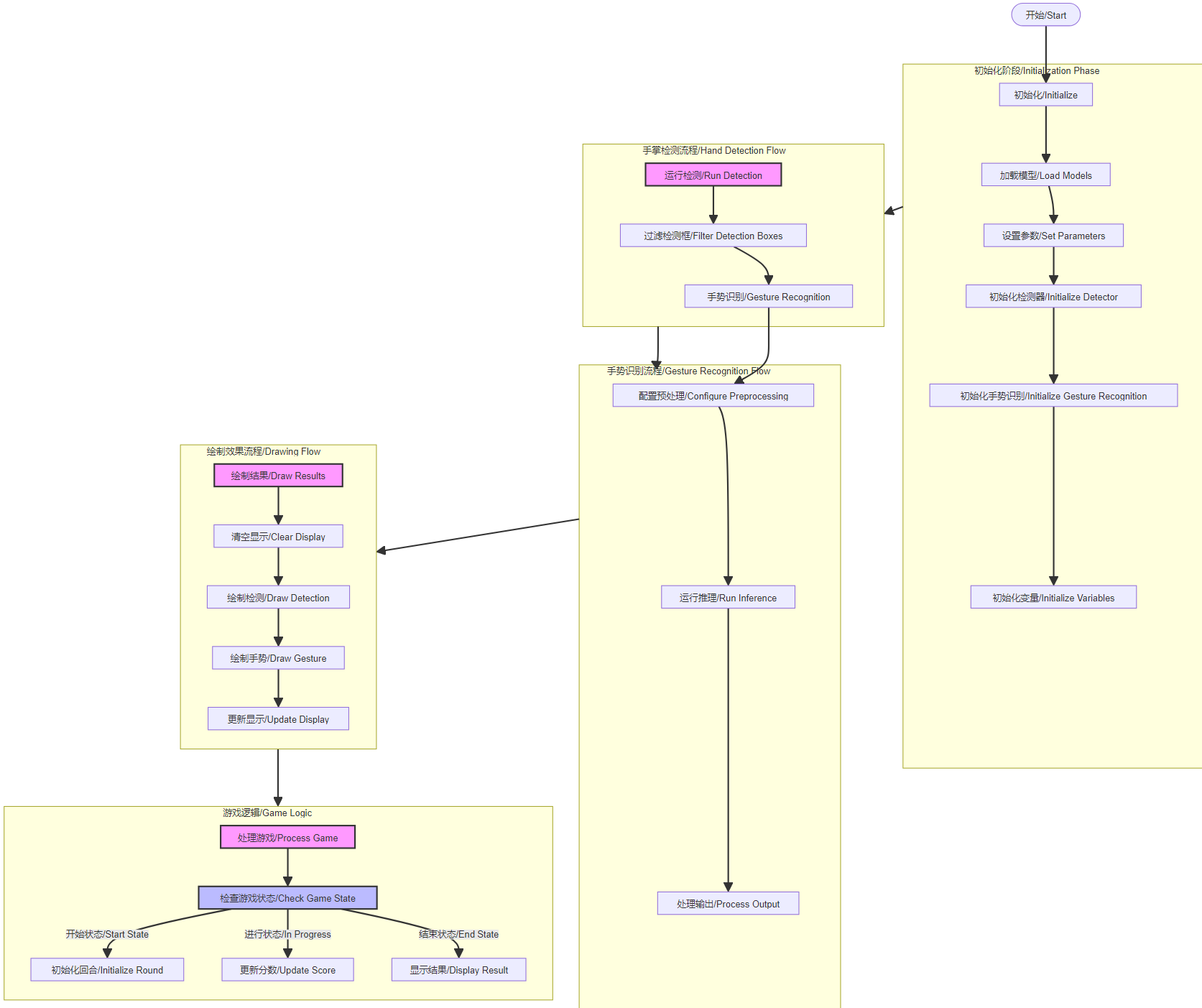
image-20250217204457340

Code detailed structure

  1. Initialization Phase:

    • Load detection and recognition models
    • Set various parameters/Set parameters
    • Initialize detector and gesture recognition module
    • Initialize game-related variables
  2. Hand Detection Flow:

    • Run hand detection
    • Filter detection boxes
    • Pass to gesture recognition module
  3. Gesture Recognition Flow:

    • Configure preprocessing
    • Run model inference
    • Process output
  4. Drawing Flow:

    • Clear display
    • Draw detection
    • Draw gesture recognition results
    • Update display
  5. Game Logic:

    • Process game logic
    • Check game state
    • Initialize new round
    • Update player and AI scores
    • Display final result

Key Code

x
# 猜拳游戏任务类 / Rock-paper-scissors game task class
class FingerGuess:
    def __init__(self, hand_det_kmodel, hand_kp_kmodel, det_input_size, kp_input_size, labels, anchors, confidence_threshold=0.25, nms_threshold=0.3, nms_option=False, strides=[8, 16, 32], guess_mode=3, rgb888p_size=[1280, 720], display_size=[1920, 1080], debug_mode=0):
        # 手掌检测模型路径 / Hand detection model path
        self.hand_det_kmodel = hand_det_kmodel
        # 手掌关键点模型路径 / Hand keypoint model path
        self.hand_kp_kmodel = hand_kp_kmodel
        # 手掌检测模型输入分辨率 / Hand detection model input resolution
        self.det_input_size = det_input_size
        # 手掌关键点模型输入分辨率 / Hand keypoint model input resolution
        self.kp_input_size = kp_input_size
        self.labels = labels
        # anchors / Anchor boxes
        self.anchors = anchors
        # 置信度阈值 / Confidence threshold
        self.confidence_threshold = confidence_threshold
        # nms阈值 / Non-Maximum Suppression threshold
        self.nms_threshold = nms_threshold
        # nms选项 / NMS option
        self.nms_option = nms_option
        # 特征图针对输入的下采样倍数 / Feature map downsampling multipliers relative to input
        self.strides = strides
        # sensor给到AI的图像分辨率,宽16字节对齐 / Image resolution from sensor to AI, width aligned to 16 bytes
        self.rgb888p_size = [ALIGN_UP(rgb888p_size[0], 16), rgb888p_size[1]]
        # 视频输出VO分辨率,宽16字节对齐 / Video output VO resolution, width aligned to 16 bytes
        self.display_size = [ALIGN_UP(display_size[0], 16), display_size[1]]
        # debug_mode模式 / Debug mode
        self.debug_mode = debug_mode
        self.guess_mode = guess_mode
        # 石头剪刀布的贴图array / Rock-paper-scissors image arrays
        self.five_image = self.read_file("/sdcard/utils/five.bin")
        self.fist_image = self.read_file("/sdcard/utils/fist.bin")
        self.shear_image = self.read_file("/sdcard/utils/shear.bin")
        self.counts_guess = -1                                                               # 猜拳次数 计数 / Count of rock-paper-scissors rounds
        self.player_win = 0                                                                  # 玩家 赢次计数 / Player win count
        self.k230_win = 0                                                                    # k230 赢次计数 / K230 win count
        self.sleep_end = False                                                               # 是否 停顿 / Whether to pause
        self.set_stop_id = True                                                              # 是否 暂停猜拳 / Whether to suspend the game
        self.LIBRARY = ["fist", "yeah", "five"]                                              # 猜拳 石头剪刀布 三种方案的dict / Dictionary of three rock-paper-scissors options
        self.hand_det = HandDetApp(self.hand_det_kmodel, self.labels, model_input_size=self.det_input_size, anchors=self.anchors, confidence_threshold=self.confidence_threshold, nms_threshold=self.nms_threshold, nms_option=self.nms_option, strides=self.strides, rgb888p_size=self.rgb888p_size, display_size=self.display_size, debug_mode=0)
        self.hand_kp = HandKPClassApp(self.hand_kp_kmodel, model_input_size=self.kp_input_size, rgb888p_size=self.rgb888p_size, display_size=self.display_size)
        self.hand_det.config_preprocess()
​
    # run函数 / Run function
    def run(self, input_np):
        # 先进行手掌检测 / First perform hand detection
        det_boxes = self.hand_det.run(input_np)
        boxes = []
        gesture_res = []
        for det_box in det_boxes:
            # 对检测的手做手势识别 / Perform gesture recognition on detected hands
            x1, y1, x2, y2 = det_box[2], det_box[3], det_box[4], det_box[5]
            w, h = int(x2 - x1), int(y2 - y1)
            if (h < (0.1 * self.rgb888p_size[1])):
                continue
            if (w < (0.25 * self.rgb888p_size[0]) and ((x1 < (0.03 * self.rgb888p_size[0])) or (x2 > (0.97 * self.rgb888p_size[0])))):
                continue
            if (w < (0.15 * self.rgb888p_size[0]) and ((x1 < (0.01 * self.rgb888p_size[0])) or (x2 > (0.99 * self.rgb888p_size[0])))):
                continue
            self.hand_kp.config_preprocess(det_box)
            results_show, gesture = self.hand_kp.run(input_np)
            boxes.append(det_box)
            gesture_res.append(gesture)
        return boxes, gesture_res
​
    # 绘制效果 / Draw results
    def draw_result(self, pl, dets, gesture_res):
        pl.osd_img.clear()
        # 手掌的手势分类得到用户的出拳,根据不同模式给出开发板的出拳,并将对应的贴图放到屏幕上显示
        # Get user's gesture from hand gesture classification, determine the board's gesture based on different modes, and display corresponding images on screen
        if (len(dets) >= 2):
            pl.osd_img.draw_string_advanced(self.display_size[0] // 2 - 50, self.display_size[1] // 2 - 50, 30, "请保证只有一只手入镜 Make sure only one hand on the screen", color=(255, 255, 0, 0))
        elif (self.guess_mode == 0):
            draw_img_np = np.zeros((self.display_size[1], self.display_size[0], 4), dtype=np.uint8)
            draw_img = image.Image(self.display_size[0], self.display_size[1], image.ARGB8888, alloc=image.ALLOC_REF, data=draw_img_np)
            if (gesture_res[0] == "fist"):
                draw_img_np[:400, :400, :] = self.shear_image
            elif (gesture_res[0] == "five"):
                draw_img_np[:400, :400, :] = self.fist_image
            elif (gesture_res[0] == "yeah"):
                draw_img_np[:400, :400, :] = self.five_image
            pl.osd_img.copy_from(draw_img)
        elif (self.guess_mode == 1):
            draw_img_np = np.zeros((self.display_size[1], self.display_size[0], 4), dtype=np.uint8)
            draw_img = image.Image(self.display_size[0], self.display_size[1], image.ARGB8888, alloc=image.ALLOC_REF, data=draw_img_np)
            if (gesture_res[0] == "fist"):
                draw_img_np[:400, :400, :] = self.five_image
            elif (gesture_res[0] == "five"):
                draw_img_np[:400, :400, :] = self.shear_image
            elif (gesture_res[0] == "yeah"):
                draw_img_np[:400, :400, :] = self.fist_image
            pl.osd_img.copy_from(draw_img)
        else:
            draw_img_np = np.zeros((self.display_size[1], self.display_size[0], 4), dtype=np.uint8)
            draw_img = image.Image(self.display_size[0], self.display_size[1], image.ARGB8888, alloc=image.ALLOC_REF, data=draw_img_np)
            if (self.sleep_end):
                time.sleep_ms(2000)
                self.sleep_end = False
            if (len(dets) == 0):
                self.set_stop_id = True
                return
            if (self.counts_guess == -1 and gesture_res[0] != "fist" and gesture_res[0] != "yeah" and gesture_res[0] != "five"):
                draw_img.draw_string_advanced(self.display_size[0] // 2 - 50, self.display_size[1] // 2 - 50, 30, "游戏开始 GAME START", color=(255, 255, 0, 0))
                time.sleep_ms(500)
            elif (self.counts_guess == self.guess_mode):
                draw_img.clear()
                if (self.k230_win > self.player_win):
                    draw_img.draw_string_advanced(self.display_size[0] // 2 - 50, self.display_size[1] // 2 - 50, 30, "你输了 You lose", color=(255, 255, 0, 0))
                elif (self.k230_win < self.player_win):
                    draw_img.draw_string_advanced(self.display_size[0] // 2 - 50, self.display_size[1] // 2 - 50, 30, "你赢了 You win", color=(255, 255, 0, 0))
                else:
                    draw_img.draw_string_advanced(self.display_size[0] // 2 - 50, self.display_size[1] // 2 - 50, 30, "平局 | tie", color=(255, 255, 0, 0))
                self.counts_guess = -1
                self.player_win = 0
                self.k230_win = 0
                self.sleep_end = True
            else:
                if (self.set_stop_id):
                    if (self.counts_guess == -1 and (gesture_res[0] == "fist" or gesture_res[0] == "yeah" or gesture_res[0] == "five")):
                        self.counts_guess = 0
                    if (self.counts_guess != -1 and (gesture_res[0] == "fist" or gesture_res[0] == "yeah" or gesture_res[0] == "five")):
                        k230_guess = randint(1, 10000) % 3
                        if (gesture_res[0] == "fist" and self.LIBRARY[k230_guess] == "yeah"):
                            self.player_win += 1
                        elif (gesture_res[0] == "fist" and self.LIBRARY[k230_guess] == "five"):
                            self.k230_win += 1
                        if (gesture_res[0] == "yeah" and self.LIBRARY[k230_guess] == "fist"):
                            self.k230_win += 1
                        elif (gesture_res[0] == "yeah" and self.LIBRARY[k230_guess] == "five"):
                            self.player_win += 1
                        if (gesture_res[0] == "five" and self.LIBRARY[k230_guess] == "fist"):
                            self.player_win += 1
                        elif (gesture_res[0] == "five" and self.LIBRARY[k230_guess] == "yeah"):
                            self.k230_win += 1
                        if (self.LIBRARY[k230_guess] == "fist"):
                            draw_img_np[:400, :400, :] = self.fist_image
                        elif (self.LIBRARY[k230_guess] == "five"):
                            draw_img_np[:400, :400, :] = self.five_image
                        elif (self.LIBRARY[k230_guess] == "yeah"):
                            draw_img_np[:400, :400, :] = self.shear_image
                        self.counts_guess += 1
                        draw_img.draw_string_advanced(self.display_size[0] // 2 - 50, self.display_size[1] // 2 - 50, 30, "第" + str(self.counts_guess) + "回合 | Round " +  str(self.counts_guess), color=(255, 255, 0, 0))
                        self.set_stop_id = False
                        self.sleep_end = True
                    else:
                        draw_img.draw_string_advanced(self.display_size[0] // 2 - 50, self.display_size[1] // 2 - 50, 30, "第" + str(self.counts_guess + 1) + "回合 | Round " +  str(self.counts_guess), color=(255, 255, 0, 0))
            pl.osd_img.copy_from(draw_img)
​
    # 读取石头剪刀布的bin文件方法 / Method to read rock-paper-scissors bin files
    def read_file(self, file_name):
        image_arr = np.fromfile(file_name, dtype=np.uint8)
        image_arr = image_arr.reshape((400, 400, 4))
        return image_arr

Dynamic gesture recognition
OCR character detection

COMPANY

  • About us
  • Team Style
  • Blog

LEARNING & EXPLORATION

  • Tutorials
  • Edge AI hardware
  • Educational robots
  • Embedded intelligent hardware

WHERE TO BUY

  • Yahboom Online Store
  • Amazon
  • Alibaba
  • AliExpress
  • Mercado

TECHNOLOGY SUPPORT

  • Email: support@yahboom.com

BE A DISTRIBUTOR

  • Email: sales@yahboom.com
QR Code

Copyright © 2017-2026 Yahboom. All Rights Reserved.

EN/中文