Welcome to K230 Vision Module repository
16.Image Binarization - Color Image
Image Binarization - Color Image
Image Binarization - Color ImageExample ResultsCode OverviewImporting ModulesSetting the Image SizeInitialize the camera (RGB888 format)Initialize the display moduleInitialize the media manager and start the cameraSet binarization parametersImage processing and binarizationResource ReleaseParameter Adjustment Instructions
Example Results
Run the example code in this section [Source Code/06.cv_lite/14.rgb888_threshold_binary.py]
In this section, we will use the cv_lite extension module to implement RGB888 format binarization on an embedded device.
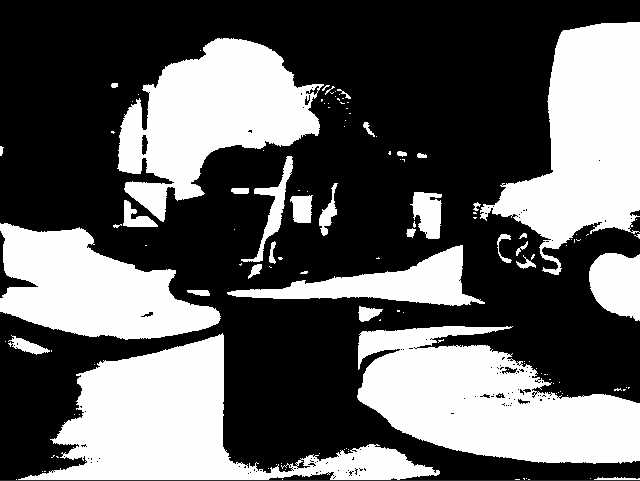
Code Overview
Importing Modules
import time, os, sys, gcfrom machine import Pinfrom media.sensor import * # Camera interfacefrom media.display import * # Display interfacefrom media.media import * # Media managerimport _threadimport cv_lite # cv_lite extension with binary thresholdimport ulab.numpy as npSetting the Image Size
xxxxxxxxxximage_shape = [480, 640] # Height x WidthDefine the image resolution to 480x640 (Height x Width). Width). The camera and display module will be initialized based on this size later.
Initialize the camera (RGB888 format)
xxxxxxxxxxsensor = Sensor(id=2, width=640, height=480)sensor.reset()sensor.set_framesize(width=640, height=480)sensor.set_pixformat(Sensor.RGB888)- Initialize the camera, setting the resolution to 640x480 and the frame rate to an unspecified default.
- Resize the output frame to 640x480 and set it to RGB888 format (a three-channel color image, suitable for binarization of color images).
Initialize the display module
xxxxxxxxxxDisplay.init(Display.ST7701, width=640, height=480, to_ide=True, quality=50)Initialize the display module, using the ST7701 driver chip, with a resolution consistent with the image size. to_ide=True indicates that the image will be simultaneously transmitted to the IDE for virtual display, and quality=50 sets the image transmission quality.
Initialize the media manager and start the camera
xxxxxxxxxxMediaManager.init()sensor.run()Initialize the media resource manager and start the camera to capture the image stream.
Set binarization parameters
xxxxxxxxxxthresh = 130 # Threshold valuemaxval = 255 # Maximum value (white)clock = time.clock() # Start FPS timerthresh: Binarization threshold. Pixels below this value will be set to 0 (black), while pixels above or equal to this value will be set to maxval (white).maxval: Maximum pixel value after binarization, typically set to 255 to represent white.clock: Used to calculate frame rate.
Image processing and binarization
xwhile True: clock.tick() # Capture a frame img = sensor.snapshot() img_np = img.to_numpy_ref() # Call binary threshold function (returns ndarray) binary_np = cv_lite.rgb888_threshold_binary(image_shape, img_np, thresh, maxval) # Construct grayscale image for display img_out = image.Image(image_shape[1], image_shape[0], image.GRAYSCALE, alloc=image.ALLOC_REF, data=binary_np) # Show image Display.show_image(img_out) # Garbage collection & print FPS and print FPS gc.collect() print("binary:", clock.fps())- Image Capture: Acquire an image frame using
sensor.snapshot()and convert it to a NumPy array reference usingto_numpy_ref(). - Binarization: Call
cv_lite.rgb888_threshold_binary()to perform binarization, returning a NumPy array of the binarized grayscale image. - Image Packaging and Display: Pack the binarized result into a grayscale image object and display it on the screen or in an IDE virtual window.
- Memory Management and Frame Rate Output: Call
gc.collect()to clear memory and print the current frame rate usingclock.fps().
Resource Release
xxxxxxxxxxsensor.stop()Display.deinit()os.exitpoint(os.EXITPOINT_ENABLE_SLEEP)time.sleep_ms(100)MediaManager.deinit()Parameter Adjustment Instructions
thresh: Threshold. A higher value requires brighter pixels to turn white. Adjust based on image brightness. It is recommended to test from 100 to 200 to filter noise or highlight the target.maxval: Maximum value. Usually kept at 255. If you need to customize the output intensity, you can adjust it, but generally it does not need to be changed.