Welcome to MicroROS V2 Robot Car repository
4. Visual Line Tracking
Visual Line Tracking (No-PTZ)
Experiment Objective
The camera recognizes ground lines (HSV color segmentation), PID controls the chassis angular velocity to drive along the line, and the LiDAR stops the car on obstacles ahead. The No-PTZ version uses a fixed camera bracket without the pan-tilt tilt-down function.
Experiment Principle
1. Keyword Explanation
| Keyword | Description |
|---|---|
| Line Following | The camera recognizes the line position, uses the image center as the reference to compute the error, and PID closed-loop controls the angular velocity |
| HSV Color Segmentation | Uses cv.inRange in the HSV color space to binarize and extract lines of a specific color, with hue wrap-around support (e.g., red H crossing 0°) |
| Line Tracking ROI | Only processes the lower part of the image (line_roi_top_ratio=0.55), excluding distant background interference |
| Discrete PID Controller | Independent P+I+D gains with integral clamping; pixel error is scaled by line_error_divisor and normalized by pid_scale(1000) |
| Laser Obstacle Avoidance Stop | If valid points in the 0.20~0.35m range within the front ±90° half-angle of /scan exceed 10 → immediate stop + optional buzzer |
| Automatic Exit on Line Loss | Automatically calls rclpy.shutdown() after the line-lost timeout line_lost_timeout_sec(1.5s) |
| Mouse HSV Sampling | Selects a ROI with the mouse → takes the 5~95 percentile HSV → automatically updates the threshold → saves to a file |
| QoS | best_effort (image/laser input + cmd_vel downlink), sensor_data (LiDAR) |
| TF Coordinate Frames | odom → base_footprint → base_link |
2. Technical Architecture
Dual timers (image 30Hz + control 20Hz) + laser callback + discrete PID controller:
/camera/image_raw (BEST_EFFORT)→ follow_line_node├── Image processing timer (30Hz): image conversion → flip → HSV binarization → morphology → largest contour → EMA filtering└── Chassis control timer (20Hz): pixel error → scaling → discrete PID → angular velocity clamping → /cmd_vel (BEST_EFFORT)/scan (sensor_data)→ Obstacle avoidance callback: count valid front points → above threshold → stop + buzzer/JoyState (Bool)→ Joystick override → stop + PID reset
Differences between No-PTZ and PTZ versions: the camera is fixed and cannot tilt down (no pan-tilt). Compensate by manually adjusting the camera mounting angle, or increasing line_roi_top_ratio to enlarge the lower ROI.
3. Core Topics Quick Reference
Firmware Uplink (Sensor Data)
| Topic | Message Type | QoS | Description |
|---|---|---|---|
/camera/image_raw | sensor_msgs/Image | best_effort | ESP32 camera raw image frames |
/scan | sensor_msgs/LaserScan | sensor_data | LiDAR scan data (for obstacle avoidance) |
Firmware Downlink (Control Commands)
| Topic | Message Type | QoS | Field | Range | Direction |
|---|---|---|---|---|---|
/cmd_vel | geometry_msgs/Twist | best_effort + keep_last(1) | linear.x | 0.15 m/s (constant) | +=forward |
angular.z | -1.20~1.20 rad/s | +=turn left, −=turn right | |||
/beep | std_msgs/UInt16 | reliable | data | 0/1 | 1=buzzer on (obstacle avoidance triggered) |
Usage example:
xxxxxxxxxx# Increase line tracking speedros2 launch microros_v2_no_ptz_visual_control_pkg follow_line.launch.py \ line_linear_speed:=0.20 max_angular_speed:=1.5ROS2 Internal Topics
| Topic | Message Type | QoS | Source | Description |
|---|---|---|---|---|
/JoyState | std_msgs/Bool | reliable | Joystick node | When the joystick is active, follow_line_node stops + PID reset |
Experiment Steps
1. Hardware Preparation
| Hardware | Requirement |
|---|---|
| PTZ version | ❌ This section is for the No-PTZ version |
| No-PTZ version | ✅ |
| Required peripherals | ESP32 camera (fixed bracket) + T-mini Plus LiDAR |
2. Start Agent + Camera + Joint Model (Terminal 1)
xxxxxxxxxxros2 launch microros_v2_bringup car_base.launch.py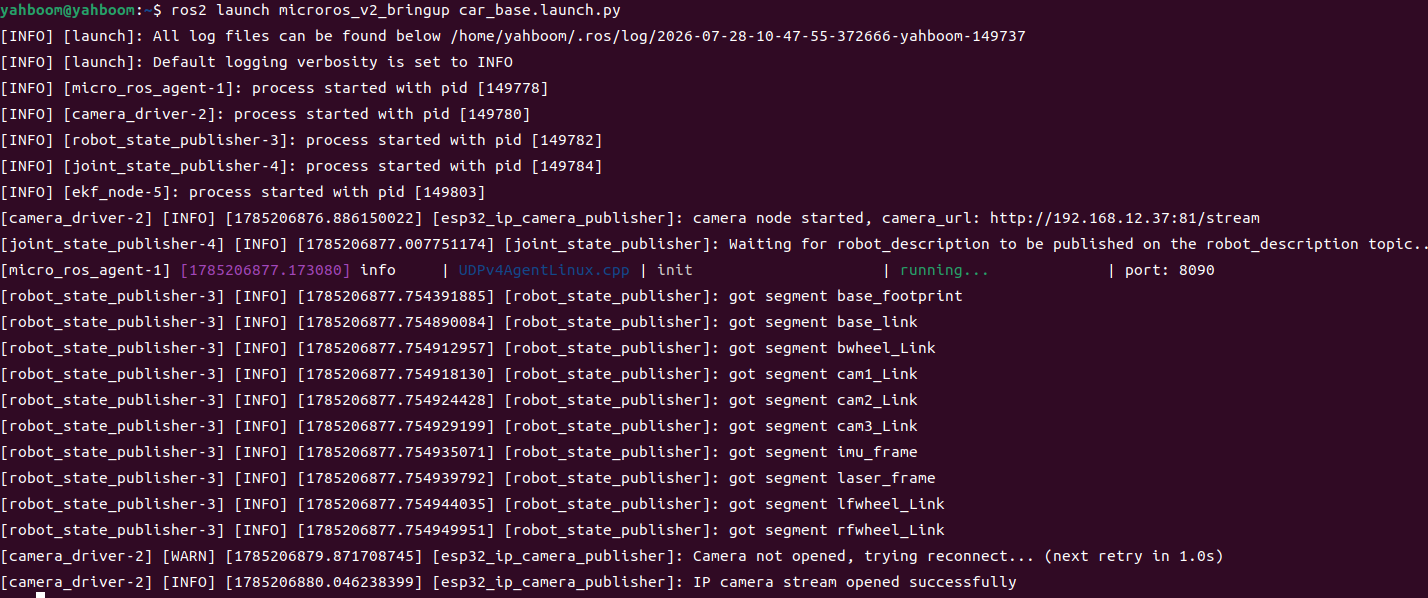
3. Start Visual Line Tracking (Terminal 2)
xxxxxxxxxxros2 launch microros_v2_no_ptz_visual_control_pkg follow_line.launch.py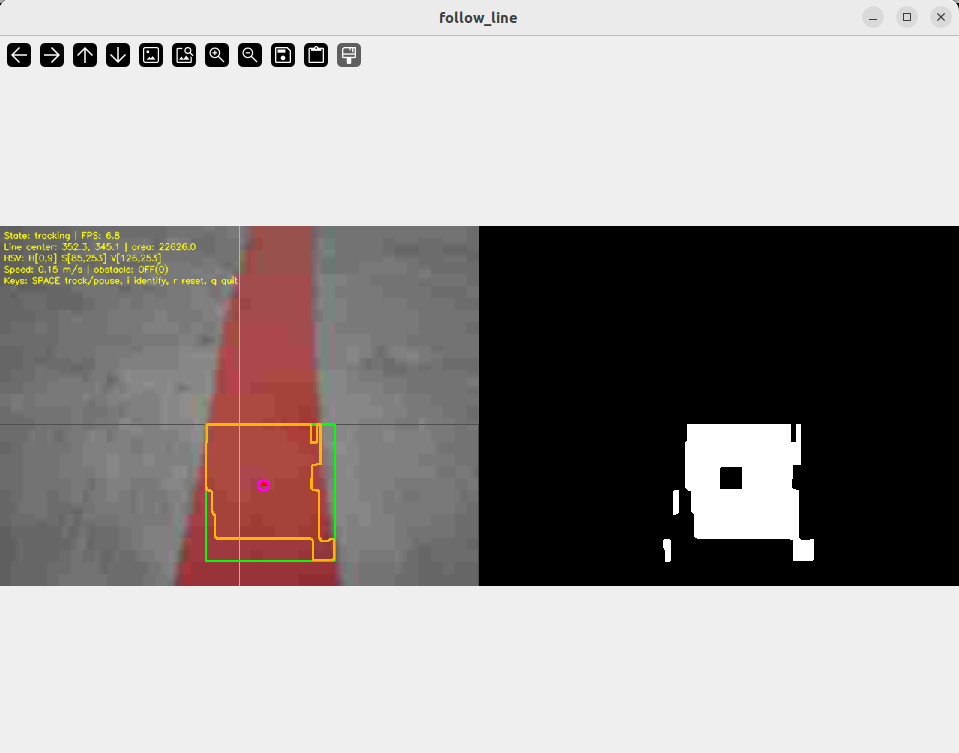
5. Operation Instructions
Interaction
| Key | Function |
|---|---|
| Space | tracking/paused |
| i / I | Recognition only (does not control the chassis) |
| r / R | Reset |
| Mouse drag | HSV sampling (drag to select the line area, threshold auto-updates) |
| q / Q / ESC | Quit |
Safety and Boundary Handling
- Obstacle avoidance takes priority over the line tracking PID
- Joystick override → stop + PID reset
- Deadband: drive straight within 40px (PID reset)
- Line lost 1.5s → stop + optional automatic exit
- PID integral clamping prevents saturation (
pid_integral_limit=100) - Hue wrap-around handles red lines (two-segment mask merged when Hmin > Hmax)
- Stop before quitting
Experiment Result
- Automatic line tracking: drives along the line at 0.15 m/s, PID corrects deviations
- Line centered: drives straight within the 40px deadband
- Line to the left: turns right to correct; turns left when the line is to the right
- Obstacle ahead: stops + buzzer within 0.35m, resumes after the obstacle is removed
- Line lost >1.5s: automatically stops and exits
- Joystick: stops, resumes after release
Code Explanation
Source paths:
- Launch:
~/microros_ws/src/microros_v2_no_ptz_visual_control_pkg/launch/follow_line.launch.py- Node source:
~/microros_ws/src/microros_v2_no_ptz_visual_control_pkg/microros_v2_no_ptz_visual_control_pkg/follow_line_node.py
1. Core Node Analysis
follow_line_node is the most feature-complete of the 4 visual control nodes — integrating HSV line tracking, discrete PID control, laser obstacle avoidance, mouse sampling, and joystick override. It uses a dual-timer architecture to decouple image processing from chassis control.
Data flow:
image_callback→ only caches the latest rawImage(non-blocking)process_latest_image(30Hz) → image conversion → orientation correction → ROI HSV binarization → largest contour extraction → EMA filtering → state updatepublish_chassis_control_command(20Hz) → pixel error/ line_error_divisor→ discrete PID → angular velocity clamping → publish/cmd_velscan_callback→ count valid front points → obstacle avoidance stop when above the threshold
Constructor — declares parameters, creates the discrete PID controller, subscribers/publishers/dual timers:
x# Source file: ~/microros_ws/src/microros_v2_no_ptz_visual_control_pkg/microros_v2_no_ptz_visual_control_pkg/follow_line_node.pydef __init__(self) -> None: """Initialize the line following node.""" super().__init__(DEFAULT_NODE_NAME) self.image_lock = threading.Lock() self.line_state_lock = threading.Lock() self.scan_state_lock = threading.Lock() # Cache the latest image (does not block the subscription callback) self.latest_image_msg: Optional[Image] = None self.latest_image_sequence_id = 0 self.processed_image_sequence_id = 0 self.tracking_state = TRACKING_STATE_IDENTIFY self.is_node_running = True self.joy_is_active = False # Line detection state self.line_is_valid = False self.raw_line_center: Optional[Tuple[float, float]] = None self.filtered_line_center: Optional[Tuple[float, float]] = None # After EMA filtering self.latest_line_update_time_sec = 0.0 self.line_lost_start_time_sec: Optional[float] = None # Obstacle state self.obstacle_warning_count = 0 self.obstacle_is_active = False # Mouse HSV sampling state self.mouse_selecting = False self.roi_selection_start: Tuple[int, int] = (0, 0) self.roi_selection_end: Tuple[int, int] = (0, 0) self.roi_selection_pending = False self.declare_and_get_parameters() self.load_hsv_parameters_from_file_if_needed() # Create the discrete PID controller (gains normalized by pid_scale) self.line_pid_controller = DiscretePidController( self.line_pid_kp / self.pid_scale, # 22.0 / 1000 = 0.022 self.line_pid_ki / self.pid_scale, # 0.0 self.line_pid_kd / self.pid_scale, # 5.0 / 1000 = 0.005 self.pid_integral_limit, # 100.0 ) # Image subscription (QoS: KEEP_LAST, BEST_EFFORT) self.image_subscription = self.create_subscription( Image, self.image_topic, self.image_callback, QoSProfile(history=QoSHistoryPolicy.KEEP_LAST, depth=1, reliability=QoSReliabilityPolicy.BEST_EFFORT, durability=QoSDurabilityPolicy.VOLATILE), ) # LiDAR subscription (sensor_data QoS) self.scan_subscription = self.create_subscription( LaserScan, self.scan_topic, self.scan_callback, qos_profile_sensor_data, ) # Joystick subscription self.joy_state_subscription = self.create_subscription( Bool, self.joy_state_topic, self.joy_state_callback, 10, ) # cmd_vel publisher (BEST_EFFORT aligned with firmware) self.cmd_vel_qos = QoSProfile( history=QoSHistoryPolicy.KEEP_LAST, depth=1, reliability=QoSReliabilityPolicy.BEST_EFFORT, durability=QoSDurabilityPolicy.VOLATILE, ) self.cmd_vel_publisher = self.create_publisher(Twist, self.cmd_vel_topic, self.cmd_vel_qos) self.beep_publisher = self.create_publisher(UInt16, self.beep_topic, 10) # Dual timers self.image_processing_timer = self.create_timer( 1.0 / max(self.image_processing_rate_hz, MINIMUM_TIMER_RATE_HZ), self.process_latest_image, ) self.control_timer = self.create_timer( 1.0 / max(self.control_rate_hz, MINIMUM_TIMER_RATE_HZ), self.publish_chassis_control_command, ) self.dynamic_parameter_callback_handle = self.add_on_set_parameters_callback( self.on_dynamic_parameter_update ) if self.auto_start_tracking: self.tracking_state = TRACKING_STATE_TRACKINGChassis control timer callback — PID line tracking + obstacle avoidance priority:
xxxxxxxxxx# Source file: ~/microros_ws/src/microros_v2_no_ptz_visual_control_pkg/microros_v2_no_ptz_visual_control_pkg/follow_line_node.pydef publish_chassis_control_command(self) -> None: """Publish chassis control command at a fixed rate.""" if not self.is_node_running: return # Joystick override: zero velocity + PID reset (already handled in joy_state_callback) if self.joy_is_active: self.publish_zero_twist() return # Obstacle avoidance priority: obstacle ahead → stop + buzzer with self.scan_state_lock: local_obstacle_is_active = self.obstacle_is_active if self.enable_obstacle_stop and local_obstacle_is_active: self.publish_zero_twist() self.publish_beep(True) return self.publish_beep(False) if self.tracking_state != TRACKING_STATE_TRACKING: if self.tracking_state in (TRACKING_STATE_LOST, TRACKING_STATE_PAUSED) or self.lost_line_stop: self.publish_zero_twist() return with self.line_state_lock: local_line_is_valid = self.line_is_valid local_filtered_center = self.filtered_line_center local_image_width = self.image_width local_latest_update_time_sec = self.latest_line_update_time_sec # Line-lost timeout check if (not local_line_is_valid or local_filtered_center is None or local_image_width <= 0 or (time.perf_counter() - local_latest_update_time_sec) > self.line_lost_timeout_sec): self.line_pid_controller.reset() self.publish_zero_twist() return # Pixel error → PID angular velocity line_center_x = local_filtered_center[0] image_center_x = local_image_width * 0.5 pixel_error_x = line_center_x - image_center_x twist_command = Twist() twist_command.linear.x = float(self.line_linear_speed) # Constant linear velocity if abs(pixel_error_x) <= self.line_center_deadband_pixel: angular_command = 0.0 # Drive straight within the deadband self.line_pid_controller.reset() else: pid_input_value = pixel_error_x / self.line_error_divisor # Error scaling pid_output_value = self.line_pid_controller.update(pid_input_value, 0.0) angular_command = -pid_output_value if self.reverse_angular_direction else pid_output_value angular_command = float(np.clip(angular_command, -self.max_angular_speed, self.max_angular_speed)) twist_command.angular.z = angular_command self.cmd_vel_publisher.publish(twist_command)Key logic:
- HSV hue wrap-around: when
Hmin > Hmax(e.g., red: Hmin=0, Hmax=9),create_hsv_mask()automatically merges two mask segments (0~Hmax + Hmin~179) - EMA filtering:
target_smooth_alpha(0.55) applies an exponential moving average to the detected center, reducing jitter - Mouse sampling:
on_mouse_eventrecords the selected ROI →update_hsv_from_selected_roitakes the 5~95 percentile HSV → automatically writes to the parameter server - Discrete PID:
DiscretePidControlleris an independent class with independent P/I/D terms + integral clamping, supporting dynamic gain updates
2. Key Parameters
Parameter definition files:
- Launch:
~/microros_ws/src/microros_v2_no_ptz_visual_control_pkg/launch/follow_line.launch.py- Node:
~/microros_ws/src/microros_v2_no_ptz_visual_control_pkg/microros_v2_no_ptz_visual_control_pkg/follow_line_node.py
Line Tracking Control Parameters
| Parameter | Type | Default | Description |
|---|---|---|---|
line_linear_speed | float | 0.15 m/s | Constant linear velocity for line tracking |
max_angular_speed | float | 1.2 rad/s | Maximum angular velocity clamping |
line_pid_kp | float | 22.0 | PID P gain (actual 0.022 after scaling by pid_scale=1000) |
line_pid_ki | float | 0.0 | PID I gain |
line_pid_kd | float | 5.0 | PID D gain (actual 0.005 after scaling) |
pid_scale | float | 1000.0 | PID gain normalization divisor |
pid_integral_limit | float | 100.0 | Integral clamping |
line_error_divisor | float | 16.0 | Pixel error scaling divisor |
line_center_deadband_pixel | float | 40.0 px | Deadband (drive straight when the error is within this range, PID reset) |
reverse_angular_direction | bool | true | Reverse the angular velocity direction |
Line Tracking Detection Parameters
| Parameter | Type | Default | Description |
|---|---|---|---|
line_roi_top_ratio | float | 0.55 | ROI top ratio (only processes the lower part of the frame) |
line_roi_bottom_ratio | float | 2.00 | ROI bottom ratio |
line_min_area | float | 150.0 px² | Minimum contour area |
line_lost_timeout_sec | float | 1.5 s | Line-lost timeout |
target_smooth_alpha | float | 0.55 | EMA filter coefficient |
Hmin/Smin/Vmin | int | 0/85/126 | HSV lower bound |
Hmax/Smax/Vmax | int | 9/253/253 | HSV upper bound |
morph_kernel_size | int | 5 | Morphology kernel size |
Obstacle Avoidance Parameters
| Parameter | Type | Default | Description |
|---|---|---|---|
enable_obstacle_stop | bool | true | Laser obstacle avoidance switch |
obstacle_min_valid_distance | float | 0.20 m | Minimum valid distance |
obstacle_response_distance | float | 0.35 m | Obstacle response distance |
obstacle_check_angle_deg | float | 90.0° | Obstacle check half-angle |
obstacle_warning_count_threshold | int | 10 | Minimum valid point count to trigger obstacle avoidance |
3. Node Description
| Node | Package | Description |
|---|---|---|
follow_line_node | microros_v2_no_ptz_visual_control_pkg | Visual line tracking + obstacle avoidance, dual timers + discrete PID + mouse sampling |
Common Problems
| Problem | Cause | Solution |
|---|---|---|
| Line tracking sways left and right | PID gains too large | Reduce line_pid_kp or line_pid_kd |
| Line not detected | HSV thresholds do not match | Select the line area with the mouse to re-sample; check the binary image in show_binary_window |
| Obstacle avoidance too sensitive | obstacle_response_distance too large or obstacle_warning_count_threshold too small | Reduce the response distance or increase the point count threshold |
| Sudden stop | lost_line_stop stops the car when the line is lost | Set it to false as needed, or check the HSV/LiDAR inputs |