yahboom
HomeTutorialsProduct
Solution
Blog
Online Store
About Us
EN/中文
Store
MicroROS V2 Robot Car📖
01.Introduction
  • 0.Unboxing Video
  • 1. Readme Learning Route
  • 2. Must Read Before Use
  • 3. Introduction to MicroROS V2 Control Board
  • 4. Introduction to LiDAR
  • 5. Introduction to ESP32 Camera Module
  • 6. FAQ
  • 7. About Charging
02.Assembly course
  • Assembly Video
03.Preparation
  • 1. Quickly Start
  • 2. Write Firmware
  • 3. Install VM and Start System
  • 4. Configure VM and Connect Robot
  • 5. Connect to MicroROS Agent
  • 6. Change Ubuntu System Language to English
04.Quick start control course
  • 1. VM Keyboard Remote Control
  • 2. VM Handle Remote Control
  • 3. USB Handle Control
05.Robot control course
  • 1. Robot Information Release
  • 2. Robot Keyboard Control
  • 3. Robot Handle Control
  • 4. Robot State Estimation
  • 5. Linear Speed Calibration
  • 6. Angular Velocity Calibration
  • 7. Robot URDF Model
06.Lidar course
  • 1. Precautions for LiDAR Mapping and Navigation
  • 2. Lidar Avoid
  • 3. Lidar Following
  • 4. Lidar Guard
  • 5. Lidar Patrol
  • 6. Gmapping Mapping
  • 7. Cartographer Mapping
  • 8. Cartographer Quickly Repositioning Navigation
  • 9. Slam Toolx Mapping
  • 10. Navigation2 Single Point Navigation
  • 11. Navigation2 Multi Point Navigation
  • 12. Ros Robot App Mapping And Navigation
07.Road network planning
  • 1. Introduction to Road Network Planning and Quick Start
  • 2. Build a Pose Map
  • 3. Road Network Annotation
  • 4. Planning and Navigation Between Road Networks
  • 5. Road Network Navigation in Any Pose
  • 6. Path Replanning
08.Vision basic course
OpenCV Image Processing
  • 1. Introduction to OpenCV Source CV
  • 2. Open Source CV Geometric Transformation
  • 3. Open Source CV Image Processing and Drawing Text Line Segments
  • 4. Open Source CV Image Beautification
09.Visual General Course (For Standard&Superior version)
1. ESP32 Visual Recognition Module Configuration
  • 1. Serial Port Configuration WiFi Instructions
  • 2. Use ESP32 Camera Module in Robot Car
  • 3. Servo PTZ Calibration
2. OpenCV Visual Recognition
  • 1. Human Pose Estimation
  • 2. Object Detection
  • 3. AR Vision
  • 4. QR Code
  • 5. Color Recognition
  • 6. Facial Recognition
  • 7. AprilTag Machine Code Recognition
3. Mediapipe Visual Recognition
  • 1. Hand Detection
  • 2. Pose Detection
  • 3. Holistic Detection
  • 4. Facial Detection
  • 5. Facial Recognition
  • 6. Facial Special Effects
  • 7. 3D Object Recognition
  • 8. Brush
  • 9. Gesture Recognition
  • 10. Palm Target Localization
  • 11. Fingertip Trajectory Recognition
4. Yolov11&26 Visual Recognition
  • 1. YOLO Environment Setup
  • 2. CLI Usage
  • 3. Object Detection
  • 4. Instance Segmentation
  • 5. Pose Estimation
  • 6. Image Classification
  • 7. Oriented Bounding Boxes Object Detection
  • 8. Model Prediction
10.Visual Advanced Course (Just for Standard version)
1. Visual Control
  • 1. QR Code Recognition Control Action
  • 2. AprilTag Control Car Action Group
  • 3. Gesture Control Car Action Group
  • 4. Visual Line Tracking
2. Visual Tracking
  • 1. Color Tracking
  • 2. Facial Tracking
  • 3. QR Code Tracking
  • 4. Object Recognition And Tracking
  • 5. Mediapipe Palm Tracking
  • 6. Mediapipe Gesture Tracking
  • 7. Mediapipe Human Pose Tracking
  • 8. KCF Object Tracking
  • 9. AprilTag Machine Code Tracking
3. Visual Following
  • 1. Color Follow
  • 2. Face Follow
  • 3. QR Code Follow
  • 4. Mediapipe Palm Follow
  • 5. Mediapipe Gesture Follow
  • 6. Mediapipe Human Posture Follow
  • 7. AprilTag Machine Code Follow
  • 8. Object Follow
11.Visual Advanced Course (Just for Superior version)
1. Visual Control
  • 1. QR Code Recognition Control Action
  • 2. AprilTag Control Car Action Group
  • 3. Gesture Control Car Action Group
  • 4. Visual Line Tracking
2. Visual Tracking
  • 1. Color Tracking
  • 2. Facial Tracking
  • 3. QR Code Tracking
  • 4. YOLO Object Recognition and Tracking
  • 5. Mediapipe Palm Tracking
  • 6. Mediapipe Gesture Tracking
  • 7. Mediapipe Human Pose Tracking
  • 8. KCF Object Tracking
  • 9. AprilTag Machine Code Tracking
3. Visual Follow
  • 1. Color Follow
  • 2. Face Follow
  • 3. QR Code Follow
  • 4. Mediapipe Palm Follow
  • 5. Mediapipe Gesture Follow
  • 6. Mediapipe Human Pose Follow
  • 7. AprilTag Machine Code Follow
  • 8. Object Follow
12.AI Large Model Basic and Applications Course
1. AI Large Model Preparation
  • 1.AI Large Model Preparation
2. AI Large Model Basic Course
  • 1. AI Large Model Types and Principles
  • 2. RAG Retrieval Augmented and Training Samples
  • 3. Embodied Intelligent System Architecture
  • 4. Embodied Intelligence Core Source Code
3. AI Large Model Development
  • 1. Register Model Service Account
  • 2. Configure API KEY
  • 3. Dify Introduction
  • 4. Dify Basic Features
  • 5. RAG Knowledge Base Deployment
  • 6. AI Application Development Chatbot
  • 7. RAG Knowledge Base and Chatbot
  • 8. AI Agent Workflow
4. AI Large Model (Text Version)
  • 1. Semantic Understanding and Instruction Following
  • 2. Multimodal Visual Understanding
  • 3. Multimodal Visual Understanding + Basic Control
  • 4. Multimodal Visual Understanding + Object Following
  • 5. Multimodal Visual Understanding + Visual Line Following
  • 6. Multimodal Visual Understanding + SLAM Navigation
  • 7. Multimodal Visual Understanding + SLAM Navigation + Visual Line Following
  • 8. Multimodal Visual Understanding + SLAM Navigation + Object Following
  • 9. Intent Inference + Multimodal Visual Understanding + SLAM Navigation
13.Openclaw Basics Course
  • 1. Openclaw Introduction
  • 2. Openclaw Core Concepts
  • 3. Openclaw Api-Key Configuration
  • 4. Openclaw Switching Models
  • 5. Openclaw System Prompt
  • 6. Openclaw Common CLI Command
14. Openclaw Interaction Course
  • 1. Openclaw Webchat Interaction
  • 2. Openclaw Tui Interaction
  • 3. Openclaw Whatsapp Interaction
15.Openclaw Development Course
  • 1. Openclaw Robot Mcp Service Integration
  • 2. Robot CLI Command Tools
  • 3. Robot-Control Plugin Tools
  • 4. Openclaw Skills Development
  • 5. Openclaw Scheduled Tasks
  • 6. Openclaw Multi Agent System
  • 7. Openclaw Proactive Interaction
  • 8. Openclaw Vector Memory
16.Openclaw Embodied Intelligence Course
  • 1. OpenClaw Natural Interaction + Basic Control
  • 2. OpenClaw Natural Interaction + Slam Navigation
  • 3. OpenClaw Natural Interaction + Multimodal Visual Understand
  • 4. OpenClaw Natural Interaction + Multimodal Visual Understand + Slam Navigation + Visual Follow
  • 5. OpenClaw Natural Interaction + Multimodal Visual Understand + Slam Navigation + Visual Track
17.Multi-machine Course
  • 1. Multi Machine Handle Control
  • 2. Multi Machine Keyboard Control
  • 3. Multi Machine Navigation
18.MicroROS-V2 Control Board Development Environment
  • 1. Set Up the ESP32-IDF Development Environment
  • 2. ESP32-IDF Configuration Tool
  • 3. ESP Flash Tool Flashing Firmware
  • 4. Install ESP32 Microros Components
  • 5. Install And Start Microros Agent
19.MicroROS-V2 Control Board ESP32 Basic Course
  • 1. Led Light Up
  • 2. Button Function
  • 3. Drive Buzzer
  • 4. Oled
  • 5. Usb Host Function
  • 6. Serial Communication
  • 7. Battery Voltage Detection
  • 8. Drive Pwm Servo
  • 9. Drive Motors
  • 10. Read Motor Encoder Data
  • 11. Pid Motor Speed Control
  • 12. Robot Kinematics Analysis Theory
  • 13. Read Imu Data
  • 14. Read Lidar Data
  • 15. Flash Data Storage
  • 16. Custom Partition Table
  • 17. Bluetooth Communication
  • 18. Wifi Connection
  • 19. ESP32 Visual Recognition Module
20.MicroROS-V2 Control Board Micro_ros Basic Course
  • 1. Publish Topics
  • 2. Subscribe To Topics
  • 3. Multi Topic Subscription And Publishing
  • 4. Subscribe To Buzzer Topic
  • 5. Subscribe To Pwm Servo Topic
  • 6. Subscribe To Speed Control Topic
  • 7. Publish Odometry Topic
  • 8. Publish Imu Data Topic
  • 9. Publish Lidar Data Topic
21. Linux System Course
  • 1.Introduction to Linux system
  • 2.Ubuntu file system
  • 3.Ubuntu common commands
  • 4.Ubuntu common editors
  • 5.Ubuntu software operation commands
  • 6.Virtual machine installation
  • 7.SSH remote control
  • 8.VNC remote control
  • 9.Transfer files remotely
  • 10.Driver library and communication
  • 11.Static IP and hotspot mode
  • 12.Bind device ID
  • 13.Capacity expansion and resource allocation
  • 14.Update system software sources
  • 15.Set root user password
  • 16.sudo free password
  • 17.Connect to WiFi network
  • 18.View system version
  • 19.Customized service management
  • 20.Back up system image
22.Docker Course
  • 1.Docker overview and docker installation
  • 2.Common commands for docker image containers
  • 3.Docker images deeply understand and publish images
23.ROS Basic Course
  • 1.Introduction to ROS2
  • 2.ROS2 install Humble
  • 3.ROS2 development environment
  • 4.ROS2 workspace
  • 5.ROS2 function package
  • 6.ROS2 node
  • 7.ROS2 topic communication
  • 8.ROS2 service communication
  • 9.ROS2 action communication
  • 10.ROS2 custom interface message
  • 11.ROS2 parameter service case
  • 12.ROS2 meta-function package
  • 13.ROS2 distributed communication
  • 14.ROS2 DDS
  • 15.ROS2 time related API
  • 16.ROS2 common command tools
  • 17.ROS2 rviz2 use
  • 18.ROS2 rqt toolbox
  • 19.ROS2 Launch startup file configuration
  • 20.ROS2 recording and playback tool
  • 21.ROS2 URDF model
  • 22.ROS2 Gazebo simulation platform
  • 23.ROS2 TF2 coordinate transformation
Download
  • Mapping_APP(iOS_Android)
  • Code
  • Software_Tools
  • VM_System_File
  • 3D_Model_File
  • ESP32_Firmware
  • Dify LLM Base
  • Instruction_Manual
  • VMware
Download ZIP

Welcome to MicroROS V2 Robot Car repository

2. Lidar Avoid

LiDAR Obstacle Avoidance

LiDAR Obstacle Avoidance1. Course Content2. Demo3. Source Code Analysis

1. Course Content

  • Start the demo program: the robot uses the LiDAR to detect obstacles ahead and automatically turns to avoid them.

2. Demo

xxxxxxxxxx
ros2 launch microros_v2_bringup lidar_demo.launch.py demo:=laser_Avoidance
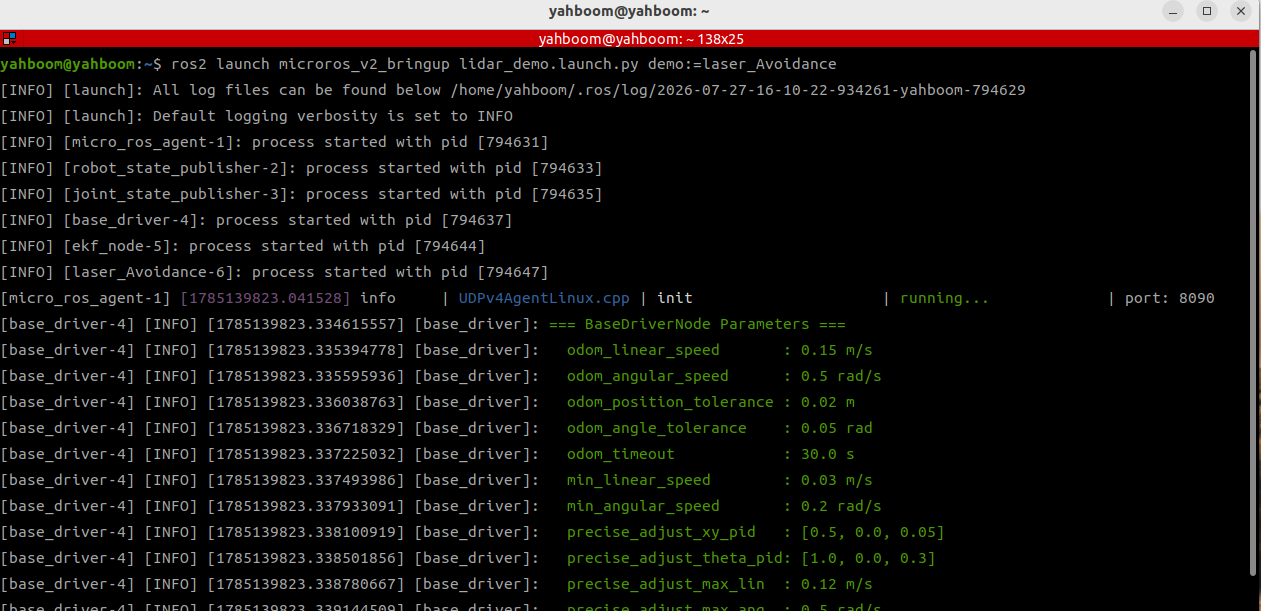
image-20260727161042016


  • While the robot moves forward, the LiDAR scans a 30° range in front in real time for obstacles
  • When an obstacle is detected within 0.3 m ahead, the robot automatically turns to go around it
  • After bypassing the obstacle, it resumes moving straight forward
  • The detection range and the obstacle response distance can be tuned through the parameter file


3. Source Code Analysis

Source code path:

xxxxxxxxxx
$HOME/microros_ws/src/common_demo/common_demo/lidar/laser_Avoidance.py

The core logic of the obstacle avoidance node is divided into two parts: TF coordinate transform setup and laser point cloud processing + obstacle avoidance decision-making.

  1. Wait for TF transform (wait_for_tf): On startup it first waits 1 second so that TransformListener can cache TF data. If the laser_frame parameter is not specified, it waits for the /scan callback to auto-detect the LiDAR frame name. It then repeatedly queries the base_link ← laser_frame TF until it becomes available or the node exits, ensuring that the later point cloud transforms do not fail because TF is not ready.

  2. Laser callback (registerScan):

    • Point cloud traversal: Each valid laser point (distance not 0 and less than range_max) is converted from polar coordinates to Cartesian coordinates (x, y), then transformed to the base_link frame via do_transform_point, so that the bearing is judged correctly even when the LiDAR is mounted with an offset.

    • Region division: Based on the distance to base_link (≤ ResponseDist × 1.5) and the angle relative to the x axis, the points are classified into three regions:

      • |angle| < LaserAngle → front warning front_warning
      • LaserAngle ≤ angle < 90° → left warning Left_warning
      • -90° < angle ≤ -LaserAngle → right warning Right_warning
    • Obstacle avoidance decision:

      • Front clear → move straight forward, release the turn direction lock
      • Front blocked → rotate in place, once a turn direction is chosen it is locked until the front is clear again, avoiding left/right oscillation
      • Turn direction priority: left blocked → turn right; right blocked → turn left; both sides blocked → choose the side with fewer warning points
​x
    def wait_for_tf(self):
        """Wait for TF transform to be available"""
        self.get_logger().info('Waiting for TF transform listener to be ready...')
        
        # Wait for TransformListener to cache TF data
        time.sleep(1.0)
        
        # If laser_frame parameter is empty, wait for first scan data to detect actual frame_id
        if not self.laser_frame:
            self.get_logger().info('laser_frame parameter not set, will detect from /scan topic')
            # Wait a short time for sub_laser callback to receive data
            wait_count = 0
            while not self.laser_frame and wait_count < 10:
                time.sleep(0.5)
                wait_count += 1
            
            if not self.laser_frame:
                self.get_logger().error('Failed to detect laser frame from /scan topic')
                return
        
        # Wait for TF transform to be available
        while rclpy.ok():
            try:
                self.tf_buffer.lookup_transform(
                    'base_link',
                    self.laser_frame,
                    rclpy.time.Time(),
                    timeout=rclpy.duration.Duration(seconds=1.0)
                )
                self.get_logger().info(f'TF available: base_link <- {self.laser_frame}')
                self.tf_ready = True
                return
            except TransformException:
                # Throttle TF waiting logs
                current_time = self.get_clock().now().nanoseconds / 1e9
                if (current_time - self.last_tf_log_time) >= self.tf_log_interval:
                    self.get_logger().info(f'Waiting for TF: base_link <- {self.laser_frame}...')
                    self.last_tf_log_time = current_time
                time.sleep(0.5)
​
    def registerScan(self, scan_data):
        if not isinstance(scan_data, LaserScan): return
        
        # Auto-detect laser frame_id
        if not self.laser_frame:
            self.laser_frame = scan_data.header.frame_id
            self.get_logger().info(f'Detected laser frame: {self.laser_frame}')
        
        # If TF is not ready, try to establish connection
        if not self.tf_ready:
            try:
                self.tf_buffer.lookup_transform(
                    'base_link',
                    scan_data.header.frame_id,
                    rclpy.time.Time(),
                    timeout=rclpy.duration.Duration(seconds=0.1)
                )
                self.tf_ready = True
                self.get_logger().info(f'TF ready: base_link <- {scan_data.header.frame_id}')
            except TransformException:
                # TF not ready, skip this scan
                return
        
        # Reset counters
        self.Right_warning = 0
        self.Left_warning = 0
        self.front_warning = 0
        
        # Get transform from laser to base_link
        try:
            trans = self.tf_buffer.lookup_transform(
                'base_link',
                scan_data.header.frame_id,
                rclpy.time.Time(),
                timeout=rclpy.duration.Duration(seconds=0.1)
            )
        except TransformException:
            # Throttle TF error logs
            current_time = self.get_clock().now().nanoseconds / 1e9
            if (current_time - self.last_tf_log_time) >= self.tf_log_interval:
                self.get_logger().warn('TF not available, skipping scan')
                self.last_tf_log_time = current_time
            return
        
        # Iterate through all laser points
        ranges = np.array(scan_data.ranges)
        for i in range(len(ranges)):
            if ranges[i] == 0.0 or ranges[i] > scan_data.range_max:
                continue
                
            # Calculate laser point position in laser coordinate frame
            angle = scan_data.angle_min + scan_data.angle_increment * i
            point_in_laser = PointStamped()
            point_in_laser.header = scan_data.header
            point_in_laser.point.x = ranges[i] * math.cos(angle)
            point_in_laser.point.y = ranges[i] * math.sin(angle)
            point_in_laser.point.z = 0.0
​
            # Transform to base_link coordinate frame
            try:
                point_in_base = do_transform_point(point_in_laser, trans)
                x = point_in_base.point.x
                y = point_in_base.point.y
                
                # Determine obstacle position based on base_link coordinate frame
                dist = math.sqrt(x**2 + y**2)
                if dist <= self.ResponseDist * 1.5:
                    # Use atan2 to calculate angle relative to base_link x-axis
                    angle_to_base = math.atan2(y, x) * RAD2DEG
​
                    if abs(angle_to_base) < self.LaserAngle:
                        self.front_warning += 1
                    elif self.LaserAngle <= angle_to_base < 90.0:
                        self.Left_warning += 1
                    elif -90.0 < angle_to_base <= -self.LaserAngle:
                        self.Right_warning += 1
            except TransformException:
                continue
        twist = Twist()
        current_time = self.get_clock().now().nanoseconds / 1e9
        
        # Determine current obstacle state
        front_blocked = self.front_warning > self.conut
        left_blocked = self.Left_warning > self.conut
        right_blocked = self.Right_warning > self.conut
        
        if not front_blocked:
            # Front is clear: side obstacles do not block forward motion,
            # just go straight and release the turn direction lock
            self.turn_dir = 0
            obstacle_state = 10
            twist.linear.x = self.linear
            twist.angular.z = 0.0
        else:
            # Front blocked: rotate in place. Pick a direction once and keep it
            # until the front is clear again, preventing left/right oscillation
            if self.turn_dir == 0:
                if left_blocked and not right_blocked:
                    self.turn_dir = -1   # obstacle on left, turn right
                elif right_blocked and not left_blocked:
                    self.turn_dir = 1    # obstacle on right, turn left
                else:
                    self.turn_dir = 1 if self.Left_warning <= self.Right_warning else -1
            obstacle_state = 6 if self.turn_dir > 0 else 4
            twist.linear.x = 0.0
            twist.angular.z = self.turn_dir * self.angular
        
        # Log only when state changes or after log_interval
        if obstacle_state != self.last_obstacle_state or (current_time - self.last_log_time) >= self.log_interval:
            log_messages = {
                4: 'Obstacle in front, turning right',
                6: 'Obstacle in front, turning left',
                10: 'Front clear, going forward'
            }
            if obstacle_state in log_messages:
                self.get_logger().info(log_messages[obstacle_state])
            self.last_log_time = current_time
            self.last_obstacle_state = obstacle_state
        
        self.pub_vel.publish(twist)


  • Parameter file path
xxxxxxxxxx
$HOME/microros_ws/src/microros_v2_bringup/config/common.yaml

Parameter descriptions and tuning suggestions for the laser_Avoidance node in common.yaml:

ParameterDefault valueDescriptionTuning suggestions
linear0.15 m/sLinear speed while moving forward during avoidanceIn narrow spaces it is recommended to lower to 0.1 m/s; in open areas it can be raised to 0.2 m/s
angular1.0 rad/sIn-place turning angular velocityIf turning is too slow the response will be sluggish; it can be raised to 1.5 rad/s
LaserAngle30.0°Half-angle of the front sector, determines the "straight ahead" judgment rangeThe larger the angle, the more sensitive it is to lateral obstacles, but it may also cause unnecessary turns; recommended between 20°–45°
ResponseDist0.3 mObstacle response distance (the actual detection threshold is 1.5×, i.e., 0.45 m)Too close risks collision; too far causes premature turns and longer detour paths; adjust according to the obstacle size in your environment
laser_Avoidance:
  ros__parameters:
    linear: 0.15                    # Forward linear speed (m/s)
    angular: 1.0                    # In-place turning angular velocity (rad/s)
    LaserAngle: 30.0                # Half-angle of the front obstacle detection sector (deg)
    ResponseDist: 0.3               # Obstacle response distance (m), actual detection threshold is 1.5x this value
Precautions for LiDAR Mapping and Navigation
Lidar Following

COMPANY

  • About us
  • Team Style
  • Blog

LEARNING & EXPLORATION

  • Tutorials
  • Edge AI hardware
  • Educational robots
  • Embedded intelligent hardware

WHERE TO BUY

  • Yahboom Online Store
  • Amazon
  • Alibaba
  • AliExpress
  • Mercado

TECHNOLOGY SUPPORT

  • Email: support@yahboom.com

BE A DISTRIBUTOR

  • Email: sales@yahboom.com
QR Code

Copyright © 2017-2026 Yahboom. All Rights Reserved.

EN/中文