Welcome to MicroROS V2 Robot Car repository
3. QR Code Follow
QR Code Follow (PTZ)
1. Experiment Objective
PTZ pan-tilt + car body collaborative QR code following; stable-frame gating filters transient code loss; pan-tilt PD locks on + body homing + QR code size distance following.
2. Experiment Principle
1. Key Terms
| Term | Description |
|---|---|
| Visual Following | Pan-tilt tracking + coordinated body movement; the car actively turns and moves forward/back to follow |
| Error sharing (body_share) | The body takes on the pan-tilt angle × body_share homing task |
| Angular-rate feedforward (body_ff_gain) | When the body rotates, the pan-tilt compensates in the opposite direction, preventing the target from being dragged away |
| Stable-frame gating (follow_stable_frames) | The body output is allowed only after the QR code is detected stably for N consecutive frames, filtering pyzbar transient false detections/code loss |
| Lost-frame tolerance (lost_frame_threshold) | The target is judged lost only after N consecutive lost frames, preventing single-frame misjudgment |
| pyzbar / OpenCV QR | Dual-backend QR code detection/decoding libraries; pyzbar is preferred by default |
2. Technical Architecture
Node chain: state estimation (ekf_filter_node + camera_node) → qr_follow_ptz_node → /cmd_ptz_angle (pan-tilt) + /cmd_vel (body)
Three-layer coordination: PTZ PD (20 Hz) + body angular-velocity PD (10 Hz) + distance-follow PD (10 Hz)
3. Core Topics Quick Reference
Firmware Uplink
| Topic Name | Message Type | QoS | Source |
|---|---|---|---|
| /camera/image_raw | Image | best_effort | ESP32 camera |
| /odom | Odometry | best_effort | Odometry (needed by the body control) |
Firmware Downlink
| Topic Name | Message Type | QoS | Description |
|---|---|---|---|
| /cmd_ptz_angle | Vector3 | best_effort + keep_last(1) | x: [-90,90]° horizontal, y: [-90,20]° tilt |
| /cmd_vel | Twist | best_effort + keep_last(1) | angular.z: turning, linear.x: forward/back |
ROS2 Internal
| Topic Name | Message Type | QoS | Source | Description |
|---|---|---|---|---|
| /joint_states | JointState | reliable | State estimation layer | Current pan-tilt angle feedback |
3. Experiment Steps
1. Hardware Preparation
| Hardware | Requirement |
|---|---|
| PTZ version | ✅ |
| No-PTZ version | ❌ |
| Required peripherals | ESP32 camera (pan-tilt) + PTZ servo |
2. Start Agent + Camera + Joint Model (Terminal 1)
ros2 launch microros_v2_bringup car_base.launch.py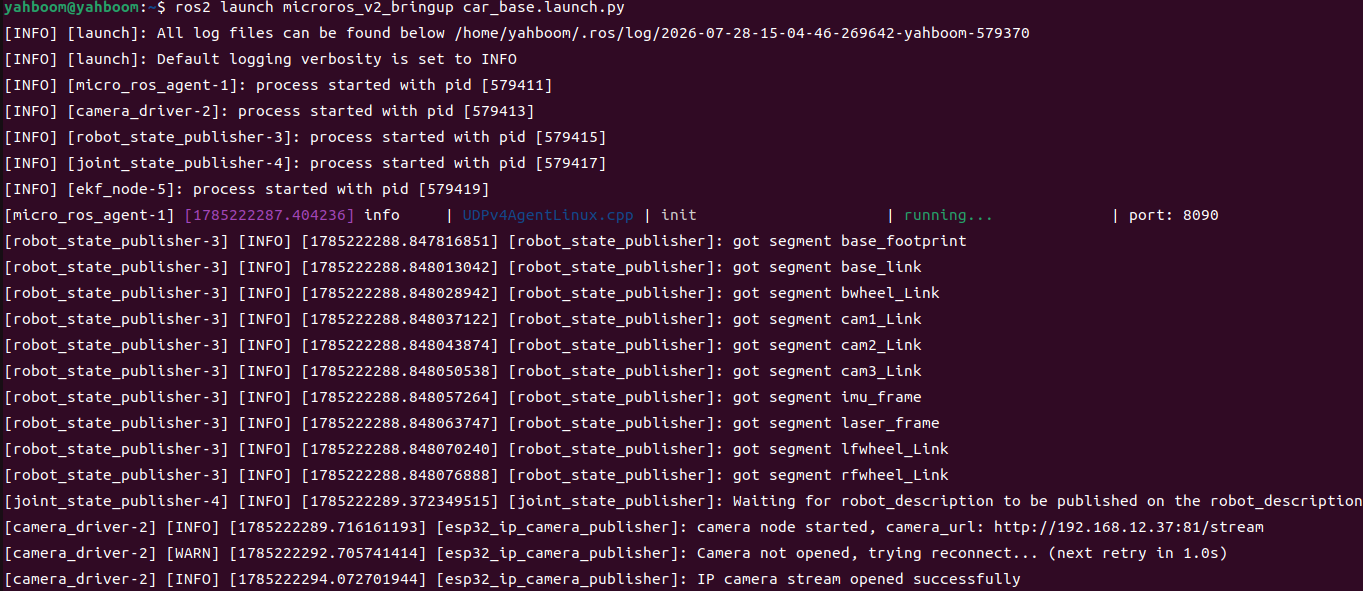
3. Start QR Code Follow (Terminal 2)
xxxxxxxxxxros2 launch microros_v2_ptz_visual_control_pkg qr_follow_ptz.launch.py 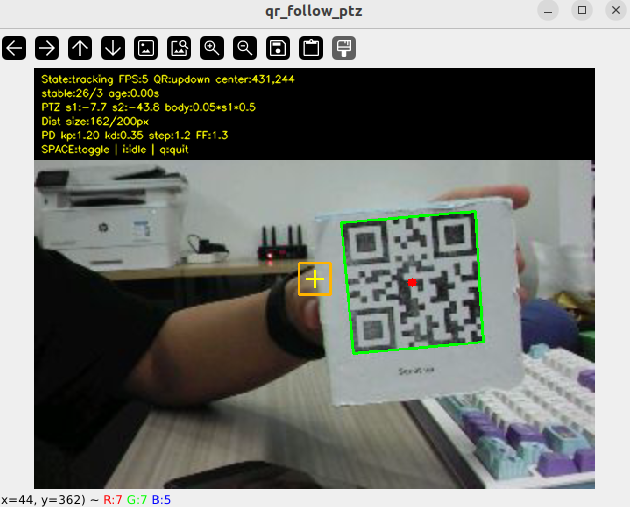
4. Operation Instructions
Workflow:
Three-layer coordinated control: PTZ PD (20 Hz) + body angular-velocity PD (10 Hz) + distance-follow PD (10 Hz).
QR code detection and stable-frame gating: the pyzbar/OpenCV dual backend detects QR codes, processed after scaling to 640×480. The largest code is taken as the primary target, yielding the center (cx, cy) and bbox size. A new
follow_stable_frames(3 frames) gate — the QR code must be detected stably for ≥3 consecutive frames before the body is allowed to output angular/linear velocity. The PTZ pan-tilt control is not affected by the gating (it always responds); only the body output is delayed by the gate, preventing body jitter caused by pyzbar transient false detections.PTZ PD control (20 Hz): normalized error → PD (
pd_kp=1.2,pd_kd=0.35) → step limiting (±1.2°) → angular-rate feedforward compensation → publish/cmd_ptz_angle.Body control (10 Hz):
- Angular velocity: s1 ×
body_share(0.5) → PD (angular_kp=0.05,angular_kd=0.05) → limiting ±0.12 rad/s - Distance: deviation between the QR code bbox size and
target_qr_size_px(200 px) → PD (distance_kp=0.008,distance_kd=0.003) → limiting ±0.12 m/s
- Angular velocity: s1 ×
Interaction:
| Key | Function | Description |
|---|---|---|
| Space | idle ↔ tracking | Toggles the follow state |
| i / I | idle | Stops control |
| q / Q / ESC | Exit | Stop + os._exit(0) |
Safety and Edge Cases:
- Stable-frame gating: body velocity is sent only after 3 consecutive stable frames; transient code loss does not jitter the body
- Target lost ≥ 5 frames: the body freezes
- When pyzbar is unavailable, degrades to pure opencv QR detection
- Pan-tilt angle limiting: horizontal [-90°, 90°], tilt [-90°, 20°]
- Velocity limiting: angular velocity ±0.12 rad/s, linear velocity ±0.12 m/s
- Stop first on exit
5. How to Stop
Press Ctrl+C to stop Terminal 2 → Terminal 1 in order.
4. Experiment Observations
- idle state: The frame shows QR detection, the pan-tilt and body are stationary
- tracking + QR code stable for 3 frames: The body starts to respond, the pan-tilt locks onto the code center with PD, the body turns to home with s1, and distance following maintains a code size of about 200 px
- QR code transient frame loss (< 3 frames): The pan-tilt keeps tracking, but the body does not respond temporarily (stable-frame gating)
- QR code lost ≥ 5 consecutive frames: the body freezes
- QR code too close (large bbox): the car moves back
- QR code too far (small bbox): the car moves forward
- Multiple codes: the
largeststrategy selects the largest code, and the others are marked green
5. Program Analysis
Source code paths:
- Launch:
~/microros_ws/src/microros_v2_ptz_visual_control_pkg/launch/qr_follow_ptz.launch.py- Node:
~/microros_ws/src/microros_v2_ptz_visual_control_pkg/microros_v2_ptz_visual_control_pkg/qr_follow_ptz_node.py
1. Core Node Analysis
QrFollowPtzNode completes the parameter declaration, QR detector initialization, subscriber/publisher creation, and three-timer initialization (image processing, PTZ control, body control) in __init__:
x# Source file: ~/microros_ws/src/microros_v2_ptz_visual_control_pkg/microros_v2_ptz_visual_control_pkg/qr_follow_ptz_node.pyclass QrFollowPtzNode(Node): def __init__(self) -> None: super().__init__(DEFAULT_NODE_NAME) self._tgt_lock = threading.Lock() self._image_lock = threading.Lock() self._latest_image_msg: Optional[Image] = None self._latest_image_seq = 0 self._processed_image_seq = 0 self._latest_frame: Optional[np.ndarray] = None self._state = STATE_IDLE self._shutdown = False self._has_target = False self._lost_frames = 0 self._stable_track_frames = 0 self._last_target_time = 0.0 self._target_x: Optional[float] = None self._target_y: Optional[float] = None self._target_size_px: Optional[float] = None self._target_payload = "" self._target_polygon: Tuple[Tuple[int, int], ...] = tuple() self._target_rect: Tuple[int, int, int, int] = (0, 0, 0, 0) self._h_deg = 0.0 self._p_deg = 0.0 self._prev_err_x = 0.0 self._prev_err_y = 0.0 self._prev_ctrl_t = 0.0 self._last_sx = 0.0 self._last_sy = 0.0 self._prev_s1 = 0.0 self._prev_s1_eff = 0.0 self._prev_body_t = 0.0 self._last_body_az = 0.0 self._prev_size_err = 0.0 self._prev_linear_t = 0.0 self._fps = 0.0 self._fps_n = 0 self._fps_t = time.perf_counter() self._win_ok = False self._last_print_t = 0.0 self._last_debug_log_time = 0.0 self._qr_detector = cv2.QRCodeDetector() self._declare_params() self._load_params() self._h_deg = self._init_h_deg self._p_deg = self._init_p_deg video_qos = QoSProfile( history=QoSHistoryPolicy.KEEP_LAST, depth=1, reliability=QoSReliabilityPolicy.BEST_EFFORT, durability=QoSDurabilityPolicy.VOLATILE, ) self._sub = self.create_subscription( Image, self._img_topic, self._on_image, video_qos ) self._ptz_pub = self.create_publisher(Vector3, self._ptz_topic, 10) self._cmd_pub = self.create_publisher(Twist, self._cmd_topic, 10) self._image_timer = self.create_timer( 1.0 / max(self._img_rate, MINIMUM_TIMER_RATE_HZ), self._process_latest_image ) self._ptz_timer = self.create_timer( 1.0 / max(self._ptz_rate, MINIMUM_TIMER_RATE_HZ), self._ptz_tick ) self._body_timer = None self._rebuild_body_timer(False) self._key_timer = None if self._show_win: self._init_win() self._key_timer = self.create_timer(0.05, self._poll_keys) self._init_ptz_timer = None self._init_ptz_remain = 0 if self._pub_init: self._start_init_ptz() self._param_cb = self.add_on_set_parameters_callback(self._on_param_update) self.get_logger().info( f"QR follow PTZ+body started. SPACE=toggle, i=idle, q=quit. " f"ptz={self._ptz_rate:.0f}Hz body={self._body_rate:.0f}Hz backend={self._qr_detector_backend}" )QR code detection method _detect_qr: supports three backends: pyzbar, opencv, and auto. For the dual backend, pyzbar is tried first and falls back to opencv if nothing is returned. The candidate codes are used to select the primary target by qr_select_strategy (largest / nearest_center / first).
Body control method _body_tick: the difference from Color/Face Follow is the added stable-frame gating — no body velocity is output while stable_track_frames < follow_stable_frames. It also uses lost_timeout (0.5 s) as the target timeout judgment, providing double protection together with lost_frame_threshold.
PTZ control method _ptz_tick: the structure matches Color Follow, but the PTZ control rate is 20 Hz (lower than Color Follow's 30 Hz) because QR code detection is computationally heavy.
2. Key Parameters
Parameter definition file:
~/microros_ws/src/microros_v2_ptz_visual_control_pkg/launch/qr_follow_ptz.launch.py
| Parameter | Type | Default Value | Description |
|---|---|---|---|
pd_kp / pd_kd | float | 1.2 / 0.35 | Pan-tilt PD gains |
ptz_control_rate | float | 20.0 Hz | Pan-tilt control rate |
body_control_rate | float | 10.0 Hz | Body control rate |
deadband_x / deadband_y | float | 18.0 / 18.0 px | Deadband |
body_share | float | 0.5 | Ratio of the error taken on by the body |
body_ff_gain | float | 1.3 | Angular-rate feedforward gain |
follow_stable_frames | int | 3 | Stable-frame gating frame count |
lost_frame_threshold | int | 5 | Lost-frame tolerance threshold |
lost_timeout | float | 0.5 s | Target timeout |
target_qr_size_px | float | 200.0 px | Distance-follow target QR code size |
max_angular_z | float | 0.12 rad/s | Maximum turning angular velocity |
max_linear_x | float | 0.12 m/s | Maximum linear velocity |
qr_detector_backend | string | pyzbar | QR code detection backend (pyzbar/opencv/auto) |
qr_select_strategy | string | largest | Multi-code selection strategy (largest/nearest_center/first) |
6. Frequently Asked Questions
| Problem | Cause | Solution |
|---|---|---|
| The body freezes after code loss | Not recovered within lost_frame_threshold | Increase lost_frame_threshold (e.g., 10) |
| The body response lags | follow_stable_frames gating delay | Reduce follow_stable_frames (e.g., 1) |
| Poor decode+follow performance | pyzbar detection is computationally heavy | Switch to the opencv backend or reduce the processing resolution |