Welcome to MicroROS V2 Robot Car repository
6. Facial Recognition
Face Recognition
1. Experiment Objective
Use the OpenCV Haar Cascade classifier to detect faces in the camera image, with support for detection scaling, histogram equalization, and dynamic parameter tuning.
2. Experiment Principle
1. Key Terms
| Term | Description |
|---|---|
| Haar Cascade | A machine learning object detection method based on Haar features; a sliding window + feature matching approach that quickly locates face regions |
| detectMultiScale | The core detection function of CascadeClassifier; scans the image with a multi-scale sliding window and returns the positions and sizes of all matched targets |
| Histogram Equalization | Stretches the grayscale image histogram to the full range, enhancing contrast and improving detection in dark/overexposed environments |
| Detection Scaling | First shrinks the image (default 0.75×) before detection, greatly reducing computation; the result coordinates are mapped back to the original image proportionally |
| minNeighbors | Controls detection strictness: larger values mean fewer false positives but possible missed detections; smaller values mean a higher detection rate but more false positives |
2. Technical Architecture
Terminal 1: start agent + camera + joint modelsTerminal 2: start face recognition
Data Flow: Image subscription → image conversion → orientation correction → detection scaling → grayscale + equalizeHist → detectMultiScale(scaleFactor=1.1, minNeighbors=5, minSize=(60,60)) → coordinate inverse mapping → draw rectangles + count → real-time display.
3. Experiment Steps
1. Hardware Preparation
| Hardware | Requirement |
|---|---|
| PTZ Version | ✅ Supported |
| No-PTZ Version | ✅ Supported |
| Required Peripherals | ESP32 camera |
2. Start Agent + Camera + Joint Model (Terminal 1)
xxxxxxxxxxros2 launch microros_v2_bringup car_base.launch.py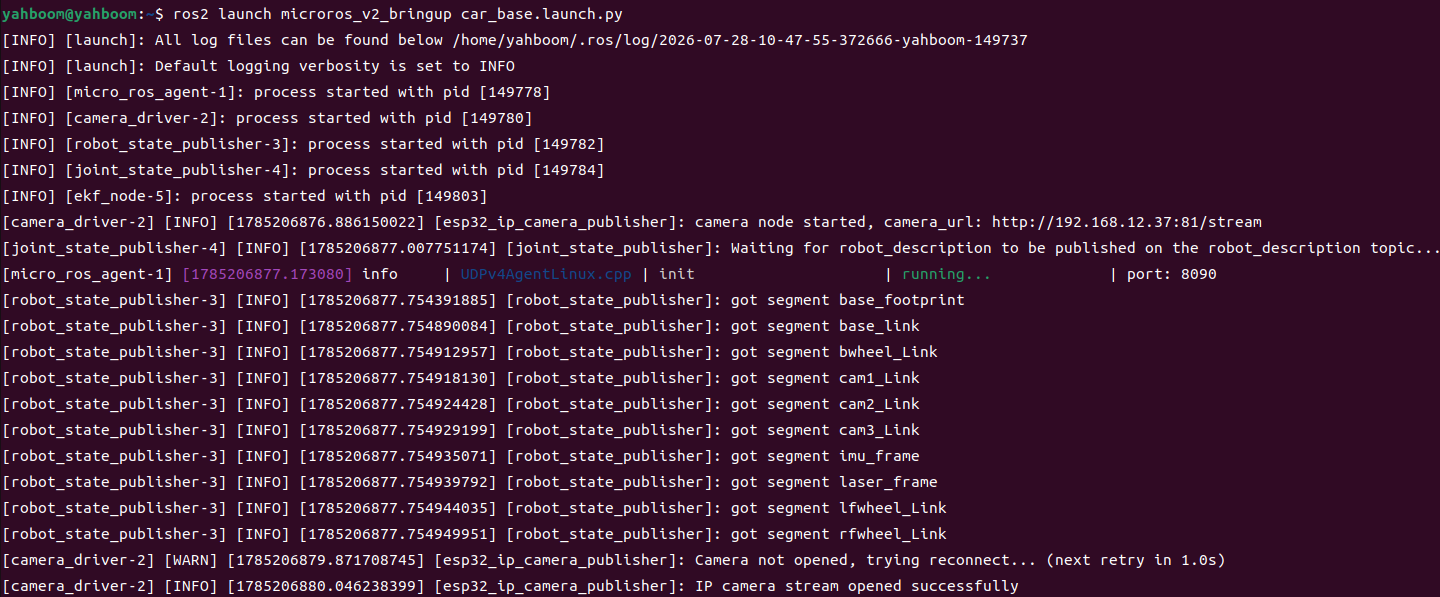
3. Start Face Recognition (Terminal 2)
xxxxxxxxxxros2 launch microros_v2_opencv_visual_pkg detect_face.launch.py4. Operation Instructions
Workflow: Image scaling (×0.75) → grayscale + equalizeHist histogram equalization → detectMultiScale(scaleFactor=1.1, minNeighbors=5, minSize=(60,60)) → coordinate denormalization (÷0.75) → cv2.rectangle draws the face box + count label.
Dynamic parameter tuning:
xxxxxxxxxxros2 param list /detect_face_node # list this node's adjustable parametersros2 param set /detect_face_node face_detection_scale 0.5 # at runtime, change face_detection_scale to 0.5 (image scaling ratio before face detection)Adjustable parameters: face detection scaling ratio, minimum number of neighbors, minimum face size, histogram equalization toggle, image flip/rotation, text overlay style, etc.
| Operation | Function |
|---|---|
q / ESC | Exit |
5. How to Stop
Press Ctrl+C to stop the terminals one by one.
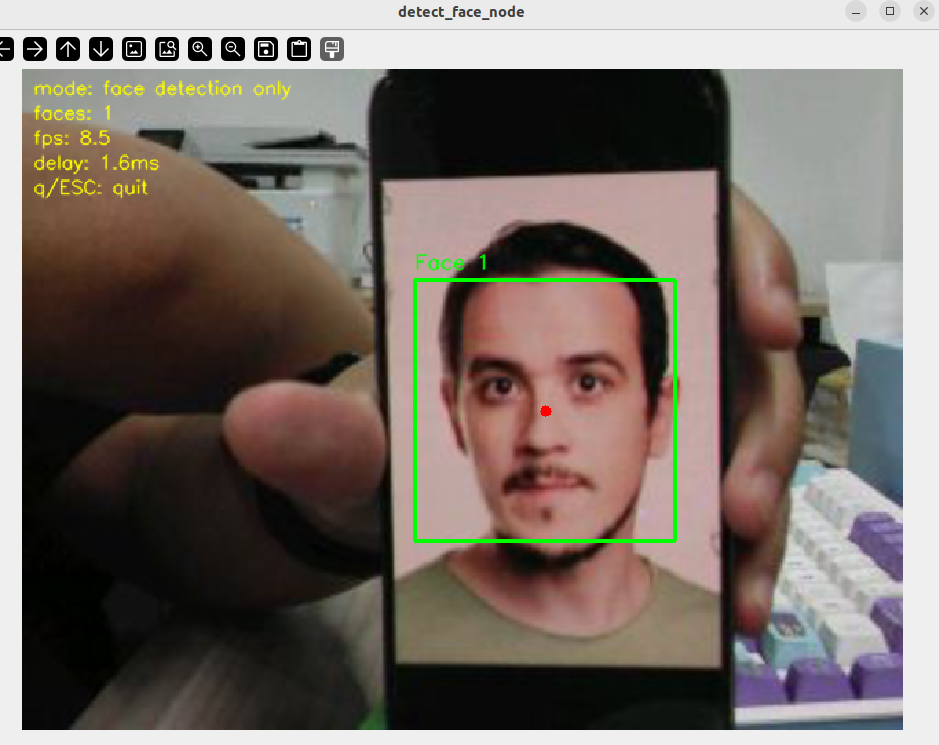
4. Experiment Observations
- Normal detection: Faces in the frame are marked with blue rectangles, with a
Face Nindex above the box and a face count overlaid in the upper-left corner - Multiple faces: Multiple faces are marked simultaneously, each independently numbered
- Dark environment: Histogram equalization automatically enhances contrast, improving detection in low light
5. Program Analysis
Source code paths:
- Launch:
~/microros_ws/src/microros_v2_opencv_visual_pkg/launch/detect_face.launch.py- Node:
~/microros_ws/src/microros_v2_opencv_visual_pkg/microros_v2_opencv_visual_pkg/detect_face.py
1. Core Node Analysis
DetectFaceNode uses the Haar Cascade classifier to detect faces, with support for detection scaling and histogram equalization.
x# Source file: ~/microros_ws/src/microros_v2_opencv_visual_pkg/microros_v2_opencv_visual_pkg/detect_face.pyclass DetectFaceNode(Node): def __init__(self): super().__init__('detect_face_node') self.declare_parameter('image_topic', '/camera/image_raw') self.declare_parameter('face_detection_scale', 0.75) self.declare_parameter('face_min_neighbors', 5) self.declare_parameter('face_min_width', 60) self.declare_parameter('face_min_height', 60) self.declare_parameter('enable_gray_equalize', True) # Prefer the cascade file bundled in the package; fall back to the OpenCV system built-in pkg_share = get_package_share_directory('microros_v2_opencv_visual_pkg') cascade_path = os.path.join(pkg_share, 'config', 'haarcascade_frontalface_default.xml') if not os.path.exists(cascade_path): cascade_path = cv.data.haarcascades + 'haarcascade_frontalface_default.xml' self.face_cascade = cv.CascadeClassifier(cascade_path) def image_callback(self, msg): frame = self.bridge.imgmsg_to_cv2(msg, 'bgr8') # Detection scaling: shrink the image to reduce computation scale = self.get_parameter('face_detection_scale').value small = cv.resize(frame, (0, 0), fx=scale, fy=scale) gray = cv.cvtColor(small, cv.COLOR_BGR2GRAY) if self.get_parameter('enable_gray_equalize').value: gray = cv.equalizeHist(gray) faces = self.face_cascade.detectMultiScale( gray, scaleFactor=1.1, minNeighbors=self.min_neighbors, minSize=(self.min_width, self.min_height)) # Map coordinates back to the original image size for (x, y, w, h) in faces: x, y, w, h = int(x/scale), int(y/scale), int(w/scale), int(h/scale) cv.rectangle(frame, (x, y), (x+w, y+h), (255, 0, 0), 2) return frameKey logic notes:
- Detection scaling: with
face_detection_scale=0.75, the original image is shrunk to 75% before being fed to the Haar Cascade, cutting the computation by about 44% (the area halves); coordinates are mapped back to the original image via÷0.75 - Cascade file fallback: the custom cascade file bundled in the package
config/is loaded first; if loading fails, it automatically falls back to the OpenCV system built-inhaarcascades, ensuring the node can start in any environment - Histogram equalization:
cv2.equalizeHiststretches the grayscale histogram to the full 0~255 range, significantly improving dark/backlit scenes detectMultiScaleparameters:scaleFactor=1.1enlarges the scanning window by 10% at each pass;minNeighbors=5requires at least 5 adjacent window confirmations for a valid detection- The node registers a ROS2 dynamic parameter callback, so runtime parameters can be modified with
ros2 param set /detect_face_node <parameter> <value>
2. Key Parameters
Parameter definition files:
- Launch:
~/microros_ws/src/microros_v2_opencv_visual_pkg/launch/detect_face.launch.py- Node:
~/microros_ws/src/microros_v2_opencv_visual_pkg/microros_v2_opencv_visual_pkg/detect_face.py
| Parameter | Type | Default Value | Description |
|---|---|---|---|
face_detection_scale | float | 0.75 | Scaling ratio before detection (smaller is faster but less accurate) |
face_min_neighbors | int | 5 | Minimum number of neighbors for detectMultiScale |
face_min_width / face_min_height | int | 60 / 60 | Minimum face size (px) |
enable_gray_equalize | bool | true | Whether to enable histogram equalization |
3. Node Description
| Node | Function |
|---|---|
detect_face_node | Haar Cascade face detection + histogram equalization + detection scaling optimization + rqt dynamic tuning |
6. Frequently Asked Questions
| Problem | Cause | Solution |
|---|---|---|
| No face detected | Insufficient lighting or the face is too far away | Enable enable_gray_equalize and move the person closer to the camera |
| False positives (non-face regions boxed) | minNeighbors too low | Increase face_min_neighbors (e.g. 6~8) |
| Slow detection | Detection scaling ratio too high | Lower face_detection_scale (e.g. 0.5) |