yahboom
HomeTutorialsProduct
Solution
Blog
Online Store
About Us
EN/中文
Store
MicroROS V2 Robot Car📖
01.Introduction
  • 0.Unboxing Video
  • 1. Readme Learning Route
  • 2. Must Read Before Use
  • 3. Introduction to MicroROS V2 Control Board
  • 4. Introduction to LiDAR
  • 5. Introduction to ESP32 Camera Module
  • 6. FAQ
  • 7. About Charging
02.Assembly course
  • Assembly Video
03.Preparation
  • 1. Quickly Start
  • 2. Write Firmware
  • 3. Install VM and Start System
  • 4. Configure VM and Connect Robot
  • 5. Connect to MicroROS Agent
  • 6. Change Ubuntu System Language to English
04.Quick start control course
  • 1. VM Keyboard Remote Control
  • 2. VM Handle Remote Control
  • 3. USB Handle Control
05.Robot control course
  • 1. Robot Information Release
  • 2. Robot Keyboard Control
  • 3. Robot Handle Control
  • 4. Robot State Estimation
  • 5. Linear Speed Calibration
  • 6. Angular Velocity Calibration
  • 7. Robot URDF Model
06.Lidar course
  • 1. Precautions for LiDAR Mapping and Navigation
  • 2. Lidar Avoid
  • 3. Lidar Following
  • 4. Lidar Guard
  • 5. Lidar Patrol
  • 6. Gmapping Mapping
  • 7. Cartographer Mapping
  • 8. Cartographer Quickly Repositioning Navigation
  • 9. Slam Toolx Mapping
  • 10. Navigation2 Single Point Navigation
  • 11. Navigation2 Multi Point Navigation
  • 12. Ros Robot App Mapping And Navigation
07.Road network planning
  • 1. Introduction to Road Network Planning and Quick Start
  • 2. Build a Pose Map
  • 3. Road Network Annotation
  • 4. Planning and Navigation Between Road Networks
  • 5. Road Network Navigation in Any Pose
  • 6. Path Replanning
08.Vision basic course
OpenCV Image Processing
  • 1. Introduction to OpenCV Source CV
  • 2. Open Source CV Geometric Transformation
  • 3. Open Source CV Image Processing and Drawing Text Line Segments
  • 4. Open Source CV Image Beautification
09.Visual General Course (For Standard&Superior version)
1. ESP32 Visual Recognition Module Configuration
  • 1. Serial Port Configuration WiFi Instructions
  • 2. Use ESP32 Camera Module in Robot Car
  • 3. Servo PTZ Calibration
2. OpenCV Visual Recognition
  • 1. Human Pose Estimation
  • 2. Object Detection
  • 3. AR Vision
  • 4. QR Code
  • 5. Color Recognition
  • 6. Facial Recognition
  • 7. AprilTag Machine Code Recognition
3. Mediapipe Visual Recognition
  • 1. Hand Detection
  • 2. Pose Detection
  • 3. Holistic Detection
  • 4. Facial Detection
  • 5. Facial Recognition
  • 6. Facial Special Effects
  • 7. 3D Object Recognition
  • 8. Brush
  • 9. Gesture Recognition
  • 10. Palm Target Localization
  • 11. Fingertip Trajectory Recognition
4. Yolov11&26 Visual Recognition
  • 1. YOLO Environment Setup
  • 2. CLI Usage
  • 3. Object Detection
  • 4. Instance Segmentation
  • 5. Pose Estimation
  • 6. Image Classification
  • 7. Oriented Bounding Boxes Object Detection
  • 8. Model Prediction
10.Visual Advanced Course (Just for Standard version)
1. Visual Control
  • 1. QR Code Recognition Control Action
  • 2. AprilTag Control Car Action Group
  • 3. Gesture Control Car Action Group
  • 4. Visual Line Tracking
2. Visual Tracking
  • 1. Color Tracking
  • 2. Facial Tracking
  • 3. QR Code Tracking
  • 4. Object Recognition And Tracking
  • 5. Mediapipe Palm Tracking
  • 6. Mediapipe Gesture Tracking
  • 7. Mediapipe Human Pose Tracking
  • 8. KCF Object Tracking
  • 9. AprilTag Machine Code Tracking
3. Visual Following
  • 1. Color Follow
  • 2. Face Follow
  • 3. QR Code Follow
  • 4. Mediapipe Palm Follow
  • 5. Mediapipe Gesture Follow
  • 6. Mediapipe Human Posture Follow
  • 7. AprilTag Machine Code Follow
  • 8. Object Follow
11.Visual Advanced Course (Just for Superior version)
1. Visual Control
  • 1. QR Code Recognition Control Action
  • 2. AprilTag Control Car Action Group
  • 3. Gesture Control Car Action Group
  • 4. Visual Line Tracking
2. Visual Tracking
  • 1. Color Tracking
  • 2. Facial Tracking
  • 3. QR Code Tracking
  • 4. YOLO Object Recognition and Tracking
  • 5. Mediapipe Palm Tracking
  • 6. Mediapipe Gesture Tracking
  • 7. Mediapipe Human Pose Tracking
  • 8. KCF Object Tracking
  • 9. AprilTag Machine Code Tracking
3. Visual Follow
  • 1. Color Follow
  • 2. Face Follow
  • 3. QR Code Follow
  • 4. Mediapipe Palm Follow
  • 5. Mediapipe Gesture Follow
  • 6. Mediapipe Human Pose Follow
  • 7. AprilTag Machine Code Follow
  • 8. Object Follow
12.AI Large Model Basic and Applications Course
1. AI Large Model Preparation
  • 1.AI Large Model Preparation
2. AI Large Model Basic Course
  • 1. AI Large Model Types and Principles
  • 2. RAG Retrieval Augmented and Training Samples
  • 3. Embodied Intelligent System Architecture
  • 4. Embodied Intelligence Core Source Code
3. AI Large Model Development
  • 1. Register Model Service Account
  • 2. Configure API KEY
  • 3. Dify Introduction
  • 4. Dify Basic Features
  • 5. RAG Knowledge Base Deployment
  • 6. AI Application Development Chatbot
  • 7. RAG Knowledge Base and Chatbot
  • 8. AI Agent Workflow
4. AI Large Model (Text Version)
  • 1. Semantic Understanding and Instruction Following
  • 2. Multimodal Visual Understanding
  • 3. Multimodal Visual Understanding + Basic Control
  • 4. Multimodal Visual Understanding + Object Following
  • 5. Multimodal Visual Understanding + Visual Line Following
  • 6. Multimodal Visual Understanding + SLAM Navigation
  • 7. Multimodal Visual Understanding + SLAM Navigation + Visual Line Following
  • 8. Multimodal Visual Understanding + SLAM Navigation + Object Following
  • 9. Intent Inference + Multimodal Visual Understanding + SLAM Navigation
13.Openclaw Basics Course
  • 1. Openclaw Introduction
  • 2. Openclaw Core Concepts
  • 3. Openclaw Api-Key Configuration
  • 4. Openclaw Switching Models
  • 5. Openclaw System Prompt
  • 6. Openclaw Common CLI Command
14. Openclaw Interaction Course
  • 1. Openclaw Webchat Interaction
  • 2. Openclaw Tui Interaction
  • 3. Openclaw Whatsapp Interaction
15.Openclaw Development Course
  • 1. Openclaw Robot Mcp Service Integration
  • 2. Robot CLI Command Tools
  • 3. Robot-Control Plugin Tools
  • 4. Openclaw Skills Development
  • 5. Openclaw Scheduled Tasks
  • 6. Openclaw Multi Agent System
  • 7. Openclaw Proactive Interaction
  • 8. Openclaw Vector Memory
16.Openclaw Embodied Intelligence Course
  • 1. OpenClaw Natural Interaction + Basic Control
  • 2. OpenClaw Natural Interaction + Slam Navigation
  • 3. OpenClaw Natural Interaction + Multimodal Visual Understand
  • 4. OpenClaw Natural Interaction + Multimodal Visual Understand + Slam Navigation + Visual Follow
  • 5. OpenClaw Natural Interaction + Multimodal Visual Understand + Slam Navigation + Visual Track
17.Multi-machine Course
  • 1. Multi Machine Handle Control
  • 2. Multi Machine Keyboard Control
  • 3. Multi Machine Navigation
18.MicroROS-V2 Control Board Development Environment
  • 1. Set Up the ESP32-IDF Development Environment
  • 2. ESP32-IDF Configuration Tool
  • 3. ESP Flash Tool Flashing Firmware
  • 4. Install ESP32 Microros Components
  • 5. Install And Start Microros Agent
19.MicroROS-V2 Control Board ESP32 Basic Course
  • 1. Led Light Up
  • 2. Button Function
  • 3. Drive Buzzer
  • 4. Oled
  • 5. Usb Host Function
  • 6. Serial Communication
  • 7. Battery Voltage Detection
  • 8. Drive Pwm Servo
  • 9. Drive Motors
  • 10. Read Motor Encoder Data
  • 11. Pid Motor Speed Control
  • 12. Robot Kinematics Analysis Theory
  • 13. Read Imu Data
  • 14. Read Lidar Data
  • 15. Flash Data Storage
  • 16. Custom Partition Table
  • 17. Bluetooth Communication
  • 18. Wifi Connection
  • 19. ESP32 Visual Recognition Module
20.MicroROS-V2 Control Board Micro_ros Basic Course
  • 1. Publish Topics
  • 2. Subscribe To Topics
  • 3. Multi Topic Subscription And Publishing
  • 4. Subscribe To Buzzer Topic
  • 5. Subscribe To Pwm Servo Topic
  • 6. Subscribe To Speed Control Topic
  • 7. Publish Odometry Topic
  • 8. Publish Imu Data Topic
  • 9. Publish Lidar Data Topic
21. Linux System Course
  • 1.Introduction to Linux system
  • 2.Ubuntu file system
  • 3.Ubuntu common commands
  • 4.Ubuntu common editors
  • 5.Ubuntu software operation commands
  • 6.Virtual machine installation
  • 7.SSH remote control
  • 8.VNC remote control
  • 9.Transfer files remotely
  • 10.Driver library and communication
  • 11.Static IP and hotspot mode
  • 12.Bind device ID
  • 13.Capacity expansion and resource allocation
  • 14.Update system software sources
  • 15.Set root user password
  • 16.sudo free password
  • 17.Connect to WiFi network
  • 18.View system version
  • 19.Customized service management
  • 20.Back up system image
22.Docker Course
  • 1.Docker overview and docker installation
  • 2.Common commands for docker image containers
  • 3.Docker images deeply understand and publish images
23.ROS Basic Course
  • 1.Introduction to ROS2
  • 2.ROS2 install Humble
  • 3.ROS2 development environment
  • 4.ROS2 workspace
  • 5.ROS2 function package
  • 6.ROS2 node
  • 7.ROS2 topic communication
  • 8.ROS2 service communication
  • 9.ROS2 action communication
  • 10.ROS2 custom interface message
  • 11.ROS2 parameter service case
  • 12.ROS2 meta-function package
  • 13.ROS2 distributed communication
  • 14.ROS2 DDS
  • 15.ROS2 time related API
  • 16.ROS2 common command tools
  • 17.ROS2 rviz2 use
  • 18.ROS2 rqt toolbox
  • 19.ROS2 Launch startup file configuration
  • 20.ROS2 recording and playback tool
  • 21.ROS2 URDF model
  • 22.ROS2 Gazebo simulation platform
  • 23.ROS2 TF2 coordinate transformation
Download
  • Mapping_APP(iOS_Android)
  • Code
  • Software_Tools
  • VM_System_File
  • 3D_Model_File
  • ESP32_Firmware
  • Dify LLM Base
  • Instruction_Manual
  • VMware
Download ZIP

Welcome to MicroROS V2 Robot Car repository

6. Mediapipe Gesture Tracking

Mediapipe Gesture Tracking (No-PTZ)

1. Experiment Objective

MediaPipe gesture recognition is used to track the palm while recognizing the gesture category (5 fingers open / 4 fingers / 3 fingers / 2 fingers / 1 finger / fist), and the car rotates to keep the hand at the center of the frame. It supports Tracking mode (rotation only), Follow mode, and Control mode.

2. Experiment Principle

1. Keyword Explanation

KeywordDescription
Gesture RecognitionComputes the extension state of each finger based on MediaPipe hand keypoints, classifying them into 6 categories: 0–5 fingers open and fist
Fingertip CountingDetermines whether a finger is open by checking the distance relationship between the fingertip keypoints (numbered 4, 8, 12, 16, 20) and the corresponding finger roots
MediaPipe HandsA lightweight hand keypoint detection model provided by Google that outputs the coordinates of 21 hand keypoints in real time
Gesture ControlMaps the recognized gesture category to car motion commands (e.g., 5 fingers forward, fist stop, etc.)
PD ControlProportional-derivative controller that computes the body angular velocity based on the palm center deviation and its rate of change
QoSbest_effort (image input + cmd_vel downlink), depth=1

2. Technical Architecture

/camera/image_raw (BEST_EFFORT)
  → gesture_tracker_node
    ├── Image processing: image conversion → flip → MediaPipe Hands → 21 keypoints → fingersUp() classification
    └── Body control timer (10Hz): pixel error → PD angular velocity (track/follow) / gesture command mapping (control)

Requires a MediaPipe Python environment (ROS 2 and workspace environment).

3. Core Topic Quick Reference

Firmware Downlink

TopicMessage TypeQoSFieldRangeDirection
/cmd_velgeometry_msgs/Twistbest_effort + keep_last(1)linear.x-0.20~0.20 m/s+= forward, −= backward
   angular.z-0.60~0.60 rad/s+= turn left, −= turn right

3. Experiment Steps

1. Hardware Preparation

HardwareRequirement
PTZ version❌
No-PTZ version✅
Required peripheralESP32 camera (bracket-mounted)

2. Start the Agent + Camera + Joint Model (Terminal 1)

xxxxxxxxxx
ros2 launch microros_v2_bringup car_base.launch.py
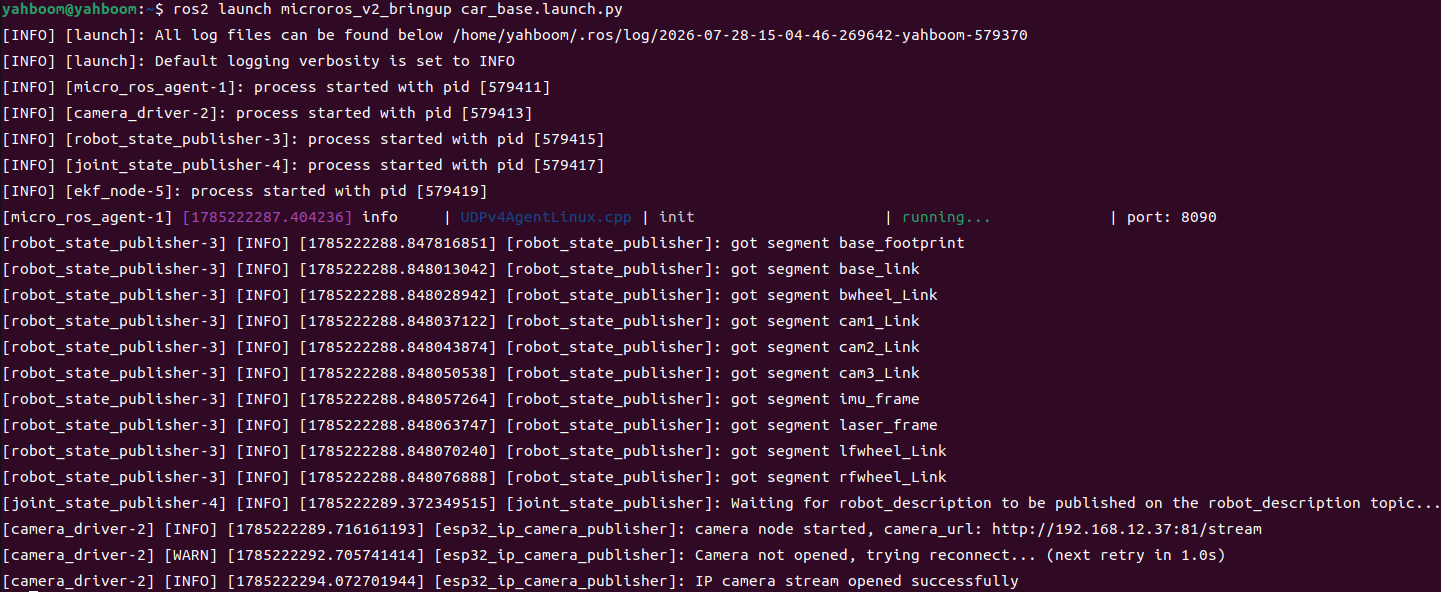
image-20260728163646027

3. Start Gesture Tracking (Terminal 2)

Tracking mode (rotation only, showing the gesture category):

xxxxxxxxxx
ros2 launch microros_v2_no_ptz_visual_control_pkg gesture_tracker.launch.py
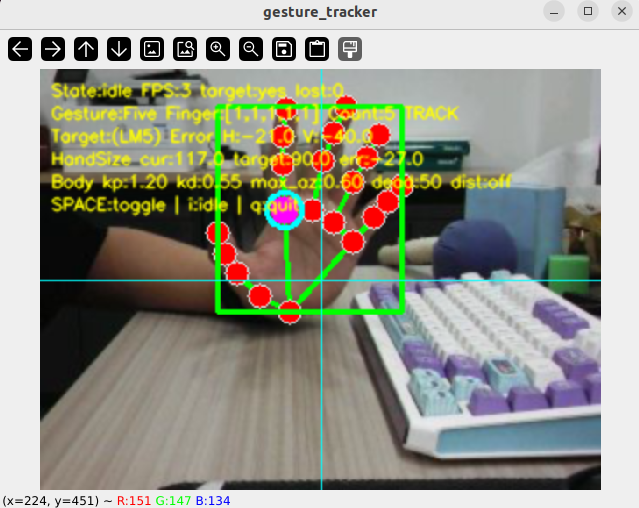
image-20260728163829100

4. Operation Instructions

KeyFunction
SpaceToggle tracking/standby state
q / Q / ESCExit the program

4. Experiment Phenomenon

  • When the hand moves in the frame, the car automatically rotates to track it
  • The frame displays the current gesture category in real time (5 fingers open / 4 fingers / 3 fingers / 2 fingers / 1 finger / fist)
  • The 21 hand keypoints and skeleton connections are visualized
  • Follow mode: backs away when the hand moves closer and moves forward when it moves away
  • Control mode: different gestures drive different action commands

5. Code Explanation

Source path:

  • Launch (track): ~/microros_ws/src/microros_v2_no_ptz_visual_control_pkg/launch/gesture_tracker.launch.py
  • Node source: ~/microros_ws/src/microros_v2_no_ptz_visual_control_pkg/microros_v2_no_ptz_visual_control_pkg/gesture_tracker_node.py
  • Hand detector: ~/microros_ws/src/microros_v2_no_ptz_visual_control_pkg/microros_v2_no_ptz_visual_control_pkg/hand_detector.py

1. Core Node Analysis

gesture_tracker_node adds gesture classification on top of hand_tracker_node. Core differences:

  • fingersUp(): computes the extension state of the 5 fingers [thumb, index, middle, ring, pinky]
  • Gesture classification: maps to 6 categories based on the number of extended fingers and specific positions
  • Control mode: gesture categories are directly mapped to car commands (5 fingers forward, fist stop, etc.)

2. Key Parameters

Parameter definition file:

  • Launch: ~/microros_ws/src/microros_v2_no_ptz_visual_control_pkg/launch/gesture_tracker.launch.py
  • Node: ~/microros_ws/src/microros_v2_no_ptz_visual_control_pkg/microros_v2_no_ptz_visual_control_pkg/gesture_tracker_node.py
ParameterTypeDefaultDescription
hand_detection_confidencefloat0.8Hand detection confidence threshold
deadband_x_pixelfloat50.0 pxHorizontal deadband
angular_kpfloat1.2Body angle PD proportional coefficient
angular_kdfloat0.55Body angle PD derivative coefficient
max_angular_zfloat0.6 rad/sMaximum body steering speed
lost_frame_thresholdint5Consecutive lost-frame tolerance threshold
enable_distance_followboolfalseWhether to enable distance following

3. Node Description

NodePackageDescription
gesture_tracker_nodemicroros_v2_no_ptz_visual_control_pkgMediaPipe gesture recognition + tracking with finger-count classification

6. Common Problems

ProblemCauseSolution
Gesture is not recognizedInsufficient lighting or the hand is too farImprove ambient lighting and move closer to the camera
Wrong gesture classificationInsufficient fingertip detection accuracyKeep the fingers separated and clearly visible
Control mode does not respondGesture recognition confidence is too lowLower the hand_detection_confidence threshold
Mediapipe Palm Tracking
Mediapipe Human Pose Tracking

COMPANY

  • About us
  • Team Style
  • Blog

LEARNING & EXPLORATION

  • Tutorials
  • Edge AI hardware
  • Educational robots
  • Embedded intelligent hardware

WHERE TO BUY

  • Yahboom Online Store
  • Amazon
  • Alibaba
  • AliExpress
  • Mercado

TECHNOLOGY SUPPORT

  • Email: support@yahboom.com

BE A DISTRIBUTOR

  • Email: sales@yahboom.com
QR Code

Copyright © 2017-2026 Yahboom. All Rights Reserved.

EN/中文