Welcome to MicroROS V2 Robot Car repository
3. USB Handle Control
USB Gamepad Standalone Control
USB Gamepad Standalone Control1. Course Content2. Brief Introduction to the Working Principle3. Control Priority and Switching4. Operating Instructions4.1 Movement Control4.2 Speed Levels4.3 Handle Control4.4 Buzzer Feedback
1. Course Content
- Use a USB handle connected directly to the robot control board to control the robot's vehicle controller
2. Brief Introduction to the Working Principle
Unlike Section 4.2, which processes handle signals through a chain of ROS2 nodes, the data path in this mode forms a closed loop entirely on the control board:
USB handle → control board USB port → firmware parses handle data → directly drives motor/servo/buzzer
- After power-up, the firmware automatically detects whether a handle is plugged into the USB port
- Once a handle is detected, it autonomously handles joystick reading, button parsing, and command generation
3. Control Priority and Switching
The USB standalone handle and ROS2 topic control can be online at the same time; the USB standalone handle has higher priority:
xxxxxxxxxxControl signal source Priority Effective condition──────────────────────────────────────────────USB standalone handle (this section) High When the handle is plugged into the USB port and has valid inputROS2 /cmd_vel (4.1/4.2) Low Automatically takes over when there is no USB handle input
When the USB handle has valid joystick input → the firmware uses the USB handle commands and ignores
/cmd_velWhen the USB handle has no input (joystick centered or unplugged) → the firmware automatically switches, and
/cmd_veltakes over
4. Operating Instructions
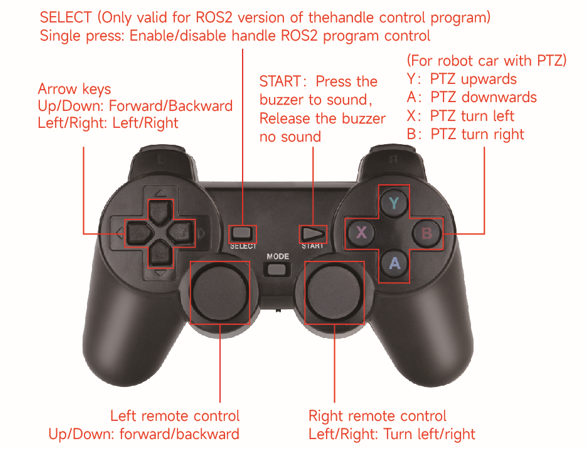
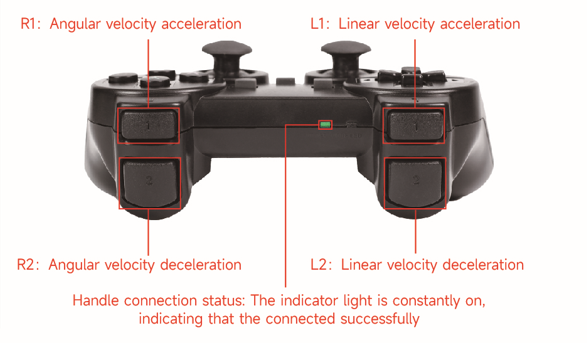
The button functions are the same as the ROS2 handle control in Section 4.2:
4.1 Movement Control
| Input | Function |
|---|---|
| Left stick up/down | Forward / Backward |
| Right stick left/right | Turn left / Turn right |
| D-pad | Digital fallback when the joystick is idle |
4.2 Speed Levels
A fixed 5-level speed table (G2 is the default level):
| Level | Linear speed (m/s) | Angular speed (rad/s) |
|---|---|---|
| G1 | 0.20 | 0.50 |
| G2 (default) | 0.30 | 1.50 |
| G3 | 0.50 | 2.50 |
| G4 | 0.75 | 3.75 |
| G5 | 1.00 | 5.00 |
| Key | Function |
|---|---|
| L1 | Increase linear speed by one level (0→1 rising edge trigger) |
| L2 | Decrease linear speed by one level (0→1 rising edge trigger) |
| R1 | Increase angular speed by one level (0→1 rising edge trigger) |
| R2 | Decrease angular speed by one level (0→1 rising edge trigger) |
4.3 Handle Control
| Key | Function |
|---|---|
| X | Servo S1 forward |
| B | Servo S1 reverse |
| Y | Servo S2 reverse |
| A | Servo S2 forward |
4.4 Buzzer Feedback
| Trigger condition | Behavior |
|---|---|
| START (OPTIONS) held | Beeps continuously |
| Gear shift succeeded (up or down one level) | Beeps once briefly |
| Gear shift hits a boundary (G1/G5) | Beeps twice briefly |