Welcome to MicroROS V2 Robot Car repository
9. AprilTag Machine Code Tracking
AprilTag Machine Code Tracking (PTZ)
1. Experiment Objective
The PTZ pan-tilt tracks the AprilTag fiducial marker, obtains the Tag's 6-DOF 3D pose (position XYZ), and keeps the Tag at the center of the frame through PD control.
2. Experiment Principle
1. Key Terms
| Term | Description |
|---|---|
| AprilTag | A visual fiducial marker system developed by the April Laboratory at the University of Michigan; similar to a QR code but designed specifically for high-precision pose estimation, supporting multiple tag families (tag36h11, tag25h9, etc.) |
| 6-DOF Pose | Six degrees of freedom (translation X/Y/Z + rotation Roll/Pitch/Yaw); the AprilTag detector computes the Tag's position relative to the camera from the four corner points + camera intrinsics via the PnP algorithm |
| dt_apriltags | A Python wrapper library based on the C++ AprilTag 3 detector, supporting sub-pixel precision corner extraction and pose estimation |
| Visual Tracking | Detects a target and keeps locking onto it through a vision algorithm; only the pan-tilt follows, the car does not move |
| PTZ Pan-Tilt | A two-degree-of-freedom servo pan-tilt; s1 rotates horizontally and s2 tilts, controlled via the /cmd_ptz_angle topic |
| PD Control | Proportional-derivative control; computes the pan-tilt angle step from the target offset and the offset change rate |
| Deadband | When the target offset is within the deadband pixel range, the pan-tilt does not move, avoiding continuous jitter caused by tiny errors |
2. Technical Architecture
State estimation (ekf_filter_node + camera_node) → april_tag_tracker_ptz_node → /cmd_ptz_angle → firmware servo control
Node chain explanation:
- ekf_filter_node: Extended Kalman filter node that fuses IMU/odometry data for state estimation
- camera_node: Camera driver node that handles the image topic published by the ESP32
- april_tag_tracker_ptz_node: AprilTag tracking node that recognizes the Tag with the dt_apriltags detector, computes the 6-DOF pose, and drives the pan-tilt with a PD controller
- /cmd_ptz_angle: PTZ servo angle command topic, bridged to the ESP32 firmware by micro_ros_agent, controlling the s1 (horizontal) and s2 (tilt) servos
3. Core Topics Quick Reference
Firmware Uplink (ESP32 firmware → micro_ros_agent → ROS2 node)
| Topic Name | Type | QoS | Description |
|---|---|---|---|
/camera/image_raw | sensor_msgs/Image | BEST_EFFORT, KEEP_LAST, depth=1, VOLATILE | Raw image frames published by the ESP32 camera |
Firmware Downlink (ROS2 node → micro_ros_agent → ESP32 firmware)
| Topic Name | Type | QoS | Description |
|---|---|---|---|
/cmd_ptz_angle | geometry_msgs/Vector3 | RELIABLE, KEEP_LAST, depth=10 | PTZ pan-tilt angle command (s1: horizontal angle, s2: tilt angle) |
ROS2 Internal (inter-node communication)
| Topic Name | Type | QoS | Description |
|---|---|---|---|
/camera/image_raw | sensor_msgs/Image | BEST_EFFORT | Camera image (bridged to ROS2 by micro_ros_agent; subscribed by the tracking node) |
/cmd_ptz_angle | geometry_msgs/Vector3 | RELIABLE | PTZ angle command (published by the tracking node; bridged to the firmware by micro_ros_agent) |
3. Experiment Steps
1. Hardware Preparation
| Hardware | Requirement |
|---|---|
| PTZ version | ✅ |
| No-PTZ version | ❌ |
| Required peripherals | ESP32 camera (pan-tilt) + PTZ servo + a printed AprilTag |
2. Start Agent + Camera + Joint Model (Terminal 1)
xxxxxxxxxxros2 launch microros_v2_bringup car_base.launch.py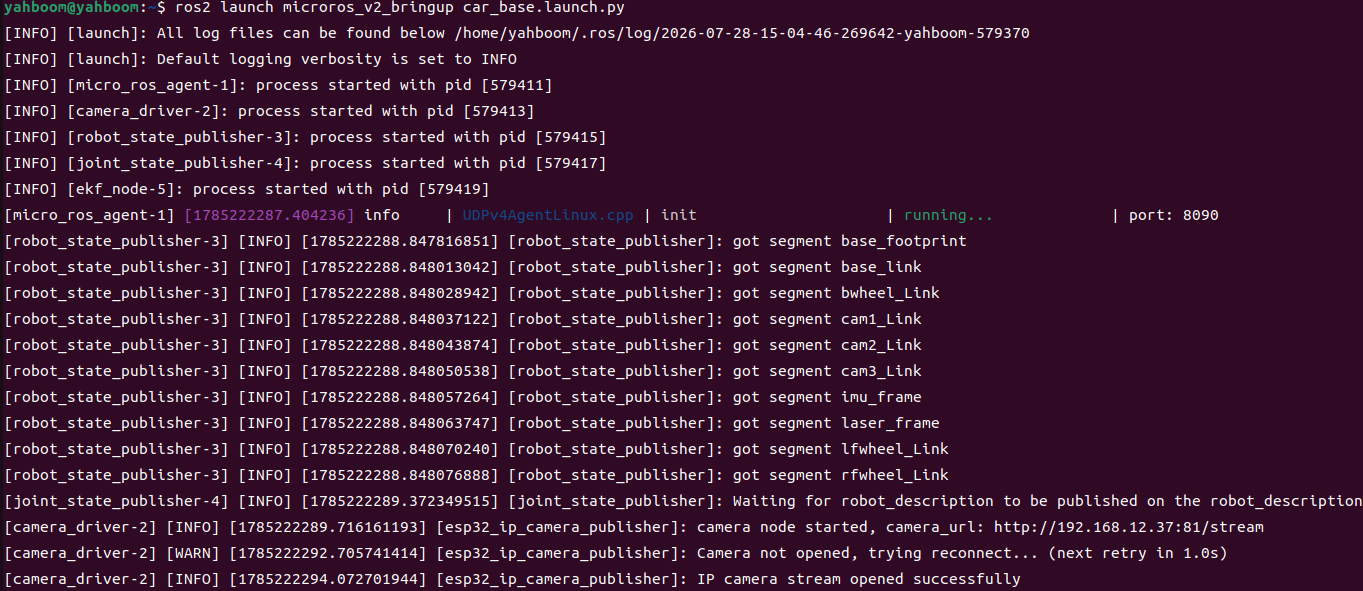
3. Start the AprilTag Machine Code Tracking Node (Terminal 2)
Open a second terminal, activate the dt_apriltags runtime environment, and start the AprilTag tracking node:
xxxxxxxxxxros2 launch microros_v2_ptz_visual_control_pkg april_tag_tracker_ptz.launch.py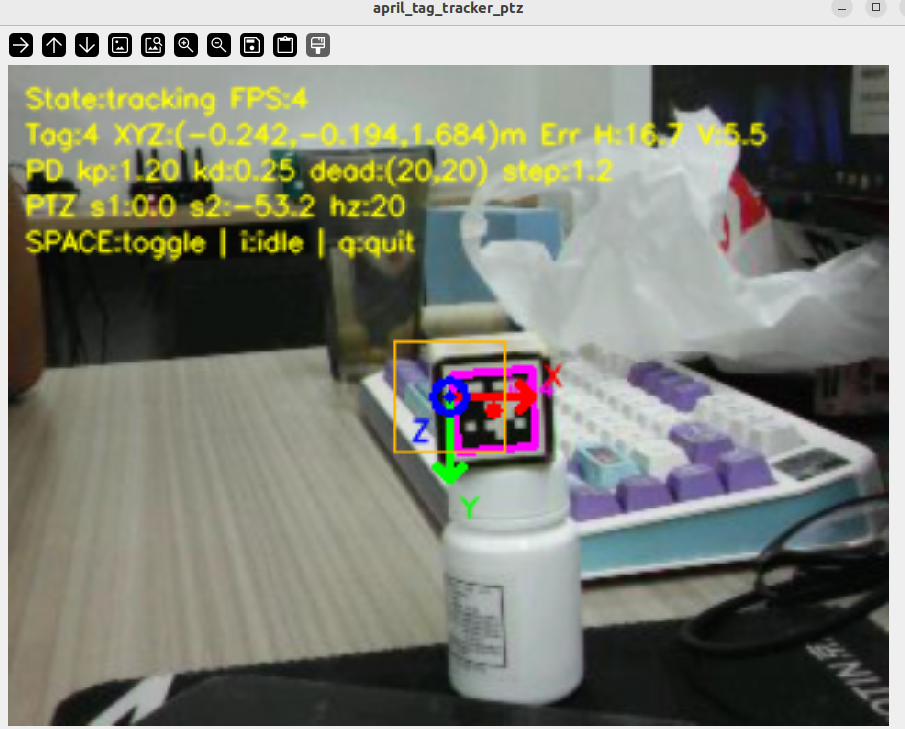
4. Operation Instructions
After startup, the node uses two independent timers: image processing (image_processing_rate_hz = 15 Hz) + pan-tilt control (control_rate_hz = 20 Hz). Minimal two-state machine: idle ↔ tracking.
Detector initialization
A dt_apriltags.Detector is created at startup with the following parameters:
families: tag family (defaulttag36h11)nthreads: 4 threads in parallelquad_decimate: quad-decimation factor (default 2.0); a larger value detects faster but small Tags may be missedrefine_edges: sub-pixel edge refinement enableddecode_sharpening: decoding sharpening strength (0.25)
If use_camera_yaml = true, the camera intrinsics (fx, fy, cx, cy) are loaded from camera.yaml and scaled by the ratio between the current processing resolution (320×240) and the calibration resolution (default 320×240) for the PnP pose estimation.
Image preprocessing
The image callback converts and caches the raw Image; the image processing timer takes a copy of the latest frame, scales it to the processing resolution (processing_width×processing_height = 320×240), and flips/rotates as needed.
AprilTag detection
Grayscale image → detector.detect(gray, estimate_tag_pose, camera_params, tag_size) returns a list of detection results. Each Tag contains: tag_id, center (pixel coordinates), corners (four corner points), pose_t (3D translation vector), and other information.
Primary Tag selection
Selects the primary Tag by the tag_select_strategy strategy:
largest(default): selects the Tag with the largest corner-enclosed areasmallest_id: selects the Tag with the smallesttag_idvalue
3D pose estimation
If the camera calibration is available (camera_params is not None), the X/Y/Z 3D coordinates (in meters) are extracted from pose_t, and the Tag ID and XYZ pose are overlaid on the frame. Without calibration, only the Tag is tracked and no pose is computed.
Visualization
On-screen overlay:
- Camera coordinate axes: X (red arrow → right), Y (green arrow → down), Z (blue ring → forward)
- Primary Tag: purple polygon + red center point + tag_id label
- Other Tags: green polygon + tag_id label
- Deadband box: orange rectangle
PD pan-tilt control (tracking + Tag present only)
Fixed-rate 20 Hz PD control: Tag center pixel coordinates → normalized error → PD step → limiting (±max_ptz_step = 1.2°) → step smoothing (α = ptz_step_smooth_alpha = 0.35) → direction reversal (horizontal not reversed, tilt reversed) → angle smoothing (α = ptz_smooth_alpha = 0.85) → clamp the angle and publish. When there is no Tag, no control is output, but the state is not changed and the PD history is not reset — tracking resumes seamlessly once the Tag reappears.
Shortcut keys
| Key | Function | Description |
|---|---|---|
| Space | idle ↔ tracking | Toggles between standby and tracking |
| i / I | Back to idle | Stops tracking and pan-tilt control |
| q / Q / ESC | Exit | Force-exits the node process with os._exit(0) |
On-screen overlay: The debug window shows the state (idle/tracking), frame rate, Tag ID, 3D pose XYZ (meters), tracking error H/V, PD parameters, and the pan-tilt s1/s2 angles. The camera coordinate axes (X/Y/Z) indicate the image-space directions.
Safety and Edge Cases
- dt_apriltags not installed: on startup an ImportError is detected and an error log is written; the node does not crash, but detection is unavailable
- Camera YAML unavailable: with
use_camera_yaml = truebut the file missing, a warning is printed, pose estimation is disabled, and only 2D tracking is performed - No Tag, no control: when no Tag is detected, the PD outputs nothing, the PD state is not reset, and tracking resumes seamlessly once a Tag is re-detected
- Pan-tilt angle limiting: horizontal [-90°, 90°], tilt [-90°, 20°]
- Deadband protection: the step is forced to zero when the Tag center offset is within the deadband (20 px)
- Initial PTZ publish at startup: the initial angle (0°, -45°) is published 20 times at 0.2 s intervals
- Quad-decimation safety:
quad_decimatemust be ≥ 1.0; values that are too small are rejected by the runtime parameter validation
5. How to Stop
Press Ctrl+C in the two terminals to stop each process; it is recommended to close them in the reverse order:
xxxxxxxxxx# Terminal 2: press Ctrl+C to stop the AprilTag tracking node# Terminal 1: press Ctrl+C to stop micro_ros_agent4. Experiment Observations
- idle state: The frame streams in real time; AprilTag detection works normally but the pan-tilt does not move, and the state is
idle - tracking + Tag present: The pan-tilt follows smoothly with PD control; the primary Tag is a purple polygon + tag_id label, other Tags are green polygons, and the Tag's 3D pose (X,Y,Z) is displayed in real time in the frame overlay (in meters)
- tracking + camera calibration available: Pose estimation is available; the Tag ID and position XYZ are shown together, and the camera coordinate axes (X/Y/Z direction indicators) are drawn
- tracking + no camera calibration: Only 2D tracking is performed, the pose display is empty, and pan-tilt control is unaffected
- Multiple Tags: All Tags are labeled with their ids; the primary Tag is highlighted with a purple polygon, and the coordinate axes are drawn based on the primary Tag
- Tag moved out of frame: The frame shows "Tag:None", the pan-tilt stays at its last position, and tracking resumes automatically when the Tag reappears
- Tag within the deadband: The step is zeroed and the pan-tilt stays completely still without jitter
- Tracking stability: AprilTag detection is more precise than a normal QR code, and the pose estimation is stable and accurate under good lighting and with a large Tag
5. Program Analysis
Source code paths:
- Launch file:
~/microros_ws/src/microros_v2_ptz_visual_control_pkg/launch/april_tag_tracker_ptz.launch.py- Node file:
~/microros_ws/src/microros_v2_ptz_visual_control_pkg/microros_v2_ptz_visual_control_pkg/april_tag_tracker_ptz_node.py- Camera calibration file:
~/microros_ws/src/microros_v2_opencv_visual_pkg/config/camera.yaml
1. Core Node Analysis
Node initialization (__init__) — create the subscriber, publisher, AprilTag detector, and dual timers
xclass AprilTagTrackerPtzNode(Node): def __init__(self) -> None: super().__init__(DEFAULT_NODE_NAME) self._image_lock = threading.Lock() self._tag_lock = threading.Lock() self._latest_frame: Optional[np.ndarray] = None self._state = STATE_IDLE # "idle" ↔ "tracking" self._has_tag = False self._tag_id = -1 self._target_x: Optional[float] = None self._target_y: Optional[float] = None self._tag_pose_x: Optional[float] = None # 3D pose X self._tag_pose_y: Optional[float] = None # 3D pose Y self._tag_pose_z: Optional[float] = None # 3D pose Z self._tag_corners: List[Tuple[int, int]] = [] self._declare_params() self._load_params() self._h_deg = float(self._init_h_deg) self._p_deg = float(self._init_p_deg) # Initialize the AprilTag detector + load the camera calibration self._detector = None self._camera_params: Optional[Tuple[float, ...]] = None self._init_detector() # Create the image subscription (BEST_EFFORT QoS) self._img_sub = self.create_subscription( Image, self._img_topic, self._on_image, QoSProfile(history=QoSHistoryPolicy.KEEP_LAST, depth=1, reliability=QoSReliabilityPolicy.BEST_EFFORT, durability=QoSDurabilityPolicy.VOLATILE), ) self._ptz_pub = self.create_publisher(Vector3, self._ptz_topic, 10) # Image processing timer (15 Hz) self._img_timer = self.create_timer( 1.0 / max(float(self._img_rate), MINIMUM_TIMER_RATE_HZ), self._process_image, ) # Pan-tilt control timer (20 Hz) self._ctrl_timer = None self._rebuild_ctrl_timer(False) if self._pub_init_ptz: self._start_init_ptz() self.get_logger().info( f"AprilTag tracker PTZ started. SPACE=toggle, i=idle, q=quit. " f"ctrl={self._ctrl_rate:.0f}Hz img={self._img_rate:.0f}Hz " f"family={self._tag_family} tag_size={self._tag_size:.3f}m")Detector initialization (_init_detector) — configure dt_apriltags and the camera calibration
xxxxxxxxxxdef _init_detector(self) -> None: """Initialize the AprilTag detector + camera calibration.""" if AprilTagDetector is None: self.get_logger().error("dt_apriltags not installed. pip install dt-apriltags") return # Create the dt_apriltags detector instance self._detector = AprilTagDetector( families=self._tag_family, # tag family, e.g. tag36h11 nthreads=4, # 4 threads in parallel quad_decimate=float(self._quad_decimate), # quad-decimation factor quad_sigma=0.0, # downsampling smoothing refine_edges=1, # sub-pixel edge refinement decode_sharpening=0.25, # decoding sharpening strength debug=0, ) # Load the camera calibration file (optional) if self._use_yaml: cp = load_camera_calibration(self._camera_yaml) if cp: self._camera_params = cp self.get_logger().info(f"Loaded camera calibration from {self._camera_yaml}") else: self.get_logger().warn("Camera yaml not found. Pose estimation disabled.")def load_camera_calibration(yaml_path: str) -> Optional[Tuple[float, ...]]: """Load the camera intrinsics (fx, fy, cx, cy) from camera.yaml.""" path = os.path.expanduser(yaml_path) if not path or not os.path.exists(path): return None try: with open(path, "r", encoding="utf-8") as f: data = yaml.safe_load(f) cm = data.get("camera_matrix", {}).get("data", []) if len(cm) < 9: return None return float(cm[0]), float(cm[4]), float(cm[2]), float(cm[5]) except Exception: return NoneAprilTag detection (_detect) — Tag recognition, primary Tag selection, and 6-DOF pose extraction
xxxxxxxxxxdef _detect(self, frame: np.ndarray) -> None: if self._detector is None: return gray = cv.cvtColor(frame, cv.COLOR_BGR2GRAY) frame_w, frame_h = frame.shape[1], frame.shape[0] # Scale the camera intrinsics to the current processing resolution cam_params = None if self._camera_params is not None: fx, fy, cx, cy = self._camera_params sx = frame_w / 320.0 sy = frame_h / 240.0 cam_params = (fx * sx, fy * sy, cx * sx, cy * sy) # Run the AprilTag detection tags = self._detector.detect( gray, estimate_tag_pose=cam_params is not None, camera_params=cam_params, tag_size=float(self._tag_size), ) if not tags: with self._tag_lock: self._has_tag = False return # Select the primary Tag: largest area, or smallest tag_id if self._tag_strategy == "smallest_id": main = min(tags, key=lambda t: t.tag_id) else: main = max(tags, key=lambda t: cv.contourArea( np.array(t.corners, dtype=np.float32).reshape(-1, 2))) # Draw all Tags (primary purple + others green) for t in tags: corners = np.array(t.corners, dtype=np.int32).reshape((-1, 1, 2)) is_main = t.tag_id == main.tag_id color = (255, 0, 255) if is_main else (0, 255, 0) cv.polylines(frame, [corners], True, color, 2) cx_t, cy_t = int(t.center[0]), int(t.center[1]) cv.circle(frame, (cx_t, cy_t), 3, (0, 0, 255), -1) cv.putText(frame, f"id:{t.tag_id}", (cx_t + 5, cy_t - 5), cv.FONT_HERSHEY_SIMPLEX, 0.3, color, 1, cv.LINE_AA) # Extract the primary Tag's 6-DOF pose pose_x, pose_y, pose_z = None, None, None if hasattr(main, "pose_t") and main.pose_t is not None: pt = np.asarray(main.pose_t).ravel() if pt.size >= 3: pose_x, pose_y, pose_z = float(pt[0]), float(pt[1]), float(pt[2]) with self._tag_lock: self._has_tag = True self._tag_id = int(main.tag_id) self._target_x = float(main.center[0]) self._target_y = float(main.center[1]) self._tag_pose_x = pose_x self._tag_pose_y = pose_y self._tag_pose_z = pose_z self._tag_corners = [(int(c[0]), int(c[1])) for c in main.corners]PD pan-tilt control (_ctrl_tick) — shares the same PD algorithm pattern as the nodes above
xxxxxxxxxxdef _ctrl_tick(self) -> None: if self._state != STATE_TRACKING: return with self._tag_lock: tx = self._target_x ty = self._target_y has_tag = self._has_tag if not has_tag or tx is None or ty is None: return icx = float(self._proc_w) * 0.5 icy = float(self._proc_h) * 0.5 pex = float(tx - icx) pey = float(ty - icy) # Deadband handling cx = abs(pex) < self._db_x cy = abs(pey) < self._db_y if cx: pex = 0.0 if cy: pey = 0.0 # Normalization + PD step + smoothing + limiting + publish n = time.perf_counter() dt = n - self._prev_ctrl_t if self._prev_ctrl_t > 0.0 else 1.0 / max(...) dt = max(dt, 1e-3) nex = pex / icx; ney = pey / icy dx = (nex - self._prev_err_x) / dt dy = (ney - self._prev_err_y) / dt rx = clamp((self._kp * nex + self._kd * dx) * self._max_step, ...) ry = clamp((self._kp * ney + self._kd * dy) * self._max_step, ...) # ... step smoothing, direction reversal, angle smoothing, clamp and publish ... self._pub_ptz()2. Key Parameters
Parameter definition file:
~/microros_ws/src/microros_v2_ptz_visual_control_pkg/launch/april_tag_tracker_ptz.launch.pyCamera calibration file:
~/microros_ws/src/microros_v2_opencv_visual_pkg/config/camera.yaml
| Parameter | Type | Default Value | Description |
|---|---|---|---|
pd_kp / pd_kd | float | 1.2 / 0.25 | PD proportional/derivative gains |
control_rate_hz | float | 20.0 Hz | Pan-tilt control rate |
image_processing_rate_hz | float | 15.0 Hz | Image processing rate |
deadband_x / deadband_y | float | 20.0 / 20.0 px | Horizontal/vertical deadband |
max_ptz_step | float | 1.2° | Maximum single angle step |
ptz_step_smooth_alpha | float | 0.35 | Step EMA smoothing coefficient |
ptz_smooth_alpha | float | 0.85 | Pan-tilt angle EMA smoothing coefficient |
tag_family | str | tag36h11 | AprilTag tag family |
tag_size | float | 0.048 m | Tag physical size (side length, in meters) |
quad_decimate | float | 2.0 | Quad-decimation factor (≥1.0, larger is faster) |
tag_select_strategy | str | largest | Multi-Tag selection strategy: largest / smallest_id |
use_camera_yaml | bool | true | Whether to load the camera calibration for 3D pose estimation |
processing_width / processing_height | int | 320 / 240 px | Processing resolution |
initial_horizontal_deg / initial_pitch_deg | float | 0.0° / -45.0° | Initial pan-tilt angles |
6. Frequently Asked Questions
| Problem | Cause | Solution |
|---|---|---|
| Pose jitter | The Tag is too small or the lighting is insufficient, causing noisy corner extraction | Increase the Tag size (print it larger) and improve the lighting |
| Small Tag not detected | The Tag resolution is insufficient after quad_decimate = 2.0 downsampling | Reduce quad_decimate (e.g., 1.0 to disable downsampling), or use a larger Tag |
| Pose estimation empty | The camera calibration file was not loaded or is unavailable | Verify that the camera.yaml path is correct and the format is valid, and make sure use_camera_yaml = true |
| dt_apriltags not installed | Missing Python package | pip install dt-apriltags |
| Wrong Tag selected among multiple | The largest-area Tag is selected by default, which may differ from the expectation | ros2 param set /apriltag_track_node tag_select_strategy smallest_id |