Welcome to MicroROS V2 Robot Car repository
4. Openclaw Skills Development
OpenClaw Skills Development
OpenClaw Skills Development1. Course ContentCourse OverviewLearning Objectives2. Introduction to Skills3. Robot Factory-Preset Skills🧭 robot-navigation (Navigation and Positioning)👁️ visual-functions (Vision Functions)4. Agent Skill Management5. Custom Skill Development5.1 How to Develop Your Own Skill5.2 Creating a Skill5.3 Skill Document Format5.4 Writing Skill Content5.5 Enabling Skills in OpenClaw
1. Course Content
Course Overview
- OpenClaw Skills are a set of advanced task instruction sets for developers. They orchestrate multiple MCP Tools into complete workflows according to business logic, guiding the AI model to call the right tools at the right time to complete complex tasks
- Core skills pre-installed on the robot at the factory: navigation and positioning, visual tracking
Learning Objectives
- Understand the concept, principles, and functions of OpenClaw Skills
- Become familiar with the functions and usage of the core skills pre-installed on the robot at the factory
- Master the operations of enabling and disabling skills in Agents
2. Introduction to Skills
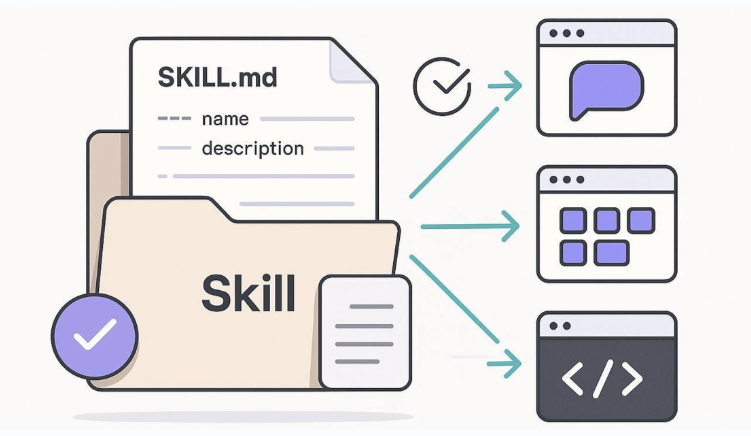
- Skills are a task-level workflow instruction set
- Based on the workflow defined in the skill file, the AI model calls MCP Tools step by step to complete the full closed loop from environment perception → decision planning → action execution → result verification
- Skill files are stored in the
$HOME/.openclaw/workspace/skillsdirectory, with each skill corresponding to a subdirectory whoseSKILL.mdfile defines the complete skill instructions
3. Robot Factory-Preset Skills
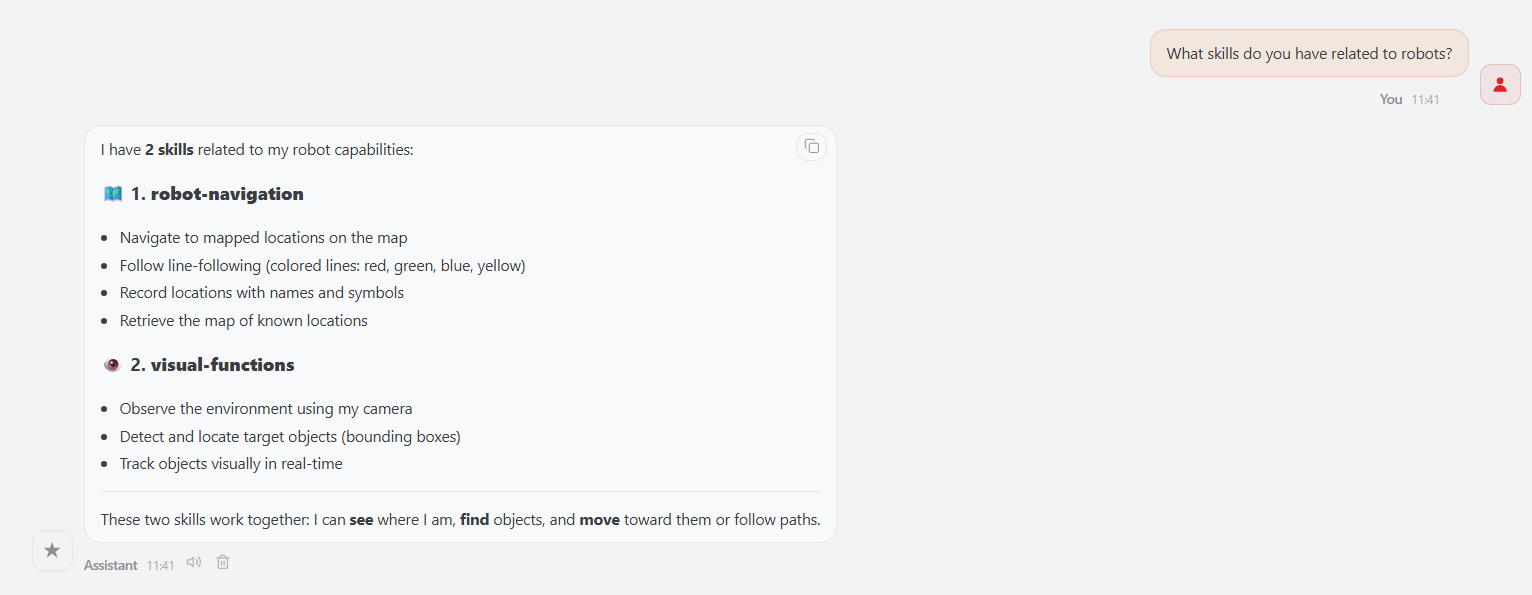
- You can directly ask OpenClaw in a conversation about the skills it currently has
- Skills folder path:
$HOME/.openclaw/workspace/skills

The following 2 core skills are pre-installed on the robot at the factory:
🧭 robot-navigation (Navigation and Positioning)
- Functions: Navigate to target locations in the map according to route rules, supporting the recording and reading of map waypoints
- Core tools: Navigation / GetMapMapping / RecordMapLocation
👁️ visual-functions (Vision Functions)
- Functions: Observe the environment and perform visual tracking of target objects
- Core tools: SeeWhat / GetBbox / TargetTrack
The above skill files are stored in the $HOME/.openclaw/workspace/skills directory, one subdirectory per skill. You can directly view or modify the SKILL.md files in them
4. Agent Skill Management
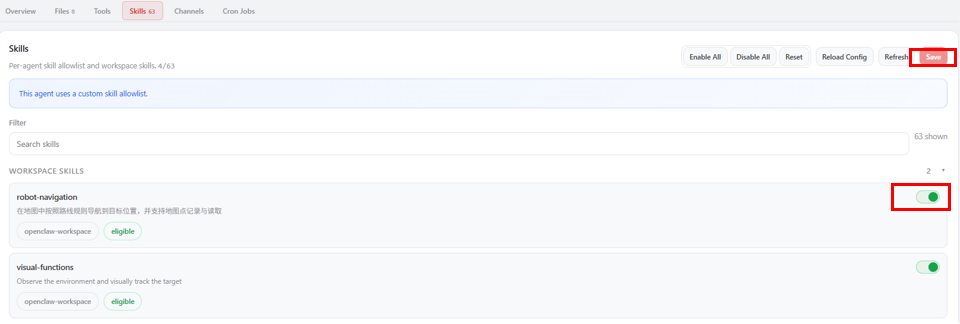
- Log in to the OpenClaw WebChat interface, then click Agent → Skills in sequence
- Under the Workspace Skills tab, you can see the factory-preset skills in the workspace. To enable or disable an individual skill, click the switch, then click Save
5. Custom Skill Development
5.1 How to Develop Your Own Skill
Creating a custom Skill is essentially writing a
SKILL.mdfile that conforms to the format specification and placing it in the$HOME/.openclaw/workspace/skillsdirectoryDeveloping a skill requires the following steps:
- Create the skill directory: Create a new subdirectory under the
skillsdirectory, with the directory name being the skill name (lowercase English plus hyphens is recommended) - Write SKILL.md: Create a
SKILL.mdfile in the subdirectory and write the skill content according to the format - Restart OpenClaw: Restart the OpenClaw gateway for the new skill to take effect
- Enable in an Agent: Enable the new skill in the Agent Skills management in WebChat
- Create the skill directory: Create a new subdirectory under the
5.2 Creating a Skill
Create the skill directory and files
xxxxxxxxxxmkdir -p $HOME/.openclaw/workspace/skills/my-custom-skilltouch $HOME/.openclaw/workspace/skills/my-custom-skill/SKILL.md5.3 Skill Document Format
Each SKILL.md file consists of two parts:
YAML metadata header
xxxxxxxxxx---namemy-custom-skill # Skill name (unique identifier)descriptionSkill function description # A brief description of the skill's purposeversion1.0.0 # Version numberauthor"Your Name" # Author informationtrigger_keywords# Trigger keywords (the AI calls this skill based on these words)keyword1keyword2---The body section uses Markdown format to write the skill workflow, usually including:
- Related tools: List the MCP Tools required by the skill
- Rules: Any necessary constraints and rules
- Workflow: Define the operation flow step by step, including specific command-line examples
- Exception handling: Disposal plans for common errors
5.4 Writing Skill Content
When writing skill content, follow these principles:
- Clear step division: Break the task into clear steps (Step1 / Step2 / ...), each with a clear execution goal and acceptance criteria
- Complete tool call examples: For the MCP Tools to be called in each step, provide the complete command format and parameter descriptions
- Exception handling mechanism: Provide clear handling strategies for possible error situations (such as target not existing, tool call failure, etc.)
- Conditional judgment and loops: Steps that require looping should specify a clear termination condition, and steps that require conditional judgment should give clear judgment criteria
When writing, you can refer to the
SKILL.mdfiles of the factory-preset skills as templates. Path:xxxxxxxxxx$HOME/.openclaw/workspace/skills/<skill-name>/SKILL.md
5.5 Enabling Skills in OpenClaw
- Refer to 4. Agent Skill Management to enable and disable skills