yahboom
HomeLearn
Solution
Blog
Online Store
About Us
EN/中文
MicroROS V2 Robot Car📖
01.Introduction
  • 0.Unboxing Video
  • 1. Readme Learning Route
  • 2. Must Read Before Use
  • 3. Introduction to MicroROS V2 Control Board
  • 4. Introduction to LiDAR
  • 5. Introduction to ESP32 Camera Module
  • 6. FAQ
  • 7. About Charging
02.Assembly course
  • Assembly Video
03.Preparation
  • 1. Quickly Start
  • 2. Write Firmware
  • 3. Install VM and Start System
  • 4. Configure VM and Connect Robot
  • 5. Connect to MicroROS Agent
04.Quick start control course
  • 1. VM Keyboard Remote Control
  • 2. VM Handle Remote Control
  • 3. USB Handle Control
05.Robot control course
  • 1. Robot Information Release
  • 2. Robot Keyboard Control
  • 3. Robot Handle Control
  • 4. Robot State Estimation
  • 5. Linear Speed Calibration
  • 6. Angular Velocity Calibration
  • 7. Robot URDF Model
06.Lidar course
  • 1. Precautions for LiDAR Mapping and Navigation
  • 2. Lidar Avoid
  • 3. Lidar Following
  • 4. Lidar Guard
  • 5. Lidar Patrol
  • 6. Gmapping Mapping
  • 7. Cartographer Mapping
  • 8. Cartographer Quickly Repositioning Navigation
  • 9. Slam Toolx Mapping
  • 10. Navigation2 Single Point Navigation
  • 11. Navigation2 Multi Point Navigation
  • 12. Ros Robot App Mapping And Navigation
07.Road network planning
  • 1. Introduction to Road Network Planning and Quick Start
  • 2. Build a Pose Map
  • 3. Road Network Annotation
  • 4. Planning and Navigation Between Road Networks
  • 5. Road Network Navigation in Any Pose
  • 6. Path Replanning
08.Vision basic course
OpenCV Image Processing
  • 1. Introduction to OpenCV Source CV
  • 2. Open Source CV Geometric Transformation
  • 3. Open Source CV Image Processing and Drawing Text Line Segments
  • 4. Open Source CV Image Beautification
09.Visual General Course (For Standard&Superior version)
4. Yolov11&26 Visual Recognition
  • 1. YOLO Environment Setup
  • 2. CLI Usage
  • 3. Object Detection
  • 4. Instance Segmentation
  • 5. Pose Estimation
  • 6. Image Classification
  • 7. Oriented Bounding Boxes Object Detection
  • 8. Model Prediction
1. ESP32 Visual Recognition Module Configuration
  • 1. Serial Port Configuration WiFi Instructions
  • 2. Use ESP32 Camera Module in Robot Car
  • 3. Servo PTZ Calibration
2. OpenCV Visual Recognition
  • 1. Human Pose Estimation
  • 2. Object Detection
  • 3. AR Vision
  • 4. QR Code
  • 5. Color Recognition
  • 6. Facial Recognition
  • 7. AprilTag Machine Code Recognition
3. Mediapipe Visual Recognition
  • 1. Hand Detection
  • 2. Pose Detection
  • 3. Holistic Detection
  • 4. Facial Detection
  • 5. Facial Recognition
  • 6. Facial Special Effects
  • 7. 3D Object Recognition
  • 8. Brush
  • 9. Gesture Recognition
  • 10. Palm Target Localization
  • 11. Fingertip Trajectory Recognition
10.Visual Advanced Course (Just for Standard version)
1. Visual Control
  • 1. QR Code Recognition Control Action
  • 2. AprilTag Control Car Action Group
  • 3. Gesture Control Car Action Group
  • 4. Visual Line Tracking
2. Visual Tracking
  • 1. Color Tracking
  • 2. Facial Tracking
  • 3. QR Code Tracking
  • 4. Object Recognition And Tracking
  • 5. Mediapipe Palm Tracking
  • 6. Mediapipe Gesture Tracking
  • 7. Mediapipe Human Pose Tracking
  • 8. KCF Object Tracking
  • 9. AprilTag Machine Code Tracking
3. Visual Following
  • 1. Color Follow
  • 2. Face Follow
  • 3. QR Code Follow
  • 4. Mediapipe Palm Follow
  • 5. Mediapipe Gesture Follow
  • 6. Mediapipe Human Posture Follow
  • 7. AprilTag Machine Code Follow
  • 8. Object Follow
11.Visual Advanced Course (Just for Superior version)
1. Visual Control
  • 1. QR Code Recognition Control Action
  • 2. AprilTag Control Car Action Group
  • 3. Gesture Control Car Action Group
  • 4. Visual Line Tracking
2. Visual Tracking
  • 1. Color Tracking
  • 2. Facial Tracking
  • 3. QR Code Tracking
  • 4. YOLO Object Recognition and Tracking
  • 5. Mediapipe Palm Tracking
  • 6. Mediapipe Gesture Tracking
  • 7. Mediapipe Human Pose Tracking
  • 8. KCF Object Tracking
  • 9. AprilTag Machine Code Tracking
3. Visual Follow
  • 1. Color Follow
  • 2. Face Follow
  • 3. QR Code Follow
  • 4. Mediapipe Palm Follow
  • 5. Mediapipe Gesture Follow
  • 6. Mediapipe Human Pose Follow
  • 7. AprilTag Machine Code Follow
  • 8. Object Follow
12.AI Large Model Basic and Applications Course
1. AI Large Model Preparation
  • 1.AI Large Model Preparation
2. AI Large Model Basic Course
  • 1. AI Large Model Types and Principles
  • 2. RAG Retrieval Augmented and Training Samples
  • 3. Embodied Intelligent System Architecture
  • 4. Embodied Intelligence Core Source Code
3. AI Large Model Development
  • 1. Register Model Service Account
  • 2. Configure API KEY
  • 3. Dify Introduction
  • 4. Dify Basic Features
  • 5. RAG Knowledge Base Deployment
  • 6. AI Application Development Chatbot
  • 7. RAG Knowledge Base and Chatbot
  • 8. AI Agent Workflow
4. AI Large Model (Text Version)
  • 1. Semantic Understanding and Instruction Following
  • 2. Multimodal Visual Understanding
  • 3. Multimodal Visual Understanding + Basic Control
  • 4. Multimodal Visual Understanding + Object Following
  • 5. Multimodal Visual Understanding + Visual Line Following
  • 6. Multimodal Visual Understanding + SLAM Navigation
  • 7. Multimodal Visual Understanding + SLAM Navigation + Visual Line Following
  • 8. Multimodal Visual Understanding + SLAM Navigation + Object Following
  • 9. Intent Inference + Multimodal Visual Understanding + SLAM Navigation
13.Openclaw Basics Course
  • 1. Openclaw Introduction
  • 2. Openclaw Core Concepts
  • 3. Openclaw Api-Key Configuration
  • 4. Openclaw Switching Models
  • 5. Openclaw System Prompt
  • 6. Openclaw Common CLI Command
14. Openclaw Interaction Course
  • 1. Openclaw Webchat Interaction
  • 2. Openclaw Tui Interaction
  • 3. Openclaw Whatsapp Interaction
15.Openclaw Development Course
  • 1. Openclaw Robot Mcp Service Integration
  • 2. Robot CLI Command Tools
  • 3. Robot-Control Plugin Tools
  • 4. Openclaw Skills Development
  • 5. Openclaw Scheduled Tasks
  • 6. Openclaw Multi Agent System
  • 7. Openclaw Proactive Interaction
  • 8. Openclaw Vector Memory
16.Openclaw Embodied Intelligence Course
  • 1. OpenClaw Natural Interaction + Basic Control
  • 2. OpenClaw Natural Interaction + Slam Navigation
  • 3. OpenClaw Natural Interaction + Multimodal Visual Understand
  • 4. OpenClaw Natural Interaction + Multimodal Visual Understand + Slam Navigation + Visual Follow
  • 5. OpenClaw Natural Interaction + Multimodal Visual Understand + Slam Navigation + Visual Track
17.Multi-machine Course
  • 1. Multi Machine Handle Control
  • 2. Multi Machine Keyboard Control
  • 3. Multi Machine Navigation
18.MicroROS-V2 Control Board Development Environment
  • 1. Set Up the ESP32-IDF Development Environment
  • 2. ESP32-IDF Configuration Tool
  • 3. ESP Flash Tool Flashing Firmware
  • 4. Install ESP32 Microros Components
  • 5. Install And Start Microros Agent
19.MicroROS-V2 Control Board ESP32 Basic Course
  • 1. Led Light Up
  • 2. Button Function
  • 3. Drive Buzzer
  • 4. Oled
  • 5. Usb Host Function
  • 6. Serial Communication
  • 7. Battery Voltage Detection
  • 8. Drive Pwm Servo
  • 9. Drive Motors
  • 10. Read Motor Encoder Data
  • 11. Pid Motor Speed Control
  • 12. Robot Kinematics Analysis Theory
  • 13. Read Imu Data
  • 14. Read Lidar Data
  • 15. Flash Data Storage
  • 16. Custom Partition Table
  • 17. Bluetooth Communication
  • 18. Wifi Connection
  • 19. ESP32 Visual Recognition Module
20.MicroROS-V2 Control Board Micro_ros Basic Course
  • 1. Publish Topics
  • 2. Subscribe To Topics
  • 3. Multi Topic Subscription And Publishing
  • 4. Subscribe To Buzzer Topic
  • 5. Subscribe To Pwm Servo Topic
  • 6. Subscribe To Speed Control Topic
  • 7. Publish Odometry Topic
  • 8. Publish Imu Data Topic
  • 9. Publish Lidar Data Topic
21. Linux System Course
  • 1.Introduction to Linux system
  • 2.Ubuntu file system
  • 3.Ubuntu common commands
  • 4.Ubuntu common editors
  • 5.Ubuntu software operation commands
  • 6.Virtual machine installation
  • 7.SSH remote control
  • 8.VNC remote control
  • 9.Transfer files remotely
  • 10.Driver library and communication
  • 11.Static IP and hotspot mode
  • 12.Bind device ID
  • 13.Capacity expansion and resource allocation
  • 14.Update system software sources
  • 15.Set root user password
  • 16.sudo free password
  • 17.Connect to WiFi network
  • 18.View system version
  • 19.Customized service management
  • 20.Back up system image
22.Docker Course
  • 1.Docker overview and docker installation
  • 2.Common commands for docker image containers
  • 3.Docker images deeply understand and publish images
23.ROS Basic Course
  • 1.Introduction to ROS2
  • 2.ROS2 install Humble
  • 3.ROS2 development environment
  • 4.ROS2 workspace
  • 5.ROS2 function package
  • 6.ROS2 node
  • 7.ROS2 topic communication
  • 8.ROS2 service communication
  • 9.ROS2 action communication
  • 10.ROS2 custom interface message
  • 11.ROS2 parameter service case
  • 12.ROS2 meta-function package
  • 13.ROS2 distributed communication
  • 14.ROS2 DDS
  • 15.ROS2 time related API
  • 16.ROS2 common command tools
  • 17.ROS2 rviz2 use
  • 18.ROS2 rqt toolbox
  • 19.ROS2 Launch startup file configuration
  • 20.ROS2 recording and playback tool
  • 21.ROS2 URDF model
  • 22.ROS2 Gazebo simulation platform
  • 23.ROS2 TF2 coordinate transformation
Download
  • Mapping_APP(iOS_Android)
  • Code
  • Software_Tools
  • VM_System_File
  • 3D_Model_File
  • ESP32_Firmware
  • Dify LLM Base
  • Instruction_Manual
  • VMware
Download ZIP

Welcome to MicroROS V2 Robot Car repository

3. Gesture Control Car Action Group

Gesture Control Car Action Group (PTZ)

1. Experiment Objective

Recognizing 5 gestures triggers preset chassis action sequences (square/circle/S-curve/back-and-forth/stop), with an odometry-driven PD closed loop completing the determination. The PTZ pan-tilt switches its angle according to the state.

2. Experiment Principle

1. Key Terms

TermDescription
Action GroupA preset chassis motion sequence; odometry data drives the phase transitions
Odometry Closed-Loop PDSubscribes to /odom_raw; each phase drives to the target distance/angle with PD, then cools down before the next phase
Gesture-to-Action MappingYes→square / OK→circle / Rock→S-curve / ThumbDown→back-and-forth / 5 fingers→emergency stop
Gesture Confirmation CountA gesture must be held for 3 consecutive frames to trigger an action, preventing false triggers
Phase Cooldown PeriodAfter the PD settles, stops for 10 ticks to let the robot stabilize before switching phases
PTZ State Switchingwaiting state (0°, -15°); action state (0°, -45°) tilts down to observe the ground
QoSbest_effort (image/odometry + cmd_vel), depth=1

2. Technical Architecture

Three-state machine (idle/waiting/action) + dual timers (image at 15 Hz + action at 30 Hz):

/camera/image_raw (BEST_EFFORT)
  → gesture_action_group_control_ptz_node
    ├── Image processing (15 Hz): MediaPipe → gesture recognition → confirmation count → trigger action
    ├── Action control (30 Hz): odometry PD closed loop → phase transition → /cmd_vel (BEST_EFFORT)
    └── PTZ: pan-tilt angle switched by state (waiting: 0°, -15° / action: 0°, -45°)
/odom_raw (BEST_EFFORT) → odometry-driven PD

3. Core Topics Quick Reference

Firmware Downlink

TopicMessage TypeQoSFieldRangeDirection
/cmd_velgeometry_msgs/Twistbest_effort + keep_last(1)linear.x-0.20~0.20 m/s+= forward, −= backward
   angular.z-1.00~1.00 rad/s+= turn left, −= turn right
/cmd_ptz_anglemicroros_v2_msgs/PtzAnglereliablehorizontal_deg0°Fixed horizontal
   pitch_deg-45°~-15°Switched by state

3. Experiment Steps

1. Hardware Preparation

HardwareRequirement
PTZ version✅
No-PTZ version❌
Required peripheralsESP32 camera (pan-tilt) + PTZ servo

2. Activate the MediaPipe Environment

xxxxxxxxxx
source /opt/ros/humble/setup.bash
source ~/microros_ws/install/setup.bash

3. Start Agent + Camera + Joint Model (Terminal 1)

xxxxxxxxxx
ros2 launch microros_v2_bringup car_base.launch.py
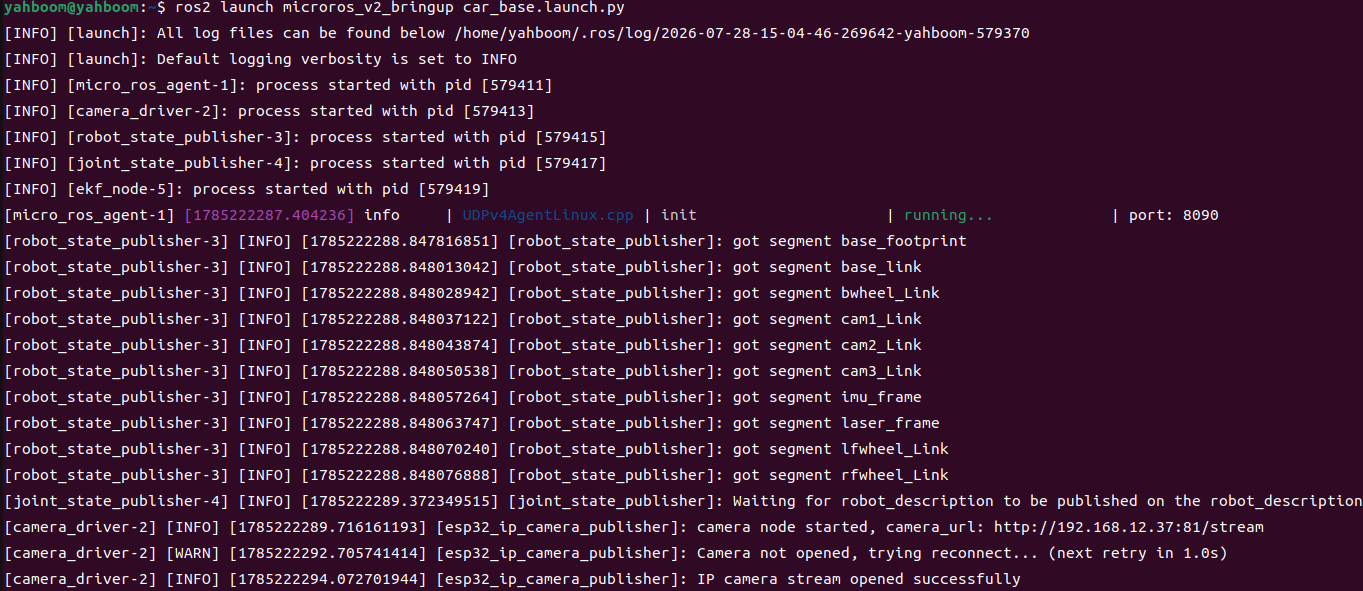
image-20260728161615714

4. Start Gesture Action Group Control (Terminal 2)

xxxxxxxxxx
ros2 launch microros_v2_ptz_visual_control_pkg gesture_action_group_control_ptz.launch.py
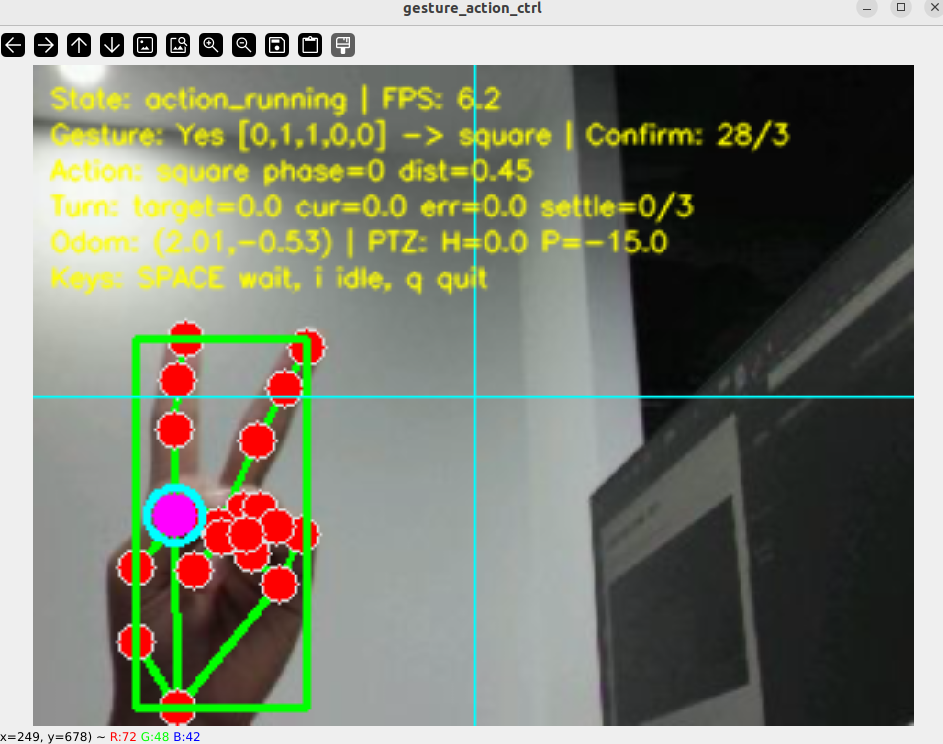
image-20260728190435064

5. Operation Instructions

Gesture-to-Action Mapping

GestureFinger CodeAction
Yes[0,1,1,0,0]square (0.5 m square, 4 sides)
OK≥3 fingers, index bentcircle (spin 360° in place)
Rock[0,1,0,0,1]s_curve (S curve)
Thumb Down≤1 finger, thumb downbackforth (back-and-forth 0.5 m)
5 fingers extended[1,1,1,1,1]stop (emergency stop)
KeyFunction
Spacewaiting ↔ idle
i / IBack to idle
q / Q / ESCExit

4. Experiment Observations

  • idle: PTZ (0°, -15°), gestures are detected but do not trigger actions
  • waiting: The car body is stationary, waiting for a gesture
  • Yes gesture held for 3 frames: 0.5 m square (4 sides), PTZ tilts down to -45°
  • OK gesture: Spins 360° in place
  • Rock gesture: S curve
  • Thumb Down: Back-and-forth 0.5 m
  • 5-finger emergency stop: Interrupts immediately and returns to waiting

5. Program Analysis

Source code paths:

  • Launch: ~/microros_ws/src/microros_v2_ptz_visual_control_pkg/launch/gesture_action_group_control_ptz.launch.py
  • Node: ~/microros_ws/src/microros_v2_ptz_visual_control_pkg/microros_v2_ptz_visual_control_pkg/gesture_action_group_control_ptz_node.py
  • Hand detector: ~/microros_ws/src/microros_v2_ptz_visual_control_pkg/microros_v2_ptz_visual_control_pkg/hand_detector.py

1. Core Node Analysis

gesture_action_group_control_ptz_node adds PTZ state switching on top of the No-PTZ version: the pan-tilt angle is (0°, -15°) in the waiting state, and switches to (0°, -45°) in the action state to tilt down and observe the ground motion.

PTZ state-switching logic:

​x
# Source file: ~/microros_ws/src/microros_v2_ptz_visual_control_pkg/microros_v2_ptz_visual_control_pkg/gesture_action_group_control_ptz_node.py
​
def _enter_waiting(self) -> None:
    """waiting state: pan-tilt (0°, -15°)"""
    self._state = STATE_WAITING
    self._set_ptz(self._waiting_h_deg, self._waiting_p_deg)  # (0°, -15°)
    self._pub_zero_cmd()
​
def _start_action(self, gesture_key: str) -> None:
    """action state: pan-tilt (0°, -45°) tilted down"""
    self._action_type = gesture_key
    self._set_ptz(0.0, -45.0)  # action: tilt down to observe the ground
    self._state = STATE_ACTION

Key logic: three-state machine (idle/waiting/action) + odometry PD closed loop + PTZ pan-tilt state linkage. The 5-finger emergency stop can interrupt any action and return to waiting.

2. Key Parameters

Parameter definition files:

  • Launch: ~/microros_ws/src/microros_v2_ptz_visual_control_pkg/launch/gesture_action_group_control_ptz.launch.py
  • Node: ~/microros_ws/src/microros_v2_ptz_visual_control_pkg/microros_v2_ptz_visual_control_pkg/gesture_action_group_control_ptz_node.py
ParameterTypeDefault ValueDescription
linear_kp / linear_kdfloat0.5 / 0.1Distance PD gains
angular_kp / angular_kdfloat0.08 / 0.15Angle PD gains
max_linear_xfloat0.2 m/sMaximum linear velocity
max_angular_zfloat1.0 rad/sMaximum angular velocity
distance_tolerancefloat0.03 mDistance determination tolerance
angle_tolerance_degfloat5.0°Angle determination tolerance
settle_framesint5Frames for the settle determination
phase_cooldown_ticksint10Cooldown ticks between phases
gesture_hold_confirm_framesint3Gesture confirmation frames
square_forward_distancefloat0.5 mSquare side length
circle_total_angle_degfloat360.0°Total circle angle
backforth_distancefloat0.5 mBack-and-forth distance
waiting_horizontal_degfloat0.0°waiting pan-tilt horizontal angle
waiting_pitch_degfloat-15.0°waiting pan-tilt pitch angle

3. Node Description

NodePackageDescription
gesture_action_group_control_ptz_nodemicroros_v2_ptz_visual_control_pkgPTZ gesture action group, three-state machine + PD closed loop + pan-tilt linkage

6. Frequently Asked Questions

ProblemCauseSolution
Action group interruptedNo data on the /odom_raw odometry topicCheck the odometry topic
Gesture does not triggerNot enough confirmation framesHold the gesture for more than 3 frames
Square drifts off courseAngle PD parameters not suited to the floorTune angular_kp/angular_kd
No detection at startupThe MediaPipe environment was not sourcedsource /opt/ros/humble/setup.bash
source ~/microros_ws/install/setup.bash
AprilTag Control Car Action Group
Visual Line Tracking

COMPANY

  • About us
  • Team Style
  • Blog

LEARNING & EXPLORATION

  • Tutorials
  • Edge AI hardware
  • Educational robots
  • Embedded intelligent hardware

WHERE TO BUY

  • Yahboom Online Store
  • Amazon
  • Alibaba
  • AliExpress
  • Mercado

TECHNOLOGY SUPPORT

  • Email: support@yahboom.com

BE A DISTRIBUTOR

  • Email: sales@yahboom.com
QR Code

Copyright © 2017-2026 Yahboom. All Rights Reserved.

EN/中文