Welcome to MicroROS V2 Robot Car repository
5. Mediapipe Palm Tracking
Mediapipe Palm Tracking (PTZ)
1. Experiment Objective
The PTZ pan-tilt tracks the palm position. Based on MediaPipe Hands, it detects 21 hand landmarks and locks onto the index finger MCP joint (landmark 5) as the tracking target.
2. Experiment Principle
1. Key Terms
| Term | Description |
|---|---|
| MediaPipe Hands | Google's open-source hand detection and landmark localization framework; detects 21 hand landmarks |
| Landmark 5 (index finger MCP) | The base of the index finger (metacarpophalangeal joint); serves as the anchor for palm tracking — stable in position and not easily occluded |
| Visual Tracking | Detects and continuously locks onto a target through a vision algorithm; only the pan-tilt follows, the car does not move |
| PTZ Pan-Tilt | A two-degree-of-freedom servo pan-tilt; s1 rotates horizontally and s2 tilts, controlled via the /cmd_ptz_angle topic |
| PD Control | Proportional-derivative control; computes the pan-tilt angle step from the target offset and the offset change rate |
| Deadband | When the target offset is within the deadband pixel range, the pan-tilt does not move, avoiding continuous jitter caused by tiny errors |
2. Technical Architecture
xESP32 camera (firmware) → /camera/image_raw → hand_tracker_ptz_node → /cmd_ptz_angle → firmware servo controlThe state estimation layer (ekf_filter_node + camera_node) provides the image data stream
Node chain: state estimation (ekf_filter_node + camera_node) → hand_tracker_ptz_node → /cmd_ptz_angle → firmware servo control
3. Core Topics Quick Reference
Firmware Uplink (data upstream):
| Topic Name | Message Type | QoS | Description |
|---|---|---|---|
/camera/image_raw | sensor_msgs/Image | BEST_EFFORT, KEEP_LAST depth=1, VOLATILE | Raw image stream from the ESP32 camera |
Firmware Downlink (command downstream):
| Topic Name | Message Type | QoS | Description |
|---|---|---|---|
/cmd_ptz_angle | geometry_msgs/Vector3 | RELIABLE, KEEP_LAST depth=10 | Pan-tilt angle command (x=horizontal angle, y=tilt angle, z=reserved) |
3. Experiment Steps
1. Hardware Preparation
| Hardware | Requirement |
|---|---|
| PTZ version | ✅ |
| No-PTZ version | ❌ |
| Required peripherals | ESP32 camera (pan-tilt) + PTZ servo |
2. Start Agent + Camera + Joint Model (Terminal 1)
xxxxxxxxxxros2 launch microros_v2_bringup car_base.launch.py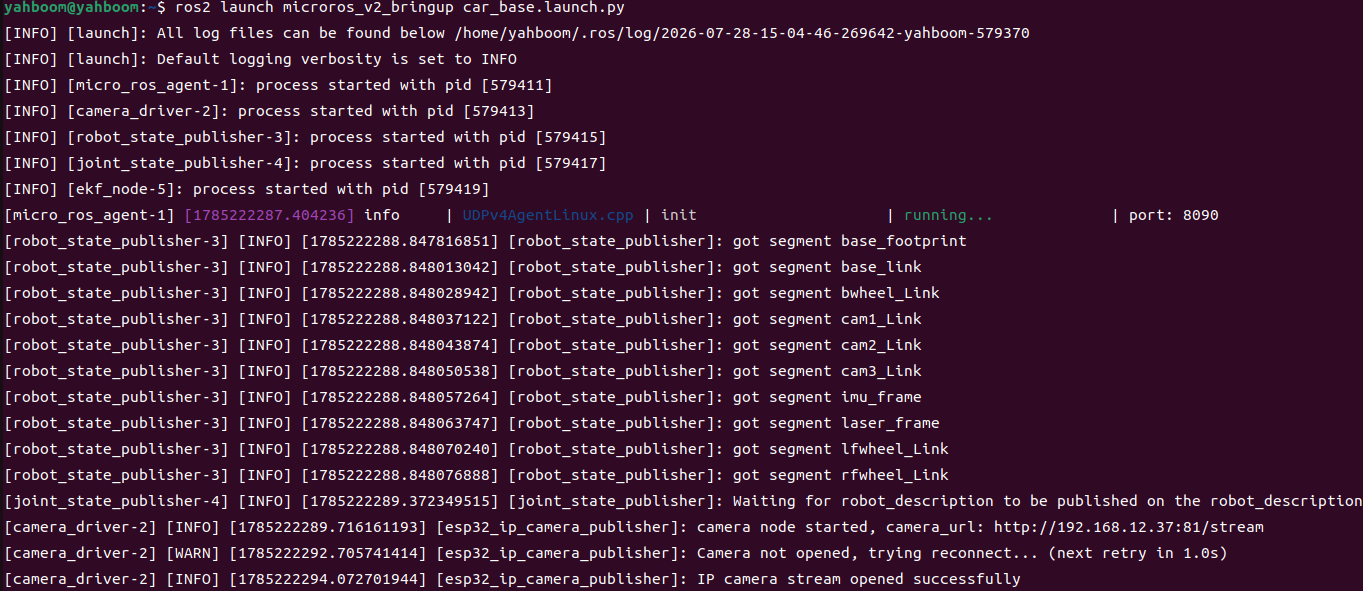
3. Start Palm Tracking (Terminal 2)
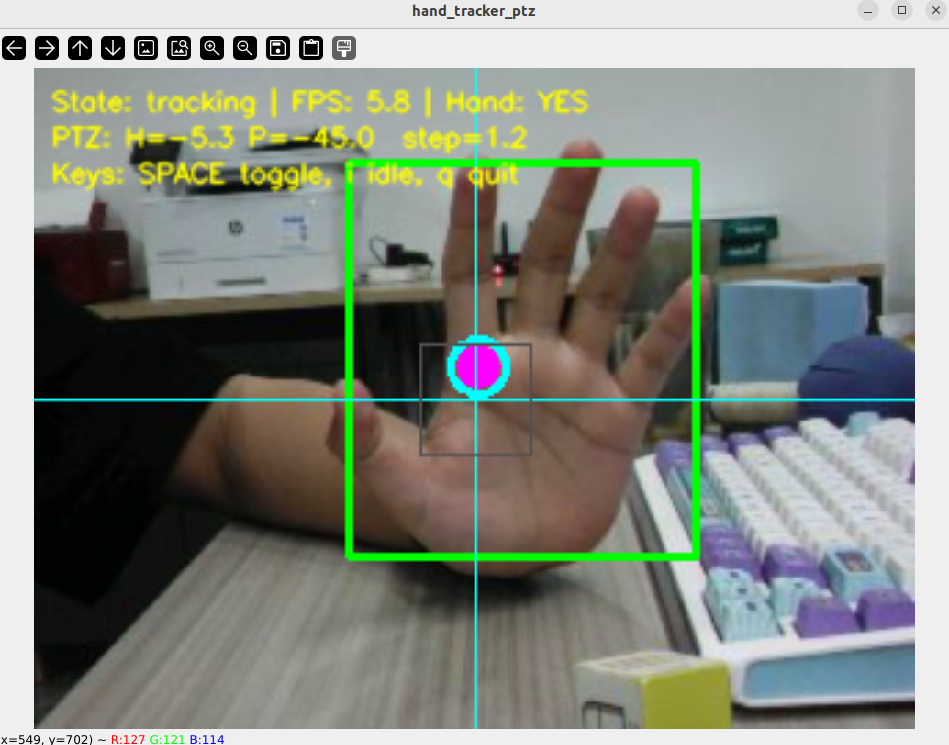
xxxxxxxxxxros2 launch microros_v2_ptz_visual_control_pkg hand_tracker_ptz.launch.pyAfter startup, the frame shows the idle state; palm detection works normally but the pan-tilt does not move.
4. Operation Instructions
1. Workflow
After startup, the node uses two independent timers: image processing (image_processing_rate_hz = 15 Hz) + pan-tilt control (ptz_control_rate = 20 Hz), with a minimal two-state machine: idle ↔ tracking.
(1) Image reception and preprocessing
Subscribes to /camera/image_raw (QoS: BEST_EFFORT, KEEP_LAST); the image callback converts and caches the raw Image. The image processing timer takes the latest frame, scales it to the processing resolution (processing_width×processing_height = 320×240), and flips/rotates as needed.
(2) MediaPipe palm detection
Uses HandDetector (wrapping MediaPipe Hands, static image mode off, max hands = 1) to detect the palm. Each detection extracts the 21 landmark coordinates (lmList) and the finger extension state (fingersUp: 5-bit list, 0=bent / 1=extended).
(3) Tracking anchor extraction
Takes landmark 5 (index finger MCP joint) as the tracking target point (mx, my); also computes the bbox of all landmarks (green rectangle). The count of bent fingers (finger_count) is used for fist detection.
(4) PD pan-tilt control (tracking state + hand present + not a fist only)
Fixed-rate 20 Hz PD control: uses the index finger MCP pixel coordinates as the target, normalizes the error → PD computation → step limiting (±max_ptz_step=1.2°) → step smoothing (α=0.35) → direction reversal (horizontal not reversed, tilt reversed) → angle smoothing (α=ptz_smooth_alpha=0.85) → clamp the angle and publish to /cmd_ptz_angle.
(5) Fist / no-hand handling
In the TRACKING state: when there is no hand or a fist (finger_count==0), no control is output, but the state is not changed and the PD history is not reset — tracking resumes seamlessly when the palm opens again.
2. Interaction
| Key | Function | Description |
|---|---|---|
| Space | idle ↔ tracking | Toggles between standby (idle) and tracking (tracking) |
| i / I | Back to idle | Stops tracking and pan-tilt control |
| q / Q / ESC | Exit | Force-exits the node process with os._exit(0) |
On-screen overlay: The debug window shows the current state (idle/tracking), frame rate, whether a hand is present, pan-tilt angle, and step amount. A crosshair is drawn at the frame center, the deadband range is shown as a gray rectangle, the palm bbox as a green rectangle, and the tracking point as a purple solid circle + yellow hollow circle.
3. Safety and Edge Cases
- No palm, no control: When there is no hand or a fist, the PD outputs nothing, but the PD history is kept for a seamless handoff when tracking resumes
- Pan-tilt angle limiting: Horizontal [-90°, 90°], tilt [-90°, 20°]
- Deadband protection: The step is forced to zero when the tracking point offset is within the deadband (20 px)
- Initial publish at startup: The initial pan-tilt angle (0°, -45°) is published once at startup to home the servos
- Exit strategy: Press q/ESC to exit directly with
os._exit(0), skipping the ROS2 and OpenCV cleanup phases to avoid hanging - Runtime parameter validation: Changes to
image_topic/ptz_command_topic/window_namerequire a node restart
5. How to Stop
Press Ctrl+C in sequence to stop the processes in the three terminals: Terminal 2 (palm tracking) → Terminal 1 (chassis, agent, camera, and model).
4. Experiment Observations
- idle state: The frame streams in real time; palm detection works normally but the pan-tilt does not move, and the state shows
idle - tracking + hand present + fingers extended: The pan-tilt follows the index finger MCP joint smoothly with PD control; the green bbox encloses the whole palm, the tracking point is a purple solid circle, and the frame overlays "Hand: YES"
- tracking + fist: Tracking pauses (
finger_count==0), the pan-tilt stays still at its current position, and tracking resumes automatically when the palm opens again - tracking + palm moved out of frame: The frame shows "Hand: NO", the pan-tilt stays at its last position, and tracking resumes when the palm reappears
- Palm within the deadband: The step is zeroed and the pan-tilt stays completely still without jitter
- MediaPipe 21 landmarks: After palm detection, the 21 blue landmarks and connections are overlaid in real time
5. Program Analysis
Source code paths:
- Launch file:
~/microros_ws/src/microros_v2_ptz_visual_control_pkg/launch/hand_tracker_ptz.launch.py- Node file:
~/microros_ws/src/microros_v2_ptz_visual_control_pkg/microros_v2_ptz_visual_control_pkg/hand_tracker_ptz_node.py- Hand detection module:
~/microros_ws/src/microros_v2_ptz_visual_control_pkg/microros_v2_ptz_visual_control_pkg/hand_detector.py
1. Core Node Analysis
The node HandTrackerPtzNode inherits from rclpy.node.Node, detects palm landmarks with MediaPipe Hands, uses the index finger base (landmark 5) as the anchor, and drives the PTZ pan-tilt to follow the palm with PD control.
Constructor __init__ core logic:
xxxxxxxxxxdef __init__(self) -> None: super().__init__(DEFAULT_NODE_NAME) self._image_lock = threading.Lock() self._track_lock = threading.Lock() self._state = STATE_IDLE # minimal state machine: idle ↔ tracking self._has_hand = False self._finger_count = 0 self._target_x: Optional[float] = None self._target_y: Optional[float] = None self._h_deg = 0.0 # initial s1 horizontal angle self._p_deg = -45.0 # initial s2 tilt angle (45° downward) # PD control history state self._prev_err_x = 0.0 self._prev_err_y = 0.0 self._last_sx = 0.0 self._last_sy = 0.0 self._declare_params() self._load_params() # Initialize the MediaPipe Hands detector self._hand_det = HandDetector() # Image subscription (QoS: BEST_EFFORT, KEEP_LAST depth=1, VOLATILE) video_qos = QoSProfile( history=QoSHistoryPolicy.KEEP_LAST, depth=1, reliability=QoSReliabilityPolicy.BEST_EFFORT, durability=QoSDurabilityPolicy.VOLATILE, ) self._img_sub = self.create_subscription( Image, self._img_topic, self._on_image, video_qos ) self._ptz_pub = self.create_publisher(Vector3, self._ptz_topic, 10) # Publish the initial pan-tilt angle s1=0°, s2=-45° init_msg = Vector3() init_msg.x = float(self._h_deg) init_msg.y = float(self._p_deg) init_msg.z = 0.0 self._ptz_pub.publish(init_msg) # Two independent timers self._img_timer = self.create_timer( 1.0 / max(float(self._img_rate), MINIMUM_TIMER_RATE_HZ), self._process_image) self._ptz_timer = self.create_timer( 1.0 / max(float(self._ptz_rate), MINIMUM_TIMER_RATE_HZ), self._ptz_tick)PD pan-tilt control callback _ptz_tick:
xxxxxxxxxxdef _ptz_tick(self) -> None: if self._state != STATE_TRACKING: return with self._track_lock: tx = self._target_x ty = self._target_y has_hand = self._has_hand fc = self._finger_count # No hand or fist → output nothing, do not reset the PD state if not has_hand or fc == 0 or tx is None or ty is None: return # 1. Compute the pixel error icx = float(self._proc_w) * 0.5 icy = float(self._proc_h) * 0.5 pex = float(tx - icx) pey = float(ty - icy) # 2. Deadband check cx = abs(pex) < self._db_x cy = abs(pey) < self._db_y if cx: pex = 0.0 if cy: pey = 0.0 # 3. Normalize the error nex = pex / icx ney = pey / icy # 4. PD step = (kp * error + kd * derivative) * max step rx = clamp((self._kp * nex + self._kd * (nex - self._prev_err_x) / dt) * self._max_step, -self._max_step, self._max_step) ry = clamp((self._kp * ney + self._kd * (ney - self._prev_err_y) / dt) * self._max_step, -self._max_step, self._max_step) # 5. Step EMA smoothing & zeroing inside the deadband sx = (1.0 - self._step_alpha) * self._last_sx + self._step_alpha * rx sy = (1.0 - self._step_alpha) * self._last_sy + self._step_alpha * ry if cx: sx = 0.0; nex = 0.0 if cy: sy = 0.0; ney = 0.0 # 6. Direction reversal & angle composition if self._rev_h: sx = -sx if self._rev_p: sy = -sy dh = clamp(self._h_deg + sx, self._h_min, self._h_max) dp = clamp(self._p_deg + sy, self._p_min, self._p_max) # 7. Angle EMA smoothing & publish self._h_deg = clamp((1.0 - self._ptz_alpha) * self._h_deg + self._ptz_alpha * dh, self._h_min, self._h_max) self._p_deg = clamp((1.0 - self._ptz_alpha) * self._p_deg + self._ptz_alpha * dp, self._p_min, self._p_max) msg = Vector3() msg.x = float(self._h_deg) msg.y = float(self._p_deg) msg.z = 0.0 self._ptz_pub.publish(msg)MediaPipe palm detection _detect:
xxxxxxxxxxdef _detect(self, frame: np.ndarray) -> None: self._hand_det.findHands(frame, draw=False) if len(self._hand_det.lmList) == 0: self._has_hand = False self._finger_count = 0 return # Extract landmark 5 (index finger MCP) as the tracking target mx, my = self._hand_det.findPoint(LANDMARK_INDEX_FINGER_MCP) fingers = self._hand_det.fingersUp() fc = int(sum(1 if int(v) != 0 else 0 for v in fingers)) # Draw the palm bbox and tracking point x_vals = [pt[1] for pt in self._hand_det.lmList] y_vals = [pt[2] for pt in self._hand_det.lmList] cv.rectangle(frame, (int(min(x_vals)), int(min(y_vals))), (int(max(x_vals)), int(max(y_vals))), (0, 255, 0), 2) cv.circle(frame, (int(mx), int(my)), 8, (255, 0, 255), -1) cv.circle(frame, (int(mx), int(my)), 10, (255, 255, 0), 2) self._has_hand = True self._finger_count = fc self._target_x = float(mx) self._target_y = float(my)The call chain of the _detect method:
xxxxxxxxxx_process_image (15 Hz timer)→ _detect(frame): MediaPipe detection→ lmList determines whether a hand is present→ findPoint(5): extract the index finger base joint coordinates→ fingersUp(): extract the finger extension state→ update the shared data (_has_hand, _target_x/y, _finger_count)_ptz_tick (20 Hz timer)→ read the shared data→ check: TRACKING state + hand present + not a fist → PD control output
2. Key Parameters
Parameter definition file:
~/microros_ws/src/microros_v2_ptz_visual_control_pkg/launch/hand_tracker_ptz.launch.py
| Parameter | Type | Default Value | Description |
|---|---|---|---|
pd_kp / pd_kd | float | 1.5 / 0.35 | PD proportional/derivative gains |
ptz_control_rate | float | 20.0 Hz | Pan-tilt control rate |
image_processing_rate_hz | float | 15.0 Hz | Image processing rate |
deadband_x / deadband_y | float | 20.0 / 20.0 px | Horizontal/vertical deadband |
max_ptz_step | float | 1.2° | Maximum single angle step |
ptz_step_smooth_alpha | float | 0.35 | Step EMA smoothing coefficient |
ptz_smooth_alpha | float | 0.85 | Pan-tilt angle EMA smoothing coefficient |
processing_width / processing_height | int | 320 / 240 px | Processing resolution |
display_width / display_height | int | 960 / 720 px | Display resolution |
lost_frame_threshold | int | 5 frames | Consecutive lost-frame threshold (currently unused) |
6. Frequently Asked Questions
| Problem | Cause | Solution |
|---|---|---|
| Palm lost when moving fast | Image processing at 15 Hz + PD response limits | Slow down the palm movement |
| False detection in complex backgrounds | MediaPipe palm detection is sensitive to complex backgrounds | Keep the palm in front of a clean background and adjust the hand-to-camera distance |
| Palm not recognized | MediaPipe environment dependency issue | Make sure the MediaPipe environment script is sourced: source /opt/ros/humble/setup.bashsource ~/microros_ws/install/setup.bash |
| Pan-tilt responds slowly | ptz_smooth_alpha too large | Run ros2 param set /hand_tracker_ptz_node ptz_smooth_alpha 0.5 to reduce the smoothing coefficient |