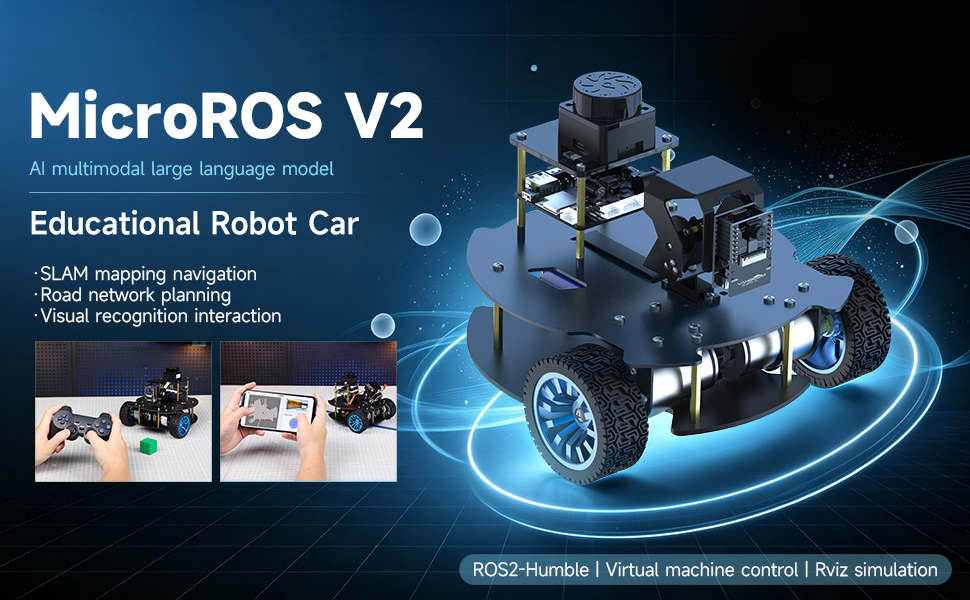
01.Introduction
02.Assembly course
03.Preparation
04.Quick start control course
05.Robot control course
06.Lidar course
- 1. Precautions for LiDAR Mapping and Navigation
- 2. Lidar Avoid
- 3. Lidar Following
- 4. Lidar Guard
- 5. Lidar Patrol
- 6. Gmapping Mapping
- 7. Cartographer Mapping
- 8. Cartographer Quickly Repositioning Navigation
- 9. Slam Toolx Mapping
- 10. Navigation2 Single Point Navigation
- 11. Navigation2 Multi Point Navigation
- 12. Ros Robot App Mapping And Navigation
07.Road network planning
08.Vision basic course
09.Visual General Course (For Standard&Superior version)
- 1. Serial Port Configuration WiFi Instructions
- 2. Use ESP32 Camera Module in Robot Car
- 3. Servo PTZ Calibration
- 1. Human Pose Estimation
- 2. Object Detection
- 3. AR Vision
- 4. QR Code
- 5. Color Recognition
- 6. Facial Recognition
- 7. AprilTag Machine Code Recognition
- 1. Hand Detection
- 2. Pose Detection
- 3. Holistic Detection
- 4. Facial Detection
- 5. Facial Recognition
- 6. Facial Special Effects
- 7. 3D Object Recognition
- 8. Brush
- 9. Gesture Recognition
- 10. Palm Target Localization
- 11. Fingertip Trajectory Recognition
- 1. YOLO Environment Setup
- 2. CLI Usage
- 3. Object Detection
- 4. Instance Segmentation
- 5. Pose Estimation
- 6. Image Classification
- 7. Oriented Bounding Boxes Object Detection
- 8. Model Prediction
1. ESP32 Visual Recognition Module Configuration
2. OpenCV Visual Recognition
3. Mediapipe Visual Recognition
4. Yolov11&26 Visual Recognition
10.Visual Advanced Course (Just for Standard version)
- 1. QR Code Recognition Control Action
- 2. AprilTag Control Car Action Group
- 3. Gesture Control Car Action Group
- 4. Visual Line Tracking
- 1. Color Tracking
- 2. Facial Tracking
- 3. QR Code Tracking
- 4. Object Recognition And Tracking
- 5. Mediapipe Palm Tracking
- 6. Mediapipe Gesture Tracking
- 7. Mediapipe Human Pose Tracking
- 8. KCF Object Tracking
- 9. AprilTag Machine Code Tracking
- 1. Color Follow
- 2. Face Follow
- 3. QR Code Follow
- 4. Mediapipe Palm Follow
- 5. Mediapipe Gesture Follow
- 6. Mediapipe Human Posture Follow
- 7. AprilTag Machine Code Follow
- 8. Object Follow
1. Visual Control
2. Visual Tracking
3. Visual Following
11.Visual Advanced Course (Just for Superior version)
- 1. QR Code Recognition Control Action
- 2. AprilTag Control Car Action Group
- 3. Gesture Control Car Action Group
- 4. Visual Line Tracking
- 1. Color Tracking
- 2. Facial Tracking
- 3. QR Code Tracking
- 4. YOLO Object Recognition and Tracking
- 5. Mediapipe Palm Tracking
- 6. Mediapipe Gesture Tracking
- 7. Mediapipe Human Pose Tracking
- 8. KCF Object Tracking
- 9. AprilTag Machine Code Tracking
- 1. Color Follow
- 2. Face Follow
- 3. QR Code Follow
- 4. Mediapipe Palm Follow
- 5. Mediapipe Gesture Follow
- 6. Mediapipe Human Pose Follow
- 7. AprilTag Machine Code Follow
- 8. Object Follow
1. Visual Control
2. Visual Tracking
3. Visual Follow
12.AI Large Model Basic and Applications Course
- 1.AI Large Model Preparation
- 1. AI Large Model Types and Principles
- 2. RAG Retrieval Augmented and Training Samples
- 3. Embodied Intelligent System Architecture
- 4. Embodied Intelligence Core Source Code
- 1. Register Model Service Account
- 2. Configure API KEY
- 3. Dify Introduction
- 4. Dify Basic Features
- 5. RAG Knowledge Base Deployment
- 6. AI Application Development Chatbot
- 7. RAG Knowledge Base and Chatbot
- 8. AI Agent Workflow
- 1. Semantic Understanding and Instruction Following
- 2. Multimodal Visual Understanding
- 3. Multimodal Visual Understanding + Basic Control
- 4. Multimodal Visual Understanding + Object Following
- 5. Multimodal Visual Understanding + Visual Line Following
- 6. Multimodal Visual Understanding + SLAM Navigation
- 7. Multimodal Visual Understanding + SLAM Navigation + Visual Line Following
- 8. Multimodal Visual Understanding + SLAM Navigation + Object Following
- 9. Intent Inference + Multimodal Visual Understanding + SLAM Navigation
1. AI Large Model Preparation
2. AI Large Model Basic Course
3. AI Large Model Development
4. AI Large Model (Text Version)
13.Openclaw Basics Course
14. Openclaw Interaction Course
15.Openclaw Development Course
16.Openclaw Embodied Intelligence Course
- 1. OpenClaw Natural Interaction + Basic Control
- 2. OpenClaw Natural Interaction + Slam Navigation
- 3. OpenClaw Natural Interaction + Multimodal Visual Understand
- 4. OpenClaw Natural Interaction + Multimodal Visual Understand + Slam Navigation + Visual Follow
- 5. OpenClaw Natural Interaction + Multimodal Visual Understand + Slam Navigation + Visual Track
17.Multi-machine Course
18.MicroROS-V2 Control Board Development Environment
19.MicroROS-V2 Control Board ESP32 Basic Course
- 1. Led Light Up
- 2. Button Function
- 3. Drive Buzzer
- 4. Oled
- 5. Usb Host Function
- 6. Serial Communication
- 7. Battery Voltage Detection
- 8. Drive Pwm Servo
- 9. Drive Motors
- 10. Read Motor Encoder Data
- 11. Pid Motor Speed Control
- 12. Robot Kinematics Analysis Theory
- 13. Read Imu Data
- 14. Read Lidar Data
- 15. Flash Data Storage
- 16. Custom Partition Table
- 17. Bluetooth Communication
- 18. Wifi Connection
- 19. ESP32 Visual Recognition Module
20.MicroROS-V2 Control Board Micro_ros Basic Course
21. Linux System Course
- 1.Introduction to Linux system
- 2.Ubuntu file system
- 3.Ubuntu common commands
- 4.Ubuntu common editors
- 5.Ubuntu software operation commands
- 6.Virtual machine installation
- 7.SSH remote control
- 8.VNC remote control
- 9.Transfer files remotely
- 10.Driver library and communication
- 11.Static IP and hotspot mode
- 12.Bind device ID
- 13.Capacity expansion and resource allocation
- 14.Update system software sources
- 15.Set root user password
- 16.sudo free password
- 17.Connect to WiFi network
- 18.View system version
- 19.Customized service management
- 20.Back up system image
22.Docker Course
23.ROS Basic Course
- 1.Introduction to ROS2
- 2.ROS2 install Humble
- 3.ROS2 development environment
- 4.ROS2 workspace
- 5.ROS2 function package
- 6.ROS2 node
- 7.ROS2 topic communication
- 8.ROS2 service communication
- 9.ROS2 action communication
- 10.ROS2 custom interface message
- 11.ROS2 parameter service case
- 12.ROS2 meta-function package
- 13.ROS2 distributed communication
- 14.ROS2 DDS
- 15.ROS2 time related API
- 16.ROS2 common command tools
- 17.ROS2 rviz2 use
- 18.ROS2 rqt toolbox
- 19.ROS2 Launch startup file configuration
- 20.ROS2 recording and playback tool
- 21.ROS2 URDF model
- 22.ROS2 Gazebo simulation platform
- 23.ROS2 TF2 coordinate transformation
Download