yahboom
HomeTutorialsProduct
Solution
Blog
Online Store
About Us
EN/中文
Store
Jetson Orin NANO Developer Kit📖
01.Get started
  • 01. Learning route
  • 02. Get started quickly
  • 03. System Update Notes
  • 04. Disabling automatic updates and troubleshooting issues
  • 05. Jetson Orin Nano official kit screwdriver instructions
02.Jetson basic course
  • 01.Jetson board introduction
  • 02.Write Jetson original system
  • 03.Installing Jetson environment
  • 04.Backup SSD system
  • 05.Restore initial image system
  • 06.Upgrade to SUPER version (Optional)
  • 07.Write SUPER boot (Must read)
  • 08.SSD expansion
  • 09.Jetpack old system upgraded to Yahboom SUPER factory system
  • 10.Write the system onto your own SSD
03.Basic setting course
  • 01.Basic knowledge
  • 02.Network configuration
  • 03.SSH remote login
  • 04.VNC remote control
  • 05.RDP remote control
  • 06.Remote file transfer
  • 07.Jtop tool
  • 08.Exchange space expansion
  • 09.Use VSCode
  • 10.Use VMware
  • 11.Modify screen resolution
04.GPIO control course
  • 01.GPIO description
  • 02.GPIO library installation
  • 03.GPIO reading
  • 04.GPIO output
  • 05.Serial communication
  • 06.I2C communication
05.Vision basic course
  • 01.CSI camera preview
  • 02.USB camera preview
  • 03.Use Jupyter Lab
  • 04.Use JetCam
06.OpenCV basic course
  • 01.Image reading
  • 02.Image saving
  • 03.Image modification
  • 04.Image scaling
  • 05.Image cropping
  • 06.Image translation
  • 07.Image mirroring
  • 08.Image grayscale conversion
  • 09.Image binarization
  • 10.Image edge detection
  • 11.Add line segments
  • 12.Add rectangles
  • 13.Add circular shape
  • 14.Add ellipses
  • 15.Add polygons
  • 16.Add Text
  • 17.Preview USB camera image
  • 18.Preview CSI camera image
07.Vision advanced course
01.Environment construction
  • 01.TensorFlow
  • 02.PyTorch
  • 03.Torchvision
02.DeepStream development
  • 01.DeepStream environment
  • 02.License plate detection and recognition
  • 03.Parallel multi-model inference
  • 04.Object embedding vector generation
  • 05.Pose recognition
  • 06.NV optical flow anomaly detection
  • 07.Single-view 3D tracking
  • 08.Multi-view 3D tracking
03.NVIDIA TAO toolkit application
  • 01.Traffic scene object detection
  • 02.Person object detection
  • 03.Vehicle brand classification
  • 04.Vehicle model classification
  • 05.License plate detection and recognition
  • 06.Person semantic segmentation
  • 07.Retail product detection and recognition
  • 08.Person feature extraction and matching (ReID)
  • 09.Person action and pose classification
  • 10.Transformer-based person detection
  • 11.3D human skeleton detection
  • 12.LiDAR 3D point cloud detection
04.YOLO11 development
  • 01.YOLO environment construction
  • 02.CLI use
  • 03.Object detection
  • 04.Instance segmentation
  • 05.Pose estimation
  • 06.Image classification
  • 07.Oriented object detection
  • 08.Model conversion
  • 09.Dataset annotation
  • 10.Model training conversion
  • 11.Model prediction
05.Mediapipe development
  • 01.Mediapipe environment
  • 02.Hand detection
  • 03.Face detection
  • 04.Face effects
  • 05.3D object recognition
  • 06.Virtual brush
  • 07.Gesture recognition
  • 08.Finger control
  • 09.Posture estimation
  • 10.Face mask
  • 11.Overall detection
  • 12.Green scene removal(Human)
06.YOLO26 development
  • 01.YOLO environment construction
  • 02.CLI use
  • 03.Object detection
  • 04.Instance segmentation
  • 05.Pose estimation
  • 06.Image classification
  • 07.Oriented object detection
  • 08.Model conversion
  • 09.Dataset annotation
  • 10.Model training conversion
  • 11.Model prediction
07.QR code recognition
  • QR code recognition
08.Docker basic course
  • 01.Docker introduction
  • 02.Docker installation
  • 03.Docker command
  • 04.Docker usage
  • 05.Docker interaction
09.ROS2-Jazzy
01.ROS2 basic course
  • 1.Introduction to ROS2
  • 2.ROS2 install Jazzy
  • 3.ROS2 development environment
  • 4.ROS2 workspace
  • 5.ROS2 function package
  • 6.ROS2 node
  • 7.ROS2 topic communication
  • 8.ROS2 service communication
  • 9.ROS2 action communication
  • 10.ROS2 custom interface message
  • 11.ROS2 parameter service case
  • 12.ROS2 meta-function package
  • 13.ROS2 distributed communication
  • 14.ROS2 DDS
  • 15.ROS2 time related API
  • 16.ROS2 common command tools
  • 17.ROS2 rviz2 use
  • 18.ROS2 rqt toolbox
  • 19.ROS2 Launch startup file configuration
  • 20.ROS2 recording and playback tool
  • 21.ROS2 URDF model
  • 22.ROS2 Gazebo simulation platform
  • 23.ROS2 TF2 coordinate transformation
02.ROS2 vision course
  • 01.Camera preview (USB)
  • 02.Camera preview (CSI)
  • 03.Camera calibration (USB)
  • 04.Camera calibration (CSI)
  • 05.AR vision (USB)
  • 06.AR vision (CSI)
10.Large model basic course
01.Offline large model
  • 01.AI large model environment deployment
  • 02.Install large model dialogue platform
  • 03.Meta AI - Llama model
  • 04.Alibaba Cloud - Qwen model
  • 05.Microsoft - Phi-4-mini model
  • 06.DeepSeek - DeepSeek model
  • 07.Alibaba Cloud - Qwen-VL visual multimodal large model
  • 08.Google - Gemma visual multimodal large model
  • 9.Llava visual multimodal large model
  • 10.MiniCPM-V visual multimodal large model
  • 11.High-quality vision-language grounding (LocateAnything)
02.Online large model
  • 01.Tongyi Qianwen large model
  • 02.OpenRouter large model API aggregation platform
11.Large model application practice
01.Voice interaction application
  • 1.Voice interaction hardware connection (Must read)
  • 2.Offline speech to text (ASR)
  • 3.Offline text to speech (TTS)
  • 4.AI large model voice interaction
  • 5.AI large model offline voice assistant
02.Multimodal large model application (Online_Offline large model + Text_Voice interaction)
  • 01.Multimodal visual understand application
  • 02.Multimodal text image application
  • 03.Multimodal video analysis application
  • 04.Multi module visual position application
  • 05.Multimodal table scanning application
  • 06.Multimodal autonomous agent application
12.NVIDIA Isaac ROS course
  • 01.Build Isaac ROS environment
  • 02.Deep segmentation
  • 03.DNN stereoscopic depth
  • 04.Free space segmentation
  • 05.Image distortion processing
  • 06.Image segmentation
  • 07.3D scene reconstruction and mapping
  • 08.Object detection
  • 09.3D attitude estimation
  • 10.Visual SLAM
13.OpenClaw deployment and basic usage
01.OpenClaw deployment and introduction
  • 01.Quick start with the pre-configured environment (Recommended)
  • 02.OpenClaw Deployment
  • 03.OpenClaw WhatsApp Plugin Application
  • 04.OpenClaw WebChat Interaction
  • 05.OpenClaw TUI Interaction
  • 06.OpenClaw Tools Introduction
  • 07.OpenClawGate Gateway User Manual
  • 08.OpenClaw Features Overview
  • 09.OpenClawHub Introduction (Skill Installation)
02.OpenClaw basic application
  • 01.OpenClaw Application - File Management
  • 02.OpenClaw Application - Camera
  • 03.OpenClaw Application - Browser Control
  • 04.OpenClaw Application - Script Execution
  • 05.OpenClaw Application - AI Programming (Peripheral & GPIO Control)
  • 06.OpenClaw Application - Dedicated AI Assistant
  • 07.OpenClaw Web Search Capability Configuration
03.NVIDIA official Agent Skills application
  • 01.AI-assisted development with VS Code or Cursor
  • 02.Jetson device skills
  • 03.Jetson BSP custom agent skills
14.OpenClaw advanced development
01.Preparation Before Use
  • 01.Peripheral Hardware Configuration
  • 02.OpenClaw API-KEY Configuration
  • 03.OpenClaw Model Switching
  • 04.OpenClaw Prompts
  • 05.AI Voice Interaction Configuration
  • 06.Three Dialogue Configuration Tests
02.OpenClaw AI Programming Peripheral Control
  • 1. Servo Control
  • 2. RGB Strip
  • 3. OLED Display
  • 4. Temperature and Humidity Sensor
  • 5. Camera Application
  • 6. AI Script Peripheral Control
03.OpenClaw Peripheral Integration Applications
  • 1. Plant Care Assistant
  • 2. AI Calorie Estimation
  • 3. AI Rock Paper Scissors Game
  • 4. AI Pet
  • 5. AI Weather Station
  • 6. Temperature Humidity Dashboard
  • 7. Scheduled Tasks
Download
  • System_File
  • VMFile_BootFile
  • 3D Model File
  • DataSheet
  • Software_Tools
  • Code
  • Manual
Download ZIP

Welcome to Jetson Orin NANO Developer Kit repository

QR code recognition

QR Code Recognition

QR Code Recognition1. Installing Dependencies2. Creating a QR Code3. Parsing a QR Code3.1. USB Camera3.2. CSI CameraCommon Problems'PIL.Image' has no attribute 'Resampling'

pip Installation Note: Ubuntu 24.04 marks the system Python as "externally managed" according to PEP 668, so installing packages directly with pip may report externally-managed-environment. --break-system-packages allows pip to install packages in this environment; virtual environments usually do not need this parameter, but this tutorial keeps it for consistent instructions.

The QR code (Quick Response Code) is a matrix barcode composed of squares that can be used to store various types of information.

1. Installing Dependencies

xxxxxxxxxx
sudo apt install libzbar-dev -y
sudo pip3 install qrcode pyzbar --break-system-packages
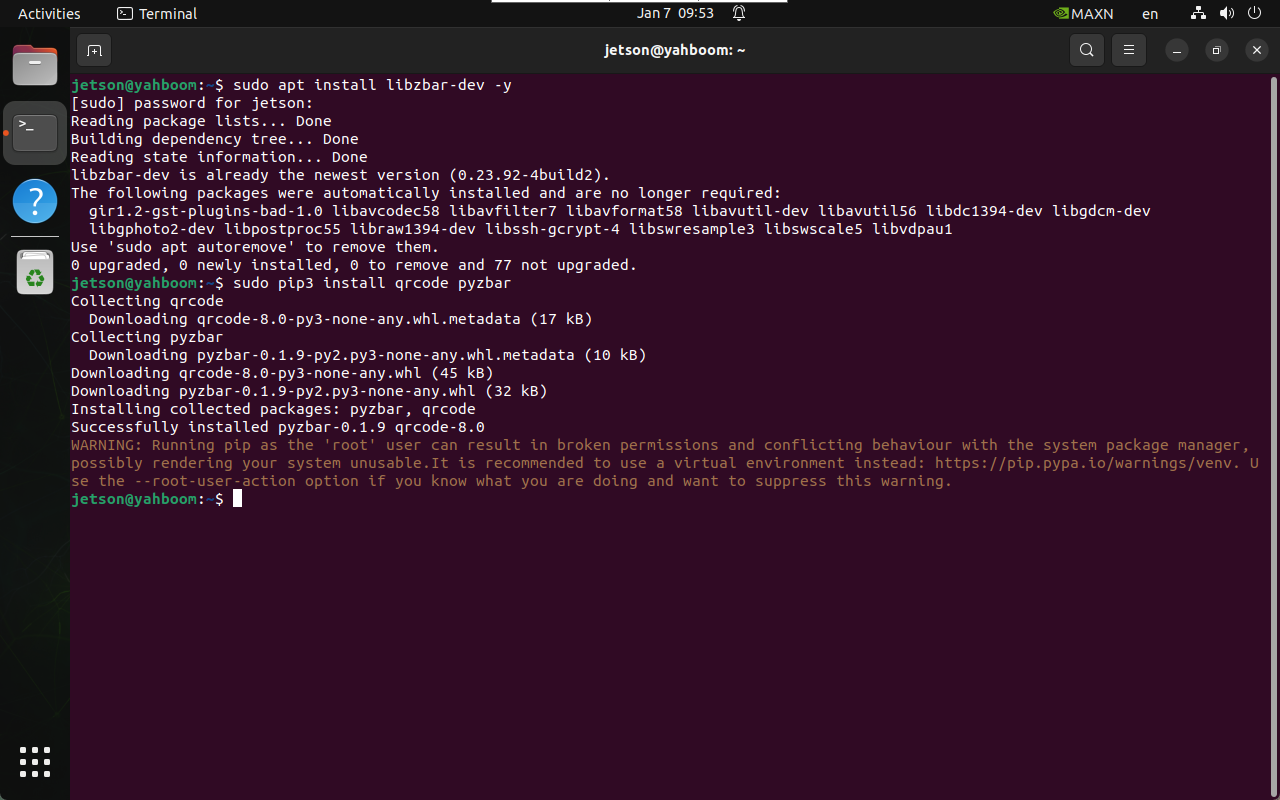
image-20250107095324205

2. Creating a QR Code

xxxxxxxxxx
cd ~/qr_code_recognition
xxxxxxxxxx
python3 qrcode_create.py

After running the command, enter the message hidden in the QR code: the generated image is located in the /home/jetson/qr_code_recognition/figures folder
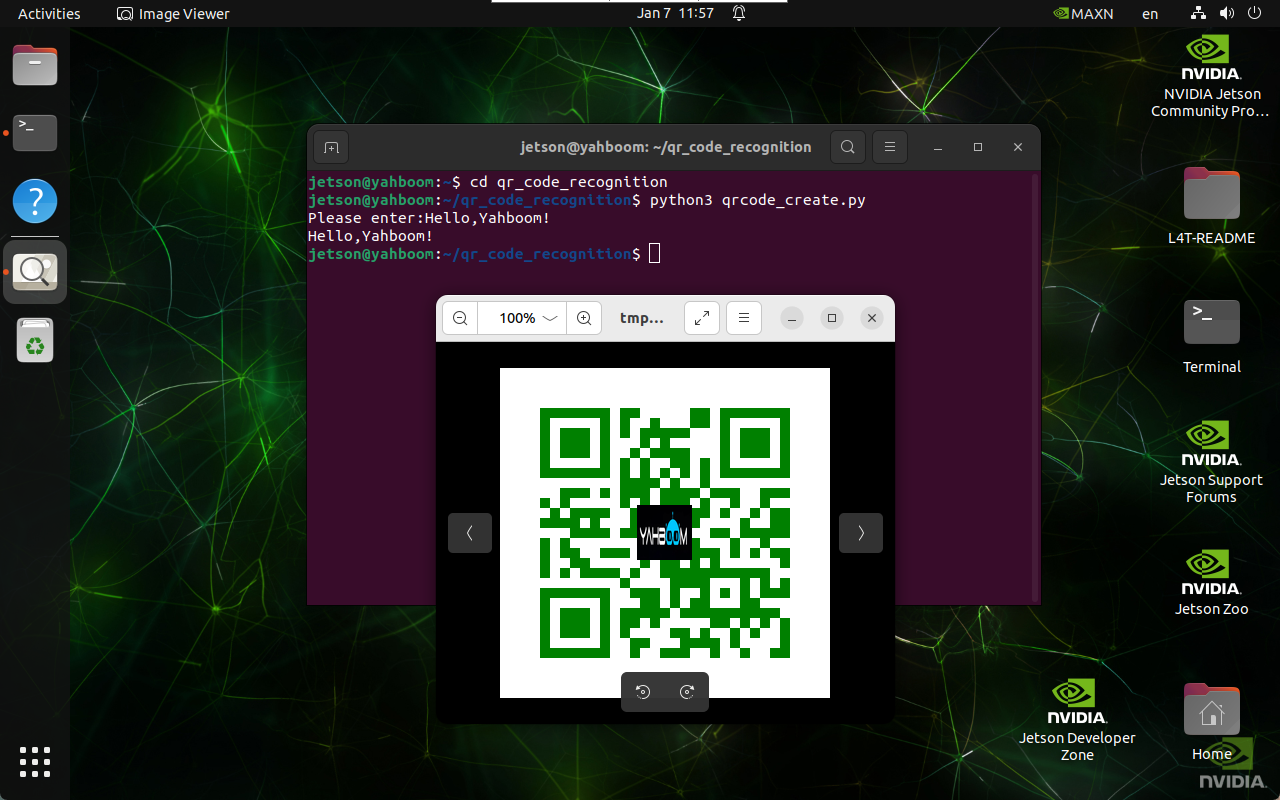
image-20250107115728060

3. Parsing a QR Code

3.1. USB Camera

xxxxxxxxxx
cd ~/qr_code_recognition
xxxxxxxxxx
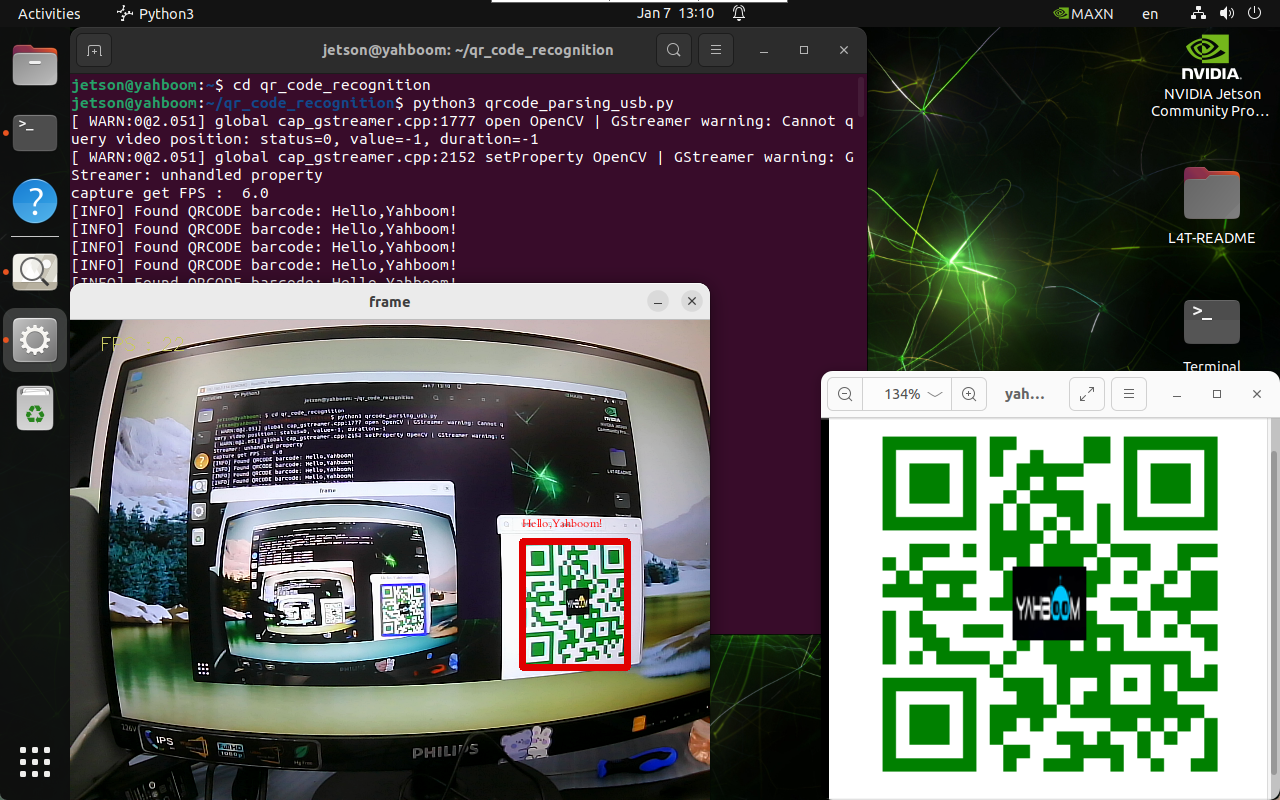
python3 qrcode_parsing_usb.py

image-20250107131103273

3.2. CSI Camera

xxxxxxxxxx
cd ~/qr_code_recognition
xxxxxxxxxx
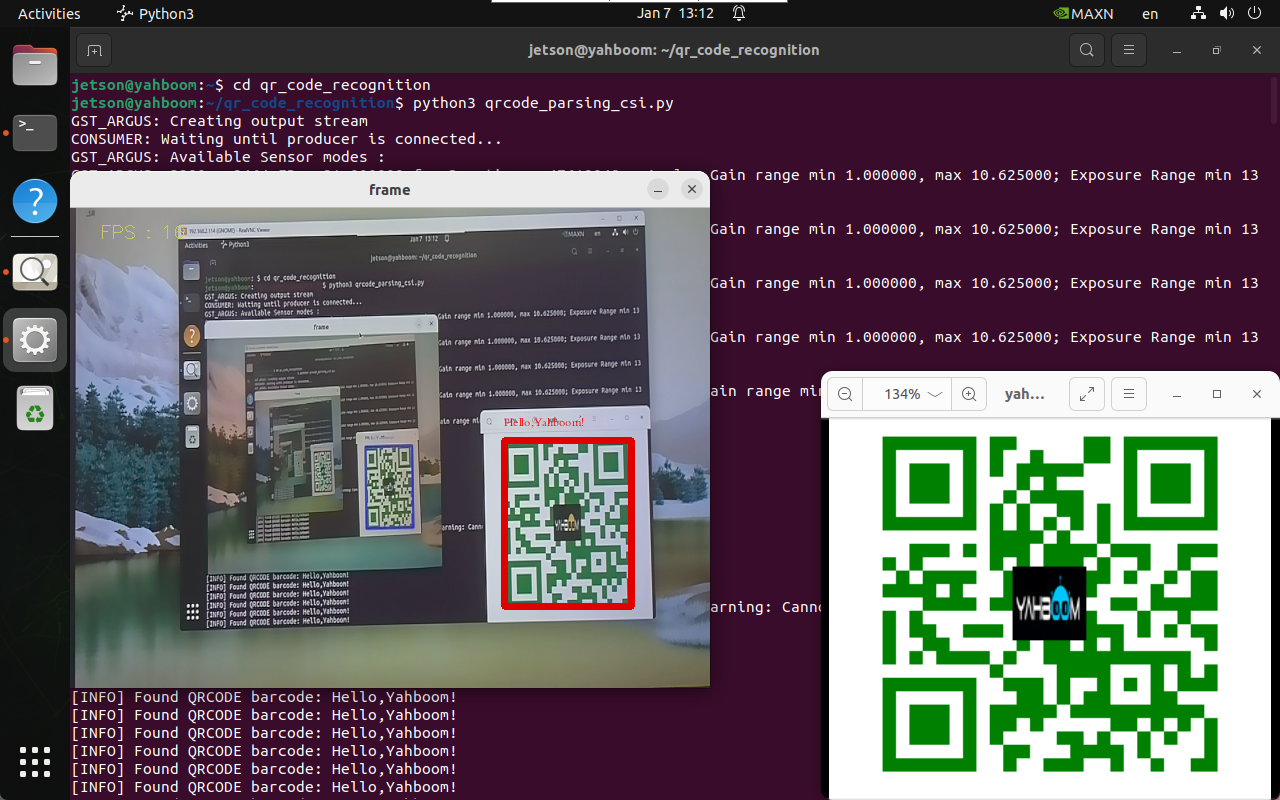
python3 qrcode_parsing_csi.py

image-20250107131233208

Common Problems

'PIL.Image' has no attribute 'Resampling'

sudo pip3 install --upgrade pillow --break-system-packages
Model prediction
Docker introduction

COMPANY

  • About us
  • Team Style
  • Blog

LEARNING & EXPLORATION

  • Tutorials
  • Edge AI hardware
  • Educational robots
  • Embedded intelligent hardware

WHERE TO BUY

  • Yahboom Online Store
  • Amazon
  • Alibaba
  • AliExpress
  • Mercado

TECHNOLOGY SUPPORT

  • Email: support@yahboom.com

BE A DISTRIBUTOR

  • Email: sales@yahboom.com
QR Code

Copyright © 2017-2026 Yahboom. All Rights Reserved.

EN/中文