yahboom
HomeTutorialsProduct
Solution
Blog
Online Store
About Us
EN/中文
Store
Jetson Orin NANO Developer Kit📖
01.Get started
  • 01. Learning route
  • 02. Get started quickly
  • 03. System Update Notes
  • 04. Disabling automatic updates and troubleshooting issues
  • 05. Jetson Orin Nano official kit screwdriver instructions
02.Jetson basic course
  • 01.Jetson board introduction
  • 02.Write Jetson original system
  • 03.Installing Jetson environment
  • 04.Backup SSD system
  • 05.Restore initial image system
  • 06.Upgrade to SUPER version (Optional)
  • 07.Write SUPER boot (Must read)
  • 08.SSD expansion
  • 09.Jetpack old system upgraded to Yahboom SUPER factory system
  • 10.Write the system onto your own SSD
03.Basic setting course
  • 01.Basic knowledge
  • 02.Network configuration
  • 03.SSH remote login
  • 04.VNC remote control
  • 05.RDP remote control
  • 06.Remote file transfer
  • 07.Jtop tool
  • 08.Exchange space expansion
  • 09.Use VSCode
  • 10.Use VMware
  • 11.Modify screen resolution
04.GPIO control course
  • 01.GPIO description
  • 02.GPIO library installation
  • 03.GPIO reading
  • 04.GPIO output
  • 05.Serial communication
  • 06.I2C communication
05.Vision basic course
  • 01.CSI camera preview
  • 02.USB camera preview
  • 03.Use Jupyter Lab
  • 04.Use JetCam
06.OpenCV basic course
  • 01.Image reading
  • 02.Image saving
  • 03.Image modification
  • 04.Image scaling
  • 05.Image cropping
  • 06.Image translation
  • 07.Image mirroring
  • 08.Image grayscale conversion
  • 09.Image binarization
  • 10.Image edge detection
  • 11.Add line segments
  • 12.Add rectangles
  • 13.Add circular shape
  • 14.Add ellipses
  • 15.Add polygons
  • 16.Add Text
  • 17.Preview USB camera image
  • 18.Preview CSI camera image
07.Vision advanced course
01.Environment construction
  • 01.TensorFlow
  • 02.PyTorch
  • 03.Torchvision
02.DeepStream development
  • 01.DeepStream environment
  • 02.License plate detection and recognition
  • 03.Parallel multi-model inference
  • 04.Object embedding vector generation
  • 05.Pose recognition
  • 06.NV optical flow anomaly detection
  • 07.Single-view 3D tracking
  • 08.Multi-view 3D tracking
03.NVIDIA TAO toolkit application
  • 01.Traffic scene object detection
  • 02.Person object detection
  • 03.Vehicle brand classification
  • 04.Vehicle model classification
  • 05.License plate detection and recognition
  • 06.Person semantic segmentation
  • 07.Retail product detection and recognition
  • 08.Person feature extraction and matching (ReID)
  • 09.Person action and pose classification
  • 10.Transformer-based person detection
  • 11.3D human skeleton detection
  • 12.LiDAR 3D point cloud detection
04.YOLO11 development
  • 01.YOLO environment construction
  • 02.CLI use
  • 03.Object detection
  • 04.Instance segmentation
  • 05.Pose estimation
  • 06.Image classification
  • 07.Oriented object detection
  • 08.Model conversion
  • 09.Dataset annotation
  • 10.Model training conversion
  • 11.Model prediction
05.Mediapipe development
  • 01.Mediapipe environment
  • 02.Hand detection
  • 03.Face detection
  • 04.Face effects
  • 05.3D object recognition
  • 06.Virtual brush
  • 07.Gesture recognition
  • 08.Finger control
  • 09.Posture estimation
  • 10.Face mask
  • 11.Overall detection
  • 12.Green scene removal(Human)
06.YOLO26 development
  • 01.YOLO environment construction
  • 02.CLI use
  • 03.Object detection
  • 04.Instance segmentation
  • 05.Pose estimation
  • 06.Image classification
  • 07.Oriented object detection
  • 08.Model conversion
  • 09.Dataset annotation
  • 10.Model training conversion
  • 11.Model prediction
07.QR code recognition
  • QR code recognition
08.Docker basic course
  • 01.Docker introduction
  • 02.Docker installation
  • 03.Docker command
  • 04.Docker usage
  • 05.Docker interaction
09.ROS2-Jazzy
01.ROS2 basic course
  • 1.Introduction to ROS2
  • 2.ROS2 install Jazzy
  • 3.ROS2 development environment
  • 4.ROS2 workspace
  • 5.ROS2 function package
  • 6.ROS2 node
  • 7.ROS2 topic communication
  • 8.ROS2 service communication
  • 9.ROS2 action communication
  • 10.ROS2 custom interface message
  • 11.ROS2 parameter service case
  • 12.ROS2 meta-function package
  • 13.ROS2 distributed communication
  • 14.ROS2 DDS
  • 15.ROS2 time related API
  • 16.ROS2 common command tools
  • 17.ROS2 rviz2 use
  • 18.ROS2 rqt toolbox
  • 19.ROS2 Launch startup file configuration
  • 20.ROS2 recording and playback tool
  • 21.ROS2 URDF model
  • 22.ROS2 Gazebo simulation platform
  • 23.ROS2 TF2 coordinate transformation
02.ROS2 vision course
  • 01.Camera preview (USB)
  • 02.Camera preview (CSI)
  • 03.Camera calibration (USB)
  • 04.Camera calibration (CSI)
  • 05.AR vision (USB)
  • 06.AR vision (CSI)
10.Large model basic course
01.Offline large model
  • 01.AI large model environment deployment
  • 02.Install large model dialogue platform
  • 03.Meta AI - Llama model
  • 04.Alibaba Cloud - Qwen model
  • 05.Microsoft - Phi-4-mini model
  • 06.DeepSeek - DeepSeek model
  • 07.Alibaba Cloud - Qwen-VL visual multimodal large model
  • 08.Google - Gemma visual multimodal large model
  • 9.Llava visual multimodal large model
  • 10.MiniCPM-V visual multimodal large model
  • 11.High-quality vision-language grounding (LocateAnything)
02.Online large model
  • 01.Tongyi Qianwen large model
  • 02.OpenRouter large model API aggregation platform
11.Large model application practice
01.Voice interaction application
  • 1.Voice interaction hardware connection (Must read)
  • 2.Offline speech to text (ASR)
  • 3.Offline text to speech (TTS)
  • 4.AI large model voice interaction
  • 5.AI large model offline voice assistant
02.Multimodal large model application (Online_Offline large model + Text_Voice interaction)
  • 01.Multimodal visual understand application
  • 02.Multimodal text image application
  • 03.Multimodal video analysis application
  • 04.Multi module visual position application
  • 05.Multimodal table scanning application
  • 06.Multimodal autonomous agent application
12.NVIDIA Isaac ROS course
  • 01.Build Isaac ROS environment
  • 02.Deep segmentation
  • 03.DNN stereoscopic depth
  • 04.Free space segmentation
  • 05.Image distortion processing
  • 06.Image segmentation
  • 07.3D scene reconstruction and mapping
  • 08.Object detection
  • 09.3D attitude estimation
  • 10.Visual SLAM
13.OpenClaw deployment and basic usage
01.OpenClaw deployment and introduction
  • 01.Quick start with the pre-configured environment (Recommended)
  • 02.OpenClaw Deployment
  • 03.OpenClaw WhatsApp Plugin Application
  • 04.OpenClaw WebChat Interaction
  • 05.OpenClaw TUI Interaction
  • 06.OpenClaw Tools Introduction
  • 07.OpenClawGate Gateway User Manual
  • 08.OpenClaw Features Overview
  • 09.OpenClawHub Introduction (Skill Installation)
02.OpenClaw basic application
  • 01.OpenClaw Application - File Management
  • 02.OpenClaw Application - Camera
  • 03.OpenClaw Application - Browser Control
  • 04.OpenClaw Application - Script Execution
  • 05.OpenClaw Application - AI Programming (Peripheral & GPIO Control)
  • 06.OpenClaw Application - Dedicated AI Assistant
  • 07.OpenClaw Web Search Capability Configuration
03.NVIDIA official Agent Skills application
  • 01.AI-assisted development with VS Code or Cursor
  • 02.Jetson device skills
  • 03.Jetson BSP custom agent skills
14.OpenClaw advanced development
01.Preparation Before Use
  • 01.Peripheral Hardware Configuration
  • 02.OpenClaw API-KEY Configuration
  • 03.OpenClaw Model Switching
  • 04.OpenClaw Prompts
  • 05.AI Voice Interaction Configuration
  • 06.Three Dialogue Configuration Tests
02.OpenClaw AI Programming Peripheral Control
  • 1. Servo Control
  • 2. RGB Strip
  • 3. OLED Display
  • 4. Temperature and Humidity Sensor
  • 5. Camera Application
  • 6. AI Script Peripheral Control
03.OpenClaw Peripheral Integration Applications
  • 1. Plant Care Assistant
  • 2. AI Calorie Estimation
  • 3. AI Rock Paper Scissors Game
  • 4. AI Pet
  • 5. AI Weather Station
  • 6. Temperature Humidity Dashboard
  • 7. Scheduled Tasks
Download
  • System_File
  • VMFile_BootFile
  • 3D Model File
  • DataSheet
  • Software_Tools
  • Code
  • Manual
Download ZIP

Welcome to Jetson Orin NANO Developer Kit repository

01.AI large model environment deployment

Ollama

Ollama1. Large Language Models (LLMs)2. Offline Models and 4GB Compatibility3. Installing OllamaScript installation4. Using Ollama5. Uninstalling OllamaReferences

Demo environment

Development board: Jetson Orin series mainboards

Ollama is an open source tool designed to simplify deploying and running large language models, so that users can run high-quality language models in a local environment.

1. Large Language Models (LLMs)

Large Language Models (LLMs) are a class of advanced text generation systems built on artificial intelligence technology. Their main characteristic is that they can learn and understand human language from large-scale training data and can generate natural and fluent text.

2. Offline Models and 4GB Compatibility

Before downloading a model, first select a version based on the board's memory. The table below summarizes the models covered in this chapter's offline model tutorials and adds the Qwen3-VL model used by the Chapter 11 visual understanding case. Compatibility is assessed for Jetson Orin Nano 4GB with this course's configuration; it is not a general conclusion for every quantization, context length, and runtime configuration of these models.

The table marks "Supported" or "Not supported" according to this course's compatibility results; even a supported model still needs memory reserved for the system and other runtime components. The model download size does not equal the runtime memory: inference also requires context cache, vision components, and system memory.

Model family and tutorialModel versionMain useOrin Nano 4GB
Llama 3.2llama3.2:1bText chatSupported
Llama 3.2llama3.2:3bText chatSupported
Qwen3qwen3:0.6bText chatSupported
Qwen3qwen3:1.7bText chatSupported
Qwen3qwen3:4bText chatSupported
Qwen3qwen3:8bText chatNot supported
Phi-4-miniphi4-mini:3.8bText chat, reasoningNot supported
DeepSeek-R1deepseek-r1:1.5bText chat, reasoningSupported
DeepSeek-R1deepseek-r1:7bText chat, reasoningNot supported
DeepSeek-R1deepseek-r1:8bText chat, reasoningNot supported
Qwen2.5-VLqwen2.5vl:3bImage understanding, text chatNot supported
Qwen2.5-VLqwen2.5vl:7bImage understanding, text chatNot supported
Qwen3-VLqwen3-vl:2bImage understanding, text chatNot supported (this course's multimodal case)
Gemma 3gemma3:1bText chatSupported
Gemma 3gemma3:4bImage understanding, text chatNot supported
LLaVAllava:7bImage understanding, text chatNot supported
MiniCPM-Vminicpm-v:8bImage understanding, text chatNot supported
LocateAnythingLocateAnything-3B Q4_K_M + BF16 mmprojVisual object groundingNot supported

Course scope: The range of small-parameter text models in the table above does not mean that complete multimodal applications can also run. The six cases in Chapter 11, "Multimodal large model application (online/offline large model + text/voice interaction)", do not support a 4GB configuration; use a Jetson Orin Nano 8GB. The fact that a model itself can run does not mean it supports the image input or tool calling required by the cases.

3. Installing Ollama

This tutorial demonstrates installing Ollama with a script on Jetson Orin series mainboards. It is already installed on the factory system, so you can skip this section.

Note: If pulling from Ollama fails, that is normal. Try several times, or pull through a proxy. How to set up a proxy is something you need to look up yourself.

Script installation

sudo apt install curl -y
sudo curl -fsSL https://ollama.com/install.sh | sh
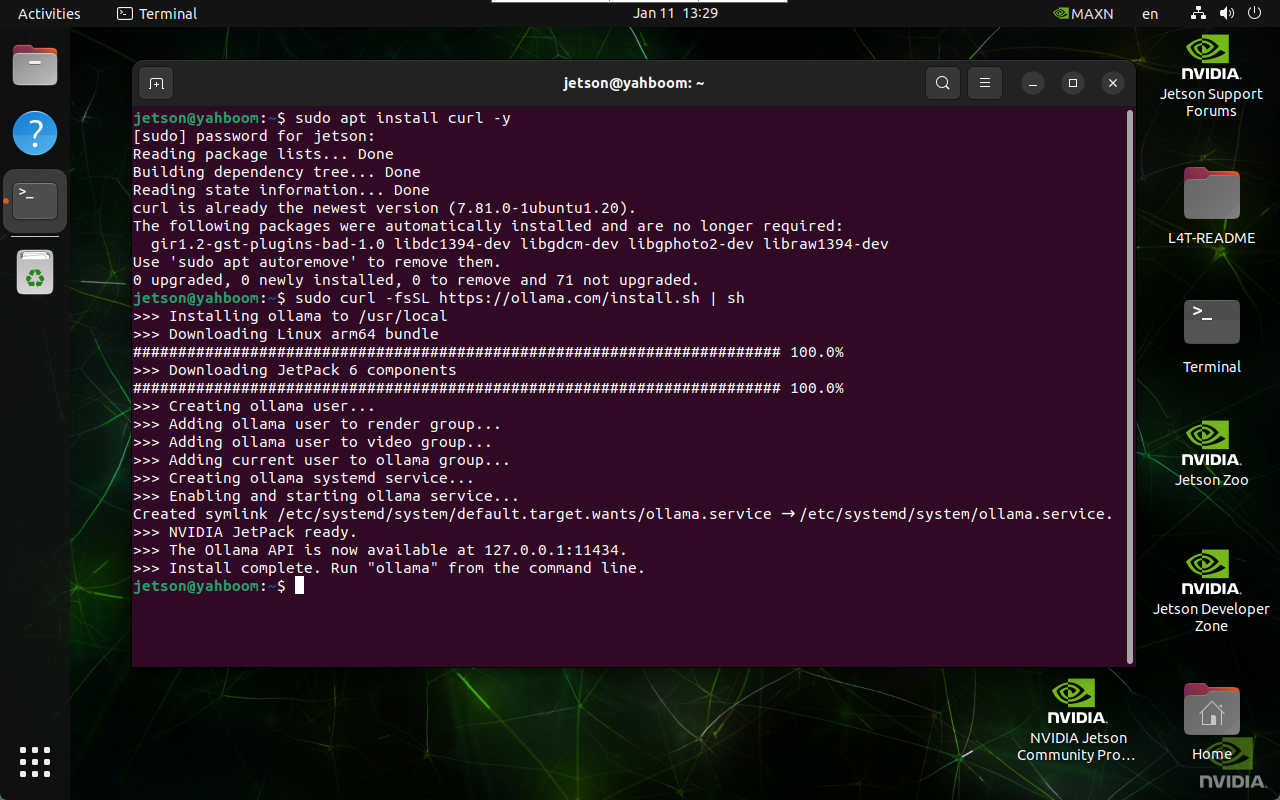
image-20250111132928934

The whole installation process takes a long time; please be patient.

4. Using Ollama

Enter ollama in the terminal to see the help output:
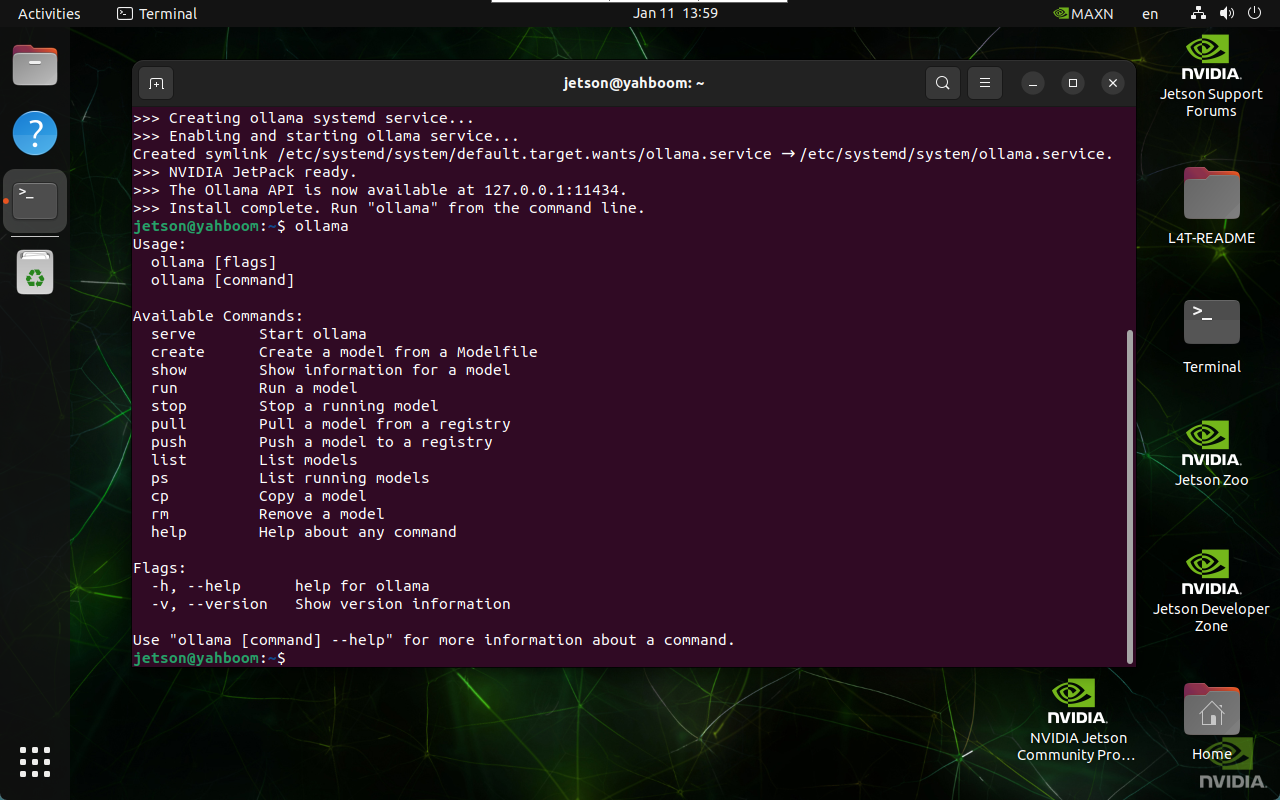
image-20250111135927014

CommandPurpose
ollama serveStart Ollama
ollama createCreate a model from a model file
ollama showShow model information
ollama runRun a model
ollama pullPull a model from the registry
ollama pushPush a model to the registry
ollama listList models
ollama psList running models
ollama cpCopy a model
ollama rmRemove a model
ollama helpGet help on any command

5. Uninstalling Ollama

  • Remove the service

xxxxxxxxxx
sudo systemctl stop ollama
sudo systemctl disable ollama
sudo rm /etc/systemd/system/ollama.service
  • Remove the files

xxxxxxxxxx
sudo rm $(which ollama)
  • Remove the models, service user, and group

xxxxxxxxxx
sudo rm -r /usr/share/ollama
sudo userdel ollama
sudo groupdel ollama

References

Ollama

Official website: https://ollama.com/

GitHub: https://github.com/ollama/ollama

AR vision (CSI)
Install large model dialogue platform

COMPANY

  • About us
  • Team Style
  • Blog

LEARNING & EXPLORATION

  • Tutorials
  • Edge AI hardware
  • Educational robots
  • Embedded intelligent hardware

WHERE TO BUY

  • Yahboom Online Store
  • Amazon
  • Alibaba
  • AliExpress
  • Mercado

TECHNOLOGY SUPPORT

  • Email: support@yahboom.com

BE A DISTRIBUTOR

  • Email: sales@yahboom.com
QR Code

Copyright © 2017-2026 Yahboom. All Rights Reserved.

EN/中文