Welcome to Jetson Orin NANO Developer Kit repository
07.Single-view 3D tracking
DeepStream Single-View 3D Multi-Object Tracking (SV3DT)
DeepStream Single-View 3D Multi-Object Tracking (SV3DT)1. Example Goal2. Monocular Geometry and Calibration Requirements3. Environment and Assets4. Direct Run5. Output and Acceptance6. Common Issues
Applicable environment: JetPack 7.2.1, Ubuntu 24.04, DeepStream 9.1, CUDA 13.2, TensorRT 10.16, Jetson Orin Nano 8GB. This course has completed offline inference acceptance on the official Retail video. The current unified entry is located at
deepstream-shell-demo; this example only works with offline video and does not provide USB/CSI run entriesAfter the power mode is set to MAXN, running the example may pop up an over-current warning; just ignore it
1. Example Goal
SV3DT (Single-View 3D Tracking) detects and tracks persons in a video from a single fixed viewpoint, and combines camera calibration and human size priors to estimate the targets' 3D positions and sizes relative to the camera. It is not multi-camera fusion, nor does it recover the precise real-world size of arbitrary objects from monocular video alone.
Typical processing chain:
Video → PeopleNet person detection → ReIdentificationNet appearance features → BodyPose3DNet pose/human geometry → NvMultiObjectTracker 3D tracking → 2D/3D OSD, MP4, trajectory text, and per-frame results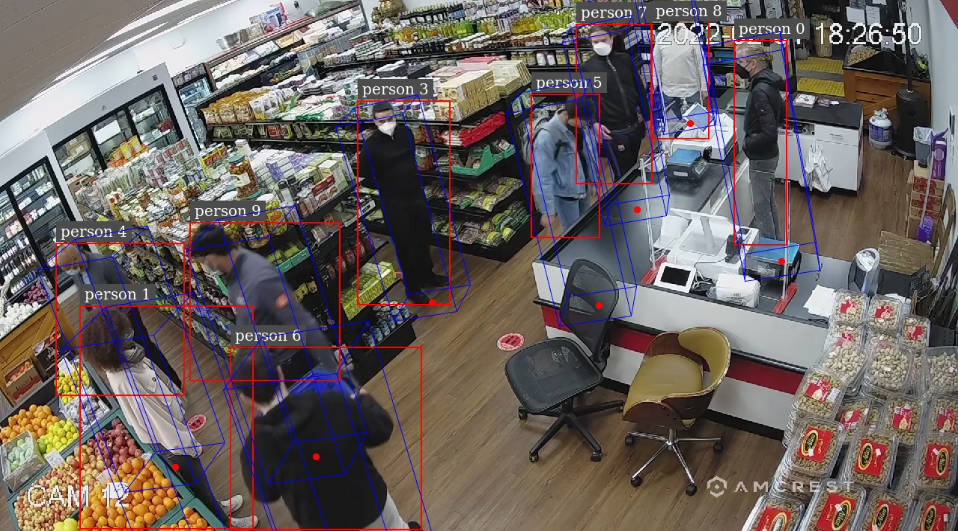
The person N in the frame is the tracking ID; the red box indicates the target extent in the image plane, and the blue cuboid indicates the estimated 3D human box. The estimation results are affected by camera parameters, ground assumptions, occlusion, detection boxes, and human size priors, and should not be treated as measurement-grade 3D scanning.
2. Monocular Geometry and Calibration Requirements
Monocular images lack direct depth. SV3DT estimates depth using constraints such as the camera projection model, the detected foot points/human shape, and preset human sizes. Therefore:
When using the official sample video, use the matching configuration and
camInfo.ymlprovided with that video.Your own video or camera must provide a
projectionMatrix_3x4matching the resolution, cropping, rotation, and mounting pose.After the camera moves, zooms, rotates, changes resolution, or crops, the original calibration usually no longer applies and recalibration is required.
In the calibration YAML, the units of human height, radius, etc. must be consistent with the projection/world coordinate conventions.
The USB/CSI calibration chain is not yet within the accepted scope of this course; the camera matrix of the official Retail video must not be applied to your own camera.
3. Environment and Assets
Official reference application: https://github.com/NVIDIA/DeepStream/tree/main/src/apps/reference_apps/deepstream-tracker-3d
Isolated workspace on the target machine:
xxxxxxxxxx~/DeepStream/sv3dt-workspace/The run uses the prepared sv3dt-deepstream:9.1-triton-setup image, PeopleNet, ReIdentificationNet, BodyPose3DNet, and the corresponding TensorRT engines. The first deployment requires the official Docker image, model assets, additional dependencies, and engine building; the course device is already prepared, so do not repeatedly download or delete models/engines.
4. Direct Run
Execute in a Jetson local terminal or a terminal logged into the graphical desktop:
xxxxxxxxxxcd ~/DeepStream/deepstream-shell-demoexport DISPLAY=:0xhost +si:localuser:root./run_video.sh sv3dtThe launcher uses the official Retail sample video and the corresponding camera configuration inside the isolated workspace to start containerized DeepStream inference. A pure SSH session without a valid X11/VNC display environment cannot see the real-time preview; do not use xhost + to open all local connections.
5. Output and Acceptance
The main outputs of the official sample are located at:
xxxxxxxxxx~/DeepStream/sv3dt-workspace/output/out.mp4~/DeepStream/sv3dt-workspace/configs/track_dump_0.txt~/DeepStream/sv3dt-workspace/output/track_results/On normal completion, the log should contain Received EOS and App run successful. During acceptance, also check:
The video window has person detection boxes and 3D boxes.
out.mp4is playable and seekable, with a duration matching the sample.track_dump_0.txtandtrack_results/contain non-empty tracking results.
To stop the program, press Ctrl+C once in the original terminal and wait for the pipeline to exit; do not use kill -9. The MP4 needs the EOS wrap-up to finish writing the container index.
6. Common Issues
| Symptom | Cause or Handling |
|---|---|
| The 3D box depth is unreasonable | Check whether camInfo.yml corresponds to the current video, resolution, and viewpoint, and check the units of the human priors. |
| Position deviation after replacing/moving the camera | The old projection matrix no longer matches; recalibration is required. |
| Only output files, no window | Launch from the Jetson desktop or a VNC graphical session, and confirm the DISPLAY authorization. |
| MP4 unplayable after stopping | Wait for the EOS wrap-up to finish normally; do not force-kill the process. |
| Long engine build on first launch | Check the device memory and the build log; do not run other heavy inference tasks in parallel. |