Welcome to Jetson Orin NANO Developer Kit repository
03.Object detection
Object Detection
Object Detection1. Model Introduction2. Object Prediction: ImageResult Preview3. Object Prediction: VideoResult Preview4. Object Prediction: Real-Time Detection4.1. USB CameraResult Preview4.2. CSI CameraResult PreviewReferences
Uses Python to demonstrate Ultralytics Object Detection on images, videos, and real-time detection.
1. Model Introduction
Object detection is a task that involves identifying the location and class of objects in an image or video stream.
The output of an object detector is a set of bounding boxes that enclose the objects in the image, along with class labels and confidence scores for each box. Object detection is a good choice when you need to identify the objects of interest in a scene, but do not need to know exactly where the object is or its exact shape.
2. Object Prediction: Image
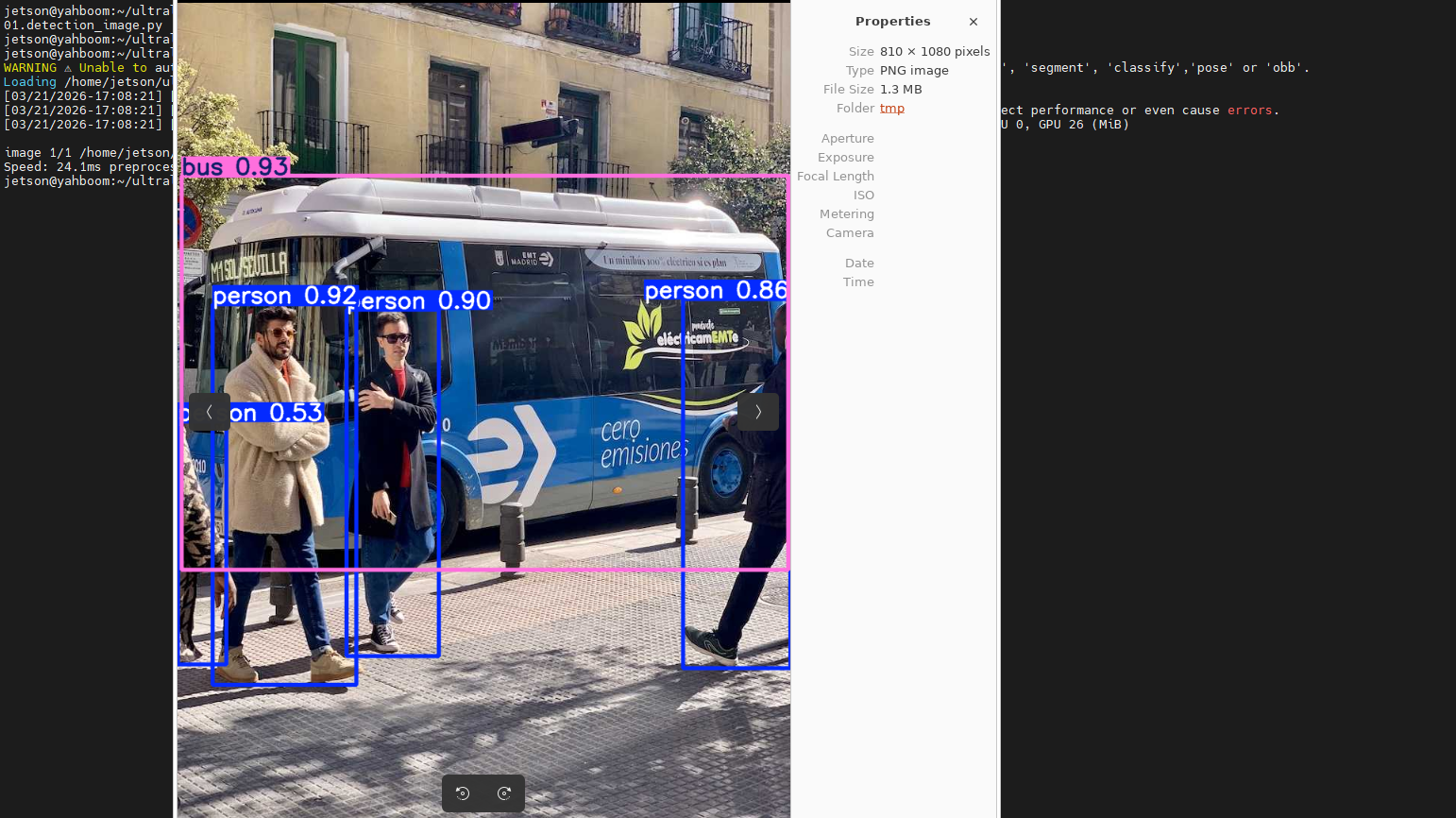
Use yolo26n.engine to predict the images in the ultralytics26 folder.
Enter the code folder:
cd /home/jetson/ultralytics_yolo26/yahboom_demo
Run the code:
xxxxxxxxxxpython3 01.detection_image.py
Result Preview
The location of the images output by yolo recognition: /home/jetson/ultralytics_yolo26/output/
Example code:
ximport os, syssys.path.insert(0, "/home/jetson/ultralytics_yolo26/runtime")os.environ.setdefault("ULTRALYTICS_CONFIG_DIR", "/home/jetson/ultralytics_yolo26/.config")
from ultralytics import YOLO
# Load a modelmodel = YOLO("/home/jetson/ultralytics_yolo26/models/yolo26n.engine")
# Run batched inference on a list of imagesresults = model("/home/jetson/ultralytics_yolo26/assets/bus.jpg") # return a list of Results objects
# Process results listfor result in results: boxes = result.boxes # Boxes object for bounding box outputs # masks = result.masks # Masks object for segmentation masks outputs # keypoints = result.keypoints # Keypoints object for pose outputs # probs = result.probs # Probs object for classification outputs # obb = result.obb # Oriented boxes object for OBB outputs result.show() # display to screen result.save(filename="/home/jetson/ultralytics_yolo26/output/bus_output.jpg") # save to disk
3. Object Prediction: Video
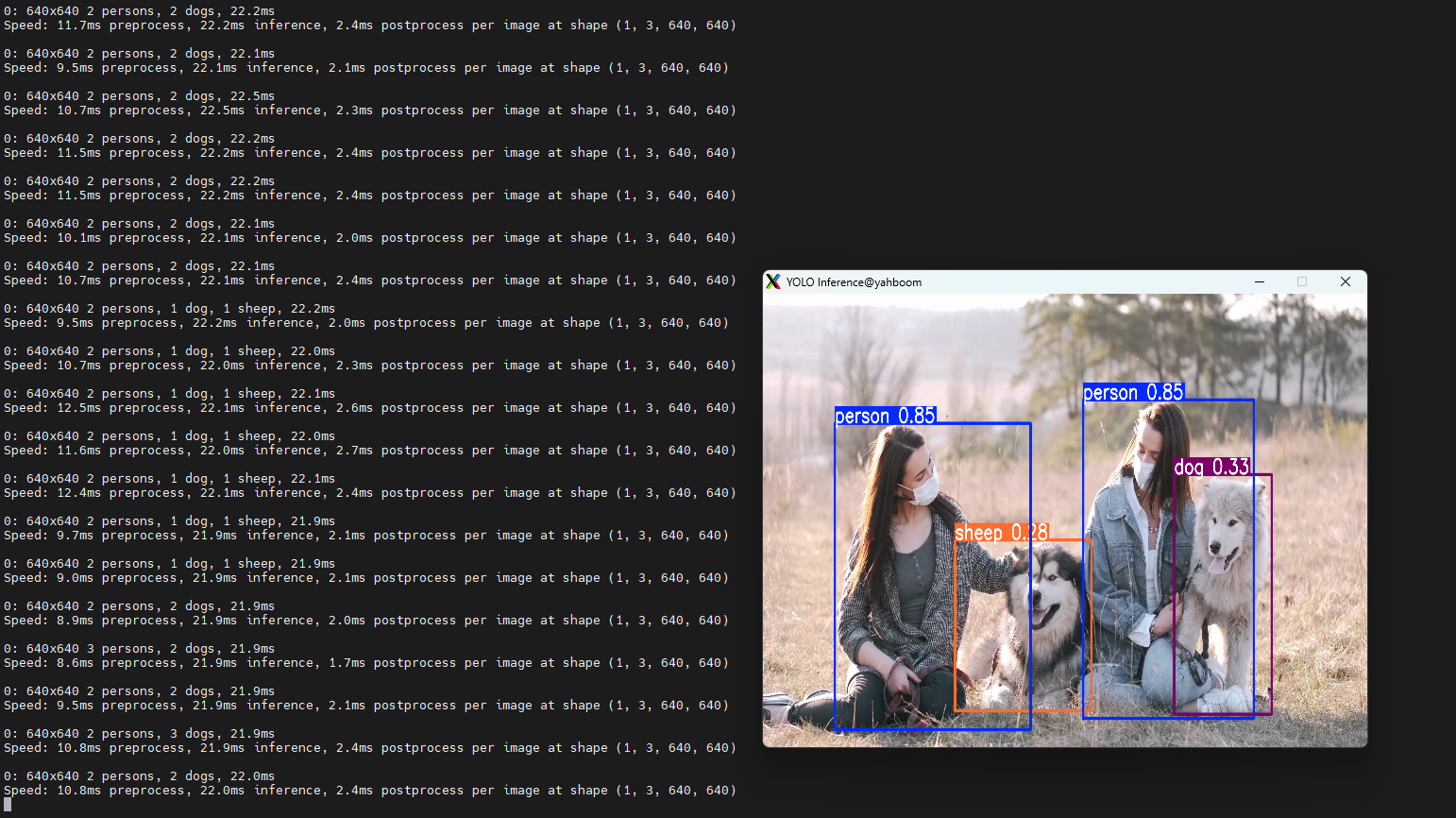
Use yolo26n.engine to predict the video in the ultralytics26 folder (not the video bundled with ultralytics).
Enter the code folder:
xxxxxxxxxxcd /home/jetson/ultralytics_yolo26/yahboom_demo
Run the code:
xxxxxxxxxxpython3 01.detection_video.py
Result Preview
The location of the video output by yolo recognition: /home/jetson/ultralytics_yolo26/output/
Example code:
xxxxxxxxxximport os, syssys.path.insert(0, "/home/jetson/ultralytics_yolo26/runtime")os.environ.setdefault("ULTRALYTICS_CONFIG_DIR", "/home/jetson/ultralytics_yolo26/.config")
import cv2from ultralytics import YOLO
# Load the YOLO modelmodel = YOLO("/home/jetson/ultralytics_yolo26/models/yolo26n.engine")
# Open the video filevideo_path = "/home/jetson/ultralytics_yolo26/videos/people_animals.mp4"cap = cv2.VideoCapture(video_path)
# Get the video frame size and frame rateframe_width = int(cap.get(cv2.CAP_PROP_FRAME_WIDTH))frame_height = int(cap.get(cv2.CAP_PROP_FRAME_HEIGHT))fps = int(cap.get(cv2.CAP_PROP_FPS))
# Define the codec and create a VideoWriter object to output the processed videooutput_path = "/home/jetson/ultralytics_yolo26/output/01.people_animals_output.mp4"fourcc = cv2.VideoWriter_fourcc(*'mp4v')  # You can use 'XVID' or 'mp4v' depending on your platformout = cv2.VideoWriter(output_path, fourcc, fps, (frame_width, frame_height))
# Loop through the video frameswhile cap.isOpened():    # Read a frame from the video    success, frame = cap.read()
    if success:        # Run YOLO inference on the frame        results = model(frame)
        # Visualize the results on the frame        annotated_frame = results[0].plot()
        # Write the annotated frame to the output video file        out.write(annotated_frame)
        # Display the annotated frame        cv2.imshow("YOLO Inference", cv2.resize(annotated_frame, (640, 480)))
        # Break the loop if 'q' is pressed        if cv2.waitKey(1) & 0xFF == ord("q"):            break    else:        # Break the loop if the end of the video is reached        break# Release the video capture and writer objects, and close the display windowcap.release()out.release()cv2.destroyAllWindows()
4. Object Prediction: Real-Time Detection
4.1. USB Camera
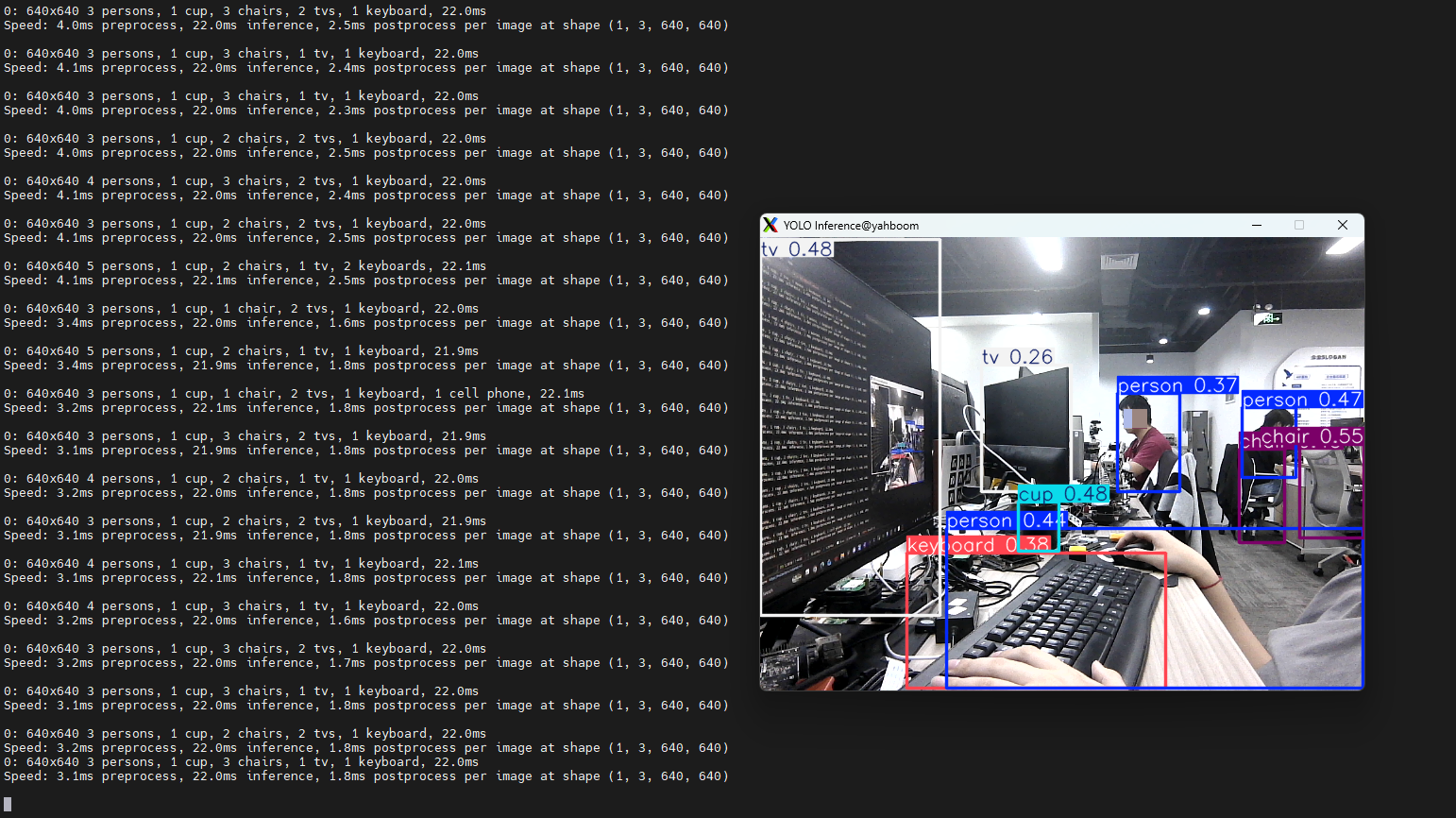
Use yolo26n.engine to predict the USB camera feed.
Enter the code folder:
xxxxxxxxxxcd /home/jetson/ultralytics_yolo26/yahboom_demo
Run the code: click the preview window and press the q key to stop the program!
xxxxxxxxxxpython3 01.detection_camera_usb.py
Result Preview
The location of the video output by yolo recognition: /home/jetson/ultralytics_yolo26/output/
Example code:
xxxxxxxxxximport os, syssys.path.insert(0, "/home/jetson/ultralytics_yolo26/runtime")os.environ.setdefault("ULTRALYTICS_CONFIG_DIR", "/home/jetson/ultralytics_yolo26/.config")
import cv2from ultralytics import YOLO
# Load the YOLO modelmodel = YOLO("/home/jetson/ultralytics_yolo26/models/yolo26n.engine")
# Open the cammeracap = cv2.VideoCapture(0)cap.set(6, cv2.VideoWriter.fourcc('M', 'J', 'P', 'G'))cap.set(cv2.CAP_PROP_FRAME_WIDTH, 640)cap.set(cv2.CAP_PROP_FRAME_HEIGHT, 480)
# Get the video frame size and frame rateframe_width = int(cap.get(cv2.CAP_PROP_FRAME_WIDTH))frame_height = int(cap.get(cv2.CAP_PROP_FRAME_HEIGHT))fps = int(cap.get(cv2.CAP_PROP_FPS))
# Define the codec and create a VideoWriter object to output the processed videooutput_path = "/home/jetson/ultralytics_yolo26/output/01.detection_camera_usb.mp4"fourcc = cv2.VideoWriter_fourcc(*'mp4v')  # You can use 'XVID' or 'mp4v' depending on your platformout = cv2.VideoWriter(output_path, fourcc, fps, (frame_width, frame_height))
# Loop through the video frameswhile cap.isOpened():    # Read a frame from the video    success, frame = cap.read()
    if success:        # Run YOLO inference on the frame        results = model(frame)
        # Visualize the results on the frame        annotated_frame = results[0].plot()
        # Write the annotated frame to the output video file        out.write(annotated_frame)

        # Display the annotated frame        cv2.imshow("YOLO Inference", cv2.resize(annotated_frame, (640, 480)))
        # Break the loop if 'q' is pressed        if cv2.waitKey(1) & 0xFF == ord("q"):            break    else:        # Break the loop if the end of the video is reached        break# Release the video capture and writer objects, and close the display windowcap.release()out.release()cv2.destroyAllWindows()
4.2. CSI Camera
For CSI camera features, be sure to use VNC or a physical monitor to view the output!! X11 forwarding services such as MobaXTerm are not supported
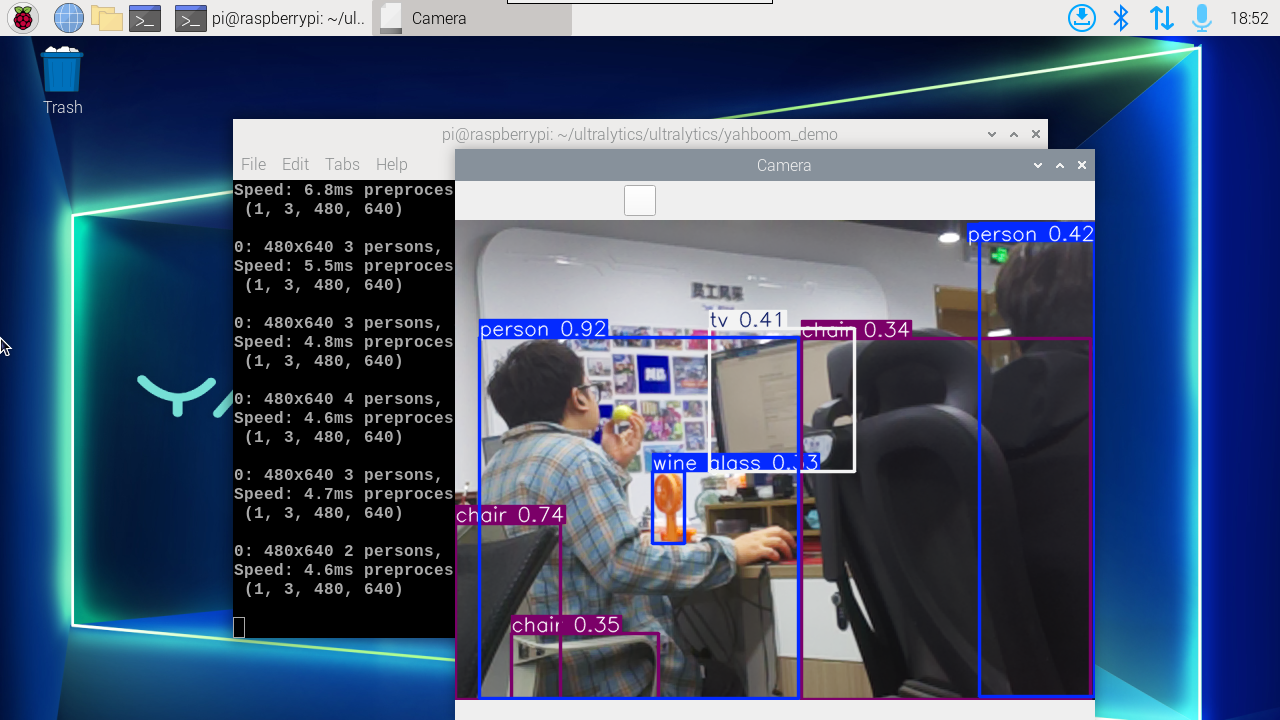
Use yolo26n.engine to predict the CSI camera feed.
Enter the code folder:
xxxxxxxxxxcd /home/jetson/ultralytics_yolo26/yahboom_demo
Run the code: click the preview window and press the q key to stop the program!
xxxxxxxxxxpython3 01.detection_camera_csi.py
Result Preview
The location of the video output by yolo recognition: /home/jetson/ultralytics_yolo26/output/
Example code:
xxxxxxxxxximport os, syssys.path.insert(0, "/home/jetson/ultralytics_yolo26/runtime")os.environ.setdefault("ULTRALYTICS_CONFIG_DIR", "/home/jetson/ultralytics_yolo26/.config")
import cv2from ultralytics import YOLOfrom jetcam.csi_camera import CSICamera
# Load the YOLO modelmodel = YOLO("/home/jetson/ultralytics_yolo26/models/yolo26n.engine")
# Open the camera (CSI Camera)cap = CSICamera(capture_device=0, width=640, height=480)
# Get the video frame size and frame rateframe_width = 640frame_height = 480fps = 30
# Define the codec and create a VideoWriter object to output the processed videooutput_path = "/home/jetson/ultralytics_yolo26/output/01.detection_camera_csi.mp4"fourcc = cv2.VideoWriter_fourcc(*'mp4v')  # You can use 'XVID' or 'mp4v' depending on your platformout = cv2.VideoWriter(output_path, fourcc, fps, (frame_width, frame_height))
# Loop through the video frameswhile True:    # Read a frame from the camera    frame = cap.read()
    if frame is not None:        # Run YOLO inference on the frame        results = model(frame)
        # Visualize the results on the frame        annotated_frame = results[0].plot()
        # Write the annotated frame to the output video file        out.write(annotated_frame)
        # Display the annotated frame        cv2.imshow("YOLO Inference", cv2.resize(annotated_frame, (640, 480)))
        # Break the loop if 'q' is pressed        if cv2.waitKey(1) & 0xFF == ord("q"):            break    else:        # Break the loop if no frame is received (camera error or end of stream)        print("No frame received, breaking the loop.")        break
# Release the video capture and writer objects, and close the display windowcap.release()out.release()cv2.destroyAllWindows()