Welcome to Jetson Orin NANO Developer Kit repository
02.Jetson device skills
Jetson Device Skills Tutorial
1. Function Description
jetson-device-skills is a collection of device-side Agent Skills for Jetson provided by NVIDIA, used to let OpenClaw perform device diagnostics, memory auditing, inference service configuration, video capability checks and performance testing according to Jetson-specific procedures.
This document takes a standard OpenClaw Gateway as an example; NemoClaw is not installed and the NemoClaw sandbox is not used.
Official repository:
https://github.com/NVIDIA-AI-IOT/jetson-device-skills2. Obtain the Repository
It is installed by default in the factory system, so this step can be skipped.
Execute the following in the Jetson terminal:
xxxxxxxxxxcdgit clone https://github.com/NVIDIA-AI-IOT/jetson-device-skills.gitcd ~/jetson-device-skills3. Skills and Official Installation Script Description
Included skills:
jetson-diagnosticcaptures a read-only device health snapshot, including Jetson identity, memory, GPU, temperature, power, storage, services and top processes.jetson-memory-auditmeasures DRAM/NvMap usage and verifies the situation before and after memory reclamation using real-time audit data.jetson-headless-modehelps turn the Jetson into a headless edge node by disabling the desktop and safe background services.jetson-inference-mem-tunerecommends runtime and memory flags for vLLM, SGLang, llama.cpp and TensorRT Edge-LLM.jetson-llm-serveprovides vLLM and SGLang service recipes suitable for Jetson.jetson-llm-benchmarkoutputs structured benchmark metrics for vLLM, llama.cpp and theOllamapath.jetson-packageguides Jetson-specific package, wheel and container selection.jetson-speculative-decodingadds Jetson-specific EAGLE-3 or draft model speculative decoding guidance for vLLM.jetson-video-setupinstalls and independently verifies the native NVIDIA video codec SDK and the PyNvVideoCodec interface.jetson-video-capabilityreconciles real-time NVENC/NVDEC queries and operations with the products supported by the documentation.jetson-video-recipeconverts codec usage cases into verified, media-free native and PyNvVideoCodec configuration solutions.jetson-video-benchmarkmeasures the encoding and decoding performance of the official samples on the target device.jetson-video-pipelineexecutes and verifies the operations of the official sample codec stages and their artifact passing.
Install the skills in the agent skill directory on the Jetson:
xxxxxxxxxx./install.sh
By default, install.sh links the skills to the user-level skill root directories of Claude Code, Codex and Cursor.
~/.claude/skills~/.codex/skills~/.agents/skills~/.cursor/skillsYou can choose specific targets or copy files instead of creating symbolic links:
xxxxxxxxxx./install.sh --targets claude,cursor./install.sh --targets cursor-project --project /path/to/project./install.sh --copy./install.sh --force
For the NemoClaw/OpenClaw sandbox:
x./install.sh --targets nemoclaw --nemoclaw-sandbox jetson-skills
Restart the agent session after installation so that the new skill entries are loaded. If your agent expects a different skill directory, copy or synchronize the skills/ directory to that location. Keep each skill as a complete directory containing its SKILL.md , scripts/ and references/ content.
4. Integrate with a Standard OpenClaw
Current OpenClaw workspace Skills directory:
xxxxxxxxxx/home/jetson/.openclaw/workspace/skillsThis system only sets up the openclaw environment and does not set up the Nemoclaw sandbox. The commands for creating the symbolic links one by one are as follows:
x
cd ~/jetson-device-skills
for s in ~/jetson-device-skills/skills/jetson-*; do n="${s##*/}"; t="$HOME/.openclaw/workspace/skills/$n"; [ -e "$t" ] || [ -L "$t" ] || { ln -s "$s" "$t"; echo "Linked: $n"; }; done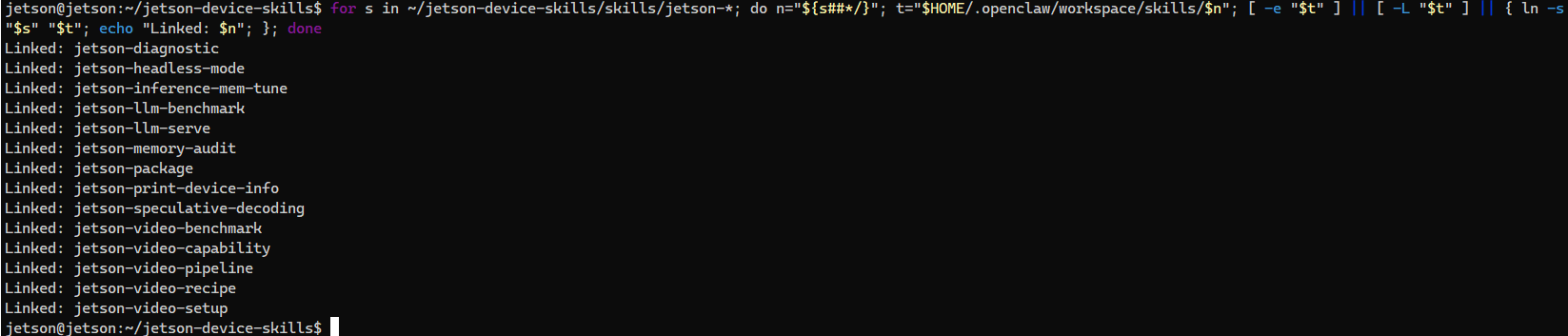
Link relationship example:
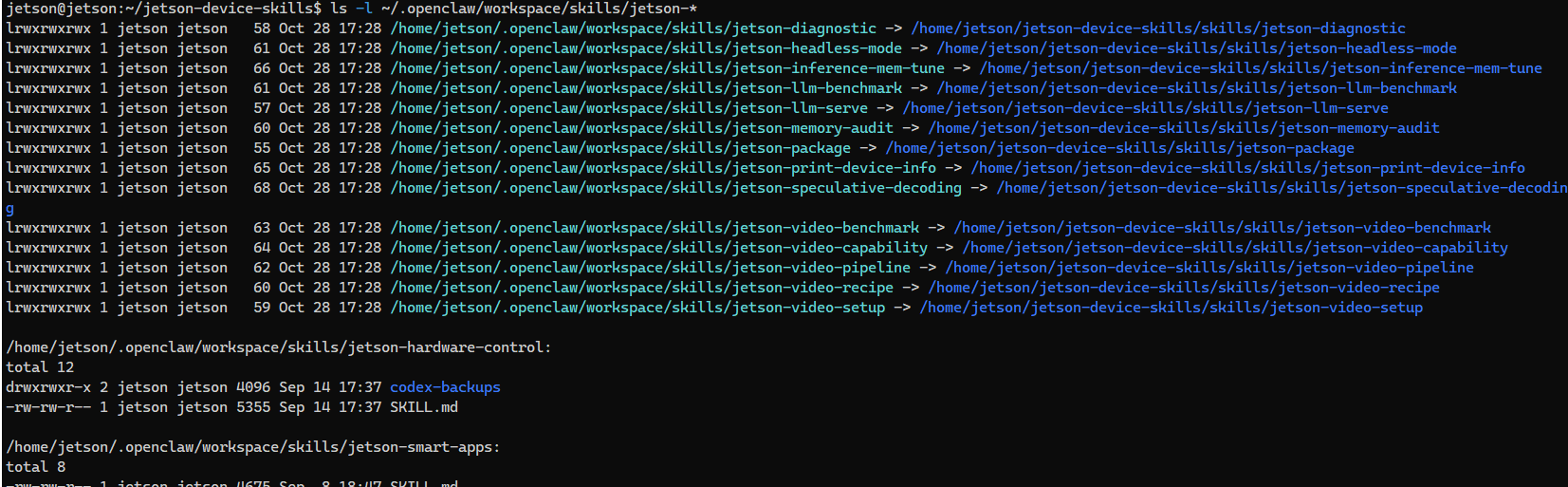
xxxxxxxxxx~/.openclaw/workspace/skills/jetson-diagnostic -> ~/jetson-device-skills/skills/jetson-diagnosticThis is not copying files, and no subdirectory named jetson-device-skills is created. The source directory must be kept.
5. Verify the Integration
View the symbolic links:
x
View the SKILL.md in the links:
xxxxxxxxxxfind -L ~/.openclaw/workspace/skills -maxdepth 2 -name SKILL.md | grep '/jetson-'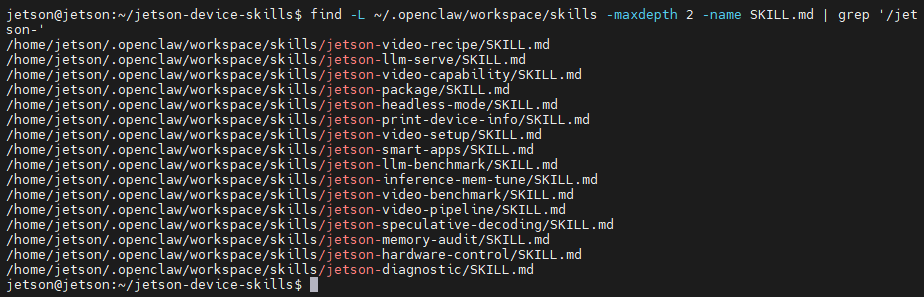
-L must be added, because a normal find does not enter symbolic link directories by default.
Restart the Gateway and open a new session:
x
openclaw gateway restartopenclaw tui6. Testing Some Skills
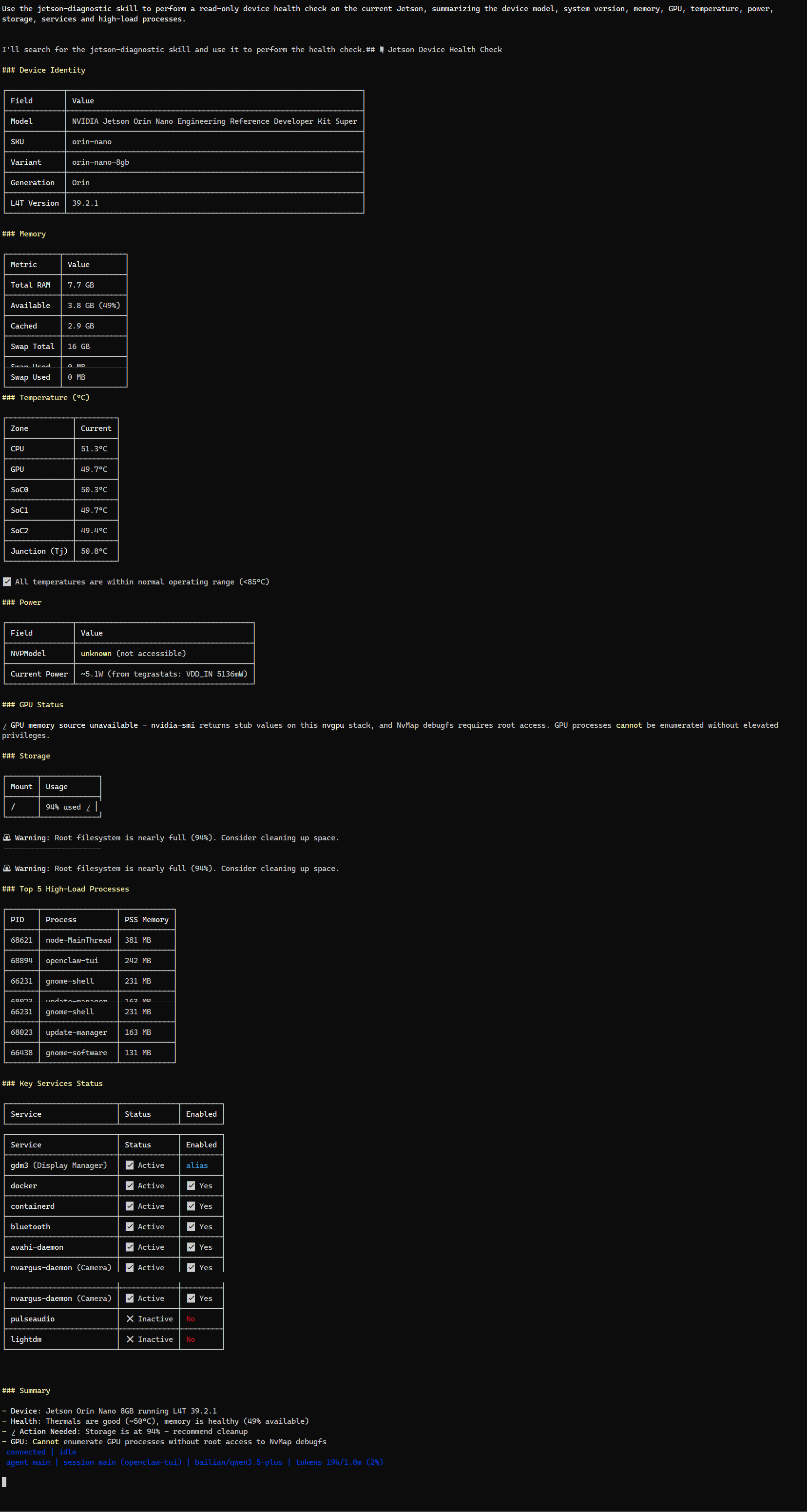
Use the jetson-diagnostic skill to perform a read-only device health check on the current Jetson, summarizing the device model, system version, memory, GPU, temperature, power, storage, services and high-load processes.
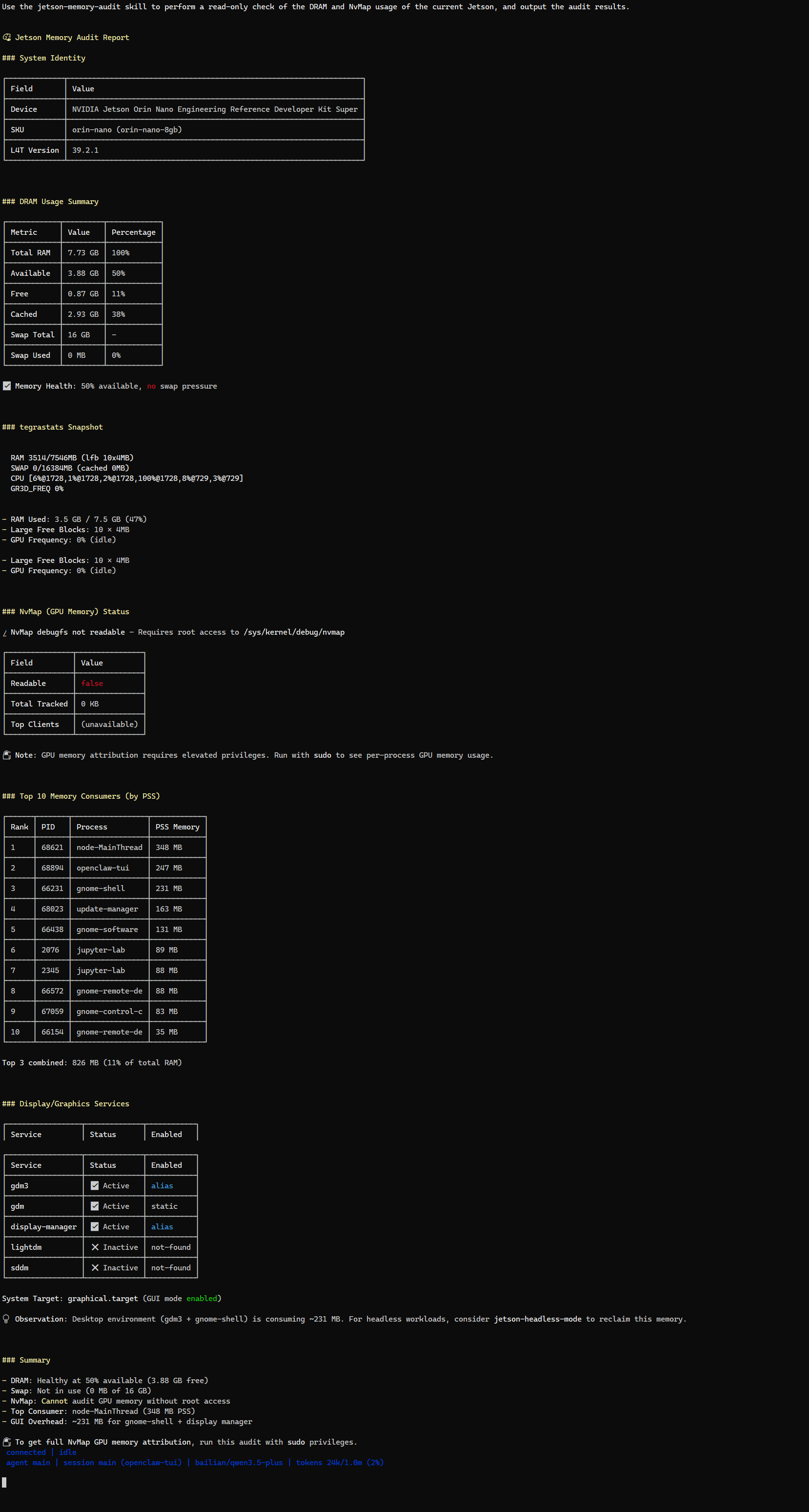
Use the jetson-memory-audit skill to perform a read-only check of the DRAM and NvMap usage of the current Jetson, and output the audit results.
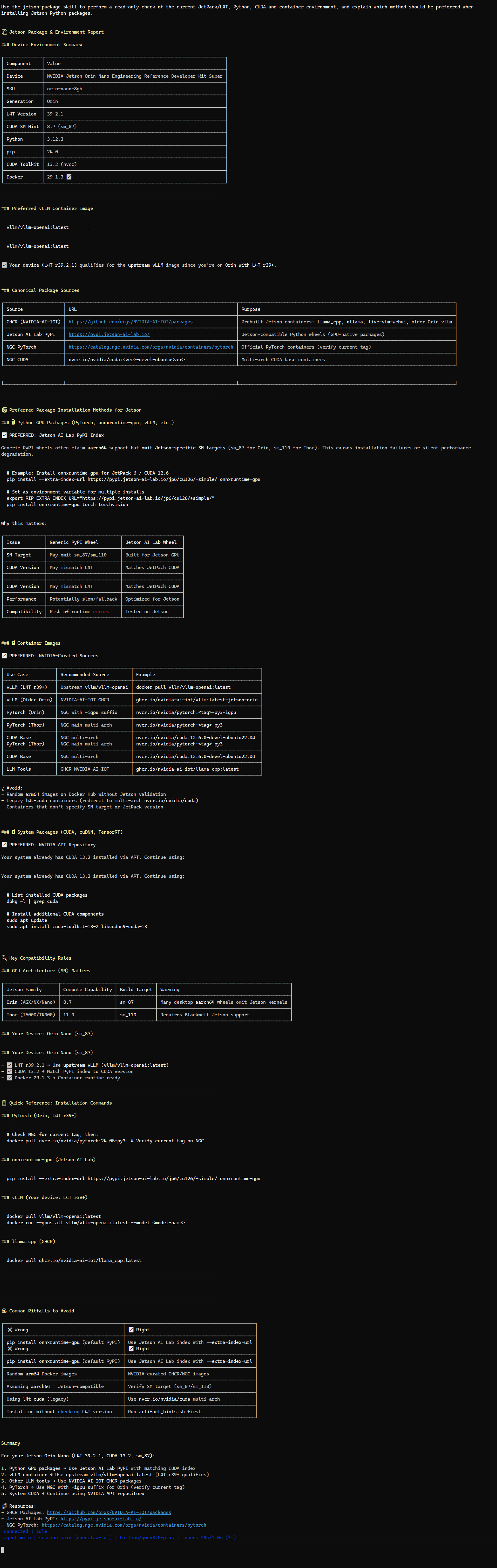
Use the jetson-package skill to perform a read-only check of the current JetPack/L4T, Python, CUDA and container environment, and explain which method should be preferred when installing Jetson Python packages.
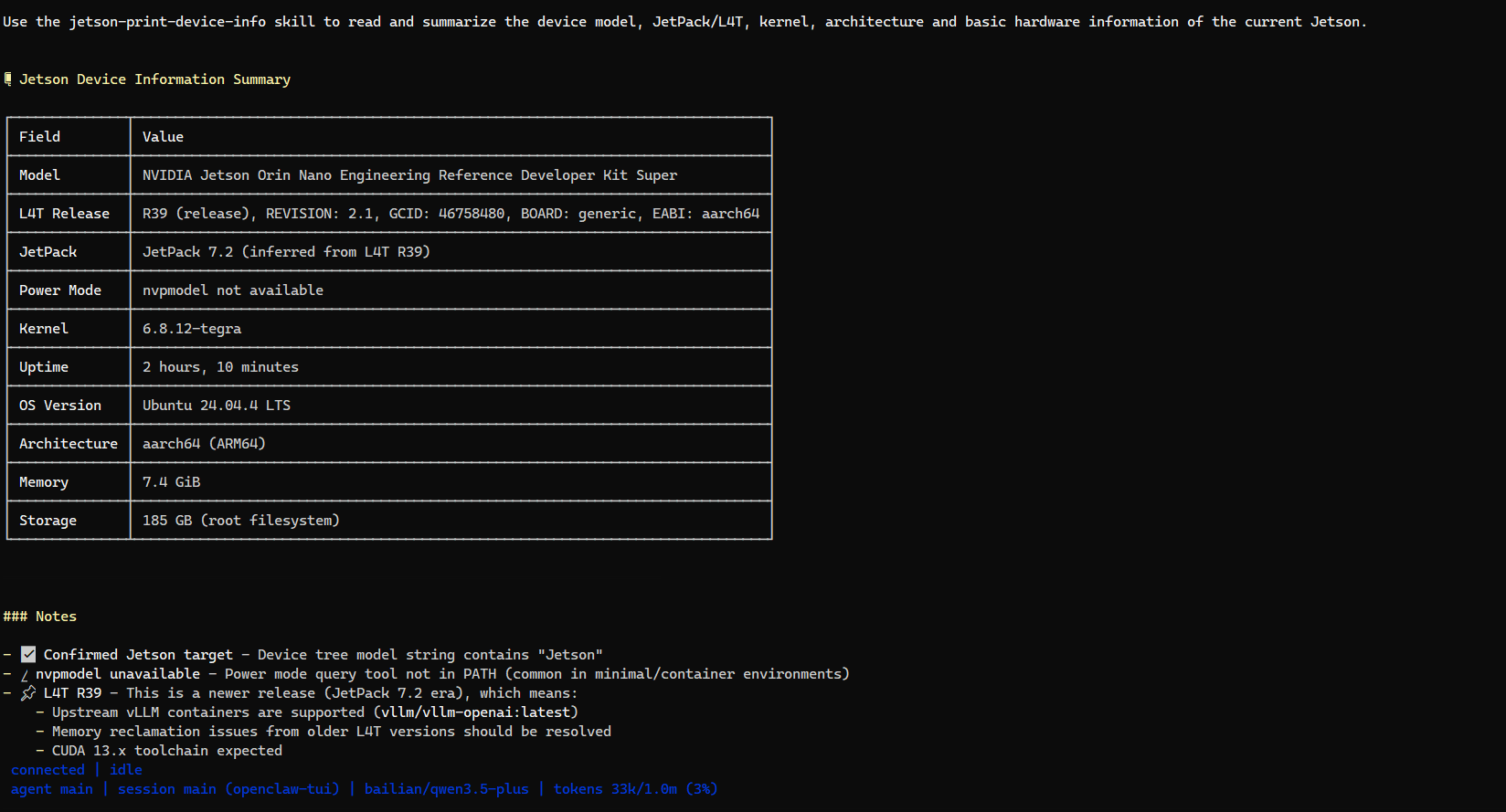
Use the jetson-print-device-info skill to read and summarize the device model, JetPack/L4T, kernel, architecture and basic hardware information of the current Jetson.
7. Roll Back the Symbolic Links
Delete only the symbolic links that point to the NVIDIA repository:
xxxxxxxxxxd="$HOME/.openclaw/workspace/skills"; for l in "$d"/jetson-*; do [ -L "$l" ] || continue; t="$(readlink "$l")"; case "$t" in "$HOME/jetson-device-skills/skills/"*) rm "$l"; echo "Deleted: ${l##*/}";; esac; doneThis command does not delete the source directory, and does not delete the existing real directories jetson-smart-apps and jetson-hardware-control.
8. Precautions
nemoclaw is not installed in the current system; the device-skills are only linked into the skills of openclaw.
Do not treat
--targets codexas an OpenClaw installation parameter.The
jetson-device-skillssource directory must be kept, otherwise the symbolic links become invalid.jetson-headless-modemay change the desktop and service states, so the impact must be confirmed before use.LLM and video benchmarks may consume a large amount of memory, GPU and disk space; on Orin Nano 4GB, read-only checks and short-duration tests should be prioritized.
The final execution rules of each Skill are subject to the
SKILL.mdin its directory.