Welcome to Jetson Orin NANO Developer Kit repository
08.Multi-view 3D tracking
DeepStream Multi-View 3D Tracking (MV3DT)
DeepStream Multi-View 3D Tracking (MV3DT)1. Example Goal and Chain2. Input Data and Calibration3. Dependencies and Resource Preparation4. Running the Official 4-Stream Sample5. Checking Tracking and Kafka Metadata6. 12-Stream Resource Limitations7. Common Issues
Applicable environment: JetPack 7.2.1, Ubuntu 24.04, DeepStream 9.1, CUDA 13.2, TensorRT 10.16, Jetson Orin Nano 8GB. The official 4-stream offline sample has been accepted on the course device; although the 12-stream sample has an entry point, it fails on the Orin Nano 8GB due to insufficient GPU/video buffer memory, and is not provided as a usable configuration. Real USB/CSI multi-camera input is currently not connected
After the power mode is set to MAXN, running the example may pop up an over-current warning; just ignore it
1. Example Goal and Chain
MV3DT (Multi-View 3D Tracking) associates the observations of multiple calibrated cameras into shared world coordinates, maintains global target IDs across viewpoints, and publishes structured 3D tracking metadata via Kafka.
4 synchronized video streams → per-stream person detection/pose estimation → camera coordinate projection → cross-camera target association and global 3D tracking → Kafka mv3dt topic → BEV visualization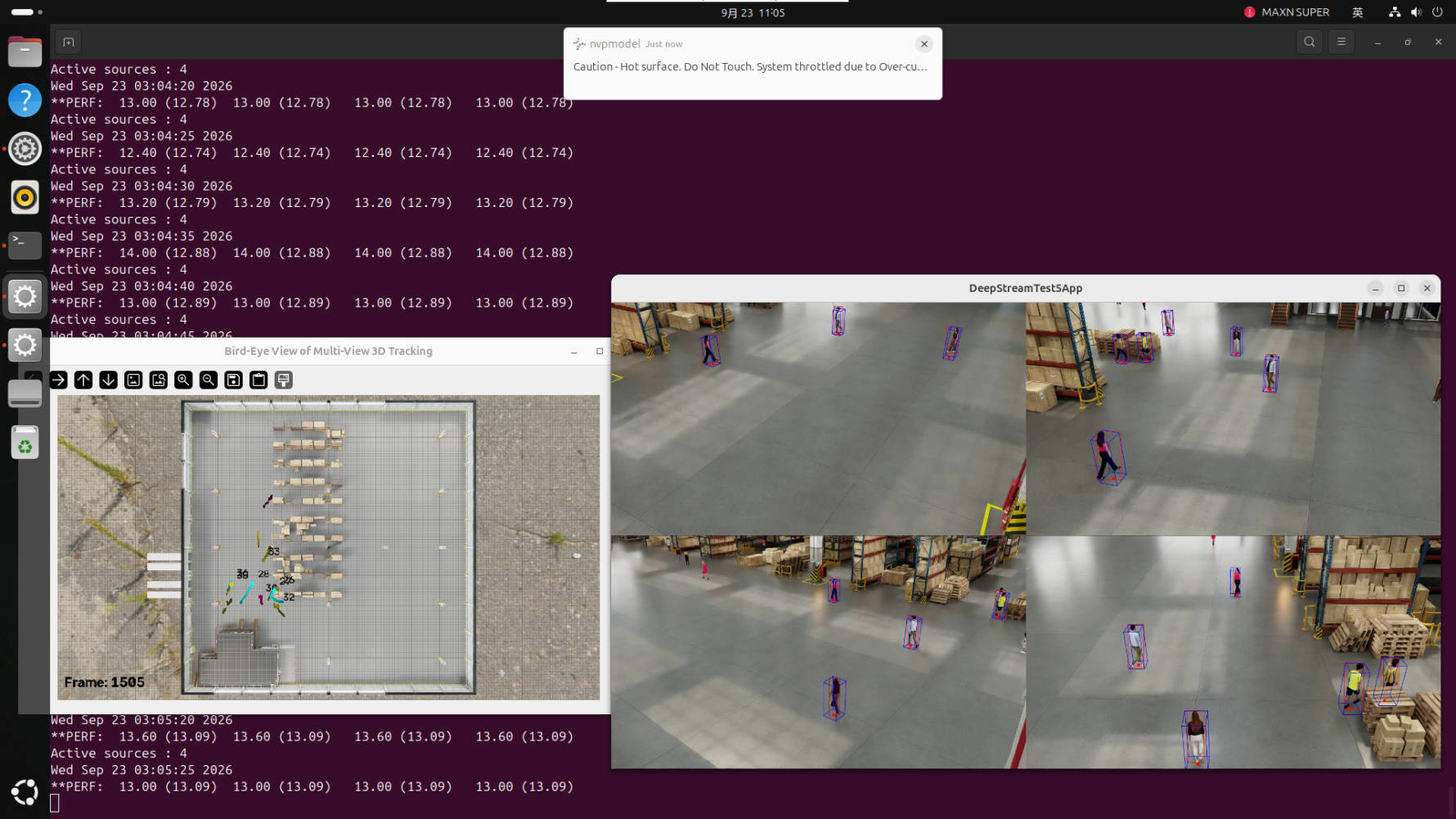
The DeepStreamTest5App on the right displays the four camera views; the Bird-Eye View on the left projects cross-camera trajectories onto the field map. The desktop also displays performance information. The over-current/thermal-limit notifications in the screenshot are not algorithm outputs; during operation, use adequate power supply and maintain cooling.
2. Input Data and Calibration
The official 4-stream data is located in the dataset directory of the DeepStream multi-view reference application, containing synchronized videos, per-camera configurations, world-to-pixel projection matrices, and BEV map resources. Custom data must satisfy:
All camera videos are time-synchronized, with alignable frame rates/timestamps.
The resolutions are identical and correspond to the calibration parameters.
Every camera must have its own
projectionMatrix_3x4_w2p; the matrix of another camera must not be reused.The camera fields of view need sufficient overlap or associable areas; the field map and coordinate transformation should cover the actual area.
MV3DT still requires calibration. It does not automatically know the spatial relationships between cameras just because multiple cameras are used.
3. Dependencies and Resource Preparation
Official reference application: https://github.com/NVIDIA/DeepStream/tree/main/src/apps/reference_apps/deepstream-tracker-3d-multi-view
The first deployment usually requires: Git LFS data, the official multi-view video/camera YAMLs, the PeopleNet detection model plus BodyPose3DNet, Kafka, MQTT/Mosquitto, Python visualization dependencies, and TensorRT engines. The course target machine already has the 4-stream configuration, the Kafka mv3dt topic, and the run dependencies ready; the prerequisites do not need to be run again.
Unified Jetson entry point:
xxxxxxxxxx~/DeepStream/deepstream-shell-demo/run_video.sh4. Running the Official 4-Stream Sample
Run from a terminal in the Jetson graphical desktop or a VNC session:
xxxxxxxxxxcd ~/DeepStream/deepstream-shell-demoexport DISPLAY=:0xhost +si:localuser:root./run_video.sh mv3dt --4The current default detection model uses PeopleNet2.6.3, with a batch-4 engine adapted to the Orin Nano 8GB. If an engine still needs to be built on the first run, wait for completion and watch the terminal log; do not start other large inference tasks at the same time. The run requires a desktop display and a local Kafka service; the launcher checks/prepares Kafka and the topic, and sets up the local X11 authorization required by the container.
5. Checking Tracking and Kafka Metadata
Four OSD streams and the BEV window are expected to appear on the desktop, and the terminal shows 4 active sources. After pressing Ctrl+C once, the main program should exit and close the BEV child-process window.
Open another terminal to read the cross-camera messages:
xxxxxxxxxxcd ~/DeepStream/src/apps/reference_apps/deepstream-tracker-3d-multi-viewsource ./mv3dt_venv/bin/activatepython utils/kafka_client.py --broker localhost:9092 --topic mv3dtThe messages should contain fields such as the camera identifier, target ID, footLocation3D, and bbox3d. The ID association across consecutive frames/different cameras is used to determine whether global tracking is working; Kafka having a topic does not mean the inference succeeded — you still need to confirm that new messages are received.
6. 12-Stream Resource Limitations
Although the batch-12 engine of PeopleNet2.6.3 can be built successfully and the launcher keeps the following experimental entry, actual 12-stream runs showed GPU out of memory, unavailable video output buffers, and tracker submission failures:
xxxxxxxxxx./run_video.sh mv3dt --127. Common Issues
| Symptom | Handling |
|---|---|
| BEV window or four-pane layout does not appear | Launch from the Jetson graphical desktop/VNC, and check DISPLAY, X11 authorization, and the run log. |
| No messages in Kafka | Check whether Kafka is running, whether the mv3dt topic exists, and whether the main pipeline is processing video. |
| IDs do not match across cameras | Check the time synchronization, each stream's projectionMatrix_3x4_w2p, the coordinate systems, and the field-of-view overlap. |
| 12-stream OOM | A known hardware limitation; go back to --4; reduce the number of streams or switch to a platform with more memory. |
| Residual BEV window after Ctrl+C | The updated official script should close the child processes via exit cleanup; if it still remains, first confirm the actually running script version. |