Welcome to Jetson Orin NANO Developer Kit repository
07.Oriented object detection
Oriented Bounding Box Object Detection
Oriented Bounding Box Object Detection1. Model Introduction2. Oriented Bounding Box Object Detection: ImageResult Preview3. Oriented Bounding Box Object Detection: VideoResult Preview4. Oriented Bounding Box Object Detection: Real-Time Detection4.1. USB CameraResult Preview4.2. CSI CameraResult PreviewReferences
Uses Python to demonstrate Ultralytics Oriented Bounding Boxes Object Detection on images, videos, and real-time detection.
1. Model Introduction
Oriented bounding box object detection, also called oriented object detection, goes a step further than standard object detection by introducing an extra angle to locate objects in an image more accurately.
The output of an oriented object detector is a set of rotated bounding boxes that precisely enclose the objects in the image, along with class labels and confidence scores for each box. Oriented bounding boxes are especially useful when objects appear at different angles, for example in aerial images, where traditional axis-aligned bounding boxes may include unnecessary background.
Simply put, oriented object detection can use tilted boxes to precisely enclose tilted objects, reducing unnecessary background regions and improving detection accuracy.
2. Oriented Bounding Box Object Detection: Image
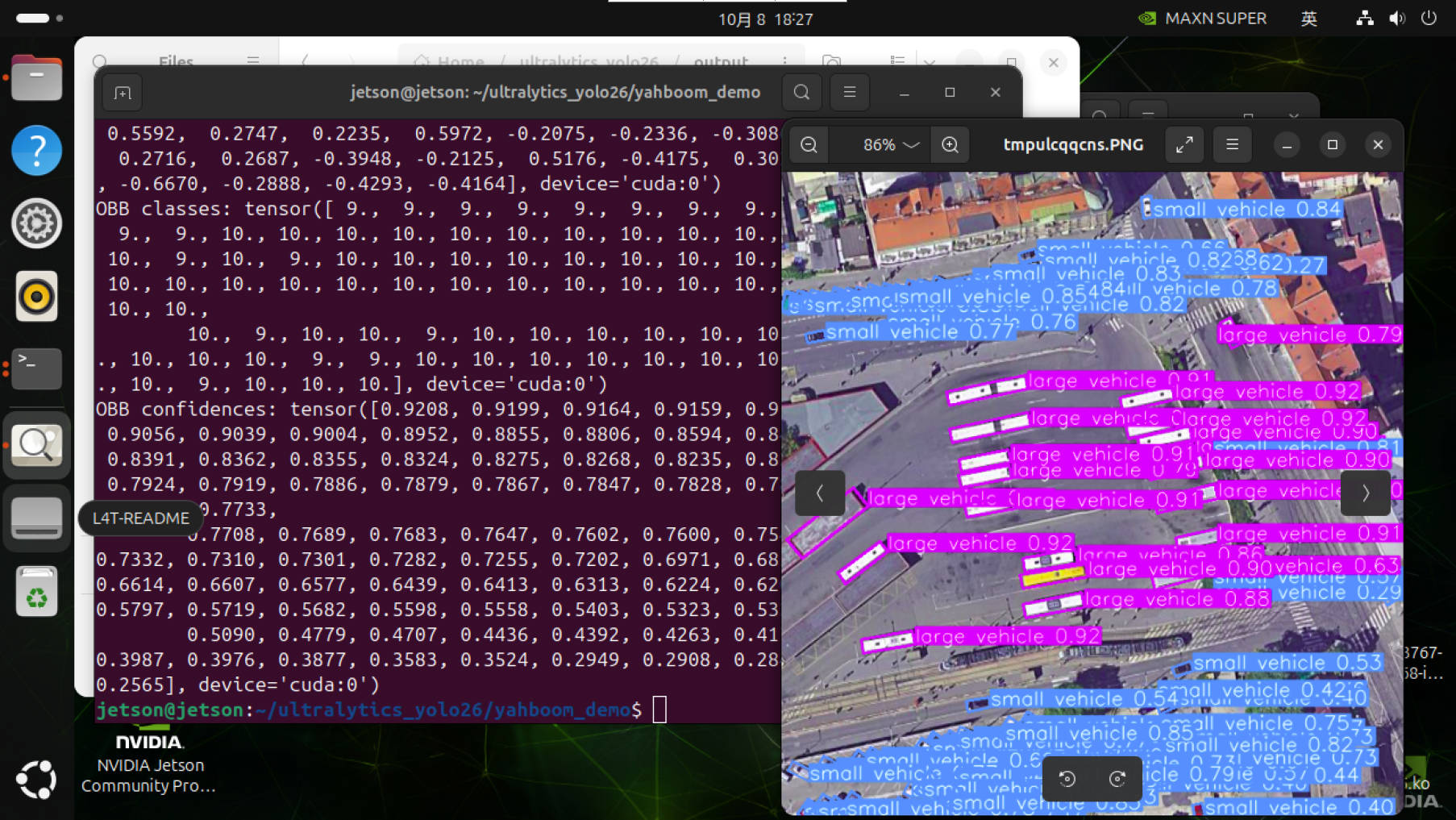
Use yolo26n-obb.engine to predict the images in the ultralytics26 folder (not the images bundled with ultralytics).
Enter the code folder:
cd /home/jetson/ultralytics_yolo26/yahboom_demo
Run the code:
xxxxxxxxxxpython3 05.obb_image.py
Result Preview
The location of the images output by yolo recognition: /home/jetson/ultralytics_yolo26/output/
Example code:
ximport os, syssys.path.insert(0, "/home/jetson/ultralytics_yolo26/runtime")os.environ.setdefault("ULTRALYTICS_CONFIG_DIR", "/home/jetson/ultralytics_yolo26/.config")
from ultralytics import YOLO
# Load a modelmodel = YOLO("/home/jetson/ultralytics_yolo26/models/yolo26n-obb.engine")
# Run batched inference on a list of imagesresults = model("/home/jetson/ultralytics_yolo26/assets/bus.jpg") # return a list of Results objects
# Process results listfor result in results: # boxes = result.boxes # Boxes object for bounding box outputs # masks = result.masks # Masks object for segmentation masks outputs # keypoints = result.keypoints # Keypoints object for pose outputs # probs = result.probs # Probs object for classification outputs obb = result.obb # Oriented boxes object for OBB outputs # Print OBB results if obb is not None: print("OBB boxes:", obb.xyxy) print("OBB angles:", obb.xywhr[:, 4]) print("OBB classes:", obb.cls) print("OBB confidences:", obb.conf) result.show() # display to screen result.save(filename="/home/jetson/ultralytics_yolo26/output/bus_obb.jpg") # save to disk
3. Oriented Bounding Box Object Detection: Video
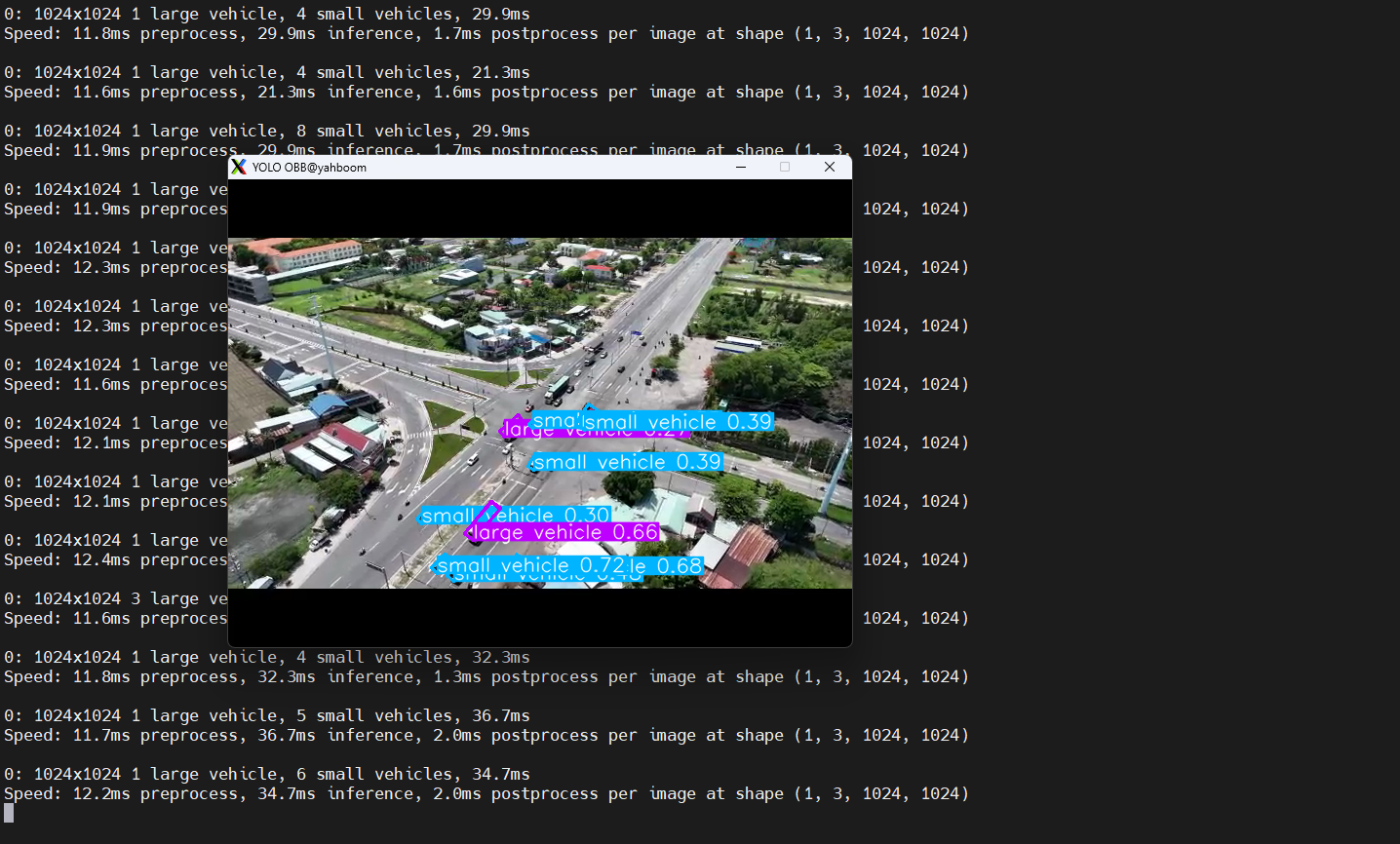
Use yolo26n-obb.engine to predict the video in the ultralytics26 folder (not the video bundled with ultralytics).
Enter the code folder:
xxxxxxxxxxcd /home/jetson/ultralytics_yolo26/yahboom_demo
Run the code:
xxxxxxxxxxpython3 05.obb_video.py
Result Preview
The location of the video output by yolo recognition: /home/jetson/ultralytics_yolo26/output/
Example code:
xxxxxxxxxximport os, syssys.path.insert(0, "/home/jetson/ultralytics_yolo26/runtime")os.environ.setdefault("ULTRALYTICS_CONFIG_DIR", "/home/jetson/ultralytics_yolo26/.config")
import cv2from ultralytics import YOLO
# Load the YOLO OBB modelmodel = YOLO("/home/jetson/ultralytics_yolo26/models/yolo26n-obb.engine")
# Open the video filevideo_path = "/home/jetson/ultralytics_yolo26/videos/people_animals.mp4"cap = cv2.VideoCapture(video_path)
# Get the video frame size and frame rateframe_width = int(cap.get(cv2.CAP_PROP_FRAME_WIDTH))frame_height = int(cap.get(cv2.CAP_PROP_FRAME_HEIGHT))fps = int(cap.get(cv2.CAP_PROP_FPS))
# Define the codec and create a VideoWriter object to output the processed videooutput_path = "/home/jetson/ultralytics_yolo26/output/05.obb_video_output.mp4"fourcc = cv2.VideoWriter_fourcc(*'mp4v')  # You can use 'XVID' or 'mp4v' depending on your platformout = cv2.VideoWriter(output_path, fourcc, fps, (frame_width, frame_height))
# Loop through the video frameswhile cap.isOpened():    # Read a frame from the video    success, frame = cap.read()
    if success:        # Run YOLO OBB inference on the frame        results = model(frame)
        # Visualize the OBB results on the frame        annotated_frame = results[0].plot()
        # Write the annotated frame to the output video file        out.write(annotated_frame)
        # Display the annotated frame        cv2.imshow("YOLO OBB", cv2.resize(annotated_frame, (640, 480)))
        # Break the loop if 'q' is pressed        if cv2.waitKey(1) & 0xFF == ord("q"):            break    else:        # Break the loop if the end of the video is reached        break# Release the video capture and writer objects, and close the display windowcap.release()out.release()cv2.destroyAllWindows()
4. Oriented Bounding Box Object Detection: Real-Time Detection
4.1. USB Camera
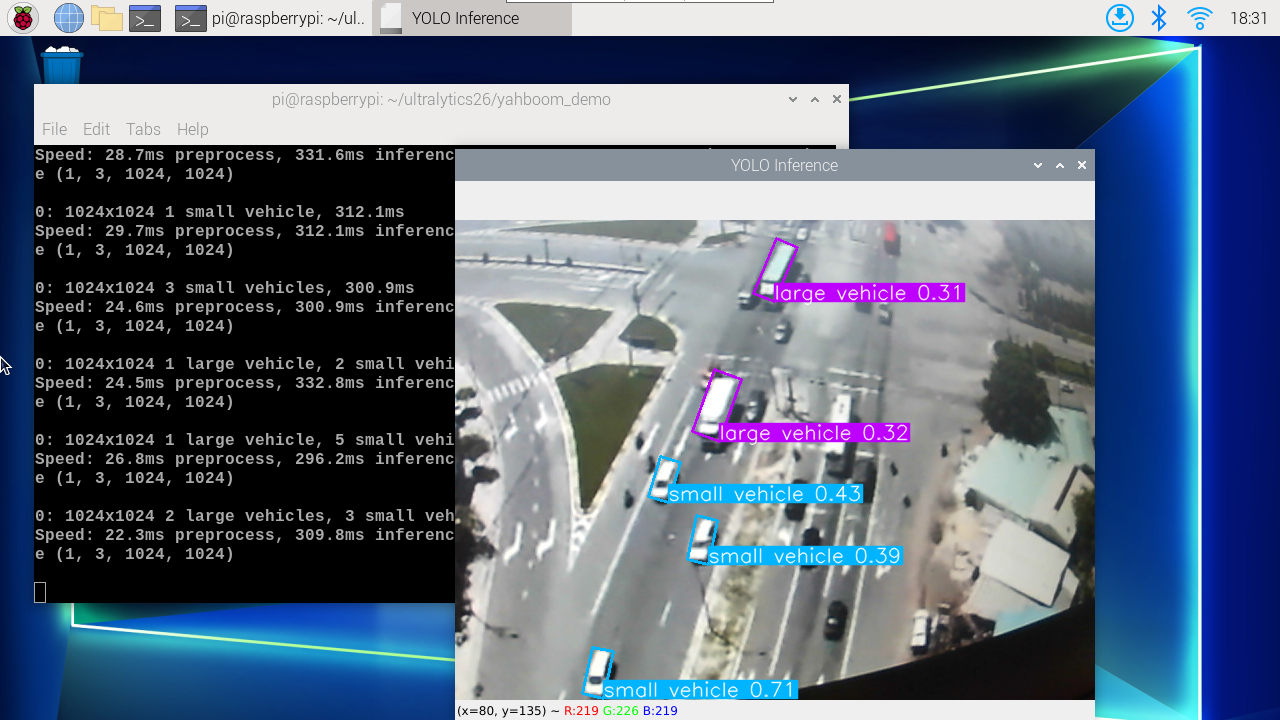
Use yolo26n-obb.engine to predict the USB camera feed.
Enter the code folder:
xxxxxxxxxxcd /home/jetson/ultralytics_yolo26/yahboom_demo
Run the code: click the preview window and press the q key to stop the program!
xxxxxxxxxxpython3 05.obb_camera_usb.py
Result Preview
The location of the video output by yolo recognition: /home/jetson/ultralytics_yolo26/output/
Example code:
xxxxxxxxxximport os, syssys.path.insert(0, "/home/jetson/ultralytics_yolo26/runtime")os.environ.setdefault("ULTRALYTICS_CONFIG_DIR", "/home/jetson/ultralytics_yolo26/.config")
import cv2from ultralytics import YOLO
# Load the YOLO OBB modelmodel = YOLO("/home/jetson/ultralytics_yolo26/models/yolo26n-obb.engine")
# Open the cameracap = cv2.VideoCapture(0)cap.set(6, cv2.VideoWriter.fourcc('M', 'J', 'P', 'G'))cap.set(cv2.CAP_PROP_FRAME_WIDTH, 640)cap.set(cv2.CAP_PROP_FRAME_HEIGHT, 480)
# Get the video frame size and frame rateframe_width = int(cap.get(cv2.CAP_PROP_FRAME_WIDTH))frame_height = int(cap.get(cv2.CAP_PROP_FRAME_HEIGHT))fps = int(cap.get(cv2.CAP_PROP_FPS))
# Define the codec and create a VideoWriter object to output the processed videooutput_path = "/home/jetson/ultralytics_yolo26/output/05.obb_camera_usb.mp4"fourcc = cv2.VideoWriter_fourcc(*'mp4v')  # You can use 'XVID' or 'mp4v' depending on your platformout = cv2.VideoWriter(output_path, fourcc, fps, (frame_width, frame_height))
# Loop through the video frameswhile cap.isOpened():    # Read a frame from the video    success, frame = cap.read()
    if success:        # Run YOLO OBB inference on the frame        results = model(frame)
        # Visualize the OBB results on the frame        annotated_frame = results[0].plot()
        # Write the annotated frame to the output video file        out.write(annotated_frame)
        # Display the annotated frame        cv2.imshow("YOLO OBB", cv2.resize(annotated_frame, (640, 480)))
        # Break the loop if 'q' is pressed        if cv2.waitKey(1) & 0xFF == ord("q"):            break    else:        # Break the loop if the end of the video is reached        break# Release the video capture and writer objects, and close the display windowcap.release()out.release()cv2.destroyAllWindows()
4.2. CSI Camera
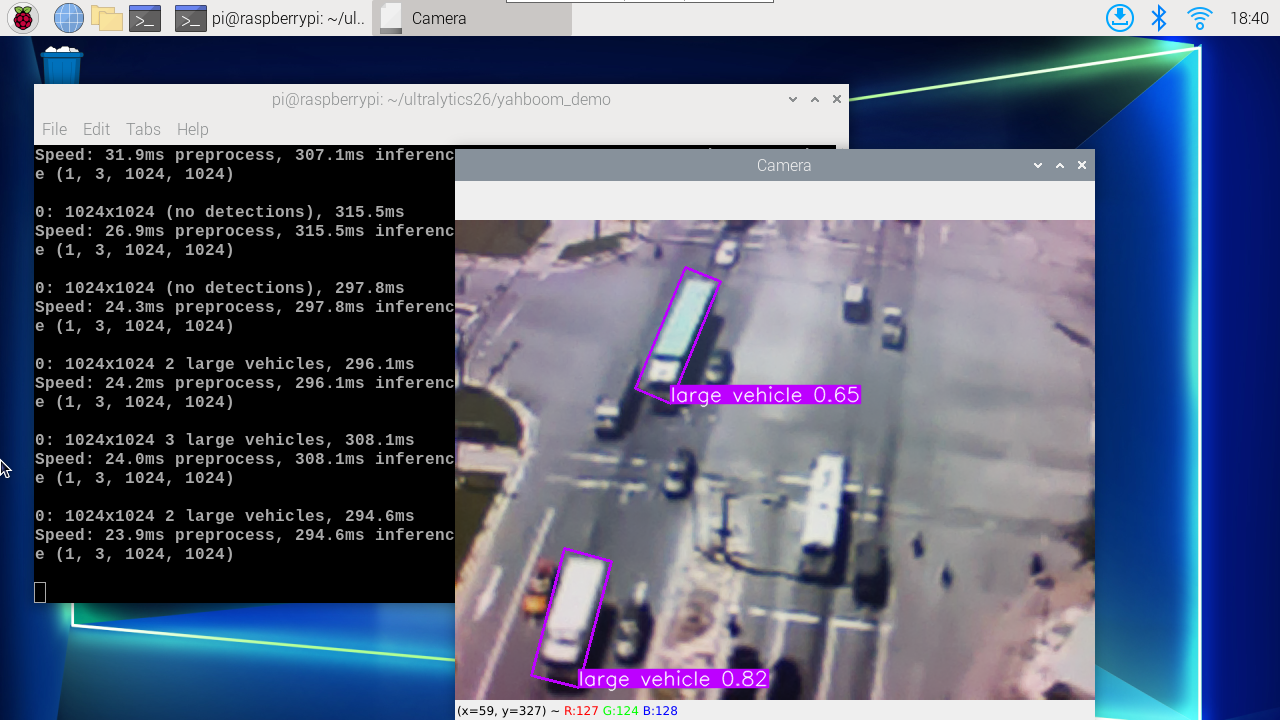
Use yolo26n-obb.engine to predict the CSI camera feed.
Enter the code folder:
xxxxxxxxxxcd /home/jetson/ultralytics_yolo26/yahboom_demo
Run the code: click the preview window and press the q key to stop the program!
xxxxxxxxxxpython3 05.obb_camera_csi.py
Result Preview
The location of the video output by yolo recognition: /home/jetson/ultralytics_yolo26/output/
Example code:
xxxxxxxxxximport os, syssys.path.insert(0, "/home/jetson/ultralytics_yolo26/runtime")os.environ.setdefault("ULTRALYTICS_CONFIG_DIR", "/home/jetson/ultralytics_yolo26/.config")
import cv2from ultralytics import YOLOfrom jetcam.csi_camera import CSICamera
# Load the YOLO OBB modelmodel = YOLO("/home/jetson/ultralytics_yolo26/models/yolo26n-obb.engine")
# Open the camera (CSI Camera)cap = CSICamera(capture_device=0, width=640, height=480)
# Get the video frame size and frame rateframe_width = 640frame_height = 480fps = 30
# Define the codec and create a VideoWriter object to output the processed videooutput_path = "/home/jetson/ultralytics_yolo26/output/05.obb_camera_csi.mp4"fourcc = cv2.VideoWriter_fourcc(*'mp4v')  # You can use 'XVID' or 'mp4v' depending on your platformout = cv2.VideoWriter(output_path, fourcc, fps, (frame_width, frame_height))
# Loop through the video frameswhile True:    # Read a frame from the camera    frame = cap.read()
    if frame is not None:        # Run YOLO OBB inference on the frame        results = model(frame)
        # Visualize the OBB results on the frame        annotated_frame = results[0].plot()
        # Write the annotated frame to the output video file        out.write(annotated_frame)
        # Display the annotated frame        cv2.imshow("YOLO OBB", cv2.resize(annotated_frame, (640, 480)))
        # Break the loop if 'q' is pressed        if cv2.waitKey(1) & 0xFF == ord("q"):            break    else:        # Break the loop if no frame is received (camera error or end of stream)        print("No frame received, breaking the loop.")        break
# Release the video capture and writer objects, and close the display windowcap.release()out.release()cv2.destroyAllWindows()
References
Oriented Bounding Box Object Detection - Ultralytics YOLO Docs