Welcome to ROSMASTER M1 PRO repository
1.Lidar Introduction And Use
LiDAR Introduction and Use
LiDAR Introduction and Use1. Course Content2. LiDAR Introduction2.1 T-mini Plus2.2 Slamtec C13. Case Demonstration4. Viewing LiDAR Data5. Source Code Analysis
1. Course Content
Understand the LiDAR's basic parameters.
Start the example program and view the LiDAR's visualized point cloud.
2. LiDAR Introduction
The ROSMASTER-M1Pro package provides two LiDARs: 1. Tmini Plus, 2. Slamtec C1
2.1 T-mini Plus
| Attribute | Value | Unit |
|---|---|---|
| Ranging frequency | 4000 | Hz |
| Scan frequency | 6 (6-12) | Hz |
| Ranging range | 0.05-12 | m |
| Scan angle | 0-360 | Deg |
| Ranging accuracy | 20 | mm |
| Angle resolution | 0.54 | Deg |
2.2 Slamtec C1
| Attribute | Value | Unit |
|---|---|---|
| Ranging frequency | 4000 | Hz |
| Scan frequency | (6-12) | Hz |
| Ranging range | 0.05-12 | m |
| Scan angle | 0-360 | Deg |
| Ranging accuracy | 20 | mm |
| Angle resolution | 0.54 | Deg |
3. Case Demonstration
xxxxxxxxxxros2 launch yahboomcar_bringup laser_view.launch.py
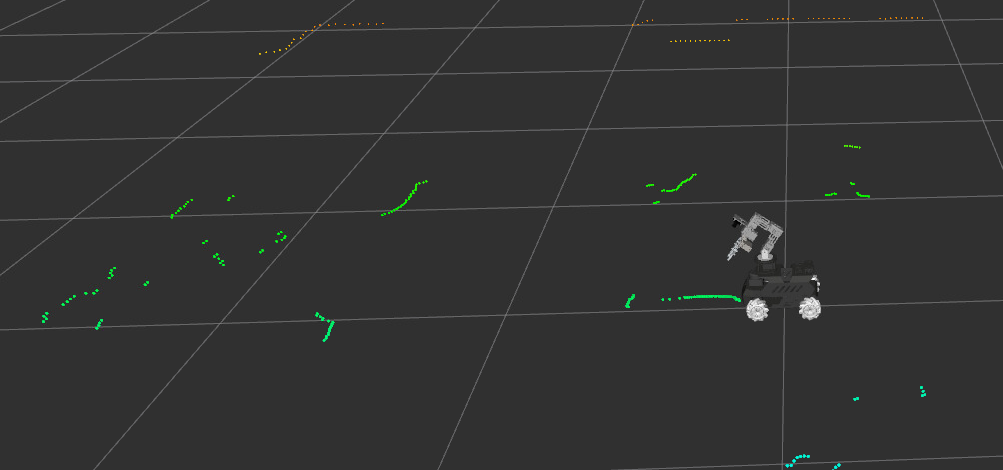
The green point cloud in the RVIZ image is the point cloud from the LiDAR scanning the contours of the surrounding environment
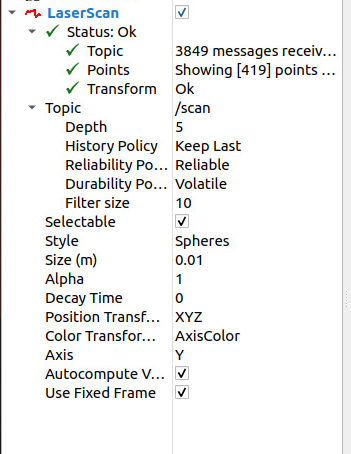
In the LaserScan option in rviz's sidebar, you can view the received LiDAR data information and modify the LiDAR point cloud's color style, etc.
4. Viewing LiDAR Data
Run the ros2 CLI command
xxxxxxxxxxros2 topic echo /scan
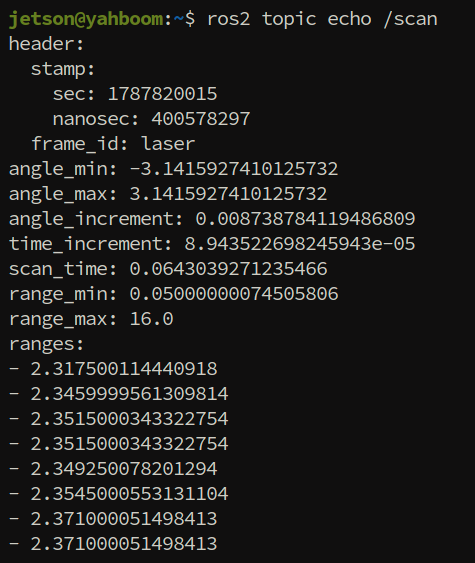
A single frame of data is as shown above, where:
frame_id: represents the LiDAR's coordinate frame name.
angle_min and angle_max: represent the minimum and maximum radians of the LiDAR scan; converted to degrees here, they are 0 degrees to 360 degrees.
angle_increment: represents the angle increment.
range_min and range_max: represent the minimum and maximum distance of the LiDAR scan, in meters
ranges: represents the distance measured at each angle within the LiDAR's scan range, in meters.
5. Source Code Analysis
car_base launch file path
xxxxxxxxxx~/yahboomcar_ros2_ws/yahboomcar_ws/src/yahboomcar_bringup/launch/car_base.launch.py
GetLidarType(): gets the current LiDAR model, and starts the corresponding driver respectively according to the return valueWhen the model is
c1(Slamtec C1): starts thesllidar_nodenode, configuring the serial port/dev/rplidar, baud rate460800, coordinate frameframe_idaslaser, and enabling angle compensationangle_compensateWhen the model is
tmini(T-mini Plus): callsydlidar_launch.pyviaExecuteProcessto start the driverBoth are controlled by the
use_lidarlaunch parameter; when it isFalse, the LiDAR is not started
xxxxxxxxxxdef generate_launch_description(): #bring up LiDAR sensor LiDAR_Type=GetLidarType() if LiDAR_Type=="c1": bringup_LiDAR =Node( package='sllidar_ros2', executable='sllidar_node', name='sllidar_node', parameters=[{'channel_type': 'serial', 'serial_port': '/dev/rplidar', 'serial_baudrate': 460800, 'frame_id': 'laser', 'inverted': False, 'angle_compensate': True, 'scan_mode': 'Standard', 'masked_sector_center_deg': 0.0, 'masked_sector_half_width_deg': 57.0}], output='screen', condition=IfCondition(LaunchConfiguration('use_lidar')), arguments=['--ros-args', '--log-level', 'warn']) elif LiDAR_Type=="tmini": bringup_LiDAR = ExecuteProcess( cmd=['ros2', 'launch', 'ydlidar_ros2_driver', 'ydlidar_launch.py'], output='screen', condition=IfCondition(LaunchConfiguration('use_lidar')))
laser_view launch file path
xxxxxxxxxx~/yahboomcar_ros2_ws/yahboomcar_ws/src/yahboomcar_bringup/launch/laser_view.launch.py
Loads the Rviz configuration file
laser_view.rviz, in which the LiDAR point cloud display style is presetIncludes
car_base.launch.pyviaIncludeLaunchDescription, enabling only the LiDAR (use_lidar: True) and disabling the IMU, camera, magnetometer, etc.
xdef generate_launch_description():
declared_arguments = [] declared_arguments.append( DeclareLaunchArgument( "rviz", default_value="true", description="Start Rviz2 automatically", ) )
rviz_config_file= os.path.join(get_package_share_directory('yahboomcar_bringup'), 'rviz', 'laser_view.rviz') bringup_laser_launch=IncludeLaunchDescription( PythonLaunchDescriptionSource(os.path.join(get_package_share_directory('yahboomcar_bringup'),'launch','car_base.launch.py')), launch_arguments={'log_level': 'info', 'use_imu': 'False', 'use_lidar': 'True', 'use_mag': 'False', 'use_camera': 'False', 'odom_tf_source': 'base' }.items()) rviz_node= Node( package='rviz2', executable='rviz2', name='rviz2', arguments=['-d', rviz_config_file], output='screen', condition=IfCondition(LaunchConfiguration("rviz")) )