Welcome to ROSMASTER M1 PRO repository
1.USB Camera Introduction
USB Camera Introduction
USB Camera Introduction1. Content Description2. Camera Introduction3. Preparation4. Case Demonstration5. Source Code Analysis
1. Content Description
Start the camera driver, view the camera image through rqt, and check the camera intrinsic parameters topic
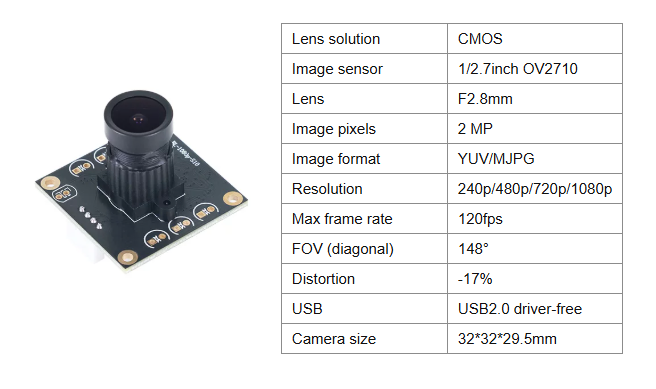
2. Camera Introduction
3. Preparation
ros2 launch yahboomcar_bringup usb_camera.launch.py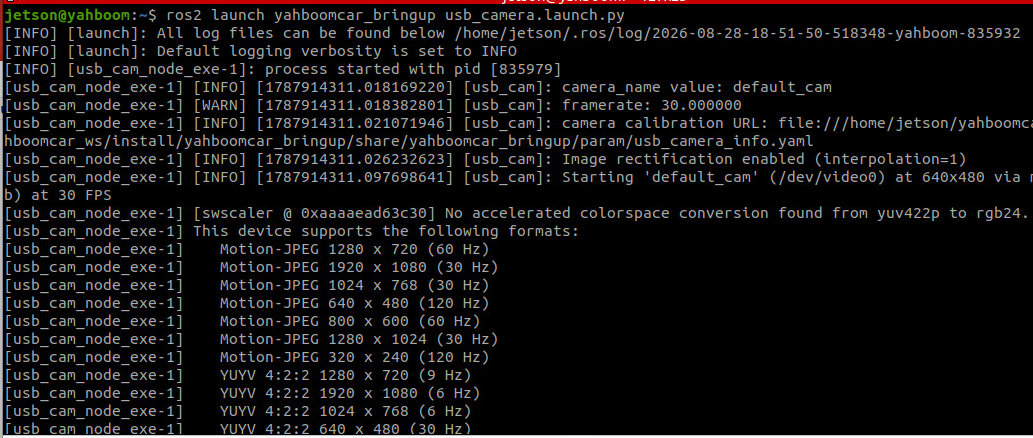
4. Case Demonstration
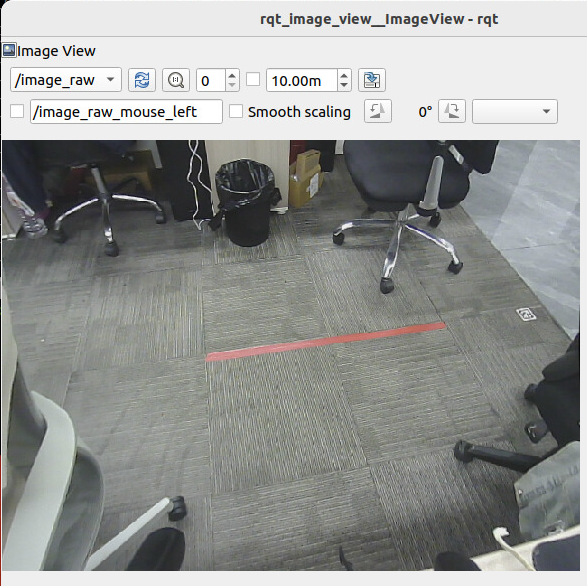
xxxxxxxxxxros2 run rqt_image_view rqt_image_viewSelect the
/image_rawtopic to see the camera's RGB color image
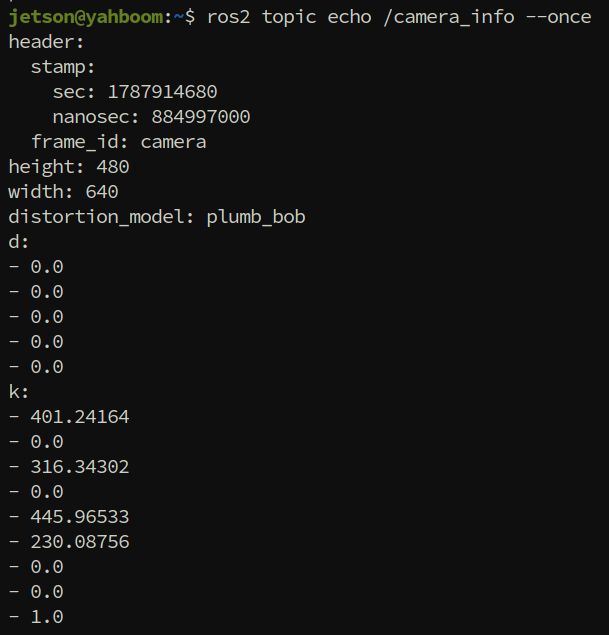
Check the camera intrinsic parameters topic
xxxxxxxxxxros2 topic echo /camera_info --once
The camera's intrinsic parameters topic will be used in subsequent courses for functions such as Aruco marker pose solving and PnP pose solving
5. Source Code Analysis
Launch path
xxxxxxxxxx~/yahboomcar_ros2_ws/yahboomcar_ws/src/yahboomcar_bringup/launch/usb_camera.launch.py
Parameter file
xxxxxxxxxx~/yahboomcar_ros2_ws/yahboomcar_ws/src/yahboomcar_bringup/param/common.yaml
common_params: loads thecommon.yamlconfiguration file throughFilePathManager, including parameters such as the camera IO method and pixel formatcamera_info_file: concatenates the full path of the camera intrinsic parameters fileusb_camera_info.yaml, adding thefile://prefix for the driver to loaduasb_camera: starts theusb_cam_node_exenode, with the main parameters:video_device: video device path/dev/video0image_width/image_height: resolution 640×480framerate: frame rate 30fpscamera_info_url: path of the intrinsic parameters file, used to publish the/camera_infotopicenable_rectify: enable image rectification
xdef generate_launch_description(): ld = LaunchDescription() common_params = FilePathManager().GetFileAndCheckExist("config_file") camera_info_file = 'file://' + os.path.join(get_package_share_directory('yahboomcar_bringup'),'param','usb_camera_info.yaml') uasb_camera = Node( package='usb_cam', executable='usb_cam_node_exe', name='usb_cam', output='both', sigterm_timeout='15', sigkill_timeout='15', parameters=[common_params, {'video_device': '/dev/video0'}, {'image_width': 640}, {'image_height': 480}, {'framerate': 30.0}, {'camera_info_url': camera_info_file}, {'enable_rectify': True} ], arguments=['--ros-args', '--log-level', LaunchConfiguration('log_level')], )
ld.add_action(DeclareLaunchArgument('log_level', default_value='info',description='ros2 logging level')) ld.add_action(uasb_camera) return ld
io_method: image acquisition method;mmapis memory mapping, which is more efficientframe_id: name of the camera TF coordinate frame, herecamerapixel_format: pixel format conversion;yuyv2rgbconverts the raw YUYV format to RGBav_device_format: raw device data formatYUV422Pbrightness/contrast/saturation/sharpness/gain: brightness, contrast, saturation, sharpness, gain;-1means use the camera default valueauto_white_balance: enable automatic white balancewhite_balance: white balance color temperature 6000K (takes effect when automatic white balance is off)autoexposure: enable automatic exposureexposure: exposure value 80 (takes effect when automatic exposure is off)focus: focus value;-1means use the camera default focus
Tip
If the ambient light changes a lot during use, causing the image to be overexposed or too dark, you can turn off autoexposure and manually adjust the exposure value
xxxxxxxxxxusb_cam ros__parameters io_method"mmap" frame_id"camera" pixel_format"yuyv2rgb" av_device_format"YUV422P" brightness-1 contrast-1 saturation-1 sharpness-1 gain-1 auto_white_balancetrue white_balance6000 autoexposuretrue exposure80 focus-1
Adjusting the exposure value of the USB monocular camera: as shown in the figure below, if the image is overexposed or too dark, you can turn off the camera's automatic exposure and manually adjust
exposure