Welcome to ROSMASTER M1 PRO repository
6.Face special effects
Face Special Effects
1. Course Content
Run the example program to implement face detection and face special effects using the dlib library.
2. Program Startup
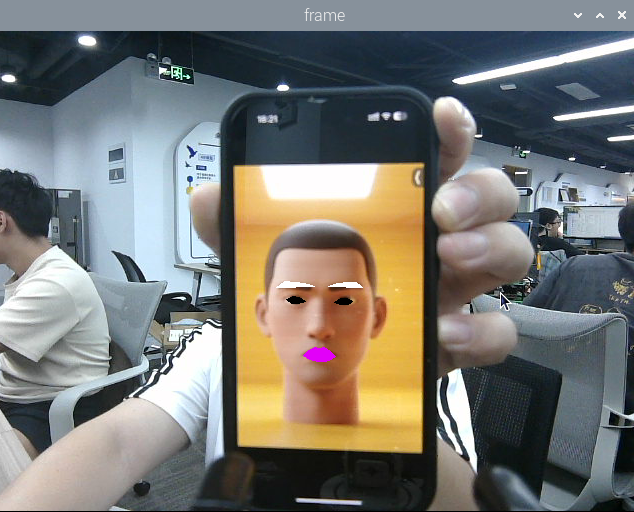
xxxxxxxxxxros2 launch yahboomcar_bringup mediapipe_demo.launch.py demo:=FaceLandmarksAfter the program runs, as shown in the figure below, it first detects the face, and then applies special effects to the eyebrow, eye, and mouth regions.
3. Core Source Code Analysis
Program code path:
xxxxxxxxxx~/yahboomcar_ros2_ws/yahboomcar_ws/src/common_demo/common_demo/mediapipe/06_FaceLandmarks.py
Import the required library files,
xxxxxxxxxximport time#Import the dlib libraryimport dlibimport cv2 as cvimport numpy as npimport rclpyfrom rclpy.node import Nodefrom cv_bridge import CvBridgefrom sensor_msgs.msg import Imagefrom arm_msgs.msg import ArmJointsimport cv2Introduction to the dlib library:
DLIB is a modern C++ toolkit containing machine learning algorithms and tools for creating complex software in C++ to solve real-world problems. It is widely used in industry and academia in fields such as robotics, embedded devices, mobile phones, and large high-performance computing environments. The dlib library uses 68 point positions to mark important parts of the face; for example, points 18-22 mark the right eyebrow, and points 51-68 mark the mouth. Use the get_frontal_face_detector module of the dlib library to detect the face, and use the shape_predictor_68_face_landmarks.dat feature data to predict the face feature values.
The 68 facial landmarks of dlib are arranged in the following order:
0-16: Jaw outline
17-21: Right eyebrow
22-26: Left eyebrow
27-35: Bridge and tip of the nose
36-41: Right eye
42-47: Left eye
48-67: Lip outline
Initialize the data and define the Publisher and Subscriber,
x def __init__(self, name): super().__init__(name) #Parameter declaration and retrieval self.declare_parameter('rgb_topic','/ascamera_hp60c/camera_publisher/rgb0/image') rgb_topic=self.get_parameter("rgb_topic").get_parameter_value().string_value self.dat_file =os.path.join(os.path.expanduser('~'), 'MODELS','mediapipe','shape_predictor_68_face_landmarks.dat') self.hog_face_detector = dlib.get_frontal_face_detector()
self.dlib_facelandmark = dlib.shape_predictor(self.dat_file)
self.rgb_bridge = CvBridge()
self.sub_rgb = self.create_subscription( Image, rgb_topic, self.get_RGBImageCallBack, 5)Color image topic callback function,
xxxxxxxxxxdef get_RGBImageCallBack(self,msg): rgb_image = self.rgb_bridge.imgmsg_to_cv2(msg, "bgr8") #Pass the obtained image into the defined get_face function, and return the detected image frame = self.get_face(rgb_image, draw=False) #Call the prettify_face function to apply special effects to the image frame = self.prettify_face(frame, eye=True, lips=True, eyebrow=True, draw=True) key = cv2.waitKey(1) cv.imshow('frame', frame)get_face function, detects the face,
xxxxxxxxxxdef get_face(self, frame, draw=True): #Convert the image space, turning BGR into a grayscale image for subsequent image processing gray = cv.cvtColor(frame, cv.COLOR_BGR2GRAY) #Pass in the grayscale image to detect the face self.faces = self.hog_face_detector(gray) for face in self.faces: self.face_landmarks = self.dlib_facelandmark(gray, face) if draw: for n in range(68): x = self.face_landmarks.part(n).x y = self.face_landmarks.part(n).y cv.circle(frame, (x, y), 2, (0, 255, 255), 2) cv.putText(frame, str(n), (x, y), cv.FONT_HERSHEY_SIMPLEX, 0.6, (0, 255, 255), 2) return frameprettify_face function, adds special effects to the face,
xxxxxxxxxxdef prettify_face(self, frame, eye=True, lips=True, eyebrow=True, draw=True): #Eyes if eye: leftEye = self.get_lmList(frame, 36, 42) rightEye = self.get_lmList(frame, 42, 48) if draw: if len(leftEye) != 0: frame = cv.fillConvexPoly(frame, np.mat(leftEye), (0, 0, 0)) if len(rightEye) != 0: frame = cv.fillConvexPoly(frame, np.mat(rightEye), (0, 0, 0)) #Lips if lips: lipIndexlistA = [51, 52, 53, 54, 64, 63, 62] lipIndexlistB = [48, 49, 50, 51, 62, 61, 60] lipsUpA = self.get_lipList(frame, lipIndexlistA, draw=True) lipsUpB = self.get_lipList(frame, lipIndexlistB, draw=True) lipIndexlistA = [57, 58, 59, 48, 67, 66] lipIndexlistB = [54, 55, 56, 57, 66, 65, 64] lipsDownA = self.get_lipList(frame, lipIndexlistA, draw=True) lipsDownB = self.get_lipList(frame, lipIndexlistB, draw=True) if draw: if len(lipsUpA) != 0: frame = cv.fillConvexPoly(frame, np.mat(lipsUpA), (249, 0, 226)) if len(lipsUpB) != 0: frame = cv.fillConvexPoly(frame, np.mat(lipsUpB), (249, 0, 226)) if len(lipsDownA) != 0: frame = cv.fillConvexPoly(frame, np.mat(lipsDownA), (249, 0, 226)) if len(lipsDownB) != 0: frame = cv.fillConvexPoly(frame, np.mat(lipsDownB), (249, 0, 226)) #Eyebrows if eyebrow: lefteyebrow = self.get_lmList(frame, 17, 22) righteyebrow = self.get_lmList(frame, 22, 27) if draw: if len(lefteyebrow) != 0: frame = cv.fillConvexPoly(frame, np.mat(lefteyebrow), (255, 255, 255)) if len(righteyebrow) != 0: frame = cv.fillConvexPoly(frame, np.mat(righteyebrow), (255, 255, 255)) return frameget_lmList function for obtaining face coordinates,
def get_lmList(self, frame, p1, p2, draw=True): #Define an empty list lmList = [] #Determine whether a face has been detected if len(self.faces) != 0: #Iterate through the face list to obtain the xy coordinates of the points in each range for n in range(p1, p2): x = self.face_landmarks.part(n).x y = self.face_landmarks.part(n).y #Add the point coordinates on the face to the list lmList.append([x, y]) if draw: next_point = n + 1 if n == p2 - 1: next_point = p1 x2 = self.face_landmarks.part(next_point).x y2 = self.face_landmarks.part(next_point).y cv.line(frame, (x, y), (x2, y2), (0, 255, 0), 1) return lmList