Welcome to ROSMASTER M1 PRO repository
7.Edge Detection (Depth Camera Only)
Edge Detection
1. Course Content
Run the example program and use the depth image for edge detection. During movement, if an edge is detected, the car stops at the edge to prevent the risk of falling.
Important
This section can only be used with the depth camera; USB monocular camera users skip this section
2.Case Demonstration
ros2 launch yahboomcar_bringup camera_demo.launch.py demo:=Edge_DetectionAfter the program starts, the initial state is stopped; after pressing the spacebar on the display window, the car will start moving forward
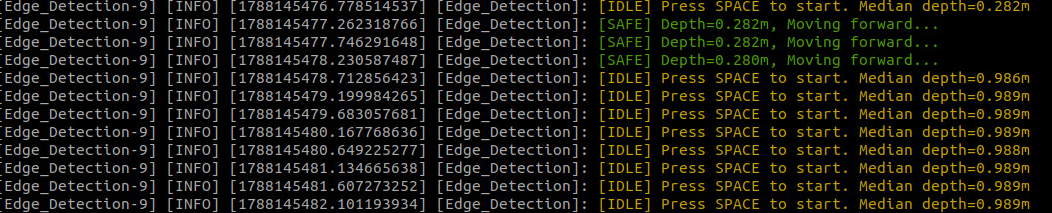
If no edge is detected (the average depth within the yellow frame in the image is less than 0.4m), the car will move forward and print "Moving...."
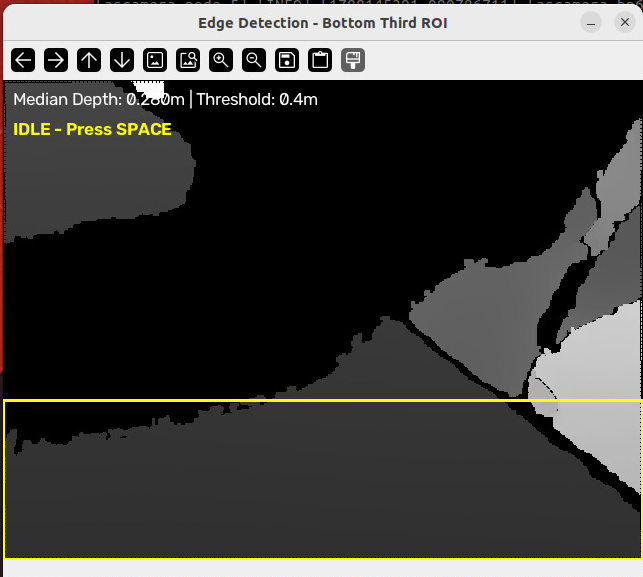
If an edge is detected, the car will stop; if you need to activate movement again, press the spacebar again.
3. Source Code Analysis
Program source code path:
xxxxxxxxxx~/yahboomcar_ros2_ws/yahboomcar_ws/src/common_demo/common_demo/camera/Edge_Detection.py
__init__: initializes the node, declares the robotic arm initial angle parameters, creates the robotic arm control client and the/cmd_velpublisher, subscribes to the depth image topic, sets the linear velocitylin_x=0.1and the cliff detection thresholddepth_threshold=0.4m, and calls_init_arm_poseto reset the robotic arm_init_arm_pose: waits for the robotic arm service to be ready, then sends the initial angle commandget_DepthImageCallBack: core callback functionConvert the depth image to OpenCV format, and take the bottom 1/3 region of the image as the ROI
Filter out invalid zero-value pixels and calculate the median depth of the ROI region (converting mm to m)
When the spacebar press is detected, toggle
move_flagto start the car moving forwardCliff detection: when the median depth > threshold, stop and output a warning; otherwise continue moving forward
Visualization: normalize and display the depth image, and draw the ROI rectangle and status text (moving/cliff/idle)
pubVel: wraps theTwistvelocity message and publishes it to/cmd_vel
xclass Edge_DetectionNode(Node): def __init__(self, name): super().__init__(name) self.declare_parameter('init_pose', [90, 100, 0, 0, 90,30]) self.init_pose = self.get_parameter('init_pose').get_parameter_value().integer_array_value self.set_arm_client = self.create_client(ArmPosition, 'set_arm_joints') self.pub_vel = self.create_publisher(Twist, '/cmd_vel', 5) self.sub_depth = self.create_subscription(Image, '/ascamera_hp60c/camera_publisher/depth0/image_raw', self.get_DepthImageCallBack, 10) self.lin_x = 0.1 self.depth_threshold = 0.4 # Cliff detection threshold in meters self.depth_bridge = CvBridge() self.move_flag = False self.count = 0 self._init_arm_pose()
def _init_arm_pose(self): if not self.set_arm_client.wait_for_service(timeout_sec=10.0): self.get_logger().warn("Failed to connect to set_arm_joints server, skipping init arm pose") return req = ArmPosition.Request() req.request_joints = list(self.init_pose) future = self.set_arm_client.call_async(req) future.add_done_callback(self._init_arm_done_callback)
def _init_arm_done_callback(self, future): result = future.result() if not result.success: self.get_logger().warn( f"Init arm pose failed: {list(result.result_joints)}, msg: {result.message}")
def get_DepthImageCallBack(self, msg): depth_image = self.depth_bridge.imgmsg_to_cv2(msg, encoding[1]) h, w = depth_image.shape[:2] bottom_third_start = h * 2 // 3 roi = depth_image[bottom_third_start:, :].astype(np.float32)
valid_pixels = roi[roi > 0] # Ignore invalid zero-depth pixels if len(valid_pixels) > 0: median_depth = np.median(valid_pixels) / 1000.0 # Convert mm to meters else: median_depth = 0.0
key = cv2.waitKey(1) if key == 32: # Spacebar (ASCII 32) self.move_flag = True
# Cliff detection and velocity control if self.move_flag: if median_depth > self.depth_threshold: # Cliff detected: depth suddenly large in bottom third self.pubVel(0, 0, 0) self.move_flag = False if self.count % 10 == 0: self.get_logger().warn( f"{Fore.RED}[CLIFF DETECTED] Depth={median_depth:.3f}m > {self.depth_threshold}m, STOPPING!{Fore.RESET}") else: self.pubVel(self.lin_x, 0, 0) if self.count % 10 == 0: self.get_logger().info( f"{Fore.GREEN}[SAFE] Depth={median_depth:.3f}m, Moving forward...{Fore.RESET}") else: self.pubVel(0, 0, 0) if self.count % 10 == 0: self.get_logger().info( f"{Fore.YELLOW}[IDLE] Press SPACE to start. Median depth={median_depth:.3f}m{Fore.RESET}")
# Visualization: draw ROI rectangle and status text on a BGR copy display = cv2.normalize(depth_image, None, 0, 255, cv2.NORM_MINMAX, dtype=cv2.CV_8U) display = cv2.cvtColor(display, cv2.COLOR_GRAY2BGR) cv2.rectangle(display, (0, bottom_third_start), (w - 1, h - 1), (0, 255, 255), 2) status_text = f"Median Depth: {median_depth:.3f}m | Threshold: {self.depth_threshold}m" cv2.putText(display, status_text, (10, 25), cv2.FONT_HERSHEY_SIMPLEX, 0.6, (255, 255, 255), 1) if self.move_flag: state_text = "MOVING" if median_depth <= self.depth_threshold else "CLIFF - STOPPED" color = (0, 255, 0) if median_depth <= self.depth_threshold else (0, 0, 255) else: state_text = "IDLE - Press SPACE" color = (0, 255, 255) cv2.putText(display, state_text, (10, 55), cv2.FONT_HERSHEY_SIMPLEX, 0.6, color, 2) cv2.imshow("Edge Detection - Bottom Third ROI", display) self.count += 1
def pubVel(self, vx, vy, vz): vel = Twist() vel.linear.x = float(vx) vel.linear.y = float(vy) vel.angular.z = float(vz) self.pub_vel.publish(vel)
def main():
rclpy.init() edge_detect = Edge_DetectionNode('Edge_Detection_node') rclpy.spin(edge_detect)